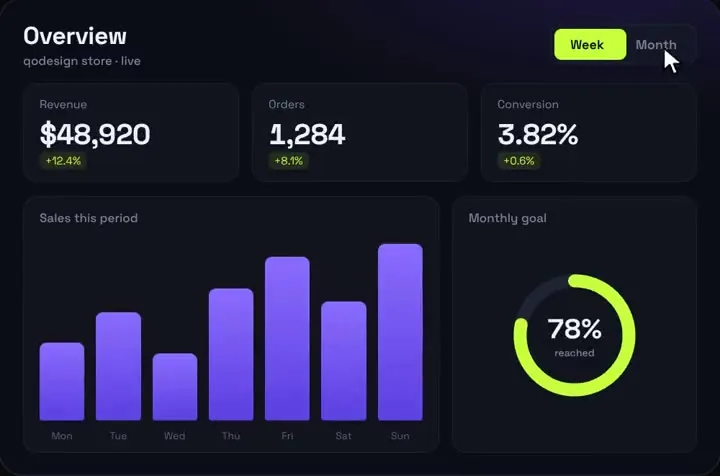
The Tabs component
components/tabs.tsx
"use client";
import { useId, useRef, useState, type KeyboardEvent, type ReactNode } from "react";

export type TabItem = { id: string; label: string; content: ReactNode };

type TabsProps = { items: TabItem[]; label: string; defaultId?: string; onChange?: (id: string) => void };

// Equal-width tabs: the pill moves by its own width per index, so nothing is
// measured and the server HTML already has it under the right tab.
export function Tabs({ items, label, defaultId, onChange }: TabsProps) {
  const base = useId();
  const [active, setActive] = useState(defaultId ?? items[0]?.id);
  const refs = useRef<(HTMLButtonElement | null)[]>([]);
  const index = Math.max(0, items.findIndex((t) => t.id === active));

  function pick(i: number, focus: boolean) {
    const next = (i + items.length) % items.length;
    const id = items[next]?.id;
    if (!id) return;
    setActive(id);
    onChange?.(id);
    if (focus) refs.current[next]?.focus();
  }

  function onKeyDown(e: KeyboardEvent<HTMLDivElement>) {
    if (e.key === "ArrowRight") pick(index + 1, true);
    else if (e.key === "ArrowLeft") pick(index - 1, true);
    else if (e.key === "Home") pick(0, true);
    else if (e.key === "End") pick(items.length - 1, true);
    else return;
    e.preventDefault();
  }

  return (
    <div>
      <div
        role="tablist"
        aria-label={label}
        onKeyDown={onKeyDown}
        className="relative grid rounded-xl border border-white/10 bg-white/5 p-1"
        style={{ gridTemplateColumns: `repeat(${items.length}, minmax(0, 1fr))` }}
      >
        <span
          aria-hidden="true"
          className="absolute inset-y-1 left-1 rounded-lg bg-lime-300 transition-transform duration-300 ease-out motion-reduce:transition-none"
          style={{ width: `calc((100% - 0.5rem) / ${items.length})`, transform: `translateX(${index * 100}%)` }}
        />
        {items.map((t, i) => {
          const selected = i === index;
          return (
            <button
              key={t.id}
              ref={(el) => {
                refs.current[i] = el;
              }}
              id={`${base}-tab-${t.id}`}
              type="button"
              role="tab"
              aria-selected={selected}
              aria-controls={`${base}-panel-${t.id}`}
              tabIndex={selected ? 0 : -1}
              onClick={() => pick(i, false)}
              className={`relative z-10 truncate rounded-lg px-3 py-2 text-sm font-semibold transition-colors focus-visible:outline-2 focus-visible:outline-offset-2 focus-visible:outline-lime-300 ${selected ? "text-zinc-950" : "text-zinc-400 hover:text-zinc-100"}`}
            >
              {t.label}
            </button>
          );
        })}
      </div>
      {items.map((t, i) => (
        <div
          key={t.id}
          id={`${base}-panel-${t.id}`}
          role="tabpanel"
          aria-labelledby={`${base}-tab-${t.id}`}
          tabIndex={0}
          hidden={i !== index}
          className="mt-4 rounded-xl focus-visible:outline-2 focus-visible:outline-lime-300"
        >
          {t.content}
        </div>
      ))}
    </div>
  );
}
Good to know
- Only the active tab is in the tab order (tabIndex 0, the others -1). Tab moves focus into the list, the arrows move between tabs and wrap, Home and End jump to the ends, and the next Tab press leaves the list. That is the ARIA Authoring Practices tabs pattern with automatic activation.
- The pill is one span behind equal-width grid columns, moved with translateX(index * 100%). Its width is the grid's width less the padding, divided by the tab count, so nothing is read from the DOM and nothing jumps when web fonts load. If your tabs need different widths, measure the active button instead; the blog post shows that version.
- All panels stay in the DOM with the hidden attribute, so switching is instant and a half-filled form inside a panel keeps its values.
- What we ran on October 27, 2026: every TypeScript file on this page type-checks with TypeScript 5.9.3 against @types/react 19, react 19.1.1 and next 15.5.28, in strict mode. Leaving a tab's label out and passing "year" to the range switch both fail the same check. We didn't run these exact files in a browser on this page; the keyboard behaviour follows the component from our blog post, which was.
Install
- Copy from the zipPut
react/src/components into src/, then none. React 19 and Tailwind v4; Next.js App Router for the ?tab= part. - Or ask your AIPaste PROMPT.md into Cursor, Lovable or v0.
Props
- data
- your KPIs and series
- title / subtitle
- header text
- startDelay
- ms before the count-up
How qodesign compares
- qodesign vs UiverseUiverse is best for: single small elements: buttons, loaders, toggles, checkboxes, inputs.
- qodesign vs AnimataAnimata is best for: free animated building blocks you copy and adapt.
- qodesign vs Motion PrimitivesMotion Primitives is best for: small motion building blocks you compose yourself: text effects, number tickers, dialogs, toolbars.
All comparisons, with prices read on each library's own site.
From the blog: Accessible Animated Tabs in React and Tailwind CSS Without a Library
From the blog: Animated Tabs with Framer Motion in Next.js App Router