Framer Motion charts in React
Motion itself has no chart component, so Framer Motion charts are hand-built: a few motion.div bars or one motion.path line, and both files below are free. For axes, tooltips and several series, Recharts or shadcn's charts fit better. Analytics Dashboard V1 is our paid Motion-only chart block.
By buying you agree to the Terms.
- Download right after paying
- Use it in client projects
- Won't run on the listed stack? We fix it or refund you
Ready forCursorv0Lovableshadcn CLI
A Framer Motion bar chart, free
"use client";
import { motion, useReducedMotion } from "motion/react";

export type BarDatum = { label: string; value: number };

export default function MotionBarChart({ data, max }: { data: BarDatum[]; max?: number }) {
  const reduce = useReducedMotion();
  const top = max ?? Math.max(1, ...data.map((d) => d.value));

  return (
    <div className="w-full">
      <ul className="flex h-56 items-end gap-3 border-b border-neutral-200 dark:border-neutral-800">
        {data.map((d, i) => (
          // key by position: when the data changes, each bar springs from its old height
          <li key={i} className="group relative flex h-full flex-1 items-end" aria-label={`${d.label}: ${d.value}`}>
            <motion.div
              className="w-full rounded-t-md bg-violet-500 group-hover:bg-violet-400"
              initial={{ height: 0 }}
              animate={{ height: `${(d.value / top) * 100}%` }}
              transition={reduce ? { duration: 0 } : { type: "spring", stiffness: 260, damping: 22, delay: i * 0.05 }}
            />
            <span className="pointer-events-none absolute -top-7 left-1/2 -translate-x-1/2 rounded bg-neutral-900 px-1.5 py-0.5 text-xs text-white opacity-0 transition-opacity group-hover:opacity-100">
              {d.value.toLocaleString()}
            </span>
          </li>
        ))}
      </ul>
      <div className="mt-2 flex gap-3 text-xs text-neutral-500">
        {data.map((d, i) => (
          <span key={i} className="flex-1 text-center">{d.label}</span>
        ))}
      </div>
    </div>
  );
}"use client";
import { motion, useReducedMotion } from "motion/react";
export default function MotionLineChart({ values, width = 320, height = 120 }: { values: number[]; width?: number; height?: number }) {
const reduce = useReducedMotion();
const min = Math.min(...values);
const span = Math.max(...values) - min || 1;
const step = values.length > 1 ? width / (values.length - 1) : 0;
// same number of points every time, so Motion can morph d when the values change
const d = values
.map((v, i) => `${i === 0 ? "M" : "L"}${(i * step).toFixed(1)},${(height - ((v - min) / span) * height).toFixed(1)}`)
.join(" ");
return (
<svg viewBox={`0 0 ${width} ${height}`} className="h-auto w-full overflow-visible text-violet-500" role="img" aria-label="Trend">
<motion.path
fill="none"
stroke="currentColor"
strokeWidth={2.5}
strokeLinecap="round"
strokeLinejoin="round"
initial={{ d, pathLength: reduce ? 1 : 0 }}
animate={{ d, pathLength: 1 }}
transition={reduce ? { duration: 0 } : { pathLength: { duration: 1.1, ease: "easeInOut" }, d: { duration: 0.5 } }}
/>
</svg>
);
}Good to know
- Both free files import from motion/react, the package Motion's docs use today (motion 14.6.0 on npm). If your app has the older framer-motion package, change the import to "framer-motion" and the code is the same; framer-motion is at 14.6.0 too.
- Keys decide where a bar starts. The bar chart keys bars by position, so when the data changes each bar springs from the height it already had (in the headless run, a bar at 20% moved to 90% without dropping to zero). Key by label and a new label mounts a new bar that grows from zero.
- Both files read the Reduce Motion setting with useReducedMotion and jump straight to the end when it is on. With reduced motion emulated in Chromium, the bars changed in one frame.
- The bar chart uses Tailwind v4 utility classes only. In a shadcn app, bg-primary instead of bg-violet-500 makes it follow your theme.
- What was run on Oct 25, 2026: every snippet here was type-checked with TypeScript 5.9.3, React 19 types (@types/react 19.3.0), motion 14.6.0 and framer-motion 14.6.0; a wrong prop fails the check. The bar chart and the dashboard were also played in headless Chromium with React 19.3.1, with bar heights read on every frame after a data switch. The line chart was type-checked only, not run. Nothing was tested inside a full Next.js build.
Framer Motion charts or a chart library?
- Hand-built Motion charts suit a small block: five to twelve bars, one trend line, a goal ring. You control every pixel, and the only dependency is Motion, which many React apps already have.
- Once you need axes with real ticks, a tooltip that follows the pointer, a legend, several series or a few hundred points, use a chart library. Recharts (MIT, 3.10.1 today) draws all of that and animates it by itself. shadcn's charts are Recharts too: its chart docs say "We use Recharts under the hood". That free route fits most dashboards better than anything on this page.
- Recharts animation comes from a few props on each series (isAnimationActive, animationDuration, animationEasing). Our Recharts animation guide lists them with their defaults and the usual reasons an animation doesn't play.
- A middle route: d3-scale for the maths and motion.rect or motion.path for the drawing. You get proper scales and keep Motion's springs.
Analytics Dashboard V1: a Motion-only chart block
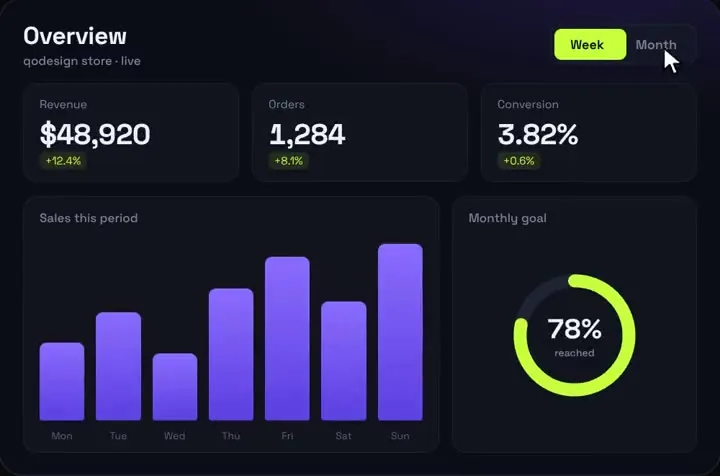
- The paid piece goes one step past the free bar chart. It has a spring bar chart with a stagger and a hover tooltip, a goal ring that fills, three KPIs that count up, and a Week/Month switch that moves every bar from its old height to the new one.
- What it does not have: axes, a line or area chart, a legend. Bars and the goal ring take percentages (0 to 100) that you work out from your own numbers. The hover tooltip shows an estimate made from the period's revenue, not a per-bar value, so change barValue in the file if you need exact numbers. fmtMoney formats US dollars.
- Measured in headless Chromium with React 19.3.1 and framer-motion 14.6.0: after a Week/Month switch the bars moved from the week heights to the month heights and settled in about 0.8 s, with no page errors.
- It does not read the Reduce Motion setting. With reduced motion emulated, its bars still animated. If that matters in your app, gate the transitions with useReducedMotion the way the free bar chart does.
- Its package.json lists framer-motion ^11 and React 18. The component type-checked as shipped against framer-motion 14.6.0 and React 19 types, and again with the import changed to motion/react.
- Tailwind v4: it works as shipped (our Tailwind v4 check found 0 pixels different at 390 and 1440 wide). It styles itself with Tailwind classes only and ships no stylesheet, so nothing leaks into a shadcn app. It inherits your app's font; for the demo's look, load Space Grotesk yourself with next/font or a link tag.
"use client";
import AnalyticsDashboard, { type DashboardData } from "@/components/AnalyticsDashboard";

// bars: 7 heights in % of the chart (0-100), one label each
const data: DashboardData = {
  week: { revenue: 12840, orders: 312, conv: 2.91, d: [6.2, 4.8, -0.3], goal: 64,
    bars: [38, 52, 47, 66, 81, 59, 90], labels: ["Mon", "Tue", "Wed", "Thu", "Fri", "Sat", "Sun"] },
  month: { revenue: 51200, orders: 1290, conv: 3.12, d: [14.1, 9.7, 0.4], goal: 88,
    bars: [48, 61, 72, 55, 84, 70, 96], labels: ["W1", "W2", "W3", "W4", "W5", "W6", "W7"] },
};

export default function Page() {
  return (
    <main className="min-h-dvh bg-[#0B0D14] p-6">
      <AnalyticsDashboard title="Revenue" subtitle="Last 7 days" data={data} />
    </main>
  );
}
Install
- Copy from the zipPut
react/src/componentsintosrc/, thennpm i framer-motion. - Or ask your AIPaste PROMPT.md into Cursor, Lovable or v0.
Props
- data
- week and month sets: revenue, orders, conv, d (three % changes), goal (0 to 100), bars (7 heights, 0 to 100), labels
- title / subtitle
- header text
- startDelay
- ms before the first count-up (150 by default)
How qodesign compares
- qodesign vs shadcnblocksshadcnblocks is best for: assembling whole pages from ready-made sections.
- qodesign vs Kokonut UIKokonut UI is best for: landing page sections and templates installed by an AI agent.
- qodesign vs TremorTremor is best for: dashboards and charts: area, bar, line and donut charts, trackers, KPI cards, tables.
All comparisons, with prices read on each library's own site.
Questions
Does Framer Motion have a chart component?
No. Motion animates elements you draw yourself. A Motion chart is divs or SVG shapes (motion.div, motion.rect, motion.path) whose height, position or pathLength you animate.
Framer Motion or Recharts for charts?
Recharts for axes, tooltips, several series or a lot of data; it animates by itself. Motion for a small custom block where the look matters more than chart features.
How do I animate a line chart with Framer Motion?
Draw the line as a motion.path and animate pathLength from 0 to 1. To move it when the data changes, keep the same number of points so Motion can morph the d attribute, as motion-line-chart.tsx does above.
Should I import from framer-motion or motion/react?
It is the same library. Motion's upgrade guide says to install motion and swap imports from "framer-motion" to "motion/react". Both packages are at 14.6.0 today.
Does Analytics Dashboard V1 work in Next.js?
Yes, as a client component. Keep "use client" at the top of the file that renders it, as in the snippet above. App Router and Pages Router both work.
Can I use it in client work?
Yes, in personal and client projects. You can't resell the code itself as a kit.