Recharts animation: the props, and why it sometimes won't play
Recharts animation is free and built in: isAnimationActive, animationBegin, animationDuration and animationEasing on each Bar, Line, Area or Pie. Those props answer most questions, shadcn charts included, so they come first. Analytics Dashboard V1, our paid Motion-only chart block, comes last as a second option.
By buying you agree to the Terms.
- Download right after paying
- Use it in client projects
- Won't run on the listed stack? We fix it or refund you
Ready forCursorv0Lovableshadcn CLI
Recharts animation props in one chart
"use client";
import { useState } from "react";
import { Bar, BarChart, CartesianGrid, Tooltip, XAxis, YAxis } from "recharts";

const week = [
  { label: "Mon", sales: 4200 }, { label: "Tue", sales: 5800 }, { label: "Wed", sales: 3600 },
  { label: "Thu", sales: 7100 }, { label: "Fri", sales: 8800 }, { label: "Sat", sales: 6400 }, { label: "Sun", sales: 9500 },
];
const month = [
  { label: "W1", sales: 5500 }, { label: "W2", sales: 6200 }, { label: "W3", sales: 8000 },
  { label: "W4", sales: 4700 }, { label: "W5", sales: 9000 }, { label: "W6", sales: 7300 }, { label: "W7", sales: 9900 },
];

export default function SalesChart() {
  const [range, setRange] = useState<"week" | "month">("week");

  return (
    <div className="w-full max-w-2xl">
      <div className="mb-3 flex gap-2">
        {(["week", "month"] as const).map((r) => (
          <button key={r} onClick={() => setRange(r)} aria-pressed={range === r}
            className="rounded-md border px-3 py-1 text-sm aria-pressed:bg-neutral-900 aria-pressed:text-white">
            {r === "week" ? "Week" : "Month"}
          </button>
        ))}
      </div>
      <BarChart responsive data={range === "week" ? week : month} style={{ width: "100%", aspectRatio: 1.8 }}>
        <CartesianGrid vertical={false} />
        <XAxis dataKey="label" />
        <YAxis />
        <Tooltip />
        <Bar
          dataKey="sales"
          fill="#7c5cff"
          radius={[8, 8, 2, 2]}
          isAnimationActive="auto"
          animationBegin={0}
          animationDuration={600}
          animationEasing="ease-out"
        />
      </BarChart>
    </div>
  );
}Good to know
- Props and defaults are from recharts 3.10.1, the current version on npm today (MIT, React 16.8 to 19). isAnimationActive takes "auto", true or false, and "auto" is the default. animationBegin is a delay in ms (Bar 0, Pie 400). animationDuration is in ms (Bar 400, Line and Area 1500, Pie 1500). animationEasing takes "ease" (the default), "ease-in", "ease-out", "ease-in-out", "linear", "spring", a cubic-bezier(...) string or your own function.
- When the data changes, Recharts animates each bar from its old height to the new one. In the headless run of the chart above, Week to Month moved every bar from its week value to its month value in about 0.6 s, and none dropped to zero first.
- What was run on Oct 25, 2026: the snippets were type-checked with TypeScript 5.9.3, recharts 3.10.1 and React 19 types; a wrong easing name fails the check. The chart above and the tests quoted on this page ran in headless Chromium with React 19.3.1, reading bar heights on every frame. The shadcn snippet was type-checked against shadcn's current chart.tsx, not rendered, and nothing was tested inside a full Next.js build.
Turn Recharts animation off
- Set isAnimationActive={false} on each series: Bar, Line, Area, Pie. It is a prop of the series, not of the chart, so a chart with three Lines needs it three times.
- The tooltip has its own isAnimationActive (default "auto") and animationDuration (400 ms). Set isAnimationActive={false} on Tooltip as well if it should jump to the pointer instead of sliding.
Recharts animation duration, delay and speed
- animationDuration sets the length in ms. There is no separate speed prop: a faster animation is a smaller number. animationBegin delays the start, which is how you stagger series, as in the second Bar below.
- animationEasing="spring" is a physics simulation (the Recharts animation guide calls it "a spring physics simulation"). In our test it ignored animationDuration: with 600 ms set, the spring bars were within a few pixels of their new heights after about 0.1 s and settled by about 0.45 s. For an overshoot with a fixed length, use a cubic-bezier string instead.
"use client";
import { Bar, BarChart, Tooltip, XAxis } from "recharts";

const data = [{ day: "Mon", orders: 42, refunds: 3 }, { day: "Tue", orders: 58, refunds: 5 }, { day: "Wed", orders: 36, refunds: 2 }];

export function OrdersChart() {
  return (
    <BarChart responsive data={data} style={{ width: "100%", aspectRatio: 2 }}>
      <XAxis dataKey="day" />
      <Tooltip isAnimationActive={false} />
      <Bar dataKey="orders" fill="#7c5cff" animationDuration={500} />
      {/* starts 200 ms later, with a small overshoot and a fixed length */}
      <Bar dataKey="refunds" fill="#c6ff3d" animationBegin={200} animationDuration={500}
        animationEasing="cubic-bezier(0.3,1.4,0.5,1)" />
    </BarChart>
  );
}
Recharts animation not working? Check these first
- Reduce Motion is on. The default isAnimationActive="auto" turns animation off for visitors who asked their device for reduced motion, and during server rendering. With reduced motion emulated in Chromium, our chart jumped to the new values in one frame. Check the OS setting before you debug. isAnimationActive={true} forces it on for everyone.
- The chart remounts. A key on the chart that changes (or a parent that unmounts and mounts it) leaves Recharts nothing to animate from, so the bars grow from zero every time. In our test a changing key on BarChart did exactly that. Keep the key stable and change data instead.
- React never saw new data. If you change the same array in place and set it back into state, React skips the render. Pass a new array.
- Points pair up by position. Since 3.9, animationMatchBy decides how old items match new ones: by index, appended at the end, matchByDataKey(key), or your own function. For a sliding time window, matchByDataKey with your time field keeps each point's identity instead of sliding every point into its neighbour's place.
- One open issue to know: recharts #8064, "Bar rectangles remount on every animation frame (key includes animated x/y), which swallows the first tap on iOS Safari". A fix is open as #8065; neither was merged on Oct 25, 2026. We did not test on an iPhone. If your bars take taps on iOS, read both before you ship.
shadcn chart animation
- shadcn's chart component is Recharts with styling on top. Its docs say "We use Recharts under the hood" and "We do not wrap Recharts", and the current version uses Recharts v3. So every prop above goes on the Bar, Line or Area inside ChartContainer, unchanged.
- To disable shadcn chart animation, pass isAnimationActive={false} to each series, which is what animate={false} does in the file below.
"use client";
import { Bar, BarChart, XAxis } from "recharts";
import { ChartContainer, ChartTooltip, ChartTooltipContent, type ChartConfig } from "@/components/ui/chart";

const chartConfig = { desktop: { label: "Desktop", color: "var(--chart-1)" } } satisfies ChartConfig;
const data = [{ month: "Jan", desktop: 186 }, { month: "Feb", desktop: 305 }, { month: "Mar", desktop: 237 }];

export function VisitsChart({ animate = true }: { animate?: boolean }) {
  return (
    <ChartContainer config={chartConfig} className="min-h-[200px] w-full">
      <BarChart accessibilityLayer data={data}>
        <XAxis dataKey="month" tickLine={false} axisLine={false} />
        <ChartTooltip content={<ChartTooltipContent />} />
        {/* the same Recharts props: shadcn passes them straight through */}
        <Bar dataKey="desktop" fill="var(--color-desktop)" radius={4}
          isAnimationActive={animate} animationDuration={800} animationEasing="ease-in-out" />
      </BarChart>
    </ChartContainer>
  );
}
Beyond the props: Analytics Dashboard V1
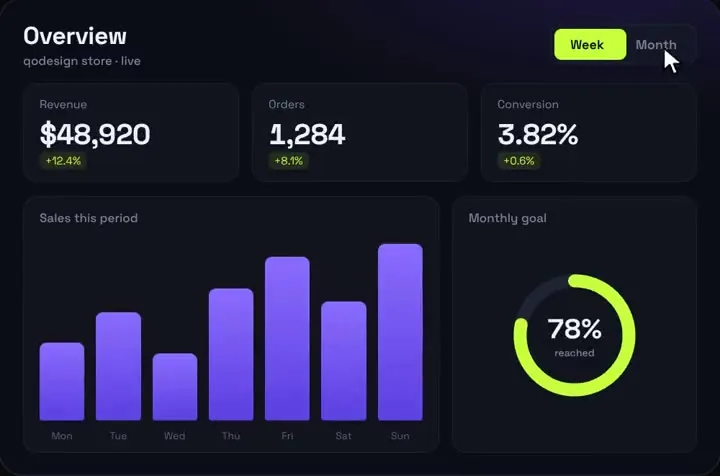
- If all you need is a small KPI block with bars that spring between two ranges, a chart library can be more than the job needs. Analytics Dashboard V1 is our paid piece for that case: a bar chart, a goal ring and three count-up KPIs built with Motion, no chart library.
- It is a narrow fit. It has no axes, no lines and no legend, and it takes bar heights as percentages. For a real reporting screen, stay with Recharts. The Framer Motion charts guide shows the free hand-built route.
- Measured in headless Chromium: a Week/Month switch moved its bars from the old heights to the new ones in about 0.8 s. Unlike Recharts with "auto", it does not read the Reduce Motion setting, so its bars animated with reduced motion emulated.
- Tailwind v4: it works as shipped. It uses Tailwind classes only and has no stylesheet, so there is nothing to scope in a shadcn app.
"use client";
import AnalyticsDashboard, { type DashboardData } from "@/components/AnalyticsDashboard";

// bars: 7 heights in % of the chart (0-100), one label each
const data: DashboardData = {
  week: { revenue: 12840, orders: 312, conv: 2.91, d: [6.2, 4.8, -0.3], goal: 64,
    bars: [38, 52, 47, 66, 81, 59, 90], labels: ["Mon", "Tue", "Wed", "Thu", "Fri", "Sat", "Sun"] },
  month: { revenue: 51200, orders: 1290, conv: 3.12, d: [14.1, 9.7, 0.4], goal: 88,
    bars: [48, 61, 72, 55, 84, 70, 96], labels: ["W1", "W2", "W3", "W4", "W5", "W6", "W7"] },
};

export default function Page() {
  return (
    <main className="min-h-dvh bg-[#0B0D14] p-6">
      <AnalyticsDashboard title="Revenue" subtitle="Last 7 days" data={data} />
    </main>
  );
}
Install
- Copy from the zipPut
react/src/componentsintosrc/, thennpm i framer-motion. - Or ask your AIPaste PROMPT.md into Cursor, Lovable or v0.
Props
- isAnimationActive
- "auto" (default), true or false, set per series
- animationBegin
- delay in ms (Bar 0, Pie 400)
- animationDuration
- length in ms (Bar 400; Line, Area and Pie 1500)
- animationEasing
- "ease" (default), "ease-in", "ease-out", "ease-in-out", "linear", "spring", a cubic-bezier string or a function
- animationMatchBy
- since 3.9: how old and new items pair up when data changes
- onAnimationStart / onAnimationEnd
- callbacks when the animation starts and ends
How qodesign compares
- qodesign vs shadcnblocksshadcnblocks is best for: assembling whole pages from ready-made sections.
- qodesign vs Kokonut UIKokonut UI is best for: landing page sections and templates installed by an AI agent.
- qodesign vs TremorTremor is best for: dashboards and charts: area, bar, line and donut charts, trackers, KPI cards, tables.
All comparisons, with prices read on each library's own site.
Questions
How do I turn off Recharts animation?
isAnimationActive={false} on each Bar, Line, Area or Pie, and on Tooltip if you want it to stop sliding too.
How do I change the Recharts animation duration?
animationDuration={ms} on the series. Defaults in 3.10.1: Bar 400, Line and Area 1500, Pie 1500 after a 400 ms animationBegin.
Why is my Recharts animation not working?
Most often Reduce Motion is on, and the default "auto" respects it. Next most often the chart remounts because its key changes, so it grows from zero every time, or the data array was edited in place.
Does Recharts animate from the old values when data changes?
Yes. In our test the bars moved from their old heights to the new ones. Since 3.9, animationMatchBy controls how old and new items are paired.
How do I disable shadcn chart animation?
The same prop: isAnimationActive={false} on the Recharts series inside ChartContainer. shadcn does not wrap Recharts.
Can I use it in client work?
Yes, in personal and client projects. You can't resell the code itself as a kit.