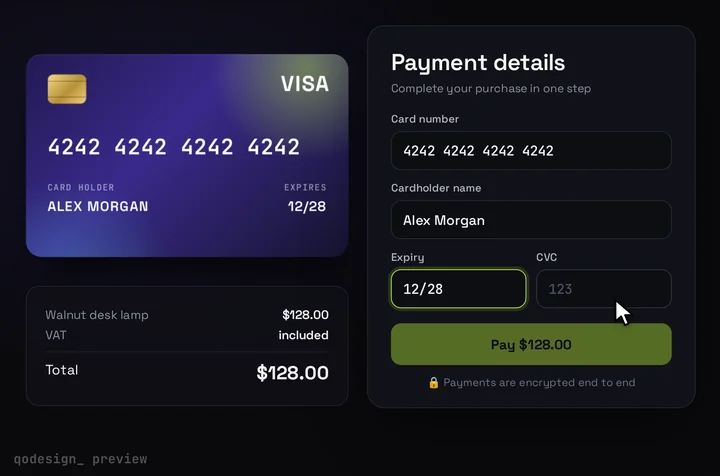
Use it in Next.js
app/pay/checkout.tsx
"use client";
import { useRef, useState } from "react";
import { useRouter } from "next/navigation";
import { loadStripe, type Appearance, type StripeExpressCheckoutElementConfirmEvent } from "@stripe/stripe-js";
import {
  Elements,
  ExpressCheckoutElement,
  CardNumberElement,
  CardExpiryElement,
  CardCvcElement,
  useStripe,
  useElements,
} from "@stripe/react-stripe-js";
import CardCheckout, { type CardFieldsSlot } from "@/components/CardCheckout";
import { createPaymentIntent } from "./actions";
import { plan } from "./plan";

const stripePromise = loadStripe(process.env.NEXT_PUBLIC_STRIPE_PUBLISHABLE_KEY!);

// The wallet buttons follow the Appearance API: on a dark theme Stripe picks light buttons.
const appearance: Appearance = { theme: "night", variables: { borderRadius: "12px" } };
// The split card fields don't read appearance. They take the older style option.
const cardStyle = { base: { color: "#F4F4F6", fontFamily: "JetBrains Mono, monospace", fontSize: "18px", "::placeholder": { color: "#6E6A8A" } } };

function PayForm() {
  const stripe = useStripe();
  const elements = useElements();
  const router = useRouter();
  const [wallets, setWallets] = useState(false); // stays false when this browser has no wallet to show
  const [walletError, setWalletError] = useState<string | null>(null);
  const done = useRef({ number: false, expiry: false, cvc: false }).current;
  const paid = (id: string) => setTimeout(() => router.push(`/thanks?pi=${id}`), 1200);

  // Apple Pay, Google Pay or Link: the buyer approved in the wallet's own sheet.
  const onWalletConfirm = async (event: StripeExpressCheckoutElementConfirmEvent) => {
    if (!stripe || !elements) return event.paymentFailed();
    const { error: submitError } = await elements.submit();
    if (submitError) return event.paymentFailed({ message: submitError.message });
    const { clientSecret } = await createPaymentIntent();
    const { error, paymentIntent } = await stripe.confirmPayment({
      elements,
      clientSecret,
      redirect: "if_required", // wallets finish on this page
      confirmParams: { return_url: `${window.location.origin}/thanks` },
    });
    if (error) return setWalletError(error.message ?? "The payment didn't go through.");
    paid(paymentIntent.id);
  };

  const cardFields = (slot: CardFieldsSlot) => {
    const track = (k: keyof typeof done) => (e: { complete: boolean; brand?: string }) => {
      done[k] = e.complete;
      slot.onChange({ complete: done.number && done.expiry && done.cvc, ...(e.brand ? { brand: e.brand } : {}) });
    };
    return (
      <>
        {/* Hidden until Stripe says a wallet can show, so nobody sees an empty row and a lonely divider. */}
        <div hidden={!wallets}>
          <ExpressCheckoutElement
            options={{
              buttonType: { applePay: "buy", googlePay: "buy" },
              buttonHeight: 44,
              layout: { maxColumns: 3, maxRows: 1, overflow: "auto" },
            }}
            onReady={({ availablePaymentMethods }) => setWallets(!!availablePaymentMethods)}
            onAvailablePaymentMethodsChange={({ paymentMethods }) => setWallets(!!paymentMethods)}
            onLoadError={() => setWallets(false)} // a bad key or a blocked script: the card still works
            // resolve() has to run within 1 second of the click, so keep this synchronous.
            onClick={(event) => event.resolve({ lineItems: [{ name: plan.name, amount: plan.amount }] })}
            onConfirm={onWalletConfirm}
            onCancel={() => setWalletError(null)}
          />
          {walletError && <p role="alert" className="m-0 mt-[8px] text-[14px] text-[#FF5C6C]">{walletError}</p>}
          <div className="my-[14px] flex items-center gap-[12px] text-[13px] text-[#8A8FA3]">
            <span className="h-px flex-1 bg-[#262A36]" />
            or pay with card
            <span className="h-px flex-1 bg-[#262A36]" />
          </div>
        </div>
        <div className="grid gap-[15px]">
          <div>
            <label className={slot.labelClassName}>Card number</label>
            <div className={slot.fieldClassName}><CardNumberElement options={{ style: cardStyle }} onChange={track("number")} /></div>
          </div>
          <div className="flex gap-[14px]">
            <div className="flex-1">
              <label className={slot.labelClassName}>Expiry</label>
              <div className={slot.fieldClassName}><CardExpiryElement options={{ style: cardStyle }} onChange={track("expiry")} /></div>
            </div>
            <div className="flex-1">
              <label className={slot.labelClassName}>CVC</label>
              <div className={slot.fieldClassName}>
                <CardCvcElement
                  options={{ style: cardStyle }}
                  onChange={track("cvc")}
                  onFocus={() => slot.onChange({ focus: "cvc" })} // flips the card
                  onBlur={() => slot.onChange({ focus: null })}
                />
              </div>
            </div>
          </div>
        </div>
      </>
    );
  };

  return (
    <CardCheckout
      amount={plan.amount / 100}
      currency="USD"
      productName={plan.name}
      resetAfter={null}
      renderCardFields={cardFields}
      // The card path: Pay was pressed and Stripe says all three fields are complete.
      onConfirm={async ({ name }) => {
        if (!stripe || !elements) throw new Error("Stripe hasn't loaded yet.");
        const card = elements.getElement(CardNumberElement);
        if (!card) throw new Error("Card field missing.");
        const { clientSecret } = await createPaymentIntent();
        const { error, paymentIntent } = await stripe.confirmCardPayment(clientSecret, {
          payment_method: { card, billing_details: { name } },
        });
        if (error) throw error; // the card shows Stripe's message and Pay comes back
        paid(paymentIntent.id);
      }}
    />
  );
}

export default function Checkout() {
  // Deferred mode: no PaymentIntent yet, so Elements gets the amount and currency up front.
  return (
    <Elements stripe={stripePromise} options={{ mode: "payment", amount: plan.amount, currency: plan.currency, appearance }}>
      <PayForm />
    </Elements>
  );
}
app/pay/actions.ts
"use server";
import Stripe from "stripe";
import { plan } from "./plan";

const stripe = new Stripe(process.env.STRIPE_SECRET_KEY!);

// Both ways to pay end here: the wallet row and the card form.
// The amount is set on the server, so a buyer can't change it in the browser.
export async function createPaymentIntent(): Promise<{ clientSecret: string }> {
  const intent = await stripe.paymentIntents.create({
    amount: plan.amount, // must match the amount on <Elements>
    currency: plan.currency,
    automatic_payment_methods: { enabled: true }, // cards, Apple Pay, Google Pay and Link
    metadata: { plan: "pro" },
  });
  return { clientSecret: intent.client_secret! };
}
app/pay/plan.ts
// What the buyer pays, in the smallest currency unit. The server action reads it; the browser only displays it.
export const plan = { name: "Pro plan", amount: 2900, currency: "usd" } as const;
app/pay/page.tsx
import Checkout from "./checkout";

// No PaymentIntent is created on page load. The server action makes one when the buyer pays.
export default function PayPage() {
  return (
    <main className="grid min-h-dvh place-items-center overflow-hidden bg-[#0b0a14] p-4">
      <Checkout />
    </main>
  );
}