PayPal Card Fields in React
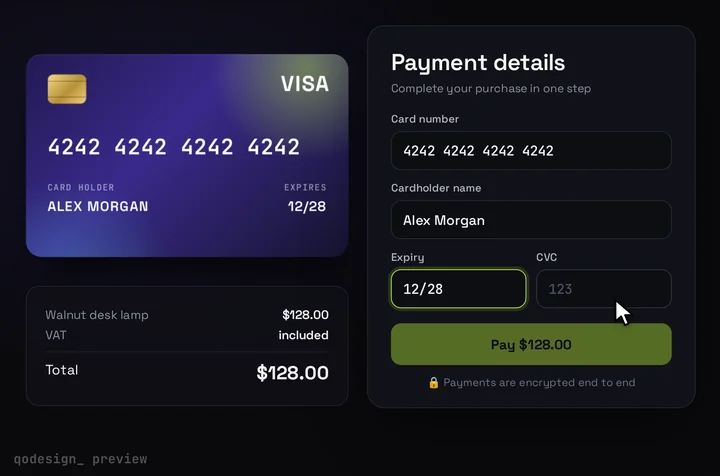
The 3D card checkout with PayPal's own Card Fields inside it. PayPal's iframes hold the card number, so the card shows the brand and which fields are valid, and it flips when the buyer reaches the CVV.
By buying you agree to the Terms.
- Download right after paying
- Use it in client projects
- Won't run on the listed stack? We fix it or refund you
Ready forCursorv0Lovableshadcn CLI
Use it in Next.js
"use client";
import { useEffect, useRef, type RefObject } from "react";
import { useRouter } from "next/navigation";
import {
  PayPalProvider,
  PayPalCardFieldsProvider,
  PayPalCardNumberField,
  PayPalCardExpiryField,
  PayPalCardCvvField,
  usePayPalCardFieldsOneTimePaymentSession,
  type EventPayload,
} from "@paypal/react-paypal-js/sdk-v6";
import CardCheckout, { type CardFieldsSlot } from "@/components/CardCheckout";

// PayPal styles the input inside its iframe. The card's wrapper draws the border and focus ring.
const style = {
  input: { color: "#F4F4F6", fontFamily: "monospace", fontSize: "19px", background: "transparent", border: "none", boxShadow: "none", padding: "0" },
  "input::placeholder": { color: "#4a4f61" },
};
const fill = { height: "100%" };

// One match left means PayPal knows the brand. The card draws Visa and Mastercard.
const brandOf = (e: EventPayload) => {
  const type = e.data.cards.length === 1 ? e.data.cards[0].type : null;
  return type === "master-card" ? "mastercard" : type;
};
const allValid = (e: EventPayload) => e.data.number.isValid && e.data.expiry.isValid && e.data.cvv.isValid;

async function createOrder() {
  const res = await fetch("/api/paypal/orders", { method: "POST" });
  const { id } = await res.json();
  if (!res.ok || !id) throw new Error("Couldn't start the payment. Try again.");
  return id as string;
}

type Outcome = { orderId?: string; error?: string };

function CardForm({ slot, amount }: { slot: RefObject<CardFieldsSlot | null>; amount: number }) {
  const router = useRouter();
  const { submit, submitResponse, error } = usePayPalCardFieldsOneTimePaymentSession();

  // submit() doesn't throw. Its result lands in submitResponse or error, so pass it back to onConfirm.
  const waiting = useRef<((o: Outcome) => void) | null>(null);
  useEffect(() => {
    const done = waiting.current;
    if (!done || (!error && !submitResponse)) return;
    waiting.current = null;
    if (error) return done({ error: error.message });
    const { state, data } = submitResponse!;
    if (state === "succeeded") return done({ orderId: data.orderId });
    done({ error: state === "canceled" ? "The card check was cancelled. Try again." : data.message || "That card didn't go through." });
  }, [submitResponse, error]);

  return (
    <CardCheckout
      amount={amount}
      currency="USD"
      productName="Pro plan"
      resetAfter={null}
      renderCardFields={(s) => {
        slot.current = s; // stable: CardCheckout memoises the slot
        return (
          <div className="grid gap-[15px]">
            <div>
              <label className={s.labelClassName}>Card number</label>
              <div className={s.fieldClassName}><PayPalCardNumberField style={style} containerStyles={fill} placeholder="Card number" /></div>
            </div>
            <div className="flex gap-[14px]">
              <div className="flex-1">
                <label className={s.labelClassName}>Expiry</label>
                <div className={s.fieldClassName}><PayPalCardExpiryField style={style} containerStyles={fill} placeholder="MM/YY" /></div>
              </div>
              <div className="flex-1">
                <label className={s.labelClassName}>CVV</label>
                <div className={s.fieldClassName}><PayPalCardCvvField style={style} containerStyles={fill} placeholder="123" /></div>
              </div>
            </div>
          </div>
        );
      }}
      onConfirm={async ({ name }) => {
        const outcome = new Promise<Outcome>((resolve) => (waiting.current = resolve));
        await submit(createOrder(), { name }); // PayPal runs 3D Secure here when the card needs it
        const { orderId, error } = await outcome;
        if (!orderId) throw new Error(error); // the card shows the message and Pay comes back

        const res = await fetch(`/api/paypal/orders/${orderId}/capture`, { method: "POST" });
        const capture = await res.json();
        if (!res.ok || capture.status !== "COMPLETED") throw new Error("The payment didn't go through. Try another card.");
        setTimeout(() => router.push(`/thanks?order=${orderId}`), 1200); // let the success state play
      }}
    />
  );
}

export default function Checkout({ clientToken, amount }: { clientToken: string; amount: number }) {
  // The slot only exists inside renderCardFields, so PayPal's events reach it through a ref.
  const slot = useRef<CardFieldsSlot | null>(null);

  return (
    <PayPalProvider clientToken={clientToken} environment="sandbox" components={["card-fields"]} pageType="checkout">
      <PayPalCardFieldsProvider
        cardtypechange={(e) => slot.current?.onChange({ brand: brandOf(e) })}
        validitychange={(e) => slot.current?.onChange({ complete: allValid(e) })}
        focus={(e) => slot.current?.onChange({ focus: e.sender === "cvv" ? "cvc" : null })}
        blur={() => slot.current?.onChange({ focus: null })}
      >
        <CardForm slot={slot} amount={amount} />
      </PayPalCardFieldsProvider>
    </PayPalProvider>
  );
}import { browserSafeClientToken } from "@/lib/paypal";
import Checkout from "./checkout";
// A fresh client token for every visit, so render this page on request.
export const dynamic = "force-dynamic";
export default async function PayPage() {
const clientToken = await browserSafeClientToken();
return (
<main className="grid min-h-dvh place-items-center overflow-hidden bg-[#0b0a14] p-4">
{/* what the card shows; PayPal charges the amount set in the order route */}
<Checkout clientToken={clientToken} amount={10} />
</main>
);
}// Server only. PayPal's v6 Card Fields guide uses these two token requests.
const BASE = process.env.PAYPAL_API_BASE ?? "https://api-m.sandbox.paypal.com"; // https://api-m.paypal.com when live
async function token(form: string) {
const basic = Buffer.from(`${process.env.PAYPAL_CLIENT_ID}:${process.env.PAYPAL_CLIENT_SECRET}`).toString("base64");
const res = await fetch(`${BASE}/v1/oauth2/token`, {
method: "POST",
headers: { Authorization: `Basic ${basic}`, "Content-Type": "application/x-www-form-urlencoded" },
body: form,
cache: "no-store",
});
if (!res.ok) throw new Error(`PayPal token request failed (${res.status})`);
return ((await res.json()) as { access_token: string }).access_token;
}
/** Browser-safe token for <PayPalProvider clientToken>. */
export const browserSafeClientToken = () =>
token("grant_type=client_credentials&response_type=client_token&intent=sdk_init");
/** POST to the Orders v2 API with a full-scope token. */
export async function paypalPost(path: string, body?: unknown) {
const access = await token("grant_type=client_credentials&response_type=token");
const res = await fetch(`${BASE}${path}`, {
method: "POST",
headers: { Authorization: `Bearer ${access}`, "Content-Type": "application/json" },
body: body === undefined ? undefined : JSON.stringify(body),
cache: "no-store",
});
return { ok: res.ok, data: await res.json() };
}import { paypalPost } from "@/lib/paypal";
export async function POST() {
// The amount is set here on the server, never by the browser.
const { ok, data } = await paypalPost("/v2/checkout/orders", {
intent: "CAPTURE",
purchase_units: [{ amount: { currency_code: "USD", value: "10.00" } }],
});
return Response.json(ok ? { id: data.id } : { error: "order_create_error" }, { status: ok ? 200 : 502 });
}import { paypalPost } from "@/lib/paypal";
export async function POST(_req: Request, { params }: { params: Promise<{ orderId: string }> }) {
const { orderId } = await params;
const { ok, data } = await paypalPost(`/v2/checkout/orders/${encodeURIComponent(orderId)}/capture`);
// Fulfil from data.status === "COMPLETED" here, or from PayPal's webhook.
return Response.json(data, { status: ok ? 200 : 502 });
}"use client";
import { useEffect, useRef } from "react";
import { client, hostedFields, type HostedFields } from "braintree-web";
import CardCheckout, { type CardFieldsSlot } from "@/components/CardCheckout";
function BraintreeFields({ slot, authorization, onReady }: { slot: CardFieldsSlot; authorization: string; onReady: (hf: HostedFields | null) => void }) {
useEffect(() => {
let hf: HostedFields | undefined;
let gone = false;
(async () => {
const created = await hostedFields.create({
client: await client.create({ authorization }),
styles: { input: { color: "#F4F4F6", "font-size": "19px", "font-family": "monospace" }, "::placeholder": { color: "#4a4f61" } },
fields: {
number: { container: "#bt-number", placeholder: "Card number" },
expirationDate: { container: "#bt-expiry", placeholder: "MM/YY" },
cvv: { container: "#bt-cvv", placeholder: "123" },
},
});
if (gone) return void created.teardown();
hf = created;
hf.on("cardTypeChange", (e) => {
const type = e.cards.length === 1 ? e.cards[0].type : null;
slot.onChange({ brand: type === "master-card" ? "mastercard" : type });
});
hf.on("validityChange", (e) => slot.onChange({ complete: e.fields.number.isValid && e.fields.expirationDate.isValid && e.fields.cvv.isValid }));
hf.on("focus", (e) => slot.onChange({ focus: e.emittedBy === "cvv" ? "cvc" : null }));
hf.on("blur", () => slot.onChange({ focus: null }));
onReady(hf);
})();
return () => {
gone = true;
onReady(null);
void hf?.teardown();
};
}, [authorization, slot, onReady]);
return (
<div className="grid gap-[15px]">
<div>
<label className={slot.labelClassName}>Card number</label>
<div id="bt-number" className={slot.fieldClassName} />
</div>
<div className="flex gap-[14px]">
<div className="flex-1">
<label className={slot.labelClassName}>Expiry</label>
<div id="bt-expiry" className={slot.fieldClassName} />
</div>
<div className="flex-1">
<label className={slot.labelClassName}>CVV</label>
<div id="bt-cvv" className={slot.fieldClassName} />
</div>
</div>
</div>
);
}
// authorization: a client token from your server (the braintree Node SDK's clientToken.generate) or a tokenization key
export default function BraintreeCheckout({ authorization, amount }: { authorization: string; amount: number }) {
const fields = useRef<HostedFields | null>(null);
const setFields = useRef((hf: HostedFields | null) => (fields.current = hf)).current;
return (
<CardCheckout
amount={amount}
currency="USD"
resetAfter={null}
renderCardFields={(slot) => <BraintreeFields slot={slot} authorization={authorization} onReady={setFields} />}
onConfirm={async ({ name }) => {
if (!fields.current) throw new Error("The card fields haven't loaded yet.");
const { nonce } = await fields.current.tokenize({ cardholderName: name });
// Your route calls gateway.transaction.sale({ amount, paymentMethodNonce: nonce }) with the server SDK.
const res = await fetch("/api/braintree/checkout", { method: "POST", body: JSON.stringify({ nonce }) });
if (!res.ok) throw new Error("That card didn't go through.");
}}
/>
);
}Good to know
- What the card can show: PayPal's iframes hold the card number, expiry and CVV, so your page and your server never see the digits. The 3D card hears the brand from cardtypechange, the valid state from validitychange, and the CVV focus from focus and blur. It shows the brand, lights up Pay and flips for the CVV. It doesn't show the number the buyer types.
- What we ran and what we didn't: on October 25, 2026 we type-checked these files against @paypal/react-paypal-js 10.6.1, braintree-web 3.147.0 (types from @types/braintree-web 3.143.2), next 15.5.28, react 19.1.1, framer-motion 14.6.0 and TypeScript 5.9.3, with the shipped CardCheckout source. We did not run them against a PayPal or Braintree sandbox. Pay with PayPal's sandbox test cards before you ship.
- submit() from usePayPalCardFieldsOneTimePaymentSession doesn't throw when a payment fails. In 10.6.1 it catches the error into the hook's error and puts the result in submitResponse, with state succeeded, failed or canceled. The snippet waits for one of those, so onConfirm can throw and the card shows the message.
- Capture on your server only after submit says succeeded, as PayPal's Card Fields guide does. When 3D Secure runs, the submit data carries liabilityShift; check it before capture if your risk rules need it. Fulfil orders from the capture result or PayPal's webhook, not from the redirect to /thanks.
- The card draws a Visa or a Mastercard mark. Other brands still pay, the card just shows no logo. Braintree's docs spell the type master-card, so both snippets map that spelling to mastercard.
- Set PAYPAL_CLIENT_ID and PAYPAL_CLIENT_SECRET. When you go live, set PAYPAL_API_BASE to https://api-m.paypal.com and switch environment to production. PayPal's guide asks for card field containers with a set height; the card's field wrapper is 54 px tall and the fields fill it.
When PayPal's own Card Fields are the better pick
- Card Fields come free with your PayPal account and render with PayPal's default styling. The style option changes the font, colour, border and padding inside each field. If a tidy card form on your own page is all you want, use that and skip this card.
- If you don't need card fields on your page at all, the same package has PayPalGuestPaymentButton. Its README calls it a guest checkout button "for card payments without a PayPal account".
- Older tutorials use PayPalHostedFields. The 10.x README documents Card Fields under @paypal/react-paypal-js/sdk-v6 and sends PayPalHostedFields and the other v5 components to a separate README-PAYPAL-JS-SDK-V5.md.
- This card is for the other case: the form should feel like part of your product, with a card that reacts while the buyer types.
react-braintree-fields on React 19
- react-braintree-fields 2.0.0 is its latest release, from February 19, 2023, and its peer range is React 16 to 18. On October 25, 2026, npm 10.1.0 stopped with ERESOLVE when we added it next to [email protected]. npm counted 1,834 downloads in the week to October 22. The GitHub repo isn't archived, and its last push was April 18, 2023.
- You don't need a wrapper. braintree-web, Braintree's own SDK, is current (3.147.0, October 2026) and renders into plain divs, so the React version doesn't matter. Braintree's docs: "Hosted Fields provides custom iframes for collecting certain sensitive payment fields, which are rendered as inputs directly onto your checkout page."
- app/pay/braintree-checkout.tsx above calls hostedFields.create inside the card's slot and feeds cardTypeChange, validityChange, focus and blur into slot.onChange, like the PayPal version. tokenize() gives you a nonce, and your server charges it with the braintree Node SDK. Install braintree-web, plus @types/braintree-web for the types.
- From react-braintree-fields: <Braintree authorization> becomes client.create({ authorization }) plus hostedFields.create. Each <HostedField type> becomes a container div that you name in fields. onCardTypeChange and the field events become hf.on("cardTypeChange"), hf.on("validityChange"), hf.on("focus") and hf.on("blur"). getTokenRef becomes hf.tokenize().
- braintree-web-drop-in-react (1.2.1, last release September 27, 2020) still installs on React 19 because its peer range has no upper bound. If you want PayPal, Venmo and cards in one box, Braintree's free Drop-in UI (braintree-web-drop-in) fits better than this card.
Install
- Copy from the zipPut
react/src/componentsintosrc/, thennpm i framer-motion @paypal/react-paypal-js. - Or ask your AIPaste PROMPT.md into Cursor, Lovable or v0.
Props
- renderCardFields
- PayPal Card Fields inside the design
- onConfirm
- submit to PayPal, capture on your server; throw to show the error
- amount / currency
- what the card shows (PayPal charges the order)
- resetAfter
- null keeps the success state
How qodesign compares
- qodesign vs 21st.dev21st.dev is best for: browsing a huge marketplace and copying many components a month.
- qodesign vs Skiper UISkiper UI is best for: unusual interaction details for landing pages: image reveals, cursor trails, tooltips, drag-and-scroll galleries.
All comparisons, with prices read on each library's own site.
Questions
Does the 3D card see the card number?
No. The number, expiry and CVV stay in PayPal's iframes. The card only hears the brand, whether each field is valid, and when the CVV field has focus.
Hosted Fields or Card Fields for PayPal?
For a new PayPal integration in React, Card Fields. The react-paypal-js README covers them under sdk-v6 and keeps PayPalHostedFields in its v5 README. Braintree is a separate product and still calls its version Hosted Fields.
Does react-braintree-fields work with React 19?
Not without --legacy-peer-deps. Its peer range stops at React 18 and npm 10 refuses the install. Calling braintree-web yourself, as the Braintree file on this page does, removes the wrapper.
Can Cursor or v0 add it for me?
Yes. Each download has a PROMPT.md. Paste it into Cursor, Lovable, v0 or Claude Code and it fits the piece into your app.
Can I use it in client work?
Yes, in personal and client projects. You can't resell the code itself as a kit.