Custom Stripe card form for Next.js
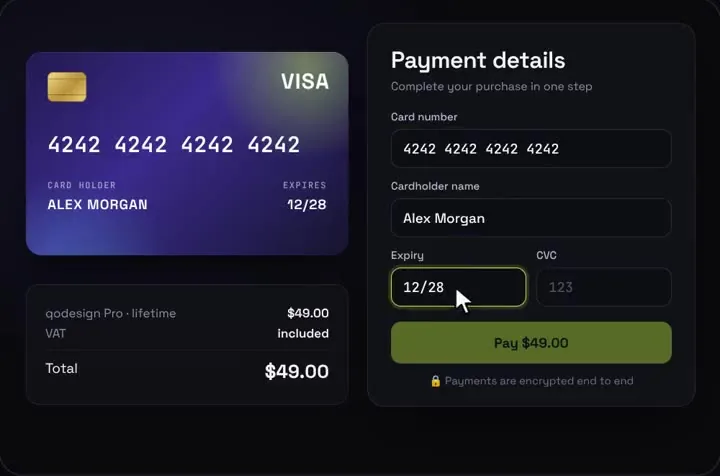
The 3D card checkout with Stripe's own card fields inside it. Your server sets the amount, and the card still flips for the CVC.
Use it in Next.js
"use client";
import { useRef } from "react";
import { useRouter } from "next/navigation";
import { loadStripe } from "@stripe/stripe-js";
import { Elements, CardNumberElement, CardExpiryElement, CardCvcElement, useStripe, useElements } from "@stripe/react-stripe-js";
import CardCheckout from "@/components/CardCheckout";

const stripePromise = loadStripe(process.env.NEXT_PUBLIC_STRIPE_PUBLISHABLE_KEY!);
const cardStyle = { base: { color: "#F4F2FF", fontFamily: "JetBrains Mono, monospace", fontSize: "18px", "::placeholder": { color: "#6E6A8A" } } };

function CardForm({ clientSecret, amount }: { clientSecret: string; amount: number }) {
  const stripe = useStripe();
  const elements = useElements();
  const router = useRouter();
  // a ref, so a re-render can't forget what Stripe already reported
  const done = useRef({ number: false, expiry: false, cvc: false }).current;

  return (
    <CardCheckout
      amount={amount}
      currency="USD"
      productName="Pro plan"
      resetAfter={null}
      renderCardFields={(slot) => {
        const track = (k: keyof typeof done) => (e: { complete: boolean; brand?: string }) => {
          done[k] = e.complete;
          slot.onChange({ complete: done.number && done.expiry && done.cvc, ...(e.brand ? { brand: e.brand } : {}) });
        };
        return (
          <div className="grid gap-[15px]">
            <div>
              <label className={slot.labelClassName}>Card number</label>
              <div className={slot.fieldClassName}><CardNumberElement options={{ style: cardStyle }} onChange={track("number")} /></div>
            </div>
            <div className="flex gap-[14px]">
              <div className="flex-1">
                <label className={slot.labelClassName}>Expiry</label>
                <div className={slot.fieldClassName}><CardExpiryElement options={{ style: cardStyle }} onChange={track("expiry")} /></div>
              </div>
              <div className="flex-1">
                <label className={slot.labelClassName}>CVC</label>
                <div className={slot.fieldClassName}>
                  <CardCvcElement
                    options={{ style: cardStyle }}
                    onChange={track("cvc")}
                    onFocus={() => slot.onChange({ focus: "cvc" })}
                    onBlur={() => slot.onChange({ focus: null })}
                  />
                </div>
              </div>
            </div>
          </div>
        );
      }}
      onConfirm={async ({ name }) => {
        if (!stripe || !elements) throw new Error("Stripe hasn't loaded yet.");
        const card = elements.getElement(CardNumberElement);
        if (!card) throw new Error("Card field missing.");
        const { error, paymentIntent } = await stripe.confirmCardPayment(clientSecret, {
          payment_method: { card, billing_details: { name } },
        });
        if (error) throw error; // the card shows Stripe's message and Pay comes back
        setTimeout(() => router.push(`/thanks?pi=${paymentIntent.id}`), 1200); // let the success state play
      }}
    />
  );
}

export default function Checkout({ clientSecret, amount }: { clientSecret: string; amount: number }) {
  return (
    <Elements stripe={stripePromise} options={{ clientSecret }}>
      <CardForm clientSecret={clientSecret} amount={amount} />
    </Elements>
  );
}import Stripe from "stripe";
import Checkout from "./checkout";
const stripe = new Stripe(process.env.STRIPE_SECRET_KEY!);
// A new PaymentIntent for every visit, so render this page on request.
export const dynamic = "force-dynamic";
export default async function PayPage() {
// The amount is set here on the server. The browser only gets the client secret.
const intent = await stripe.paymentIntents.create({
amount: 2900, // $29.00, in cents
currency: "usd",
allowed_payment_method_types: ["card"], // card only: the form below collects cards
metadata: { plan: "pro" },
});
return (
<main className="grid min-h-dvh place-items-center overflow-hidden bg-[#0b0a14] p-4">
<Checkout clientSecret={intent.client_secret!} amount={29} />
</main>
);
}Good to know
- We ran these two files in a fresh Next.js 16.4.2 app against a Stripe test account. The test card 4242 4242 4242 4242 paid and moved on to /thanks. The decline card 4000 0000 0000 0002 showed "Your card has been declined." and Pay came back.
- Card digits only exist inside Stripe's iframes. The page had no card inputs of its own, and your server only sees the PaymentIntent.
- In stripe 23.0.0 the option is called allowed_payment_method_types. Older tutorials pass payment_method_types, which fails a strict type check with this version.
- The redirect to /thanks is not proof of payment. Fulfil orders from Stripe's payment_intent.succeeded webhook.
- Set STRIPE_SECRET_KEY and NEXT_PUBLIC_STRIPE_PUBLISHABLE_KEY. The card is drawn on a fixed 1000 x 660 stage, so scale it on phones with the className or style props.
Install
- Copy from the zipPut
react/src/componentsintosrc/, thennpm i framer-motion stripe @stripe/stripe-js @stripe/react-stripe-js. - Or ask your AIPaste PROMPT.md into Cursor, Lovable or v0.
Props
- renderCardFields
- Stripe Elements inside the design
- onConfirm
- confirm with Stripe; throw to show the error
- amount / currency
- what the card shows (Stripe charges the PaymentIntent)
- resetAfter
- null keeps the success state
How qodesign compares
- qodesign vs 21st.dev21st.dev is best for: browsing a huge marketplace and copying many components a month.
- qodesign vs Skiper UISkiper UI is best for: unusual interaction details for landing pages: image reveals, cursor trails, tooltips, drag-and-scroll galleries.
All comparisons, with prices read on each library's own site.
From the blog: Stripe Elements With a Custom Card Design in React and Next.js
Questions
Is it safe for real payments?
Yes, with the slot as shown. The built-in inputs are for demos. With renderCardFields, card numbers go straight to Stripe and never reach your code or your server.
Can I use the Payment Element instead?
Yes. The slot takes Stripe's split card fields or the Payment Element. The split fields fit the card's design best, which is why the snippet uses them.
Can Cursor or v0 add it for me?
Yes. Each download has a PROMPT.md. Paste it into Cursor, Lovable, v0 or Claude Code and it fits the piece into your app.
Can I use it in client work?
Yes, in personal and client projects. You can't resell the code itself as a kit.