Airwallex Split Card Element in React: the Card element first, then split fields in a 3D card
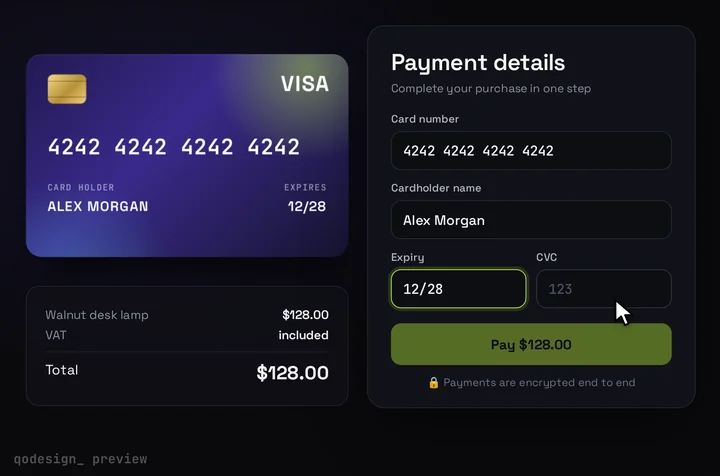
If you just want to take cards with Airwallex in React, use its own Card element: one prebuilt field, free in the same @airwallex/components-sdk package, and it fits most stores better. This page is for the other case: the Split Card Element's number, expiry and CVC fields inside an animated 3D card that shows the brand and flips for the CVC.
By buying you agree to the Terms.
- Download right after paying
- Use it in client projects
- Won't run on the listed stack? We fix it or refund you
Ready forCursorv0Lovableshadcn CLI
Use it in Next.js
"use client";
import { useEffect, useRef } from "react";
import { useRouter } from "next/navigation";
import { init, createElement } from "@airwallex/components-sdk";
import CardCheckout, { type CardFieldsSlot } from "@/components/CardCheckout";

type Intent = { id: string; client_secret: string };
type Confirm = () => Promise<string | undefined>;
type Field = "number" | "expiry" | "cvc";

// init() loads Airwallex.js once per page, even when Strict Mode runs effects twice.
let sdk: ReturnType<typeof init> | undefined;
const loadAirwallex = () => (sdk ??= init({ env: "demo", enabledElements: ["payments"] }));

// The fields are iframes and don't read your CSS, so their text is styled here.
const style = { base: { color: "#f4f5f7", fontSize: "16px" } };

// getBinInfo's card_brand to the two marks the card draws. Other brands still pay, with no logo.
const brandOf = (b?: string) => {
  const s = (b ?? "").toLowerCase();
  return s.includes("visa") ? "visa" : s.includes("master") ? "mastercard" : null;
};

function AirwallexFields({ slot, intent, onReady }: {
  slot: CardFieldsSlot;
  intent: Intent;
  onReady: (confirm: Confirm | null) => void;
}) {
  const numberBox = useRef<HTMLDivElement>(null);
  const expiryBox = useRef<HTMLDivElement>(null);
  const cvcBox = useRef<HTMLDivElement>(null);

  useEffect(() => {
    let gone = false;
    let cleanup = () => {};
    const done: Record<Field, boolean> = { number: false, expiry: false, cvc: false };
    const changed = (field: Field, completed: boolean) => {
      done[field] = completed;
      slot.onChange({ complete: done.number && done.expiry && done.cvc });
    };

    (async () => {
      await loadAirwallex();
      // In 1.36.0 createElement returns a Promise, so await it.
      const [cardNumber, expiry, cvc] = await Promise.all([
        createElement("cardNumber", { style }),
        createElement("expiry", { style }),
        createElement("cvc", { style }),
      ]);
      cleanup = () => [cardNumber, expiry, cvc].forEach((el) => el.destroy());
      if (gone) return cleanup();

      cardNumber.on("change", (e) => {
        changed("number", e.detail.completed);
        if (!e.detail.completed) return slot.onChange({ brand: null });
        // The change event carries no brand, so ask Airwallex once the number is complete.
        cardNumber.getBinInfo(intent.client_secret)
          .then((bin) => !gone && slot.onChange({ brand: brandOf(bin.card_brand) }))
          .catch(() => {});
      });
      expiry.on("change", (e) => changed("expiry", e.detail.completed));
      cvc.on("change", (e) => changed("cvc", e.detail.completed));
      cardNumber.on("focus", () => slot.onChange({ focus: "number" }));
      expiry.on("focus", () => slot.onChange({ focus: "expiry" }));
      cvc.on("focus", () => slot.onChange({ focus: "cvc" })); // flips the card
      cvc.on("blur", () => slot.onChange({ focus: null }));

      cardNumber.mount(numberBox.current!);
      expiry.mount(expiryBox.current!);
      cvc.mount(cvcBox.current!);

      // confirm() goes on the card number element; it picks up expiry and CVC by itself.
      onReady(async () => {
        const result = await cardNumber.confirm({ intent_id: intent.id, client_secret: intent.client_secret });
        return result.status;
      });
    })();

    return () => {
      gone = true;
      onReady(null);
      cleanup();
    };
  }, [slot, intent, onReady]);

  return (
    <div className="space-y-3">
      <div>
        <label className={slot.labelClassName}>Card number</label>
        <div ref={numberBox} className={slot.fieldClassName} />
      </div>
      <div className="flex gap-3">
        <div className="flex-1">
          <label className={slot.labelClassName}>Expiry</label>
          <div ref={expiryBox} className={slot.fieldClassName} />
        </div>
        <div className="flex-1">
          <label className={slot.labelClassName}>CVC</label>
          <div ref={cvcBox} className={slot.fieldClassName} />
        </div>
      </div>
    </div>
  );
}

export default function AirwallexCardCheckout({ intent, amount }: { intent: Intent; amount: number }) {
  const router = useRouter();
  const confirm = useRef<Confirm | null>(null);
  const setConfirm = useRef((c: Confirm | null) => (confirm.current = c)).current;

  return (
    <CardCheckout
      amount={amount}
      currency="USD"
      resetAfter={null}
      renderCardFields={(slot) => <AirwallexFields slot={slot} intent={intent} onReady={setConfirm} />}
      onConfirm={async () => {
        if (!confirm.current) throw new Error("The card fields haven't loaded yet.");
        let status: string | undefined;
        try {
          status = await confirm.current();
        } catch (err) {
          const message = (err as { message?: string })?.message;
          throw new Error(message || "That card didn't go through.");
        }
        if (status !== "SUCCEEDED") throw new Error("That card didn't go through.");
        router.push("/thanks");
      }}
    />
  );
}
import { createIntent } from "@/lib/airwallex";
import AirwallexCardCheckout from "./checkout";

export const dynamic = "force-dynamic";

export default async function PayPage() {
  // The amount is set here on the server. A new PaymentIntent for every visit.
  const intent = await createIntent(10, "USD");
  return <AirwallexCardCheckout intent={intent} amount={10} />;
}
// Server only. Your API key never reaches the browser.
const BASE = process.env.AIRWALLEX_API_URL ?? "https://api.sandbox.airwallex.com";

async function accessToken() {
  const res = await fetch(`${BASE}/api/v1/authentication/login`, {
    method: "POST",
    headers: {
      "Content-Type": "application/json",
      "x-api-key": process.env.AIRWALLEX_API_KEY!,
      "x-client-id": process.env.AIRWALLEX_CLIENT_ID!,
    },
    cache: "no-store",
  });
  if (!res.ok) throw new Error(`Airwallex login failed (${res.status})`);
  const { token } = (await res.json()) as { token: string };
  return token; // reusable until expires_at; cache it in production
}

export async function createIntent(amount: number, currency: string) {
  const res = await fetch(`${BASE}/api/v1/pa/payment_intents/create`, {
    method: "POST",
    headers: { Authorization: `Bearer ${await accessToken()}`, "Content-Type": "application/json" },
    body: JSON.stringify({
      request_id: crypto.randomUUID(),
      amount, // major units: 10 is 10.00
      currency,
      merchant_order_id: crypto.randomUUID(),
      return_url: `${process.env.NEXT_PUBLIC_SITE_URL}/pay`,
    }),
    cache: "no-store",
  });
  if (!res.ok) throw new Error(`Airwallex PaymentIntent failed (${res.status})`);
  const { id, client_secret } = (await res.json()) as { id: string; client_secret: string };
  return { id, client_secret };
}
Good to know
- What the card can show: the number, expiry and CVC sit in Airwallex's iframes, so your page and your server never see the digits. The 3D card hears when each field is complete, which field has focus, and the brand. It lights up Pay, flips for the CVC and shows a Visa or Mastercard mark. It doesn't show the number the buyer types.
- Brand: in 1.36.0 the change event on the card number carries completed, empty and error, and no brand (a config that reads e.detail.brand fails the type-check). So the snippet calls cardNumber.getBinInfo(client_secret) once the number is complete and maps card_brand to the card's two marks. That means the logo shows up when the last digit goes in, not while the buyer types. If the call fails, the card shows no logo and the payment still works.
- What we ran and what we didn't: on October 25, 2026 we type-checked these files against @airwallex/components-sdk 1.36.0, next 15.5.28, @types/react 19.3.0, framer-motion 14.6.0 and TypeScript 5.9.3, with the shipped CardCheckout source. Three deliberate mistakes failed the check, as they should. We didn't run them against an Airwallex sandbox account, so no PaymentIntent, getBinInfo call, payment or 3D Secure challenge went through, and we haven't seen the iframes render inside the card's 54 px field boxes. Pay with Airwallex's test cards before you ship.
- Two differences from Airwallex's npm quickstart: in 1.36.0 createElement returns a Promise, so the snippet awaits it (calling mount on the result straight away fails the type-check). And the quickstart passes intent_id, client_secret and currency to createElement('cardNumber'), which the 1.36.0 types reject. The same page says you can leave them out and pass them to confirm() instead, which is what the snippet does.
- confirm() goes on the card number element only. It returns the PaymentIntent, and the snippet treats SUCCEEDED as paid on the page. Airwallex's quickstart says to verify the status on your server and to fulfil orders from the payment_intent.succeeded webhook, because the buyer may close the tab before your code runs.
- 3D Secure: Airwallex handles it for you. When the issuer asks for a challenge, the bank's page opens in an iframe inside a div Airwallex adds after body, unless you pass authFormContainer to createElement. Card payments made in a sandbox need a fresh PaymentIntent per test.
- The npm package is a small loader: init() fetches Airwallex.js from Airwallex's servers at runtime. So it only runs in the browser, inside useEffect, and the snippet keeps a single init() per page. env "demo" is the sandbox; switch to "prod" and to https://api.airwallex.com for live payments.
- Set AIRWALLEX_CLIENT_ID, AIRWALLEX_API_KEY and NEXT_PUBLIC_SITE_URL. Both keys stay on the server. The PaymentIntent amount is in major units, so 10 means 10.00. Airwallex's docs say the split fields take Mastercard, Visa and UnionPay, and that UnionPay needs its logo next to the other two on your page; the 3D card draws no UnionPay mark.
- Tailwind v4: inside the card, Airwallex draws the three fields, so only the cardholder name is styled by the zip's CSS. That field can lose its font on Tailwind v4. The rule that fixes it is on the checkout page guide (see the Tailwind v4 section there). Text inside the iframes takes its colour and size from the style object in the snippet, not from your CSS. Our CSS leak check of this piece found every rule starts with .qcc-, so it doesn't touch your shadcn styles (re-read October 25, 2026).
When Airwallex's Card element or Drop-in is the better pick
- Airwallex has three prebuilt ways to take a card on your own page, all in @airwallex/components-sdk (MIT) at no extra cost: the Card element, a single-line field for number, expiry and CVC; the Split Card Element; and Drop-in, a prebuilt block with several payment methods. A redirect to its Hosted Payment Page is a fourth option.
- The Card element fits better for most stores. It's one createElement('card') and one confirm(), and Airwallex handles the layout, formatting and errors. Drop-in fits when you want wallets and local methods next to cards. card-element.tsx below is the whole Card element route, type-checked against 1.36.0.
- The Split Card Element is for when the form has to look like your product. Airwallex's docs put it this way: "In comparison to Card Element, it provides greater control over the look and feel of the checkout page." This page is that route, with a card that reacts while the buyer types.
- Building for React Native? The web SDK doesn't apply there. Airwallex publishes a separate airwallex-payment-react-native package (0.5.0 on npm today).
"use client";
import { useEffect, useRef } from "react";
import { init, createElement } from "@airwallex/components-sdk";

// The free route: Airwallex's single-line Card element, no custom card around it.
export default function AirwallexCard({ intent }: { intent: { id: string; client_secret: string } }) {
  const box = useRef<HTMLDivElement>(null);
  const card = useRef<Awaited<ReturnType<typeof createElement<"card">>> | null>(null);

  useEffect(() => {
    let gone = false;
    (async () => {
      await init({ env: "demo", enabledElements: ["payments"] });
      const el = await createElement("card");
      if (gone) return el.destroy();
      el.mount(box.current!);
      card.current = el;
    })();
    return () => {
      gone = true;
      card.current?.destroy();
    };
  }, []);

  return (
    <form
      onSubmit={async (e) => {
        e.preventDefault();
        const result = await card.current?.confirm({ intent_id: intent.id, client_secret: intent.client_secret });
        if (result?.status === "SUCCEEDED") location.assign("/thanks");
      }}
    >
      <div ref={box} />
      <button type="submit">Pay</button>
    </form>
  );
}
Airwallex Split Card Element events in components-sdk 1.36.0
- We read these from the 1.36.0 type definitions. Each split element (cardNumber, expiry, cvc) takes on() with ready, change, focus, blur, pressArrowKey and submit. change, focus and blur hand you e.detail with completed, empty and error.
- The card's Pay button wants all three complete, so the snippet keeps a completed flag per field and reports complete only when all three are true. focus on the CVC flips the card and blur flips it back.
- The card number element also has getBinInfo(client_secret), which returns card_brand, card_type and the issuer's country and name. That is where the brand comes from on this page.
How this differs from the Adyen, PayPal and Mercado Pago card guides
- All of them put the provider's own fields in the same card slot. With Adyen a session sends the payment, with PayPal your server creates and captures an order, and with Mercado Pago the browser makes a card token for your server.
- Airwallex is closest to Stripe: your server logs in for an access token and creates a PaymentIntent, and the browser confirms it with confirm() on the card number element. The brand is the odd one out, because it needs a getBinInfo call instead of an event.
Install
- Copy from the zipPut
react/src/componentsintosrc/, thennpm i framer-motion @airwallex/components-sdk. - Or ask your AIPaste PROMPT.md into Cursor, Lovable or v0.
Props
- renderCardFields
- Airwallex's split fields inside the design
- onConfirm
- confirm the PaymentIntent; throw to show the error
- amount / currency
- what the card shows (Airwallex charges the PaymentIntent amount)
- resetAfter
- null keeps the success state
How qodesign compares
- qodesign vs 21st.dev21st.dev is best for: browsing a huge marketplace and copying many components a month.
- qodesign vs Skiper UISkiper UI is best for: unusual interaction details for landing pages: image reveals, cursor trails, tooltips, drag-and-scroll galleries.
All comparisons, with prices read on each library's own site.
Questions
Does the 3D card see the card number?
No. The number, expiry and CVC stay in Airwallex's iframes. The card only hears when each field is complete, which field has focus, and the brand from getBinInfo.
Card element or Split Card Element?
The Card element for most stores: one field, prebuilt, same package. The Split Card Element when the form has to match your design, as on this page.
Why doesn't the brand show while I type?
The split fields' change event has no brand in 1.36.0. The snippet asks getBinInfo once the number is complete, so the logo appears at the last digit.
Does @airwallex/components-sdk work with React 19?
It has no React peer dependency; it loads Airwallex.js and mounts iframes into the divs you give it. Our snippet type-checks with @types/react 19.3.0. We didn't run it against an Airwallex account.
Can Cursor or v0 add it for me?
Yes. Each download has a PROMPT.md. Paste it into Cursor, Lovable, v0 or Claude Code and it fits the piece into your app.
Can I use it in client work?
Yes, in personal and client projects. You can't resell the code itself as a kit.