A HeroUI dashboard template for Next.js
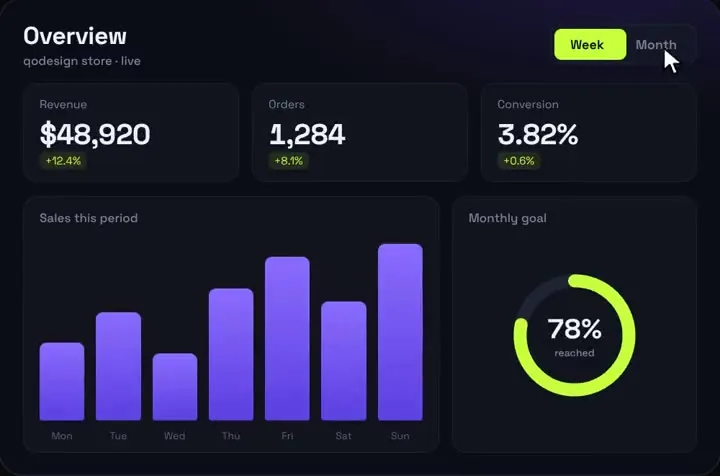
One dashboard page in a HeroUI v3 app: the animated analytics screen on top, and HeroUI's own Card, Table and Chip for the orders underneath. What HeroUI gives you for free, what it doesn't, and the Tailwind v4 notes.
By buying you agree to the Terms.
- Download right after paying
- Use it in client projects
- Won't run on the listed stack? We fix it or refund you
Ready forCursorv0Lovableshadcn CLI
Use it in Next.js
import { Space_Grotesk } from "next/font/google";
import AnalyticsDashboard from "@/components/AnalyticsDashboard";
import { getDashboardData } from "@/lib/dashboard";
import { RecentOrders } from "./recent-orders";

// The piece was drawn in Space Grotesk. Load it here so Tailwind v4 doesn't need the piece's tailwind.config.js.
const grotesk = Space_Grotesk({ subsets: ["latin"] });

// Re-read the numbers at most every 5 minutes.
export const revalidate = 300;

export default async function DashboardPage() {
  const { chart, orders } = await getDashboardData();

  return (
    <main className="mx-auto flex w-full max-w-[1000px] flex-col gap-6 px-4 py-8">
      <div className={grotesk.className}>
        <AnalyticsDashboard title="Revenue" subtitle="This week and the last 7 weeks" data={chart} />
      </div>
      <RecentOrders orders={orders} />
    </main>
  );
}"use client";
import { Card, Chip, Table } from "@heroui/react";
import type { Order } from "@/lib/dashboard";
const statusColor = { paid: "success", pending: "warning", refunded: "danger" } as const;
const money = new Intl.NumberFormat("en-US", { style: "currency", currency: "USD" });
export function RecentOrders({ orders }: { orders: Order[] }) {
return (
<Card>
<Card.Header>
<Card.Title>Recent orders</Card.Title>
<Card.Description>The last {orders.length} orders, newest first</Card.Description>
</Card.Header>
<Card.Content>
<Table>
<Table.ScrollContainer>
<Table.Content aria-label="Recent orders" className="min-w-[560px]">
<Table.Header>
<Table.Column isRowHeader>Order</Table.Column>
<Table.Column>Customer</Table.Column>
<Table.Column>Status</Table.Column>
<Table.Column>Total</Table.Column>
</Table.Header>
<Table.Body items={orders}>
{(order) => (
<Table.Row id={order.id}>
<Table.Cell>{order.id}</Table.Cell>
<Table.Cell>{order.customer}</Table.Cell>
<Table.Cell>
<Chip color={statusColor[order.status]} size="sm" variant="soft">
{order.status}
</Chip>
</Table.Cell>
<Table.Cell>{money.format(order.total)}</Table.Cell>
</Table.Row>
)}
</Table.Body>
</Table.Content>
</Table.ScrollContainer>
</Table>
</Card.Content>
</Card>
);
}import { DEFAULT_DATA, type DashboardData } from "@/components/AnalyticsDashboard";
export type Order = { id: string; customer: string; status: "paid" | "pending" | "refunded"; total: number };
/** Swap both halves for your own queries. The chart wants DashboardData (the sample in the piece shows the shape). */
export async function getDashboardData(): Promise<{ chart: DashboardData; orders: Order[] }> {
const res = await fetch(`${process.env.API_URL}/orders?limit=8`, { next: { revalidate: 300 } });
const orders: Order[] = res.ok ? await res.json() : [];
return { chart: DEFAULT_DATA, orders };
}@import "tailwindcss";
@import "@heroui/styles";import "./globals.css";
export default function RootLayout({ children }: { children: React.ReactNode }) {
return (
<html lang="en" className="dark" data-theme="dark">
<body className="bg-background text-foreground">{children}</body>
</html>
);
}Good to know
- Analytics Dashboard V1 is one screen: three KPIs that count up, a bar chart with hover values, a goal ring and a Week/Month switch. It is not a multi-page admin with a sidebar, auth, settings and CRUD tables. The HeroUI parts on this page are yours to extend.
- lib/dashboard.ts is a stand-in. Replace the fetch with your database or API, and build the chart's DashboardData from your own numbers (seven bars per range, heights from 0 to 100). The Stripe revenue guide on this site shows one way to build it from real charges.
- The piece formats revenue with a dollar sign (fmtMoney at the top of AnalyticsDashboard.tsx). Change that one line if you sell in another currency.
- The chart is drawn on a 1000 x 660 stage and scales down as one piece below 1000 px. On a 390 px phone that makes its labels small, so on phones you may prefer to show the HeroUI table first or swap the chart for HeroUI's ProgressCircle and plain numbers.
- What we ran on Oct 25 2026: these five files in a scratch Next.js 16.4.3 app with React 19.3.1, @heroui/react 3.2.6, @heroui/styles 3.2.6, Tailwind CSS 4.3.3, framer-motion 14.6.0 and TypeScript 7.0.2, plus the shipped AnalyticsDashboard.tsx. tsc and next build passed. In a headless browser at 1440 px the KPIs counted up, Month switched the numbers and the HeroUI table showed eight orders with status chips; at 390 px the page had no sideways scroll and the table scrolled inside its own container. The orders came from a local mock API, so no real database was involved.
What HeroUI v3 gives you for a dashboard, and what it doesn't
- HeroUI has no dashboard component and no chart component. What it does have, read from @heroui/react 3.2.6 on Oct 25 2026: Card (Card.Header, Card.Title, Card.Description, Card.Content, Card.Footer), Table, Chip, plus Meter, ProgressBar and ProgressCircle for simple numbers. The Table docs describe it as "Tables display structured data in rows and columns with support for sorting, selection, column resizing, and infinite scrolling."
- The v3 Table is a compound component: Table, then Table.ScrollContainer, then Table.Content with an aria-label, then Table.Header with Table.Column (isRowHeader on the first one) and Table.Body with Table.Row and Table.Cell. Table.Body takes items and a render function, as in recent-orders.tsx above. Table arrived in v3.0.0-beta.8, so a NextUI-era table won't paste in as is.
- Chip takes color (accent, default, success, warning, danger), variant (primary, secondary, tertiary, soft) and size. The status map in recent-orders.tsx uses success, warning and danger with the soft variant, the same pattern as the status column in HeroUI's own Table examples.
- npm on Oct 25 2026: @heroui/react 3.2.6 (published Sep 17 2026), 477,326 downloads in the week of Oct 16 to 22, peer dependencies react >=19.0.0 and tailwindcss >=4.0.0. Dark mode is a class on the html element (class="dark" data-theme="dark"), which is how layout.tsx above makes the HeroUI card match the dark chart.
When a free HeroUI dashboard fits better
- If you need a full admin (a sidebar, many pages, filters, editable tables), build it from HeroUI's free parts. Card, Table and Chip as above, Recharts for the charts (recharts 3.10.1, published Oct 24 2026, 35,373,674 downloads in the week of Oct 16 to 22), and ProgressCircle where a ring is enough. All of it is free and open source, and it will match your HeroUI theme everywhere.
- HeroUI's free starters are heroui-inc/next-app-template, next-pages-template and vite-template on GitHub (MIT, last pushed Sep 26 2026). They set up Next.js 16 or Vite with HeroUI v3 and Tailwind v4, with about, blog, docs and pricing pages, and no dashboard screen. Start from one of them and add your dashboard route. HeroUI Pro sells templates, including dashboards; we haven't used them and don't compare them here.
- If you are not tied to HeroUI, shadcn/ui has a free dashboard block (dashboard-01 on ui.shadcn.com/blocks) with a sidebar, charts and a data table.
- Analytics Dashboard V1 fits when you want one overview screen with motion done for you: numbers that count up, bars that spring in, a goal ring that fills. It is the top of the page, not the whole admin.
Analytics Dashboard V1 next to HeroUI v3: Tailwind v4 versus the piece's Tailwind 3.4
- HeroUI v3 needs Tailwind CSS v4 and React 19. The dashboard download is a Vite project with React 18, Tailwind CSS 3.4 and a tailwind.config.js. You don't change your app for it: copy AnalyticsDashboard.tsx into components/ and Tailwind v4 compiles its classes, because they are stock utilities and arbitrary values like bg-[#11131D] and rounded-[20px]. We checked that bg-gradient-to-b and the hover colours on the bars came through in the v4 build.
- What doesn't carry over is the config. Tailwind v4 ignores tailwind.config.js unless you point to it with @config, so the piece's Space Grotesk font setting is skipped. The page above loads Space Grotesk with next/font and puts its class on the wrapper div, so the dashboard keeps its font and your HeroUI theme keeps its own.
- HeroUI v3 dropped Framer Motion. The dashboard uses framer-motion for the bars, the goal ring and the Week/Month pill, so adding it brings that dependency back. The piece ships with framer-motion 11; we type-checked and ran it with framer-motion 14.6.0 and React 19.3.1 without changes.
Coming from the NextUI dashboard template
- The question "Admin Dashboard Example" in the HeroUI GitHub discussions (#1257, Aug 3 2023) is still open, and its one reply points to Siumauricio/nextui-dashboard-template. That repo is MIT, has 822 stars and was last pushed on Aug 5 2024. It is built on NextUI v2, before HeroUI v3 existed.
- Moving a NextUI v2 dashboard to v3 means React 19, Tailwind v4, no HeroUIProvider and the new compound components. HeroUI has migration guides for Card, Chip and Table. If your app can't move to React 19 yet, Analytics Dashboard V1 still runs on React 18 and Tailwind 3.4 as shipped, so you can add it to a NextUI v2 app today and move the rest later.
Install
- Copy from the zipPut
react/src/componentsintosrc/, thennpm i @heroui/react @heroui/styles framer-motion. - Or ask your AIPaste PROMPT.md into Cursor, Lovable or v0.
Props
- data
- DashboardData: week and month, each with revenue, orders, conv, d, goal, bars, labels
- title / subtitle
- header text
- startDelay
- ms before the count-up starts
How qodesign compares
- qodesign vs shadcnblocksshadcnblocks is best for: assembling whole pages from ready-made sections.
- qodesign vs Kokonut UIKokonut UI is best for: landing page sections and templates installed by an AI agent.
- qodesign vs TremorTremor is best for: dashboards and charts: area, bar, line and donut charts, trackers, KPI cards, tables.
All comparisons, with prices read on each library's own site.
Questions
Does HeroUI have a dashboard template?
Not in its free set. HeroUI's free next-app-template, next-pages-template and vite-template set up HeroUI v3 with Tailwind v4 but have no dashboard screen. HeroUI Pro sells templates. You can build one free from Card, Table, Chip and a chart library such as Recharts.
Does HeroUI have charts?
No chart component. It has Meter, ProgressBar and ProgressCircle for single values. For bars and lines, add a chart library or use a piece like Analytics Dashboard V1.
Can I put HeroUI components inside Analytics Dashboard V1?
Not inside its stage. The dashboard draws its own KPIs, chart and ring on a fixed 1000 x 660 layout. Put HeroUI around it: tables, filters, your nav.
Does Analytics Dashboard V1 need Tailwind v4 for HeroUI?
It ships on Tailwind 3.4 and compiles under Tailwind v4 as is. Load Space Grotesk yourself (next/font in the snippet above), because v4 ignores the piece's tailwind.config.js.
Is it a full admin template?
No. It is one animated analytics screen. Sidebar, auth, settings and other pages come from your app or from HeroUI's free parts.
Can Cursor or v0 add it for me?
Yes. Each download has a PROMPT.md. Paste it into Cursor, Lovable, v0 or Claude Code and it fits the piece into your app.
Can I use it in client work?
Yes, in personal and client projects. You can't resell the code itself as a kit.