Stripe revenue dashboard for Next.js
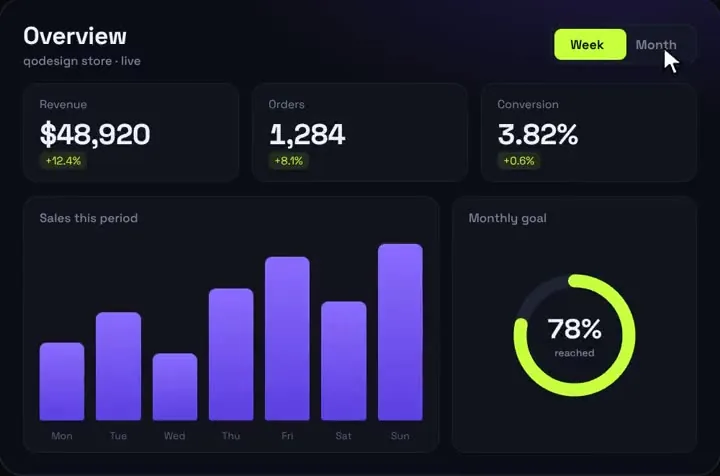
The animated analytics dashboard fed by your Stripe charges: revenue, orders, change against the previous period and a goal ring, read on the server.
Use it in Next.js
import AnalyticsDashboard from "@/components/AnalyticsDashboard";
import { getRevenueData } from "@/lib/revenue";

// Re-read Stripe at most every 5 minutes instead of on every visit.
export const revalidate = 300;

export default async function DashboardPage() {
  const data = await getRevenueData();
  return <AnalyticsDashboard title="Revenue" subtitle="Paid charges from Stripe" data={data} />;
}import Stripe from "stripe";
import type { DashboardData, RangeData } from "@/components/AnalyticsDashboard";
const stripe = new Stripe(process.env.STRIPE_SECRET_KEY!);
const DAY = 86_400; // seconds
const MONTHLY_GOAL = 20_000; // in your currency's main unit
/** Paid charges created in [from, to), unix seconds. The loop walks every page. */
async function paidCharges(from: number, to: number) {
const charges: Stripe.Charge[] = [];
for await (const charge of stripe.charges.list({ created: { gte: from, lt: to }, limit: 100 })) {
if (charge.paid && !charge.refunded) charges.push(charge);
}
return charges;
}
const net = (c: Stripe.Charge) => (c.amount - c.amount_refunded) / 100;
const change = (now: number, before: number) => (before ? Math.round(((now - before) / before) * 1000) / 10 : 0);
const label = (secondsAgo: number, opts: Intl.DateTimeFormatOptions) =>
new Date(Date.now() - secondsAgo * 1000).toLocaleDateString("en-US", opts);
/** 7 bars of `barDays` days each, compared with the 7 bars before them. */
async function range(barDays: number, labels: string[]): Promise<RangeData> {
const now = Math.floor(Date.now() / 1000);
const span = 7 * barDays * DAY;
const [current, previous] = await Promise.all([paidCharges(now - span, now), paidCharges(now - 2 * span, now - span)]);
const sums = Array<number>(7).fill(0);
for (const c of current) {
const bar = Math.min(6, Math.floor((c.created - (now - span)) / (barDays * DAY)));
sums[bar] += net(c);
}
const top = Math.max(...sums, 1);
const revenue = current.reduce((t, c) => t + net(c), 0);
const before = previous.reduce((t, c) => t + net(c), 0);
return {
revenue,
orders: current.length,
conv: 0, // Stripe has no visitor count. Pass the rate from your analytics here.
d: [change(revenue, before), change(current.length, previous.length), 0],
goal: 0, // set below from the last 28 days
bars: sums.map((v) => Math.round((v / top) * 100)),
labels,
};
}
export async function getRevenueData(): Promise<DashboardData> {
const days = Array.from({ length: 7 }, (_, i) => label((6 - i) * DAY, { weekday: "short" }));
const fourDayBars = Array.from({ length: 7 }, (_, i) => label((27 - i * 4) * DAY, { month: "short", day: "numeric" }));
const [week, month] = await Promise.all([range(1, days), range(4, fourDayBars)]);
const goal = Math.min(100, Math.round((month.revenue / MONTHLY_GOAL) * 100));
return { week: { ...week, goal }, month: { ...month, goal } };
}Good to know
- The Stripe call runs in a Server Component, so your secret key never reaches the browser. revalidate = 300 means Stripe is read at most every 5 minutes.
- next build prerenders the page, so STRIPE_SECRET_KEY has to be set at build time too.
- Stripe has no visitor numbers, so conversion is 0. Pass the rate from your analytics if you have it.
- Amounts are divided by 100 and shown with a dollar sign. That's right for USD and EUR, but not for currencies like JPY with no minor unit.
Install
- Copy from the zipPut
react/src/componentsintosrc/, thennpm i framer-motion stripe. - Or ask your AIPaste PROMPT.md into Cursor, Lovable or v0.
Props
- data
- { week, month }: revenue, orders, conv, d, goal, bars, labels
- title / subtitle
- header text
- startDelay
- ms before the count-up
How qodesign compares
- qodesign vs shadcnblocksshadcnblocks is best for: assembling whole pages from ready-made sections.
- qodesign vs Kokonut UIKokonut UI is best for: landing page sections and templates installed by an AI agent.
All comparisons, with prices read on each library's own site.
Questions
Does it page through all my charges?
Yes. The for await loop follows Stripe's pagination, 100 charges per request. With very many charges a day, cache harder or read from your own database.
Can I show subscriptions (MRR) instead?
Yes. Build the same data object from your subscriptions; the dashboard only needs numbers and seven bar heights.
Can Cursor or v0 add it for me?
Yes. Each download has a PROMPT.md. Paste it into Cursor, Lovable, v0 or Claude Code and it fits the piece into your app.
Can I use it in client work?
Yes, in personal and client projects. You can't resell the code itself as a kit.