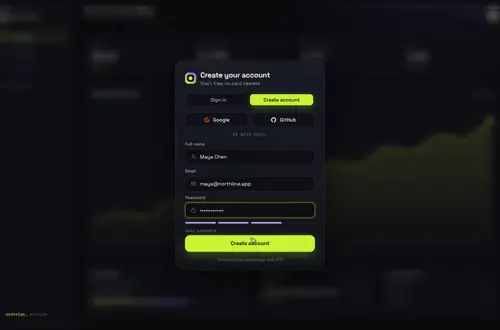
react-google-login is deprecated on npm, its repo is archived, and the Google library it wraps won't accept client IDs made after July 29, 2022. The button still renders on React 19; it's the sign-in that stops working. Google Identity Services through @react-oauth/google replaces it, and Gateway Dive is a finished sign-in card to put Google on.
"use client";
// Before (react-google-login):
// <GoogleLogin clientId="..." onSuccess={(res) => sendToServer(res.tokenId)} cookiePolicy="single_host_origin" />
import { GoogleLogin, GoogleOAuthProvider } from "@react-oauth/google";
import { useRouter } from "next/navigation";

export default function GoogleButton() {
  const router = useRouter();

  return (
    <GoogleOAuthProvider clientId={process.env.NEXT_PUBLIC_GOOGLE_CLIENT_ID!}>
      <GoogleLogin
        onSuccess={async ({ credential }) => {
          // credential is Google's ID token (a JWT), what tokenId used to be
          if (!credential) return;
          const res = await fetch("/api/auth/google", {
            method: "POST",
            headers: { "Content-Type": "application/json" },
            body: JSON.stringify({ credential }),
          });
          if (res.ok) router.push("/dashboard");
        }}
        onError={() => console.error("Google sign-in didn't finish")}
      />
    </GoogleOAuthProvider>
  );
}
app/api/auth/google/route.ts
import { NextResponse } from "next/server";
import { createRemoteJWKSet, jwtVerify } from "jose";

// Google's public keys; jose caches them between requests
const googleKeys = createRemoteJWKSet(new URL("https://www.googleapis.com/oauth2/v3/certs"));

export async function POST(req: Request) {
  const { credential } = (await req.json()) as { credential?: string };
  if (!credential) return NextResponse.json({ error: "Missing credential" }, { status: 400 });

  try {
    const { payload } = await jwtVerify(credential, googleKeys, {
      issuer: ["https://accounts.google.com", "accounts.google.com"],
      audience: process.env.NEXT_PUBLIC_GOOGLE_CLIENT_ID,
    });
    if (payload.email_verified !== true) return NextResponse.json({ error: "Email not verified" }, { status: 401 });

    // payload.sub is the stable Google user id; payload.email and payload.name come with it.
    // Find or create your user here, then set your own session cookie.
    return NextResponse.json({ ok: true, email: payload.email });
  } catch {
    return NextResponse.json({ error: "Invalid token" }, { status: 401 });
  }
}
Good to know
Where react-google-login stands: its last release is 5.2.2, from January 4, 2021. npm marks it deprecated ("Package no longer supported") and the GitHub repo (anthonyjgrove/react-google-login) is archived. npm still counted 69,445 downloads in the week of October 16 to 22, 2026.
What actually broke is Google's side. The package loads Google's old platform library (apis.google.com and gapi.auth2). Google's deprecation page says: "Support for the Google Sign-In JavaScript library is deprecated as of March 31, 2023. New OAuth Client IDs cannot use the deprecated library, but existing Client IDs created before July 29th, 2022 may continue using it until sunset." Google hasn't set the sunset date yet.
On React 19 the button itself still rendered in our test on October 26, 2026, so this isn't a React crash. Its peer range stops at React 17, so npm refuses it next to React 18 or 19 unless you pass --legacy-peer-deps.
@react-oauth/google wraps Google Identity Services, the library Google points to instead. Version 0.13.5 came out April 8, 2026, it accepts React 16.8 and up, and npm counted 772,989 downloads that same week.
Always check the credential on your server before you trust it. The route above does that with jose against Google's public keys, checking the issuer, your client ID as the audience and email_verified. Google's own page recommends a client library or a general JWT library for this; its tokeninfo endpoint is meant for debugging.
GoogleLogin draws Google's own button in an iframe, so you can pick its theme, size, shape and text but not restyle it. For a button in your own design, like the ones on Gateway Dive, let Auth.js or Supabase run the Google redirect, as in the next section.
Type-checked on October 26, 2026 with TypeScript 5.9.3 against react 19.1.1, next 15.5.28, @react-oauth/google 0.13.5, jose 6.2.13, next-auth 5.0.0-beta.32 and the shipped GatewayDive.tsx. We didn't sign in against a live Google client ID.
Your own Google button: Gateway Dive with Auth.js
If your app already has auth, or you'd rather not write the token check, use its Google provider. Auth.js and Supabase both run Google's current OAuth flow, so the button can be any button.
Gateway Dive is a sign-in and sign-up card that takes its buttons as data. Google and GitHub come with their logos. onProvider gets the id when someone presses one, and here it calls Auth.js. A wrong password shakes the card, and success dives through the button into your app.
The card always shows an email and password form. In this snippet it answers with a short message pointing to the buttons; the Auth.js guide linked below connects it to a Credentials provider instead.
"use client";
import { signIn } from "next-auth/react";
import GatewayDive from "@/components/gateway-dive/GatewayDive";

const providers = [
  { id: "google", label: "Google" },
  { id: "github", label: "GitHub" },
];

export default function LoginCard() {
  return (
    <main style={{ height: "100dvh" }}>
      <GatewayDive
        autoplayDemo={false}
        brand="Acme"
        providers={providers}
        // the card's own Google button: Auth.js runs Google's OAuth redirect and comes back to /dashboard
        onProvider={(id) => void signIn(id, { redirectTo: "/dashboard" })}
        // buttons only here; the Auth.js guide wires email and password to a Credentials provider
        onSubmit={async () => ({ ok: false, error: "Use Google or GitHub to sign in." })}
      />
    </main>
  );
}
auth.ts
import NextAuth from "next-auth";
import Google from "next-auth/providers/google";
import GitHub from "next-auth/providers/github";

// reads AUTH_GOOGLE_ID, AUTH_GOOGLE_SECRET, AUTH_GITHUB_ID, AUTH_GITHUB_SECRET and AUTH_SECRET
export const { handlers, auth, signIn, signOut } = NextAuth({
  providers: [Google, GitHub],
  pages: { signIn: "/login" },
});
react-facebook-login alternative
react-facebook-login 4.1.1 is its last release, from October 5, 2018, and its peer range asks for React 16. npm counted 61,872 downloads in the week of October 16 to 22, 2026. The repo isn't archived; its last push was October 30, 2023.
We couldn't test it fairly on React 19: it loads Facebook's SDK script, which our test setup doesn't run. So we make no claim about whether it renders.
Auth.js and Supabase both have a Facebook provider, and Gateway Dive takes { id: "facebook", label: "Facebook" } in providers. It draws logos only for Google and GitHub, so a Facebook button shows its label without an icon unless you add one in your copy of engine.ts.
Using the card in a shadcn app
gateway-dive.css only styles .gd and its gd- classes, so the rest of your app looks the same with the card on the page.
Your own screen behind the card (the backdrop prop) is the exception. The file resets button and input under .gd without a layer, which beats Tailwind's utilities. Wrap those two lines in @layer base and rename --muted and --font-mono to --gd-muted and --gd-font-mono, as below. Measured October 25, 2026 in headless Chromium with Tailwind 4.3.3.
gateway-dive.css (your copy from the zip, two edits)
/* gateway-dive.css (your copy from the zip) */

/* 1. Delete these two lines near the top of the file and paste them back
      inside a layer, so Tailwind's utilities on your own Buttons and
      Inputs win again: */
@layer base {
  :where(.gd) button{font:inherit;color:inherit;background:none;border:0;padding:0;cursor:pointer}
  :where(.gd) input{font:inherit;color:inherit;background:none;border:0;outline:0;padding:0;margin:0;width:100%;min-width:0}
}

/* 2. Replace "--muted" with "--gd-muted" (8 places) and "--font-mono"
      with "--gd-font-mono" (6 places) in this file, plus the one
      var(--muted) in engine.ts (it colours the Sign in / Create account tabs). */
Copy from the zipPut react/src/components into src/, then npm i @react-oauth/google jose (or next-auth@beta for the Auth.js route). Gateway Dive needs no animation library. Then npm uninstall react-google-login.
Or ask your AIPaste PROMPT.md into Cursor, Lovable or v0.
qodesign vs Aceternity UIAceternity UI is best for: teams building many marketing pages who want one big library.
All comparisons, with prices read on each library's own site.
Questions
Does react-google-login work with React 19?
The button renders, but npm refuses the package next to React 18 or 19 without --legacy-peer-deps, and the bigger problem is Google's: client IDs created after July 29, 2022 can't use the library it wraps.
Why do I get idpiframe_initialization_failed?
That error comes from Google's old library, which react-google-login loads, and its details start with "You have created a new client application that uses libraries for user authentication or authorization". Client IDs created after July 29, 2022 can't use that library, so the fix is Google Identity Services, as above.
What replaces tokenId?
GoogleLogin's onSuccess hands you credential, Google's ID token as a JWT. Send it to your server and verify it there, as the route above does.
Is react-google-login deprecated?
Yes. npm marks it "Package no longer supported" and the GitHub repo is archived. Its last release was January 2021.
Does the sign-in card work in Next.js?
Yes, as a client component. Keep "use client" at the top of the file that renders it, as in the snippet above. App Router and Pages Router both work.
Can Cursor or v0 add it for me?
Yes. Each download has a PROMPT.md. Paste it into Cursor, Lovable, v0 or Claude Code and it fits the piece into your app.
Can I use it in client work?
Yes, in personal and client projects. You can't resell the code itself as a kit.