Payload CMS custom login page
A sign in and create-account card for a Payload 3 auth collection on your own site. It calls Payload's login server function, keeps customers out of /admin, and puts Payload's own error messages on the card. Run against Payload 3.92.0.
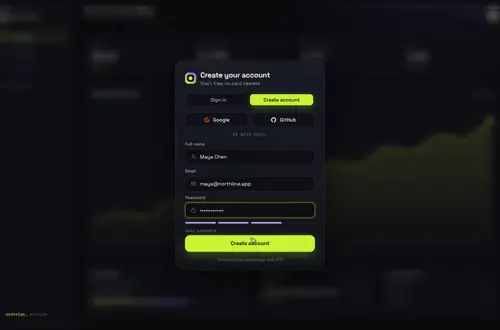
By buying you agree to the Terms.
- Download right after paying
- Use it in client projects
- Won't run on the listed stack? We fix it or refund you
Ready forCursorv0Lovableshadcn CLI
Use it in Next.js
"use client";
import { useRouter } from "next/navigation";
import GatewayDive from "@/components/gateway-dive/GatewayDive";
import { signInAction, signUpAction } from "./actions";

export default function LoginPage() {
  const router = useRouter();
  return (
    <main style={{ height: "100dvh" }}>
      <GatewayDive
        autoplayDemo={false}
        brand="Acme"
        onSubmit={({ mode, name, email, password }) =>
          mode === "signin" ? signInAction(email, password) : signUpAction(name, email, password)
        }
        onSuccess={() =>
          setTimeout(() => {
            router.push("/account");
            router.refresh();
          }, 1400)
        }
      />
    </main>
  );
}"use server";
import { getPayload, APIError, ValidationError } from "payload";
import { login } from "@payloadcms/next/auth";
import config from "@payload-config";
type Result = { ok: boolean; error?: string };
// Next.js hides thrown error messages in production builds,
// so return the message instead of throwing it.
function toResult(err: unknown): Result {
if (err instanceof ValidationError) return { ok: false, error: err.data.errors[0]?.message ?? err.message };
if (err instanceof APIError) return { ok: false, error: err.message };
return { ok: false, error: "Something went wrong. Try again." };
}
export async function signInAction(email: string, password: string): Promise<Result> {
try {
await login({ collection: "customers", config, email, password }); // sets the payload-token cookie
return { ok: true };
} catch (err) {
return toResult(err);
}
}
export async function signUpAction(name: string, email: string, password: string): Promise<Result> {
try {
const payload = await getPayload({ config });
// The Local API skips access control by default, so pass only the fields you allow.
await payload.create({ collection: "customers", data: { name, email, password } });
} catch (err) {
return toResult(err);
}
return signInAction(email, password);
}import type { CollectionConfig } from "payload";
// Your site's users, kept apart from the admins in "users".
// Only admin.user ("users") can open /admin, so a customer can't sign in there.
export const Customers: CollectionConfig = {
slug: "customers",
auth: {
tokenExpiration: 60 * 60 * 24 * 7, // a week; the default is 7200 s
// verify: true, // turn on to email a confirmation link first
},
fields: [{ name: "name", type: "text" }],
};import { buildConfig } from "payload";
import { sqliteAdapter } from "@payloadcms/db-sqlite";
import { Customers } from "./collections/Customers";
export default buildConfig({
admin: { user: "users" },
collections: [
{ slug: "users", auth: true, fields: [] },
Customers,
],
db: sqliteAdapter({ client: { url: process.env.DATABASE_URL || "file:./payload.db" } }),
secret: process.env.PAYLOAD_SECRET || "",
});Good to know
- This page is for your site's users. To change the admin login at /admin/login, use the free admin options in the next section. Gateway Dive doesn't replace that screen.
- login() from @payloadcms/next/auth sets the HTTP-only payload-token cookie for you (the prefix comes from cookiePrefix, payload by default), so the browser never handles the token.
- Customers get their own auth collection. Only the collection named in admin.user can open the admin panel, so someone who signs up here can't use /admin.
- payload.create in signUpAction runs with overrideAccess on, the Local API default, so your create access rule doesn't apply. That's why the action builds data from name, email and password only. If you spread the form into data, a visitor could set fields like a role.
- The card stops a password under 8 characters with "Use at least 8 characters." before your action runs. Payload's own checks still run on the server.
- Route in onSuccess after about 1.4 s so the dive can finish, and call router.refresh() so server components read the new cookie.
Admin login or site login? Start with the free route
- If you want your own look on /admin/login, you don't need a component. Payload 3.92.0 gives you admin.components.graphics.Logo ("The full logo used in contexts like the Login view") plus beforeLogin and afterLogin, which the docs describe as Custom Components injected "before the default login form" and "after the default login form". A logo and a line of text cover most branding requests, and they cost nothing.
- What 3.92.0 doesn't let you do is swap the login view itself. In the installed types, admin.components.views names account and dashboard, plus your own keys for new views. There's no login key. The Payload community help thread "Replacing login view" suggests pointing admin.routes.login (default /login) at a route you own. That's a community pattern rather than documented behavior. I didn't test it, so it isn't in the code here.
- For your site's users, Payload's docs already show a plain form that calls the login server function from @payloadcms/next/auth. If a plain form is all you need, use that and skip the card. Gateway Dive is for when you want sign in and create account on one animated screen over your app.
import { buildConfig } from "payload";
import { sqliteAdapter } from "@payloadcms/db-sqlite";

export default buildConfig({
  admin: {
    user: "users",
    components: {
      graphics: { Logo: "/admin-brand/Logo" },
      beforeLogin: ["/admin-brand/BeforeLogin"],
    },
  },
  collections: [{ slug: "users", auth: true, fields: [] }],
  db: sqliteAdapter({ client: { url: "file:./payload.db" } }),
  secret: process.env.PAYLOAD_SECRET || "",
});export default function BeforeLogin() {
return <p>Acme staff only. Customers sign in at acme.com/login.</p>;
}What Payload sends back, and what the card shows
- I ran the snippet in next dev against Payload 3.92.0 on SQLite and read these messages off the card.
- Wrong password: "The email or password provided is incorrect." Payload throws an AuthenticationError and toResult passes its message through.
- Sixth wrong try in a row: "This user is locked due to having too many failed login attempts." The 3.92.0 defaults are maxLoginAttempts 5 and lockTime 600000 ms, which is 10 minutes. The right password is refused too until the lock ends.
- Sign-up with an email that already has an account: "A user with the given email is already registered." That one is a ValidationError, so the message sits in err.data.errors.
- Those last two tell a stranger that an email has an account. If that matters for your site, replace them with one neutral line in toResult.
- With verify: true on the collection, the login right after sign-up throws "Please verify your email before logging in." (the 3.92.0 English text; I didn't run this case). In that setup, have signUpAction return { ok: false, error: "Check your inbox to confirm your email." } instead of signing in.
Reading the signed-in customer on the next page
- payload.auth({ headers }) reads the payload-token cookie in a server component. It returns whichever auth collection the cookie belongs to, and admins use the same cookie name, so check user.collection.
- Sign-out goes through the logout server function. The cookie is HTTP-only, so JavaScript in the browser can't delete it.
import { headers as getHeaders } from "next/headers";
import { redirect } from "next/navigation";
import { getPayload } from "payload";
import config from "@payload-config";

export default async function AccountPage() {
  const payload = await getPayload({ config });
  const { user } = await payload.auth({ headers: await getHeaders() });
  if (!user || user.collection !== "customers") redirect("/login");
  return <h1>Hi {user.name ?? user.email}</h1>;
}"use server";
import { logout } from "@payloadcms/next/auth";
import config from "@payload-config";
export async function logoutAction() {
await logout({ config });
}"use client";
import { useRouter } from "next/navigation";
import { logoutAction } from "./logout-action";
export function LogoutButton() {
const router = useRouter();
return (
<button onClick={async () => { await logoutAction(); router.push("/login"); router.refresh(); }}>
Sign out
</button>
);
}Tailwind v4, React 19 and the admin's CSS
- Payload 3.92.0 needs React 19: @payloadcms/ui asks for react ^19.0.1 || ^19.1.2 || ^19.2.1, and @payloadcms/next for next 16.3.3 or newer on the 16 line. Gateway Dive depends on nothing but React, and the snippet type-checks against @types/react 19.3.0.
- Our Tailwind v4 check (Oct 25, 2026, Tailwind 4.3.3 against a 3.4 build at 390 and 1440 px) lists Gateway Dive as works as-is: "The only computed differences are the random SVG gradient ids." The card gets its look from its own gateway-dive.css.
- Payload keeps the admin's styles inside the (payload) route group. Put the login page in your (frontend) group, as the file paths above do, and the two stay apart.
What I ran and what I didn't
- Checked on Oct 25, 2026: payload, @payloadcms/next and @payloadcms/ui 3.92.0 (published that day), next 16.4.3, react 19.3.1, @types/react 19.3.0 and TypeScript 7.0.2. npm counted 687,054 downloads of payload in the week of Oct 16 to 22.
- Every file on this page passes tsc. Calling login() without a password, reading a field ValidationError doesn't have, or returning the wrong shape from onSubmit all fail to compile, as they should.
- Then I ran it with @payloadcms/db-sqlite in next dev and drove it with headless Chromium at 390 and 1440 px. Sign-up landed on /account with the new name. Sign-in worked at both widths. The wrong password, the taken email and the lock showed the messages above, and /account sent a visitor with no cookie back to /login. Nothing scrolled sideways at 390 px.
- Not run: a production build or deploy, Postgres or MongoDB, email verification, the sign-out button, and the admin branding config, which is type-checked only. Not tried on a real phone.
Install
- Copy from the zipPut
react/src/componentsintosrc/, thennone (no animation library); payload and @payloadcms/next 3.x in your app. - Or ask your AIPaste PROMPT.md into Cursor, Lovable or v0.
Props
- onSubmit
- calls signInAction or signUpAction, returns { ok, error? }
- onSuccess
- runs when the check appears; route to /account here
- defaultMode
- 'signup' to open on create account
- brand
- the name on the card
- backdrop
- your own screen behind the card
- autoplayDemo
- false in a real app
How qodesign compares
- qodesign vs Magic UIMagic UI is best for: landing pages built with shadcn/ui.
- qodesign vs Aceternity UIAceternity UI is best for: teams building many marketing pages who want one big library.
All comparisons, with prices read on each library's own site.
Questions
Can I replace the Payload admin login page with my own?
Not as a view in Payload 3.92.0. admin.components.views has account and dashboard keys but no login key. You can add your logo and your own components before and after the built-in form. Pointing admin.routes.login at your own route is a community pattern that this page doesn't test.
Should customers and admins share the users collection?
Keeping them apart is simpler. Only the collection in admin.user can open /admin, so a separate customers collection keeps site sign-ups out of the admin panel.
REST login or the login server function?
Both work. POST /api/<collection-slug>/login sets the same HTTP-only cookie when called from the browser. The server function keeps the call on your server and lets you shape the error before the browser sees it, which is what the card needs.
Why return the error instead of throwing it?
Next.js hides the message of an error thrown in a server function in production builds, so the visitor would see a generic failure. Returning { ok: false, error } keeps Payload's message for the card.
How long does a Payload login last?
tokenExpiration defaults to 7200 seconds (2 hours) in 3.92.0. The Customers collection above sets a week.
Does it work with Payload on Postgres or MongoDB?
The login and sign-up code doesn't touch the database adapter, so it should. I only ran it on SQLite.
Can Cursor or v0 add it for me?
Yes. Each download has a PROMPT.md. Paste it into Cursor, Lovable, v0 or Claude Code and it fits the piece into your app.
Can I use it in client work?
Yes, in personal and client projects. You can't resell the code itself as a kit.