Supabase Google login for Next.js
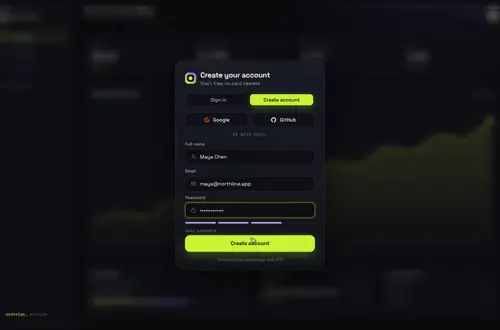
An animated sign-in card with Google and GitHub buttons that call Supabase signInWithOAuth, plus the callback route that turns the code into a session.
By buying you agree to the Terms.
- Download right after paying
- Use it in client projects
- Won't run on the listed stack? We fix it or refund you
Ready forCursorv0Lovableshadcn CLI
Use it in Next.js
"use client";
import { useRouter } from "next/navigation";
import GatewayDive from "@/components/gateway-dive/GatewayDive";
import { createClient } from "@/lib/supabase/client";

const providers = [
  { id: "google", label: "Google" },
  { id: "github", label: "GitHub" },
];

export default function Login() {
  const router = useRouter();
  const supabase = createClient();

  return (
    <main style={{ height: "100dvh" }}>
      <GatewayDive
        autoplayDemo={false}
        brand="Acme"
        providers={providers}
        onProvider={(id) => {
          void supabase.auth.signInWithOAuth({
            provider: id === "github" ? "github" : "google",
            options: { redirectTo: `${window.location.origin}/auth/callback?next=/dashboard` },
          });
        }}
        onSubmit={async ({ email, password }) => {
          const { error } = await supabase.auth.signInWithPassword({ email, password });
          return error ? { ok: false, error: error.message } : { ok: true };
        }}
        onSuccess={() => setTimeout(() => router.push("/dashboard"), 1400)}
      />
    </main>
  );
}import { NextResponse } from "next/server";
import { createClient } from "@/lib/supabase/server";
export async function GET(request: Request) {
const { searchParams, origin } = new URL(request.url);
const code = searchParams.get("code");
const next = searchParams.get("next") ?? "/";
const safeNext = next.startsWith("/") && !next.startsWith("//") ? next : "/";
if (code) {
const supabase = await createClient();
const { error } = await supabase.auth.exchangeCodeForSession(code);
if (!error) return NextResponse.redirect(`${origin}${safeNext}`);
}
return NextResponse.redirect(`${origin}/login?error=oauth`);
}import { createServerClient } from "@supabase/ssr";
import { cookies } from "next/headers";
export async function createClient() {
const cookieStore = await cookies();
return createServerClient(process.env.NEXT_PUBLIC_SUPABASE_URL!, process.env.NEXT_PUBLIC_SUPABASE_PUBLISHABLE_KEY!, {
cookies: {
getAll: () => cookieStore.getAll(),
setAll: (list) => {
try {
list.forEach(({ name, value, options }) => cookieStore.set(name, value, options));
} catch {
// called from a server component: the middleware refreshes the session instead
}
},
},
});
}import { createBrowserClient } from "@supabase/ssr";
export function createClient() {
return createBrowserClient(process.env.NEXT_PUBLIC_SUPABASE_URL!, process.env.NEXT_PUBLIC_SUPABASE_PUBLISHABLE_KEY!);
}Good to know
- Turn on Google and GitHub under Authentication > Providers in Supabase, and add http://localhost:3000/auth/callback and your live /auth/callback URL to the redirect allow list. A URL missing from that list is the usual reason the button lands on your Site URL instead.
- The browser client from @supabase/ssr uses the PKCE flow, so Supabase sends the visitor back with ?code=. The route above swaps it for a session cookie and only redirects to paths on your own site.
- The buttons come from the providers prop as plain data. Add or remove a provider there and in onProvider; the card lays them out.
- Email and password still work on the same card. A wrong password shakes it and shows Supabase's own message.
Install
- Copy from the zipPut
react/src/componentsintosrc/, thennpm i @supabase/supabase-js @supabase/ssr. - Or ask your AIPaste PROMPT.md into Cursor, Lovable or v0.
Props
- providers
- { id, label }[] for the social buttons
- onProvider
- (id) → start the OAuth redirect
- onSubmit
- email and password sign-in, returns { ok, error? }
- onSuccess
- runs when the check appears
- backdrop
- your own screen behind the card
- autoplayDemo
- false in a real app
How qodesign compares
- qodesign vs Magic UIMagic UI is best for: landing pages built with shadcn/ui.
- qodesign vs Aceternity UIAceternity UI is best for: teams building many marketing pages who want one big library.
All comparisons, with prices read on each library's own site.
Questions
Why does Google send me back to the home page?
Supabase falls back to your Site URL when redirectTo is not on the redirect allow list. Add the exact /auth/callback URL for each environment.
Do I need middleware?
For server components to see the session on every request, yes. Use the middleware from Supabase's Next.js server-side auth guide; the callback route above works with it.
Can I add Apple or Discord?
Yes. Add { id, label } to providers and pass the matching provider name to signInWithOAuth. The card has no fixed list.
Does the login page work in Next.js?
Yes, as a client component. Keep "use client" at the top of the file that renders it, as in the snippet above. App Router and Pages Router both work.
Can Cursor or v0 add it for me?
Yes. Each download has a PROMPT.md. Paste it into Cursor, Lovable, v0 or Claude Code and it fits the piece into your app.
Can I use it in client work?
Yes, in personal and client projects. You can't resell the code itself as a kit.