Auth.js Google sign-in page for Next.js
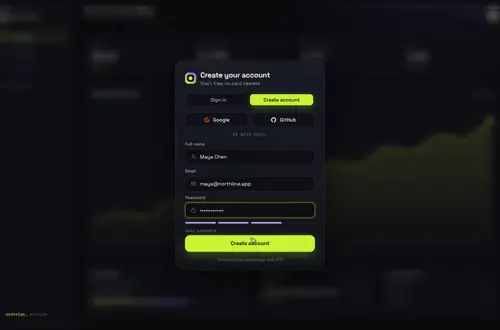
An animated sign-in card for Auth.js v5: the Google and GitHub buttons call signIn, Auth.js sends people back to your own /login page, and its error codes show up as plain sentences.
By buying you agree to the Terms.
- Download right after paying
- Use it in client projects
- Won't run on the listed stack? We fix it or refund you
Ready forCursorv0Lovableshadcn CLI
Use it in Next.js
"use client";
import { signIn } from "next-auth/react";
import { useRouter } from "next/navigation";
import GatewayDive from "@/components/gateway-dive/GatewayDive";

const providers = [
  { id: "google", label: "Google" },
  { id: "github", label: "GitHub" },
];

export default function LoginCard({ callbackUrl, error }: { callbackUrl: string; error?: string }) {
  const router = useRouter();

  return (
    <main style={{ height: "100dvh", position: "relative" }}>
      {error ? (
        <p role="alert" className="absolute inset-x-0 top-4 z-10 text-center text-sm text-red-400">{error}</p>
      ) : null}
      <GatewayDive
        autoplayDemo={false}
        brand="Acme"
        providers={providers}
        onProvider={(id) => void signIn(id, { redirectTo: callbackUrl })}
        onSubmit={async ({ email, password }) => {
          const res = await signIn("credentials", { email, password, redirect: false });
          return res?.error ? { ok: false, error: "Wrong email or password." } : { ok: true };
        }}
        onSuccess={() => setTimeout(() => router.push(callbackUrl), 1400)}
      />
    </main>
  );
}import LoginCard from "./login-card";
const messages: Record<string, string> = {
OAuthAccountNotLinked: "That email already signed in another way. Use the same button as last time.",
AccessDenied: "Access was denied. Try another account.",
};
export default async function LoginPage({ searchParams }: { searchParams: Promise<{ callbackUrl?: string; error?: string }> }) {
const { callbackUrl, error } = await searchParams;
const safe = callbackUrl?.startsWith("/") && !callbackUrl.startsWith("//") ? callbackUrl : "/dashboard";
return <LoginCard callbackUrl={safe} error={error ? messages[error] ?? "Sign-in didn't work. Try again." : undefined} />;
}import NextAuth from "next-auth";
import Google from "next-auth/providers/google";
import GitHub from "next-auth/providers/github";
import Credentials from "next-auth/providers/credentials";
import { checkPassword } from "@/lib/users"; // your own lookup: returns the user or null
export const { handlers, auth, signIn, signOut } = NextAuth({
providers: [
Google,
GitHub,
Credentials({
credentials: { email: {}, password: {} },
authorize: async (c) => checkPassword(String(c.email), String(c.password)),
}),
],
session: { strategy: "jwt" },
pages: { signIn: "/login" }, // Auth.js sends people (and its errors) here instead of its default page
});import { handlers } from "@/auth";
export const { GET, POST } = handlers;Good to know
- We type-checked these files against next-auth 5.0.0-beta.32 and next 15.5. In v5, signIn from next-auth/react takes redirectTo. callbackUrl still works but is marked deprecated.
- Google and GitHub read AUTH_GOOGLE_ID, AUTH_GOOGLE_SECRET, AUTH_GITHUB_ID and AUTH_GITHUB_SECRET from the environment, plus AUTH_SECRET. In the Google Cloud console the redirect URI is http://localhost:3000/api/auth/callback/google, and the same path on your live domain.
- pages.signIn points Auth.js at /login, so its own grey page never shows. When a sign-in fails, Auth.js comes back to /login with ?error= and a code. The server page turns the codes you care about into a sentence for the card.
- The card always has an email and password form. Here it goes to a Credentials provider. If you only want the buttons, return { ok: false, error: "Use Google or GitHub" } from onSubmit, or follow our Auth.js credentials guide for the password side.
- Copy GatewayDive.tsx, engine.ts and gateway-dive.css from react/src/components/gateway-dive. backdrop takes your own screen to sit behind the card; without it you get the bundled demo dashboard.
Install
- Copy from the zipPut
react/src/componentsintosrc/, thennpm i next-auth@beta. - Or ask your AIPaste PROMPT.md into Cursor, Lovable or v0.
Props
- providers
- { id, label }[]; the id is the Auth.js provider id
- onProvider
- (id) → signIn(id, { redirectTo })
- onSubmit
- email and password, returns { ok, error? }
- onSuccess
- runs when the check appears; route here
- backdrop
- your own screen behind the card
- autoplayDemo
- false in a real app
How qodesign compares
- qodesign vs Magic UIMagic UI is best for: landing pages built with shadcn/ui.
- qodesign vs Aceternity UIAceternity UI is best for: teams building many marketing pages who want one big library.
All comparisons, with prices read on each library's own site.
Questions
Why does Google send people to a different page after sign-in?
Auth.js only redirects to paths on your own site. Pass redirectTo with a relative path like /dashboard, and keep the callbackUrl it hands to /login, as the server page above does.
What does OAuthAccountNotLinked mean?
The email already belongs to an account that signed in with another provider. By default Auth.js won't link the two for you, so the page asks people to use the same button as last time.
Does it work with NextAuth v4?
The card is the same. In v4 you call signIn(id, { callbackUrl }) from next-auth/react and set pages.signIn in authOptions.
Does the sign-in page work in Next.js?
Yes, as a client component. Keep "use client" at the top of the file that renders it, as in the snippet above. App Router and Pages Router both work.
Can Cursor or v0 add it for me?
Yes. Each download has a PROMPT.md. Paste it into Cursor, Lovable, v0 or Claude Code and it fits the piece into your app.
Can I use it in client work?
Yes, in personal and client projects. You can't resell the code itself as a kit.