Animated login and signup page for React
One card for sign in and create account. The form morphs between them over your live app, a wrong password shakes it, and success dives the visitor straight into the dashboard. React and TypeScript, ready for the Next.js App Router.
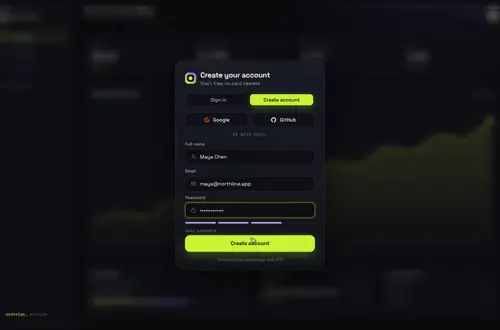 Loading live demo
Not downloaded yet? Full refund within 14 days. Broken files get fixed or refunded. Refunds
- Download right after paying
- Next.js + Cursor/v0 ready
- Use it in client projects
By buying you agree to the Terms and ask for instant access, so you lose the 14-day withdrawal right. When we still refundWe'll also email you when a new piece lands (about once a week). Unsubscribe in one click, anytime.
Paid through Stripe. We never see your card.
Ready forCursorv0Lovableshadcn CLI
Use it in Next.js
"use client";
import { useRouter } from "next/navigation";
import GatewayDive from "@/components/gateway-dive/GatewayDive";
import { createClient } from "@/lib/supabase/client";

export default function Login() {
  const router = useRouter();
  const supabase = createClient();
  return (
    <main style={{ height: "100dvh" }}>
      <GatewayDive
        autoplayDemo={false}
        brand="Acme"
        onSubmit={async ({ mode, name, email, password }) => {
          const { error } = mode === "signin"
            ? await supabase.auth.signInWithPassword({ email, password })
            : await supabase.auth.signUp({ email, password, options: { data: { name } } });
          return error ? { ok: false, error: error.message } : { ok: true };
        }}
        onSuccess={() => setTimeout(() => router.push("/dashboard"), 1400)}
      />
    </main>
  );
}
Good to know
- onSubmit gets the mode, name, email and password. Return { ok: false, error } and the card shakes and shows your message; return { ok: true } and the button turns into a check.
- The dive into the app takes about 1.4 s, so route in onSuccess after that delay, or keep the dashboard behind the gate with the backdrop prop and skip the route change.
- Pass your real dashboard (or a light static copy of it) as backdrop. It is drawn twice: blurred behind the card and sharp inside the dive.
- Under Reduce Motion the shake is off and the dive becomes a fade. The loop pauses off screen and in hidden tabs.
Install
- Copy from the zipPut
react/src/componentsintosrc/, thennone (no animation library). - Or ask your AIPaste PROMPT.md into Cursor, Lovable or v0.
Props
- autoplayDemo
- false in a real app; true loops the 12 s demo
- defaultMode
- 'signin' or 'signup'
- onSubmit
- your auth call, returns { ok, error? }
- onSuccess
- runs when the check appears
- backdrop
- your own screen behind the gate
- providers / onProvider
- Google and GitHub buttons as data
How qodesign compares
- qodesign vs Magic UIMagic UI is best for: landing pages built with shadcn/ui.
- qodesign vs Aceternity UIAceternity UI is best for: teams building many marketing pages who want one big library.
All comparisons, with prices read on each library's own site.
Questions
Does it work with Supabase, Clerk or Auth.js?
Yes. The component never talks to an auth service itself. onSubmit is where you call signInWithPassword, signUp, signIn("credentials") or your own API, and the result decides whether the card shakes or dives.
Does the login page work in Next.js?
Yes, as a client component. Keep "use client" at the top of the file that renders it, as in the snippet above. App Router and Pages Router both work.
Does it work on phones?
Yes. Below 900 px the dashboard behind the card drops its sidebar and lower row, and the card keeps a 16 px margin on each side. Nothing locks the page scroll.
Can Cursor or v0 add it for me?
Yes. Each download has a PROMPT.md. Paste it into Cursor, Lovable, v0 or Claude Code and it fits the piece into your app.
Can I use it in client work?
Yes, in personal and client projects. You can't resell the code itself as a kit.