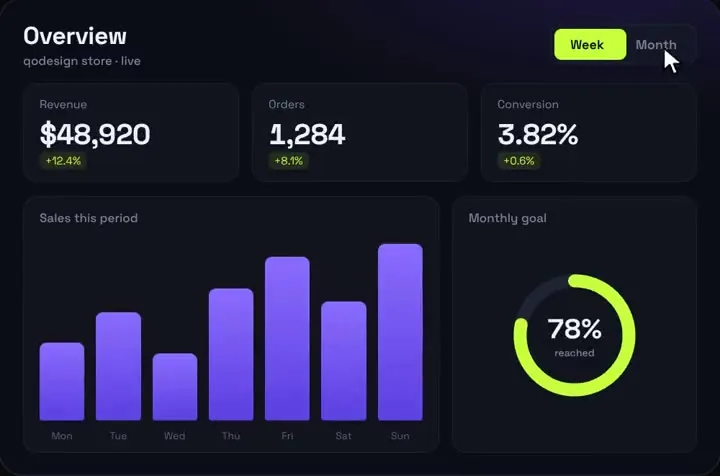
react-chartjs-2 Bar chart in a Next.js client component
components/charts/sales-bar-chart.tsx
"use client";
import { useMemo } from "react";
import {
  Chart as ChartJS,
  BarElement,
  CategoryScale,
  LinearScale,
  Tooltip,
  Legend,
  type ChartData,
  type ChartOptions,
} from "chart.js";
import { Bar } from "react-chartjs-2";
import { useChartTheme } from "./use-chart-theme";

// <Bar> registers BarController itself. Everything else the chart touches is yours to register.
// Leave out CategoryScale and Chart.js throws: "category" is not a registered scale.
ChartJS.register(BarElement, CategoryScale, LinearScale, Tooltip, Legend);

export type SalesPoint = { label: string; sales: number };

export function SalesBarChart({ points, title = "Sales" }: { points: SalesPoint[]; title?: string }) {
  const t = useChartTheme();

  const data: ChartData<"bar", number[], string> = useMemo(
    () => ({
      labels: points.map((p) => p.label),
      datasets: [
        {
          label: title, // the dataset key: same label, the bars animate to the new values
          data: points.map((p) => p.sales),
          backgroundColor: t.bar,
          borderRadius: 8,
          maxBarThickness: 48,
        },
      ],
    }),
    [points, title, t.bar],
  );

  const options: ChartOptions<"bar"> = useMemo(
    () => ({
      responsive: true,
      maintainAspectRatio: false, // the wrapper div sets the height
      plugins: {
        legend: { display: false },
        tooltip: { callbacks: { label: (ctx) => " " + (ctx.parsed.y ?? 0).toLocaleString("en-US") } },
      },
      scales: {
        x: { grid: { display: false }, ticks: { color: t.text } },
        y: { beginAtZero: true, grid: { color: t.grid }, border: { display: false }, ticks: { color: t.text } },
      },
    }),
    [t.text, t.grid],
  );

  const total = points.reduce((s, p) => s + p.sales, 0);

  return (
    <div className="relative h-72 w-full">
      <Bar
        data={data}
        options={options}
        role="img"
        aria-label={title + " by period, " + points.length + " bars, total " + total.toLocaleString("en-US")}
        fallbackContent={
          <table>
            <caption>{title}</caption>
            <tbody>
              {points.map((p) => (
                <tr key={p.label}>
                  <th scope="row">{p.label}</th>
                  <td>{p.sales}</td>
                </tr>
              ))}
            </tbody>
          </table>
        }
      />
    </div>
  );
}
components/charts/use-chart-theme.ts
"use client";
import { useEffect, useState } from "react";

export type ChartTheme = { bar: string; line: string; fill: string; grid: string; text: string };

// Canvas can't read var(--x), so read the values once the page is in the browser.
const FALLBACK: ChartTheme = { bar: "#8b6cff", line: "#c6ff3d", fill: "rgba(198,255,61,0.12)", grid: "rgba(255,255,255,0.06)", text: "#a1a1aa" };

function read(): ChartTheme {
  const css = getComputedStyle(document.documentElement);
  const v = (name: string, fallback: string) => css.getPropertyValue(name).trim() || fallback;
  return {
    bar: v("--chart-bar", FALLBACK.bar),
    line: v("--chart-line", FALLBACK.line),
    fill: v("--chart-fill", FALLBACK.fill),
    grid: v("--chart-grid", FALLBACK.grid),
    text: v("--chart-text", FALLBACK.text),
  };
}

export function useChartTheme(): ChartTheme {
  const [theme, setTheme] = useState<ChartTheme>(FALLBACK);
  useEffect(() => {
    setTheme(read());
    // Re-read when a theme toggle flips the class on <html>.
    const mo = new MutationObserver(() => setTheme(read()));
    mo.observe(document.documentElement, { attributes: true, attributeFilter: ["class", "data-theme"] });
    return () => mo.disconnect();
  }, []);
  return theme;
}
app/globals.css
/* Chart colours live in CSS, next to the rest of your theme */
:root {
  --chart-bar: #7c5cff;
  --chart-line: #22d3ee;
  --chart-fill: rgba(34, 211, 238, 0.15);
  --chart-grid: rgba(0, 0, 0, 0.08);
  --chart-text: #52525b;
}
.dark {
  --chart-bar: #8b6cff;
  --chart-line: #c6ff3d;
  --chart-fill: rgba(198, 255, 61, 0.12);
  --chart-grid: rgba(255, 255, 255, 0.06);
  --chart-text: #a1a1aa;
}
components/charts/visits-line-chart.tsx
"use client";
import {
  Chart as ChartJS,
  CategoryScale,
  LinearScale,
  PointElement,
  LineElement,
  Filler,
  Tooltip,
  Legend,
  type ChartData,
  type ChartOptions,
} from "chart.js";
import { Line } from "react-chartjs-2";
import { useChartTheme } from "./use-chart-theme";

// A line needs LineElement AND PointElement. fill: true also needs the Filler plugin.
ChartJS.register(CategoryScale, LinearScale, PointElement, LineElement, Filler, Tooltip, Legend);

export function VisitsLineChart({ labels, visits, signups }: { labels: string[]; visits: number[]; signups: number[] }) {
  const t = useChartTheme();

  const data: ChartData<"line"> = {
    labels,
    datasets: [
      { label: "Visits", data: visits, borderColor: t.line, backgroundColor: t.fill, fill: true, tension: 0.35, pointRadius: 0 },
      { label: "Sign-ups", data: signups, borderColor: t.bar, backgroundColor: t.bar, tension: 0.35, pointRadius: 3, yAxisID: "y1" },
    ],
  };

  const options: ChartOptions<"line"> = {
    responsive: true,
    maintainAspectRatio: false,
    interaction: { mode: "index", intersect: false }, // one tooltip for both lines
    plugins: { legend: { labels: { color: t.text, boxWidth: 12 } } },
    scales: {
      x: { grid: { display: false }, ticks: { color: t.text } },
      y: { beginAtZero: true, grid: { color: t.grid }, ticks: { color: t.text } },
      y1: { position: "right", beginAtZero: true, grid: { drawOnChartArea: false }, ticks: { color: t.text } },
    },
  };

  return (
    <div className="relative h-64 w-full sm:h-80">
      <Line data={data} options={options} role="img" aria-label="Visits and sign-ups per day" fallbackContent={<p>Visits and sign-ups per day for the last {labels.length} days.</p>} />
    </div>
  );
}
app/dashboard/data.ts
// Stand-in for your database or API. Runs on the server only.
export type Range = "week" | "month";

const WEEK = [
  { label: "Mon", sales: 4200 }, { label: "Tue", sales: 5800 }, { label: "Wed", sales: 3600 },
  { label: "Thu", sales: 7100 }, { label: "Fri", sales: 8800 }, { label: "Sat", sales: 6400 }, { label: "Sun", sales: 9500 },
];
const MONTH = [
  { label: "W1", sales: 28100 }, { label: "W2", sales: 31900 }, { label: "W3", sales: 26400 }, { label: "W4", sales: 35200 },
];

export async function getSales(range: Range) {
  return range === "month" ? MONTH : WEEK;
}

export async function getVisits() {
  return {
    labels: ["Mon", "Tue", "Wed", "Thu", "Fri", "Sat", "Sun"],
    visits: [1180, 1320, 990, 1460, 1710, 1250, 1630],
    signups: [21, 30, 17, 34, 41, 26, 38],
  };
}
app/dashboard/page.tsx
import Link from "next/link";
import { SalesBarChart } from "@/components/charts/sales-bar-chart";
import { VisitsLineChart } from "@/components/charts/visits-line-chart";
import { getSales, getVisits, type Range } from "./data";

// A Server Component: it reads the data and hands plain arrays to the client charts.
export default async function DashboardPage({ searchParams }: { searchParams: Promise<{ range?: string }> }) {
  const { range: raw } = await searchParams;
  const range: Range = raw === "month" ? "month" : "week";
  const [sales, visits] = await Promise.all([getSales(range), getVisits()]);

  return (
    <main className="mx-auto grid max-w-5xl gap-6 p-6 text-zinc-100">
      <section className="rounded-2xl border border-white/10 bg-white/[0.03] p-5">
        <div className="mb-4 flex items-center justify-between">
          <h2 className="text-lg font-semibold">Sales</h2>
          <nav className="flex gap-2 text-sm">
            {(["week", "month"] as const).map((r) => (
              <Link key={r} href={"?range=" + r} scroll={false} aria-current={r === range ? "page" : undefined}
                className="rounded-md border border-white/10 px-3 py-1 aria-[current=page]:bg-white aria-[current=page]:text-black">
                {r === "week" ? "Week" : "Month"}
              </Link>
            ))}
          </nav>
        </div>
        <SalesBarChart points={sales} title="Sales" />
      </section>
      <section className="rounded-2xl border border-white/10 bg-white/[0.03] p-5">
        <h2 className="mb-4 text-lg font-semibold">Traffic</h2>
        <VisitsLineChart {...visits} />
      </section>
    </main>
  );
}