HeroUI sidebar: what v3 has, and a collapsible icon rail
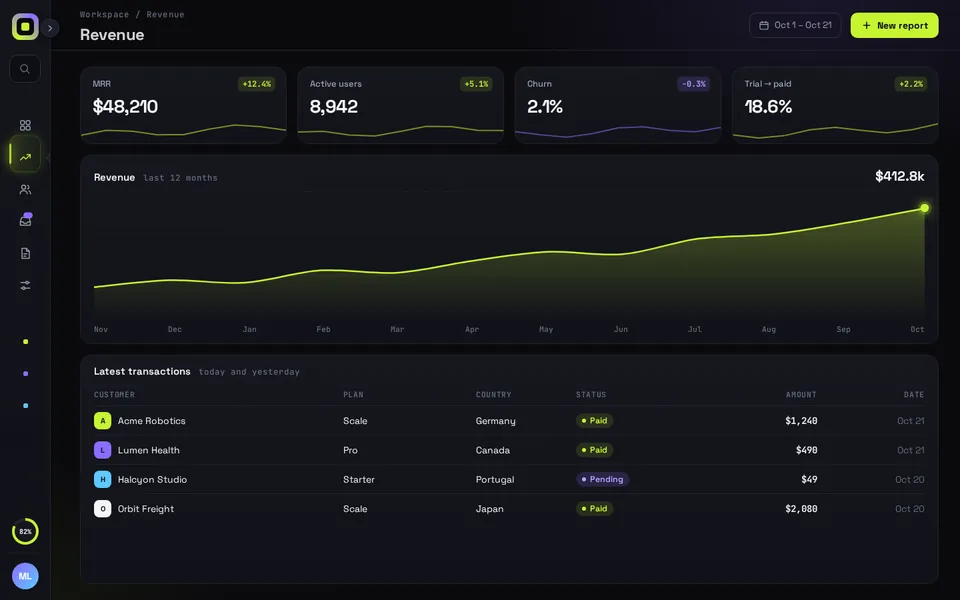
HeroUI v3 has no Sidebar in its free components. You can build a small one from Drawer and Disclosure, use the Sidebar in HeroUI Pro, or add Reflow Sidebar for an animated icon rail. All three are below, with the CSS clashes we hit putting HeroUI components inside Reflow and how we fixed them.
By buying you agree to the Terms.
- Download right after paying
- Use it in client projects
- Won't run on the listed stack? We fix it or refund you
Ready forCursorv0Lovableshadcn CLI
Add Reflow Sidebar to a HeroUI app
"use client";
import { useRouter } from "next/navigation";
import ReflowSidebar from "@/components/ReflowSidebar";

// HeroUI Pro's Sidebar and shadcn's both keep their state in a "sidebar_state" cookie
// ("false" = collapsed). Reusing the name keeps every sidebar in the app in step.
const COOKIE = "sidebar_state";

export default function ReflowShell({ rail }: { rail: boolean }) {
  const router = useRouter();
  return (
    <div style={{ height: "100dvh" }}>
      <ReflowSidebar
        autoplayDemo={false}
        // only a saved rail is passed in; undefined lets the piece pick (rail on phones, open on desktop)
        defaultCollapsed={rail ? true : undefined}
        onCollapsedChange={(collapsed) => {
          document.cookie = `${COOKIE}=${!collapsed}; path=/; max-age=${60 * 60 * 24 * 7}`;
        }}
        onNavigate={(id) => router.push(`/app/${id}`)}
      />
    </div>
  );
}import { cookies } from "next/headers";
import ReflowShell from "./reflow-shell";
// A route group of its own: the layout stays mounted across /app pages,
// so the sidebar keeps its state while the URL changes.
export default async function AppLayout({ children }: { children: React.ReactNode }) {
const rail = (await cookies()).get("sidebar_state")?.value === "false";
return (
<>
<ReflowShell rail={rail} />
{children}
</>
);
}export default function Page() {
return null;
}@import "tailwindcss";
@import "@heroui/styles";
/* Tailwind v4 draws a 1px ring on Reflow Sidebar's own .ring element (its toggle pulse) */
.qd-rs .ring { box-shadow: none; }Good to know
- Free first. If your app isn't tied to HeroUI, shadcn's Sidebar is free and already folds to icons, saves its state in a cookie and opens as a sheet on phones; our shadcn sidebar guide (linked under More for React) covers it. If you're on HeroUI v3 and only need plain navigation, the Drawer and Disclosure sidebar in the next section is enough and costs nothing.
- If you already have a HeroUI Pro licence, use its Sidebar. It's the official one, it follows your HeroUI theme, and it has an icon rail, collapsible groups and a sheet on phones. Reflow Sidebar is for when you want the rail and the whole page to move on a spring, as source you own and can edit.
- Reflow Sidebar is a whole dashboard screen: its own rail, header and a sample page. It has no children prop, so to show your page you edit the <main> in ReflowSidebar.tsx. The section on HeroUI components inside Reflow has the edits we needed.
- The snippet writes the same sidebar_state cookie, with the same values, that HeroUI Pro's Sidebar.Provider writes ("false" when collapsed). Fold the rail on a Reflow route and a Pro sidebar elsewhere opens folded too. Only a saved rail is passed in; with no cookie the piece picks the rail on phones and open on desktop.
- Reflow listens for Ctrl/Cmd + B, and so does HeroUI Pro's Sidebar (its toggleShortcut defaults to "mod+b"). Give Reflow its own route group, as above, or pass toggleShortcut={false} to Pro's Sidebar.Provider on shared pages.
- Tailwind: HeroUI v3 needs Tailwind CSS 4 (@heroui/react 3.2.6 lists tailwindcss >=4.0.0 as a peer), and Reflow Sidebar ships set up for 3.4. Our Tailwind v4 check found one difference: v4's ring utility gives Reflow's own .ring element, the pulse on the toggle, a thin 1px box-shadow that shows only during the pulse. The fix is the .qd-rs .ring { box-shadow: none; } line in globals.css above. Excluding the file with @source not doesn't help, because "ring" also appears in engine.ts.
- React: @heroui/react 3.2.6 needs react and react-dom 19 or newer. Reflow Sidebar ran on react 19.3.1 with framer-motion 14.6.0 in our test.
- What we ran on Oct 25 2026: every snippet on this page type-checks against @heroui/react 3.2.6, @heroui/styles 3.2.6, next 16.4.3, react 19.3.1, @types/react 19.3.0, framer-motion 14.6.0 and TypeScript 5.9.3, with the shipped Reflow Sidebar (a deliberate wrong Drawer placement failed, as it should). We built them into a scratch Next.js app with Tailwind 4.3.3 and checked it in headless Chromium at 1440 and 390 px: the free sidebar's Drawer opening and closing on Escape, the current link marked, the Reflow rail folding and the cookie surviving a reload, the HeroUI fixes below, and no sideways scroll. We didn't test Safari, Firefox, a real phone or HeroUI Pro.
Build a HeroUI sidebar from Drawer and Disclosure (free)
- We read HeroUI's v3 component list on heroui.com on Oct 25 2026. It has Drawer ("Slide-out panel for supplementary content and actions"), Disclosure, DisclosureGroup, Accordion, ListBox and Tabs, but no Sidebar. The request for one on HeroUI's GitHub (discussion #315, "New component : Sidebar", opened Oct 17 2021) has 167 upvotes and 82 comments with 19 replies, and it's closed.
- So the free version has two parts: a plain aside on desktop, and the same links in a Drawer with placement="left" on phones. A Disclosure folds the Reports group and opens by itself when you're on one of its pages. HeroUI's Drawer docs list a focus trap, Escape to close and body scroll lock, so the phone menu gets those for free.
- What it doesn't do: fold to an icon rail, remember its state or animate the page width. For plain navigation you don't need any of that.
"use client";
import { useState } from "react";
import Link from "next/link";
import { usePathname } from "next/navigation";
import { Button, Disclosure, Drawer } from "@heroui/react";

const MAIN = [
  { href: "/dashboard", label: "Overview" },
  { href: "/dashboard/orders", label: "Orders" },
  { href: "/dashboard/customers", label: "Customers" },
];
const REPORTS = [
  { href: "/dashboard/reports/revenue", label: "Revenue" },
  { href: "/dashboard/reports/retention", label: "Retention" },
];

function NavLinks({ onNavigate }: { onNavigate?: () => void }) {
  const pathname = usePathname();
  const [reportsOpen, setReportsOpen] = useState(pathname.startsWith("/dashboard/reports"));
  const item = (href: string, label: string) => (
    <Link
      key={href}
      href={href}
      onClick={onNavigate}
      aria-current={pathname === href ? "page" : undefined}
      className="rounded-xl px-3 py-2 text-sm text-muted hover:bg-surface-secondary aria-[current=page]:bg-surface-secondary aria-[current=page]:text-foreground"
    >
      {label}
    </Link>
  );
  return (
    <nav aria-label="Main" className="flex flex-col gap-1">
      {MAIN.map((l) => item(l.href, l.label))}
      <Disclosure isExpanded={reportsOpen} onExpandedChange={setReportsOpen}>
        <Disclosure.Heading>
          <Disclosure.Trigger className="flex w-full items-center justify-between rounded-xl px-3 py-2 text-sm text-muted">
            Reports
            <Disclosure.Indicator />
          </Disclosure.Trigger>
        </Disclosure.Heading>
        <Disclosure.Content>
          <Disclosure.Body className="flex flex-col gap-1 pl-3">
            {REPORTS.map((l) => item(l.href, l.label))}
          </Disclosure.Body>
        </Disclosure.Content>
      </Disclosure>
    </nav>
  );
}

export function AppSidebar() {
  const [open, setOpen] = useState(false);
  return (
    <>
      {/* desktop: a plain aside that stays put */}
      <aside className="hidden w-64 shrink-0 border-r border-border p-4 md:block">
        <NavLinks />
      </aside>

      {/* phones: the same links in a HeroUI Drawer from the left */}
      <div className="p-2 md:hidden">
        <Button variant="ghost" onPress={() => setOpen(true)}>
          Menu
        </Button>
        <Drawer.Backdrop isOpen={open} onOpenChange={setOpen}>
          <Drawer.Content placement="left">
            <Drawer.Dialog aria-label="Main navigation">
              <Drawer.CloseTrigger />
              <Drawer.Body>
                <NavLinks onNavigate={() => setOpen(false)} />
              </Drawer.Body>
            </Drawer.Dialog>
          </Drawer.Content>
        </Drawer.Backdrop>
      </div>
    </>
  );
}import { AppSidebar } from "@/components/app-sidebar";
export default function AppLayout({ children }: { children: React.ReactNode }) {
return (
<div className="flex min-h-dvh flex-col md:flex-row">
<AppSidebar />
<main className="flex-1 p-6">{children}</main>
</div>
);
}HeroUI Pro's Sidebar (paid)
- HeroUI Pro is HeroUI's paid component set, sold as a licence, and it includes a Sidebar. Its docs page (read Oct 25 2026) describes it as "A responsive sidebar navigation component with collapsible groups, rail mode, and mobile sheet support." You import it from @heroui-pro/react.
- From the same page: collapsible="icon" folds it to an icon-only rail, Cmd+B (Ctrl+B elsewhere) toggles it, an uncontrolled Sidebar.Provider writes a sidebar_state cookie on every toggle, and below 768 px Sidebar.Mobile renders a Sheet. Transitions switch off under reduced motion.
- If you already have Pro, or you want the sidebar to share HeroUI's theme tokens with no extra CSS, it's the better fit. We haven't built with it, so this section comes from its docs only.
Put HeroUI components inside Reflow Sidebar
- Reflow's sample page lives in <div className="body"> inside <main> in ReflowSidebar.tsx, and you replace it with your own page. We did that with a HeroUI Card and Button and hit three problems, all in the piece's own code. Each fix is a small edit to your copy.
- 1. The page crashed. engine.ts updates the sample chart with q('line').setAttribute(...) and q('area').setAttribute(...). With the chart gone those return null and React showed its error screen ("Cannot read properties of null (reading 'setAttribute')"). Adding ?. to those two calls fixed it; the rest of the engine already skips missing elements.
- 2. HeroUI buttons lost their fill. reflow-sidebar.css resets every button under .qd-rs (background: none, padding: 0). That file isn't in a cascade layer, so it beats HeroUI's styles, which sit in @layer components. A HeroUI Button inside the shell measured transparent with 0 px padding. With the reset wrapped in @layer base it came back with its fill and 16 px padding, and Reflow's own buttons computed exactly as before.
- 3. HeroUI Cards took on Reflow's look. Both use the class name card, so Reflow's .qd-rs .card rule (gradient, 1 px border, 18 px radius) won over HeroUI's Card, and HeroUI's card shadow landed on Reflow's sample cards. Renaming Reflow's class to rs-card fixes both: three className values in ReflowSidebar.tsx and one selector in the CSS.
- Also worth knowing: Reflow sets its own --surface and --muted on .qd-rs, and HeroUI v3 reads variables with the same names, so inside the shell HeroUI's text-muted came out in Reflow's grey. A data-theme="dark" (or "light") attribute on your wrapper makes HeroUI's own values apply again; we measured text-muted going back to HeroUI's colour.
- With all of that in place, at 1440 px our HeroUI card sat 308 px from the left with the sidebar open and moved to 120 px when it folded to the rail. On a 390 px phone the rail stays put and the open sidebar slides over the page, the same as in the demo.
// components/ReflowSidebar.tsx: keep <header className="top">, replace the sample <div className="body">
<div className="body" data-theme="dark">
  <Card className="w-72">
    <Card.Header><Card.Title>Orders</Card.Title></Card.Header>
    <Card.Content><p className="text-muted">12 today</p></Card.Content>
  </Card>
  <Button variant="primary">Save</Button>
</div>
// and at the top of the file:
// import { Button, Card } from "@heroui/react";// components/engine.ts: the two chart lines, with ?. so a page without the sample chart doesn't crash
q('line')?.setAttribute('d', path); q('area')?.setAttribute('d', path + ' L1000,200 L0,200 Z');/* components/reflow-sidebar.css: put the button reset in a layer so HeroUI's Button styles win inside the shell */
@layer base{.qd-rs button{font:inherit;color:inherit;background:none;border:0;padding:0;cursor:pointer}}
/* and rename Reflow's card class so HeroUI's Card keeps its own look */
.qd-rs .rs-card{ /* was .qd-rs .card */ }Install
- Copy from the zipPut
react/src/components + react/src/dataintosrc/, thennpm i framer-motion. - Or ask your AIPaste PROMPT.md into Cursor, Lovable or v0.
Props
- autoplayDemo
- false in a real app; true loops the 8 s demo
- defaultCollapsed
- start as the icon rail
- onCollapsedChange
- called with true when it folds to the rail
- onNavigate
- called with the nav item id
- data
- nav items and badge, projects, plan card, KPIs, chart and table rows
How qodesign compares
- qodesign vs shadcnblocksshadcnblocks is best for: assembling whole pages from ready-made sections.
- qodesign vs Kokonut UIKokonut UI is best for: landing page sections and templates installed by an AI agent.
- qodesign vs TremorTremor is best for: dashboards and charts: area, bar, line and donut charts, trackers, KPI cards, tables.
All comparisons, with prices read on each library's own site.
Questions
Does HeroUI have a sidebar component?
Not in the free @heroui/react v3 set. On Oct 25 2026 its component list had Drawer, Disclosure, Accordion and Tabs but no Sidebar. HeroUI Pro, the paid set, has one.
Can I use the HeroUI Drawer as a sidebar?
Yes, as the phone menu. Drawer.Content takes placement="left", and the Drawer traps focus and closes on Escape. On desktop a plain aside next to your page is simpler, as in the free example above.
Will Reflow Sidebar match my HeroUI theme?
Not by itself. It has its own dark look, lime and violet on near black, set by the CSS variables at the top of reflow-sidebar.css. Change those to your HeroUI colours if you want them to match.
Does the sidebar work in Next.js?
Yes, as a client component. Keep "use client" at the top of the file that renders it, as in the snippet above. App Router and Pages Router both work.
Can I use it in client work?
Yes, in personal and client projects. You can't resell the code itself as a kit.