shadcn sidebar collapse animation
shadcn's Sidebar is free and folds to icons with collapsible="icon", on a linear 200 ms width change. Here's how to give that collapse a spring and staggered labels, and when to swap the whole shell for Reflow Sidebar.
By buying you agree to the Terms.
- Download right after paying
- Use it in client projects
- Won't run on the listed stack? We fix it or refund you
Ready forCursorv0Lovableshadcn CLI
Swap the dashboard shell for Reflow Sidebar
"use client";
import { useRouter } from "next/navigation";
import ReflowSidebar from "@/components/ReflowSidebar";
import data from "@/data/northwind"; // swap for your own ReflowSidebarData

// shadcn's SidebarProvider keeps its state in this cookie. Writing the same one
// means a route that still uses shadcn's Sidebar opens the way you left this one.
const COOKIE = "sidebar_state";
const WEEK = 60 * 60 * 24 * 7;

export default function DashboardShell({ rail }: { rail: boolean }) {
  const router = useRouter();
  return (
    <div style={{ height: "100dvh" }}>
      <ReflowSidebar
        data={data}
        autoplayDemo={false}
        // only a saved rail is passed; undefined lets the piece pick (rail on phones, open on desktop)
        defaultCollapsed={rail ? true : undefined}
        onCollapsedChange={(collapsed) => {
          document.cookie = `${COOKIE}=${!collapsed}; path=/; max-age=${WEEK}`;
        }}
        onNavigate={(id) => router.push(`/dashboard/${id}`)}
      />
    </div>
  );
}import { cookies } from "next/headers";
import DashboardShell from "./dashboard-shell";
// The layout stays mounted across /dashboard pages, so the sidebar keeps its state.
export default async function DashboardLayout({ children }: { children: React.ReactNode }) {
// shadcn's SidebarProvider stores "false" here when its sidebar is collapsed
const rail = (await cookies()).get("sidebar_state")?.value === "false";
return (
<>
<DashboardShell rail={rail} />
{children}
</>
);
}export default function Page() {
return null;
}Good to know
- Free first. For most apps, keep shadcn's own Sidebar. It's free, it handles the keyboard and screen readers, it saves its state in a cookie and it wraps whatever pages you have. The sections below make its collapse feel softer without a new package.
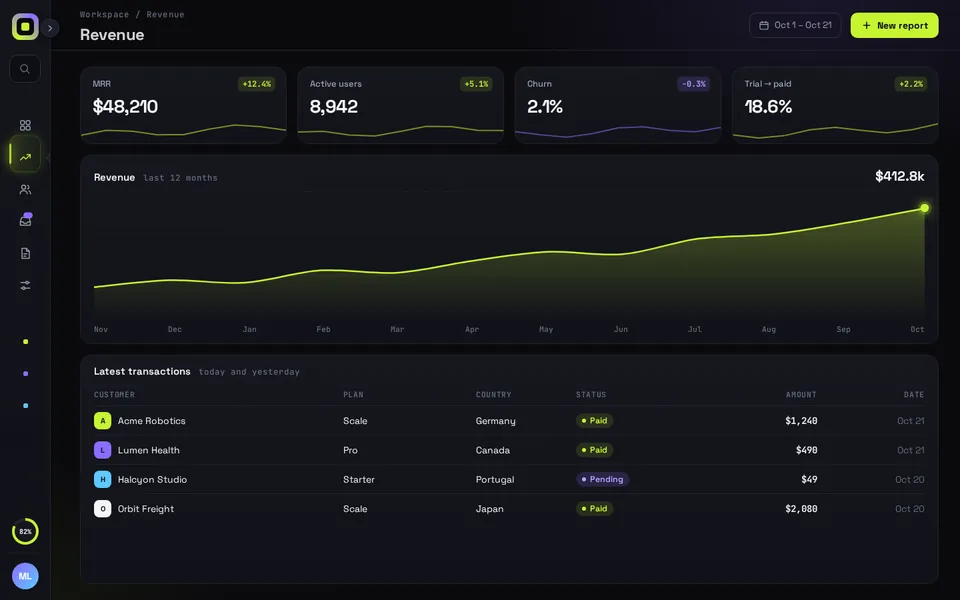
- Reflow Sidebar is a whole dashboard screen, not a skin for shadcn's Sidebar. It draws its own rail, header, KPI cards, chart and table from one data object, and it has no children prop: to show your own page you edit the <main> in ReflowSidebar.tsx. So use it for a dashboard route and keep shadcn's Sidebar for the rest of the app.
- Give the Reflow route its own route group, outside the layout that renders SidebarProvider. Both listen for Ctrl/Cmd + B, so with both on one page a single press would toggle two sidebars.
- The snippet reads and writes shadcn's own sidebar_state cookie. Fold the rail on the dashboard and a page that still uses shadcn's Sidebar opens collapsed too, and the other way round. Only a saved rail is passed in. With no cookie, defaultCollapsed stays undefined and the piece picks: the rail on phones, open on desktop.
- Reflow's width runs on a Framer Motion spring (stiffness 260, damping 30) and the cards, chart and table reflow with it. The Reflow Sidebar guide below has the full list of what moves and what it can't do yet, like highlighting the current page after a reload.
- What we ran on Oct 25 2026: the snippets on this page type-check against next 16.4.3, react 19.3.1, framer-motion 14.6.0, radix-ui 1.8.1, lucide-react 1.61.0 and TypeScript 5.9.3 and 7.0.2, with shadcn's sidebar.tsx from its registry and the shipped ReflowSidebar. We built them into a scratch Next.js app with Tailwind 4.3.3 and checked it in headless Chromium at 1440 and 390 px: the spring easing, the label stagger, the shared cookie in both directions, navigation, and no sideways scroll on a phone. We didn't test Safari, Firefox or a real phone.
How shadcn's Sidebar collapses today
- We read the docs on ui.shadcn.com on Oct 25 2026. The collapsible prop takes offcanvas, icon or none, and the docs describe icon as "A sidebar that collapses to icons."
- The width change is plain CSS. In the sidebar.tsx the shadcn CLI copies into your project (the new-york-v4 registry file, read the same day), the spacer carries "transition-[width] duration-200 ease-linear" and the fixed panel carries "transition-[left,right,width] duration-200 ease-linear". So the panel goes from 16rem to the 3rem icon width in 200 ms at one constant speed, and your page resizes on the same timing.
- State lives in SidebarProvider. useSidebar() gives you state ("expanded" or "collapsed"), open, setOpen, isMobile and toggleSidebar. The provider saves a sidebar_state cookie for 7 days, and the docs give cmd+b on Mac and ctrl+b on Windows as the shortcut. On phones it opens as a sheet instead.
- A linear tween starts and stops at full speed, which is why the collapse can feel stiff. The file lives in your repo, so you can change it.
The free fix: a spring curve in plain CSS
- No package needed. You change two class strings in components/ui/sidebar.tsx and add one easing to globals.css. The quickest version is ease-out duration-300 in place of duration-200 ease-linear.
- For a spring feel, CSS linear() can trace one. The curve below samples the same spring Reflow Sidebar uses (stiffness 260, damping 30), so it eases out and settles in about 420 ms without a visible bounce. In our scratch app the panel went from 256 px to 76 px in the first 200 ms and sat at 48 px within half a second.
- linear() works in Chrome 113, Firefox 112 and Safari 17.2 and later. An older browser ignores it and falls back to the default ease. shadcn's file has no reduced-motion rule for the width, so add motion-reduce:transition-none to the same strings if you want it to snap for people who turn on Reduce Motion.
/* add below your shadcn theme */
@theme {
  /* a spring (stiffness 260, damping 30) sampled for CSS; settles in about 420 ms */
  --ease-sidebar-spring: linear(0, 0.049, 0.156, 0.284, 0.413, 0.531, 0.633, 0.718, 0.787, 0.841, 0.884, 0.916, 0.94, 0.958, 0.971, 0.98, 0.987, 0.991, 0.995, 0.997, 1);
}// components/ui/sidebar.tsx, inside Sidebar(): the spacer next to the panel
"relative w-(--sidebar-width) bg-transparent transition-[width] duration-[420ms] ease-sidebar-spring",
// and the fixed panel (was duration-200 ease-linear on both)
"fixed inset-y-0 z-10 hidden h-svh w-(--sidebar-width) transition-[left,right,width] duration-[420ms] ease-sidebar-spring md:flex",Spring and stagger on top of shadcn's Sidebar
- The width is CSS, but the labels inside are yours. This AppSidebar reads state from useSidebar() and gives each label a Framer Motion spring. On collapse they fade out together in 0.1 s. On expand they come back one after another, 35 ms apart, once the panel has started to open.
- isMobile keeps the labels visible in the phone sheet, whatever the desktop state is. MotionConfig with reducedMotion="user" drops the slide for people with Reduce Motion on and keeps the fade. When it's collapsed, shadcn's own tooltip prop on SidebarMenuButton still names each icon.
- In the scratch app the first label was fully in at about 240 ms and the sixth at about 500 ms. The layout below is shadcn's cookie pattern, so a reload comes back collapsed or open.
- Want it prebuilt? animate-ui has a Sidebar on shadcn's API that, in its own docs, "collapses to icons and back with everything inside on one curve". It's free to use in your apps. Its licence is MIT with a Commons Clause, so you can't resell its components.
"use client";
import Link from "next/link";
import { MotionConfig, motion, type Variants } from "framer-motion";
import { BarChart3, FileText, Inbox, LayoutGrid, Settings, Users } from "lucide-react";
import {
  Sidebar,
  SidebarContent,
  SidebarGroup,
  SidebarGroupLabel,
  SidebarMenu,
  SidebarMenuButton,
  SidebarMenuItem,
  SidebarRail,
  useSidebar,
} from "@/components/ui/sidebar";

const items = [
  { title: "Overview", url: "/dashboard", icon: LayoutGrid },
  { title: "Revenue", url: "/dashboard/revenue", icon: BarChart3 },
  { title: "Customers", url: "/dashboard/customers", icon: Users },
  { title: "Inbox", url: "/dashboard/inbox", icon: Inbox },
  { title: "Reports", url: "/dashboard/reports", icon: FileText },
  { title: "Settings", url: "/dashboard/settings", icon: Settings },
];

// labels leave together and come back one after another, 35 ms apart
const label: Variants = {
  hidden: { opacity: 0, x: -6, transition: { duration: 0.1 } },
  shown: (i: number) => ({
    opacity: 1,
    x: 0,
    transition: { type: "spring", stiffness: 520, damping: 34, delay: 0.08 + i * 0.035 },
  }),
};

export function AppSidebar() {
  const { state, isMobile } = useSidebar();
  // the phone sheet always shows labels, whatever the desktop state is
  const show = isMobile || state === "expanded";
  return (
    <MotionConfig reducedMotion="user">
      <Sidebar collapsible="icon">
        <SidebarContent>
          <SidebarGroup>
            <SidebarGroupLabel>Workspace</SidebarGroupLabel>
            <SidebarMenu>
              {items.map((item, i) => (
                <SidebarMenuItem key={item.title}>
                  <SidebarMenuButton asChild tooltip={item.title}>
                    <Link href={item.url}>
                      <item.icon />
                      <motion.span
                        custom={i}
                        variants={label}
                        initial={false}
                        animate={show ? "shown" : "hidden"}
                      >
                        {item.title}
                      </motion.span>
                    </Link>
                  </SidebarMenuButton>
                </SidebarMenuItem>
              ))}
            </SidebarMenu>
          </SidebarGroup>
        </SidebarContent>
        <SidebarRail />
      </Sidebar>
    </MotionConfig>
  );
}import { cookies } from "next/headers";
import { SidebarInset, SidebarProvider, SidebarTrigger } from "@/components/ui/sidebar";
import { AppSidebar } from "@/components/app-sidebar";
export default async function AppLayout({ children }: { children: React.ReactNode }) {
const defaultOpen = (await cookies()).get("sidebar_state")?.value !== "false";
return (
<SidebarProvider defaultOpen={defaultOpen}>
<AppSidebar />
<SidebarInset>
<header className="flex h-12 items-center px-3">
<SidebarTrigger />
</header>
{children}
</SidebarInset>
</SidebarProvider>
);
}When to swap the shell for Reflow Sidebar
- Stay with shadcn's Sidebar when it wraps many different pages, or when you need nested groups, a sidebar on the right, the floating or inset variants, or your own icon set. Reflow Sidebar does none of that. Its nav icons come from a set of six, and it draws its own content.
- Reflow fits when the dashboard is the front page of the product and you want the collapse to be something people notice. The rail folds on a spring, the page reflows with it, the rail has tooltips, and on phones the open sidebar slides over the page with a dimmed backdrop.
- It takes your numbers as one object (app name, user, nav items, KPIs, chart series, table rows) and calls onNavigate with an item id, so routing stays in Next.js.
Tailwind v4 and the piece's Tailwind 3.4
- New shadcn projects run Tailwind v4. Reflow Sidebar's download is a Vite project set up with Tailwind 3.4, but the component itself doesn't lean on Tailwind classes: its look lives in reflow-sidebar.css, scoped under .qd-rs. Copy components/ and data/ into your app and leave the zip's index.css and Tailwind config behind.
- One line to add under v4. Tailwind v4 finds your source files on its own, and the toggle button holds a span with the class name ring. v4 reads that as its ring utility and puts a 1 px box-shadow on it. Add box-shadow:none to the .qd-rs .toggle .ring rule in reflow-sidebar.css. In our scratch app that took the shadow from 1 px to none.
- We compiled Tailwind 4.3.3 against the component files. ring was the only class name it matched. It also emits a few utilities (grid, hidden, sticky and others) from ordinary words in the code, but no element in the piece uses them as class names.
- The piece's package.json asks for React 18.3 and framer-motion ^11.11.0. We type-checked and ran the snippets with React 19.3.1 and framer-motion 14.6.0. We haven't tested the motion package's motion/react import.
Install
- Copy from the zipPut
react/src/components + react/src/dataintosrc/, thennpm i framer-motion. - Or ask your AIPaste PROMPT.md into Cursor, Lovable or v0.
Props
- data
- every string and number on the screen (Northwind mock by default)
- defaultCollapsed
- true starts it as the 76 px rail; leave it undefined to let the piece pick
- onCollapsedChange
- called with true when it folds to the rail
- onNavigate
- called with the nav item id
- autoplayDemo
- false in a real app
How qodesign compares
- qodesign vs shadcnblocksshadcnblocks is best for: assembling whole pages from ready-made sections.
- qodesign vs Kokonut UIKokonut UI is best for: landing page sections and templates installed by an AI agent.
- qodesign vs TremorTremor is best for: dashboards and charts: area, bar, line and donut charts, trackers, KPI cards, tables.
All comparisons, with prices read on each library's own site.
From the blog: shadcn Sidebar Icon Rail in Next.js: Keep the Collapsed State With a Cookie
Questions
How do I make the shadcn sidebar collapse to icons?
Pass collapsible="icon" to <Sidebar>. Give each SidebarMenuButton a tooltip prop so the icons still have names while it's collapsed.
Can I change the collapsed width?
Yes. It's SIDEBAR_WIDTH_ICON in sidebar.tsx, 3rem by default. You can also set --sidebar-width-icon in SidebarProvider's style prop, which the provider spreads after its own values.
Does shadcn's Sidebar support a spring animation?
Not out of the box. The width uses a linear 200 ms CSS transition. You can swap the easing for a sampled spring with CSS linear(), as above, or animate what's inside with Framer Motion.
Can I start the sidebar collapsed?
Yes. Pass defaultOpen={false} to SidebarProvider, or read the sidebar_state cookie in your layout as in the snippet above.
Can Reflow Sidebar wrap my own pages?
Not as a wrapper. It has no children prop and draws its own dashboard from the data prop. To show your own page you edit the <main> in ReflowSidebar.tsx. For a sidebar around many pages, use shadcn's Sidebar.
Can Cursor or v0 add it for me?
Yes. Each download has a PROMPT.md. Paste it into Cursor, Lovable, v0 or Claude Code and it fits the piece into your app.
Can I use it in client work?
Yes, in personal and client projects. You can't resell the code itself as a kit.