Ecommerce dashboard in React
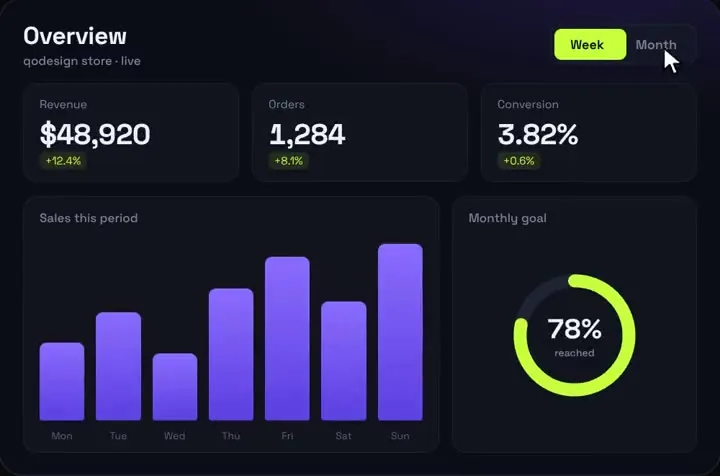
For a whole ecommerce admin in React (orders table, products, customers), start free: TailAdmin's dashboard template (MIT), Tremor's blocks or shadcn's dashboard block. Analytics Dashboard V1 is our paid store overview for the top of that admin: revenue, orders, conversion, a goal ring and a 7-bar chart that count up from your real orders.
By buying you agree to the Terms.
- Download right after paying
- Use it in client projects
- Won't run on the listed stack? We fix it or refund you
Ready forCursorv0Lovableshadcn CLI
Free ecommerce dashboard templates and store numbers
# TailAdmin: free admin template whose home page is an ecommerce dashboard (MIT)
git clone https://github.com/TailAdmin/free-nextjs-admin-dashboard.git          # Next.js
git clone https://github.com/TailAdmin/free-react-tailwind-admin-dashboard.git  # Vite + React Router

# shadcn: a dashboard block (sidebar, cards, area chart, data table) for a shadcn app
npx shadcn add dashboard-01/** One order: its total in your shop currency and when it was placed. */
export type StoreOrder = { total: number; createdAt: Date };
export type Overview = {
revenue: number;
orders: number;
/** conversion rate in %, orders / visitors */
conv: number;
/** % change against the period before: revenue, orders, conversion */
d: [number, number, number];
/** 0 to 100 */
goal: number;
/** 7 heights, 0 to 100 */
bars: number[];
labels: string[];
};
type Options = {
/** revenue target for the last 28 days, in your currency's main unit */
monthlyGoal: number;
/** visitors from your analytics: [this period, the period before]. Leave it out and conversion shows 0. */
visitors?: { week: [number, number]; month: [number, number] };
now?: Date;
};
const DAY = 86_400_000;
const change = (now: number, before: number) => (before ? Math.round(((now - before) / before) * 1000) / 10 : 0);
const rate = (orders: number, visitors: number) => (visitors ? Math.round((orders / visitors) * 10_000) / 100 : 0);
/** 7 bars of barDays days each, ending at midnight tonight, compared with the 7 bars before them. */
function range(orders: StoreOrder[], end: number, barDays: number, visitors: [number, number] | undefined, label: (d: Date) => string): Overview {
const span = 7 * barDays * DAY;
const start = end - span;
const sums = Array<number>(7).fill(0);
let revenue = 0, count = 0, before = 0, countBefore = 0;
for (const o of orders) {
const t = o.createdAt.getTime();
if (t >= start && t < end) {
sums[Math.min(6, Math.floor((t - start) / (barDays * DAY)))] += o.total;
revenue += o.total;
count++;
} else if (t >= start - span && t < start) {
before += o.total;
countBefore++;
}
}
const top = Math.max(...sums, 1);
const [seen, seenBefore] = visitors ?? [0, 0];
const conv = rate(count, seen);
return {
revenue: Math.round(revenue * 100) / 100,
orders: count,
conv,
d: [change(revenue, before), change(count, countBefore), visitors ? change(conv, rate(countBefore, seenBefore)) : 0],
goal: 0, // set from the 28-day revenue below
bars: sums.map((s) => Math.round((s / top) * 100)),
// label each bar at noon of its first day, so a daylight saving change can't shift it a day
labels: sums.map((_, i) => label(new Date(start + i * barDays * DAY + DAY / 2))),
};
}
export function storeOverview(orders: StoreOrder[], { monthlyGoal, visitors, now = new Date() }: Options) {
const tonight = new Date(now);
tonight.setHours(24, 0, 0, 0); // midnight at the end of today, in the server's time zone
const end = tonight.getTime();
const week = range(orders, end, 1, visitors?.week, (d) => d.toLocaleDateString("en-US", { weekday: "short" }));
const month = range(orders, end, 4, visitors?.month, (d) => d.toLocaleDateString("en-US", { month: "short", day: "numeric" }));
const goal = Math.min(100, Math.round((month.revenue / monthlyGoal) * 100));
return { week: { ...week, goal }, month: { ...month, goal } };
}import type { StoreOrder } from "./store-overview";
const SHOP = process.env.SHOPIFY_STORE_DOMAIN!; // your-store.myshopify.com
const TOKEN = process.env.SHOPIFY_ADMIN_TOKEN!; // Admin API access token with read_orders
const API = `https://${SHOP}/admin/api/2026-10/graphql.json`;
const QUERY = `query Orders($cursor: String, $q: String!) {
orders(first: 250, after: $cursor, query: $q, sortKey: CREATED_AT) {
nodes {
createdAt
test
cancelledAt
currentTotalPriceSet { shopMoney { amount currencyCode } }
}
pageInfo { hasNextPage endCursor }
}
}`;
type OrderNode = {
createdAt: string;
test: boolean;
cancelledAt: string | null;
currentTotalPriceSet: { shopMoney: { amount: string; currencyCode: string } };
};
type OrdersPage = {
data?: { orders: { nodes: OrderNode[]; pageInfo: { hasNextPage: boolean; endCursor: string | null } } };
errors?: { message: string }[];
};
/** Real, not cancelled orders from the last `days` days. Shopify keeps 60 days unless your app has read_all_orders. */
export async function shopifyOrders(days = 56): Promise<StoreOrder[]> {
const since = new Date(Date.now() - days * 86_400_000).toISOString();
const orders: StoreOrder[] = [];
let cursor: string | null = null;
do {
const res: Response = await fetch(API, {
method: "POST",
headers: { "Content-Type": "application/json", "X-Shopify-Access-Token": TOKEN },
body: JSON.stringify({ query: QUERY, variables: { cursor, q: `created_at:>='${since}'` } }),
});
if (!res.ok) throw new Error(`Shopify answered ${res.status}`);
const page = (await res.json()) as OrdersPage;
if (!page.data) throw new Error(page.errors?.[0]?.message ?? "Shopify orders query failed");
for (const o of page.data.orders.nodes) {
if (o.test || o.cancelledAt) continue;
orders.push({ total: Number(o.currentTotalPriceSet.shopMoney.amount), createdAt: new Date(o.createdAt) });
}
const { hasNextPage, endCursor } = page.data.orders.pageInfo;
cursor = hasNextPage ? endCursor : null;
} while (cursor);
return orders;
}Free ecommerce dashboard templates for React
- TailAdmin is the closest free match to this search. Both free versions open on an ecommerce dashboard: metric cards, a monthly sales chart, a monthly target, a statistics chart, customer demographics and a recent orders table. The React version (v2.4.0, September 13, 2026) is React 19, TypeScript and Tailwind CSS v4 on Vite and React Router. The Next.js version is a separate repo on Next.js 16 and Tailwind v4. Both are MIT on GitHub (read Oct 25, 2026). The Pro version adds more dashboards; you don't need it for a store home screen.
- Tremor's site says its blocks and templates "are now free and open-source" (300+ blocks, copy and paste, Tailwind CSS), and its source repo, tremorlabs/tremor-blocks, is tagged MIT on GitHub. Pick it if you want chart and KPI blocks to assemble yourself. Its last push to GitHub was in January 2025.
- shadcn's dashboard-01 block (npx shadcn add dashboard-01) adds a sidebar, four cards, an interactive area chart and a sortable data table to a shadcn app. Its cards are SaaS numbers (Total Revenue, New Customers, Active Accounts, Growth Rate) and the chart is visitors, so you swap in orders yourself. It is free and the code is yours.
- Any of the three answers "ecommerce dashboard template react" better than our piece does. Analytics Dashboard V1 is one screen, not an admin: it has no orders table, no product or customer pages and no sidebar.
Ecommerce dashboard numbers from your orders
- store-overview.ts is free and works with any template. Give it your orders as { total, createdAt } and it returns revenue, order count, conversion, the % change against the period before and 7 bar heights, for this week and the last 28 days. The output has the same shape as Analytics Dashboard V1's data prop, and the plain numbers fit TailAdmin's or shadcn's cards too.
- Orders can come from anywhere: Shopify (the file below), Medusa, WooCommerce, or your own orders table through Prisma, Drizzle or Supabase. Map each row to { total, createdAt } and pass the list in. For Stripe charges there is a separate guide, linked at the end.
- The week is the last 7 calendar days, today included, so the last bar is today so far and is shorter until the day ends. The 28 days are 7 bars of 4 days. Days follow the server's time zone; most hosts run in UTC, so set TZ if your store reports in another zone.
- Conversion needs visitor counts, which an order list doesn't have. Pass visitors from your analytics as [this period, the period before]; leave them out and conversion shows 0.
- Every number here is computed from the list you pass. Refunds, taxes and shipping count however your total counts them.
Shopify orders into the dashboard
- shopify-orders.ts reads orders from the Shopify Admin GraphQL API, version 2026-10 (the latest stable version on Shopify's docs on Oct 25, 2026). It needs an Admin API access token with the read_orders scope, sent in the X-Shopify-Access-Token header, as in Shopify's own example.
- Shopify's Order docs say only the last 60 days of orders are readable by default; older orders need read_all_orders, which Shopify grants on request. The overview needs 56 days (28 days plus the 28 before them), so it fits inside the default.
- It asks for 250 orders a page, Shopify's maximum, and follows the cursor until the last page. It skips test orders and cancelled orders, and uses currentTotalPriceSet, which Shopify describes as the order total after returns, including taxes and discounts. Pick another field from the Order object if your revenue means something else.
- For a store with thousands of orders a day, page-by-page reads get slow; Shopify's pagination docs point to bulk operations for large exports. Cache the result (the page below reads Shopify at most every 5 minutes) or keep daily totals in your own database.
Analytics Dashboard V1 as the store overview
- This is the paid part. It is the screen that sits on top of a free admin: revenue, orders and conversion count up when the page loads, a goal ring fills, and a Week/Month switch moves every bar from its old height to the new one. It is React with Framer Motion only, so the server file below hands it numbers and nothing else.
- The page is a Server Component, so your Shopify token never reaches the browser. The dashboard itself is a client component and gets plain numbers as props. Set the token at build time too, because next build prerenders the page.
- Its money format is US dollars (fmtMoney in the file). For another currency, change that one line to Intl.NumberFormat with your currency code; Shopify returns it as currencyCode next to each amount.
- The hover tooltip on a bar shows an estimate made from the period's revenue, not that bar's exact total. Change barValue in the file if you need exact numbers. The goal ring is labelled Monthly goal and reads the 28-day revenue in both views.
- It does not read the Reduce Motion setting; our charts guide measured that its bars still animate with reduced motion on. Its package.json lists framer-motion ^11 and React 18. The component type-checks as shipped against framer-motion 14.6.0 and React 19 types.
- Tailwind v4: it works as shipped (our Tailwind v4 check found 0 pixels different at 390 and 1440 wide). It uses Tailwind classes only and ships no stylesheet, so nothing leaks into a TailAdmin or shadcn app. It is drawn on a 1000 by 660 stage and scales down as one piece on narrow screens.
import AnalyticsDashboard from "@/components/AnalyticsDashboard";
import { shopifyOrders } from "@/lib/shopify-orders";
import { storeOverview } from "@/lib/store-overview";

// Read Shopify at most every 5 minutes instead of on every visit.
export const revalidate = 300;

export default async function StoreDashboard() {
  const orders = await shopifyOrders();
  const data = storeOverview(orders, { monthlyGoal: 30_000 });

  return (
    <main className="min-h-dvh bg-[#0B0D14] p-6">
      <AnalyticsDashboard title="Store overview" subtitle="Shopify orders, this week and the last 28 days" data={data} />
      {/* your free admin's orders table, products and customers go below */}
    </main>
  );
}
What was run
- On Oct 25, 2026 every file on this page was type-checked with TypeScript 5.9.3, React 19 types (@types/react 19.3.0) and framer-motion 14.6.0, against the shipped AnalyticsDashboard.tsx. Wrong shapes fail the check: a range without conv, a two-item d, a string total.
- store-overview.ts was run in Node with 168 sample orders, in UTC, Europe/Bucharest and America/New_York. The week labels came out Mon to Sun ending on the run day (a Sunday), the 28-day labels Sep 28 to Oct 22, and an order older than 56 days was ignored. With no orders every number is 0.
- shopify-orders.ts was not run against a real store: we have no Shopify store or token for this. Its query fields, scope, version and the 60-day rule were read from Shopify's docs on Oct 25, 2026. The dashboard page was not built inside a full Next.js app.
Install
- Copy from the zipPut
react/src/componentsintosrc/, thennpm i framer-motion. - Or ask your AIPaste PROMPT.md into Cursor, Lovable or v0.
Props
- data
- week and month sets: revenue, orders, conv, d (three % changes), goal (0 to 100), bars (7 heights, 0 to 100), labels
- title / subtitle
- header text
- startDelay
- ms before the first count-up (150 by default)
How qodesign compares
- qodesign vs shadcnblocksshadcnblocks is best for: assembling whole pages from ready-made sections.
- qodesign vs Kokonut UIKokonut UI is best for: landing page sections and templates installed by an AI agent.
- qodesign vs TremorTremor is best for: dashboards and charts: area, bar, line and donut charts, trackers, KPI cards, tables.
All comparisons, with prices read on each library's own site.
Questions
Is there a free ecommerce dashboard template for React?
Yes. TailAdmin's free React and Next.js templates open on an ecommerce dashboard (metrics, monthly sales, target, recent orders), MIT licence, React 19 and Tailwind v4. Tremor's blocks and shadcn's dashboard-01 block are free too.
How do I show Shopify sales in a React dashboard?
Read orders on the server with the Admin GraphQL API (read_orders scope), add up the totals per day and pass the numbers to your dashboard component. The shopify-orders.ts and store-overview.ts files above do exactly that.
Does Analytics Dashboard V1 include an orders table or product pages?
No. It is one overview screen: three KPIs, a 7-bar chart and a goal ring. Use it on top of a free admin template for the tables and pages.
Does it work in Next.js?
Yes. The dashboard is a client component and the page that feeds it can be a Server Component, as in app/dashboard/page.tsx above. App Router and Pages Router both work.
Can Cursor or v0 add it for me?
Yes. Each download has a PROMPT.md. Paste it into Cursor, Lovable, v0 or Claude Code and it fits the piece into your app.
Can I use it in client work?
Yes, in personal and client projects. You can't resell the code itself as a kit.