Supabase sign-up page for Next.js
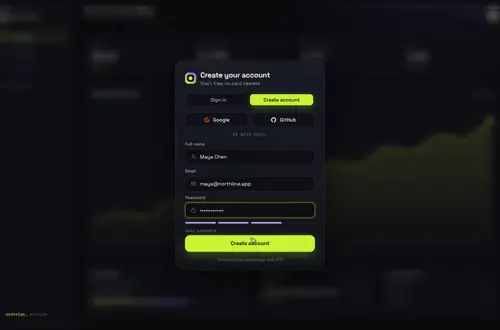
An animated create-account card on supabase.auth.signUp that handles the two cases most tutorials skip: an email that already has an account, and a sign-up that waits on email confirmation.
By buying you agree to the Terms.
- Download right after paying
- Use it in client projects
- Won't run on the listed stack? We fix it or refund you
Ready forCursorv0Lovableshadcn CLI
Use it in Next.js
"use client";
import { useRef } from "react";
import { useRouter } from "next/navigation";
import GatewayDive from "@/components/gateway-dive/GatewayDive";
import { createClient } from "@/lib/supabase/client";

export default function SignUp() {
  const router = useRouter();
  const supabase = createClient();
  const needsConfirm = useRef(false);

  return (
    <main style={{ height: "100dvh" }}>
      <GatewayDive
        autoplayDemo={false}
        defaultMode="signup"
        diveOnSuccess={false}
        brand="Acme"
        onSubmit={async ({ mode, name, email, password }) => {
          if (mode === "signin") {
            const { error } = await supabase.auth.signInWithPassword({ email, password });
            needsConfirm.current = false;
            return error ? { ok: false, error: error.message } : { ok: true };
          }
          const { data, error } = await supabase.auth.signUp({
            email,
            password,
            options: { data: { name }, emailRedirectTo: `${window.location.origin}/auth/callback?next=/dashboard` },
          });
          if (error) return { ok: false, error: error.message };
          // With confirmations on, an existing email comes back as a user with no identities and no error.
          if (data.user && data.user.identities?.length === 0) {
            return { ok: false, error: "That email already has an account. Sign in instead." };
          }
          needsConfirm.current = !data.session;
          return { ok: true };
        }}
        onSuccess={({ email }) =>
          router.push(needsConfirm.current ? `/check-email?to=${encodeURIComponent(email)}` : "/dashboard")
        }
      />
    </main>
  );
}import { NextResponse } from "next/server";
import { createClient } from "@/lib/supabase/server";
// The confirmation link lands here with ?code=. Same route as the Google login recipe.
export async function GET(request: Request) {
const { searchParams, origin } = new URL(request.url);
const code = searchParams.get("code");
const next = searchParams.get("next") ?? "/";
const safeNext = next.startsWith("/") && !next.startsWith("//") ? next : "/";
if (code) {
const supabase = await createClient();
const { error } = await supabase.auth.exchangeCodeForSession(code);
if (!error) return NextResponse.redirect(`${origin}${safeNext}`);
}
return NextResponse.redirect(`${origin}/login?error=confirm`);
}Good to know
- With Confirm email on (the Supabase default), signUp returns a user but no session. The snippet sends those people to a check-your-email page instead of the dashboard. Turn confirmations off and data.session is set, so they go straight in.
- Supabase does not return an error for an email that is already registered when confirmations are on. It returns a user with an empty identities list, so the snippet checks for that and shakes the card with a sign-in hint.
- diveOnSuccess is off here because a new account that still needs confirming shouldn't dive into the app. The button turns into a check and onSuccess routes.
- The confirmation link uses the PKCE flow, so it has to be opened in the same browser that signed up. Someone who opens it on their phone lands on the error path; tell them that on the check-email page.
- lib/supabase/client.ts and lib/supabase/server.ts are the same two files as on the Supabase Google login page.
Install
- Copy from the zipPut
react/src/componentsintosrc/, thennpm i @supabase/supabase-js @supabase/ssr. - Or ask your AIPaste PROMPT.md into Cursor, Lovable or v0.
Props
- defaultMode
- 'signup' opens on create account
- onSubmit
- receives mode, name, email, password; returns { ok, error? }
- onSuccess
- runs when the check appears
- diveOnSuccess
- false to route yourself instead of diving
- providers / onProvider
- social buttons on the same card
- autoplayDemo
- false in a real app
How qodesign compares
- qodesign vs Magic UIMagic UI is best for: landing pages built with shadcn/ui.
- qodesign vs Aceternity UIAceternity UI is best for: teams building many marketing pages who want one big library.
All comparisons, with prices read on each library's own site.
Questions
Why doesn't signUp fail for an email that already exists?
With email confirmations on, Supabase hides whether an address is registered. You get a user object with identities set to an empty array, which is what the snippet checks.
Where does the name field go?
Into options.data, which Supabase stores as user_metadata on the new user. Read it back from user.user_metadata.name.
Can people switch to sign in on the same card?
Yes. The card morphs between create account and sign in, and onSubmit gets the mode, so one handler covers both.
Does the sign-up page work in Next.js?
Yes, as a client component. Keep "use client" at the top of the file that renders it, as in the snippet above. App Router and Pages Router both work.
Can Cursor or v0 add it for me?
Yes. Each download has a PROMPT.md. Paste it into Cursor, Lovable, v0 or Claude Code and it fits the piece into your app.
Can I use it in client work?
Yes, in personal and client projects. You can't resell the code itself as a kit.