Supabase login page for Next.js
The spotlight lamp login wired to Supabase Auth: email and password, the real error message on a wrong password, and a redirect when it works.
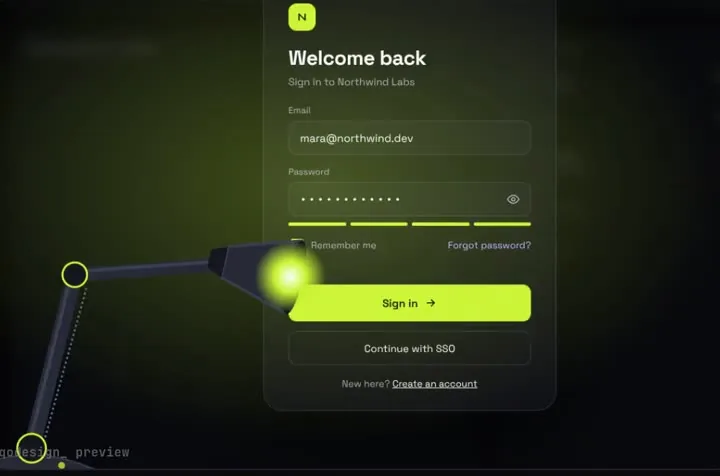
Use it in Next.js
"use client";
import { useRouter } from "next/navigation";
import SpotlightLampLogin from "@/components/SpotlightLampLogin";
import { createClient } from "@/lib/supabase/client";

export default function LoginPage() {
  const router = useRouter();
  const supabase = createClient();

  return (
    <div className="h-dvh">
      <SpotlightLampLogin
        autoplayDemo={false}
        onSignIn={async (email, password) => {
          const { error } = await supabase.auth.signInWithPassword({ email, password });
          return error ? { ok: false, message: error.message } : { ok: true };
        }}
        onSuccess={() => {
          router.push("/dashboard");
          router.refresh();
        }}
      />
    </div>
  );
}import { createBrowserClient } from "@supabase/ssr";
export function createClient() {
return createBrowserClient(process.env.NEXT_PUBLIC_SUPABASE_URL!, process.env.NEXT_PUBLIC_SUPABASE_ANON_KEY!);
}Good to know
- onSignIn gets the email and password and waits for your answer. Return { ok: false, message } and the lamp shows Supabase's own error text under the password field.
- This is the browser half. For server components and middleware to see the session, add the cookie setup from Supabase's Next.js server-side auth guide.
- The lamp is a full-screen scene, not a small card. Give it a parent with a real height (h-dvh above), or it has nothing to fill.
- Sign-up, magic links and OAuth buttons aren't part of the piece. You'd add those yourself.
Install
- Copy from the zipPut
react/src/components + react/src/dataintosrc/, thennpm i @supabase/supabase-js @supabase/ssr. - Or ask your AIPaste PROMPT.md into Cursor, Lovable or v0.
Props
- onSignIn
- (email, password) → { ok, message? }
- onSuccess
- runs after the light floods the screen
- autoplayDemo
- false for a real page
- data
- names shown after sign-in
How qodesign compares
- qodesign vs Magic UIMagic UI is best for: landing pages built with shadcn/ui.
- qodesign vs Aceternity UIAceternity UI is best for: teams building many marketing pages who want one big library.
All comparisons, with prices read on each library's own site.
Questions
Does it work with the new Supabase publishable keys?
Yes. createBrowserClient takes whichever key you put in the env var; the variable name is yours.
Does it handle sign-up too?
No. It's a sign-in screen. Point a link at your own sign-up page.
Can Cursor or v0 add it for me?
Yes. Each download has a PROMPT.md. Paste it into Cursor, Lovable, v0 or Claude Code and it fits the piece into your app.
Can I use it in client work?
Yes, in personal and client projects. You can't resell the code itself as a kit.