Convex Auth login page for Next.js
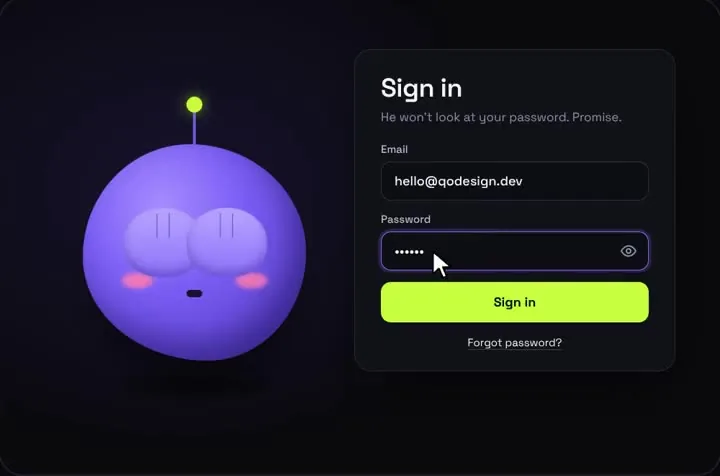
The shy-eyes mascot login on Convex Auth's Password provider. It covers the client sign-in, the Next.js providers, and middleware that keeps signed-out visitors off your dashboard.
By buying you agree to the Terms.
- Download right after paying
- Use it in client projects
- Won't run on the listed stack? We fix it or refund you
Ready forCursorv0Lovableshadcn CLI
Use it in Next.js
"use client";
import { useRouter } from "next/navigation";
import { useAuthActions } from "@convex-dev/auth/react";
import ShyEyesLogin from "@/components/ShyEyesLogin";

export default function SignInPage() {
  const router = useRouter();
  const { signIn } = useAuthActions();

  return (
    <main className="grid min-h-dvh place-items-center">
      <ShyEyesLogin
        resetAfter={null}
        signInError="That email and password don't match."
        onSubmit={async (email, password) => {
          // Throws on a wrong password: the mascot shakes its head and signInError shows.
          await signIn("password", { email, password, flow: "signIn" });
          setTimeout(() => router.push("/dashboard"), 900);
        }}
      />
    </main>
  );
}import { Password } from "@convex-dev/auth/providers/Password";
import { convexAuth } from "@convex-dev/auth/server";
export const { auth, signIn, signOut, store, isAuthenticated } = convexAuth({
providers: [Password],
});"use client";
import { ConvexAuthNextjsProvider } from "@convex-dev/auth/nextjs";
import { ConvexReactClient } from "convex/react";
import type { ReactNode } from "react";
const convex = new ConvexReactClient(process.env.NEXT_PUBLIC_CONVEX_URL!);
export function ConvexClientProvider({ children }: { children: ReactNode }) {
return <ConvexAuthNextjsProvider client={convex}>{children}</ConvexAuthNextjsProvider>;
}import type { ReactNode } from "react";
import { ConvexAuthNextjsServerProvider } from "@convex-dev/auth/nextjs/server";
import { ConvexClientProvider } from "@/components/ConvexClientProvider";
export default function RootLayout({ children }: { children: ReactNode }) {
return (
<ConvexAuthNextjsServerProvider>
<html lang="en">
<body>
<ConvexClientProvider>{children}</ConvexClientProvider>
</body>
</html>
</ConvexAuthNextjsServerProvider>
);
}import {
convexAuthNextjsMiddleware,
createRouteMatcher,
nextjsMiddlewareRedirect,
} from "@convex-dev/auth/nextjs/server";
const isSignInPage = createRouteMatcher(["/signin"]);
const isProtected = createRouteMatcher(["/dashboard(.*)"]);
export default convexAuthNextjsMiddleware(async (request, { convexAuth }) => {
if (isSignInPage(request) && (await convexAuth.isAuthenticated())) {
return nextjsMiddlewareRedirect(request, "/dashboard");
}
if (isProtected(request) && !(await convexAuth.isAuthenticated())) {
return nextjsMiddlewareRedirect(request, "/signin");
}
});
export const config = {
matcher: ["/((?!.*\\..*|_next).*)", "/", "/(api|trpc)(.*)"],
};Good to know
- signIn("password", ...) throws when the email or password is wrong. The form catches that, the mascot shakes its head, and signInError shows above the button.
- Convex hides server error text in production, so the snippet shows a fixed message instead of the thrown one. In dev you'd see InvalidSecret or InvalidAccountId in the console.
- flow: "signIn" only signs in existing users. A sign-up page calls the same signIn with flow: "signUp". The mascot form handles one of the two, so put a link between your pages.
- Run npx @convex-dev/auth once first. It adds the signing keys, convex/http.ts and the auth tables that convex/auth.ts depends on.
- We type-checked the snippets against @convex-dev/auth 0.0.96, convex 1.48 and Next.js 15.
Install
- Copy from the zipPut
react/src/componentsintosrc/, thennpm i framer-motion @convex-dev/auth @auth/[email protected]. - Or ask your AIPaste PROMPT.md into Cursor, Lovable or v0.
Props
- onSubmit
- (email, password); throw to show the error
- signInError
- text, or (err) => text, shown when onSubmit throws
- resetAfter
- null keeps the success state on screen while you redirect
- title / subtitle
- heading text
- accent
- button colour
How qodesign compares
- qodesign vs Magic UIMagic UI is best for: landing pages built with shadcn/ui.
- qodesign vs Aceternity UIAceternity UI is best for: teams building many marketing pages who want one big library.
All comparisons, with prices read on each library's own site.
Questions
Why does the redirect wait 900 ms?
So the mascot gets to celebrate before the page changes. Drop the timeout if you'd rather go straight to the dashboard.
Does it work with Convex Auth's GitHub or Google sign-in?
Those are buttons that call signIn("github") or signIn("google"). The mascot form is for email and password, so add the buttons next to it.
Can I use it with Convex and Clerk instead?
Yes. The form only needs a promise. Call Clerk's sign-in inside onSubmit and throw when it fails.
Can Cursor or v0 add it for me?
Yes. Each download has a PROMPT.md. Paste it into Cursor, Lovable, v0 or Claude Code and it fits the piece into your app.
Can I use it in client work?
Yes, in personal and client projects. You can't resell the code itself as a kit.