Better Auth 2FA code page
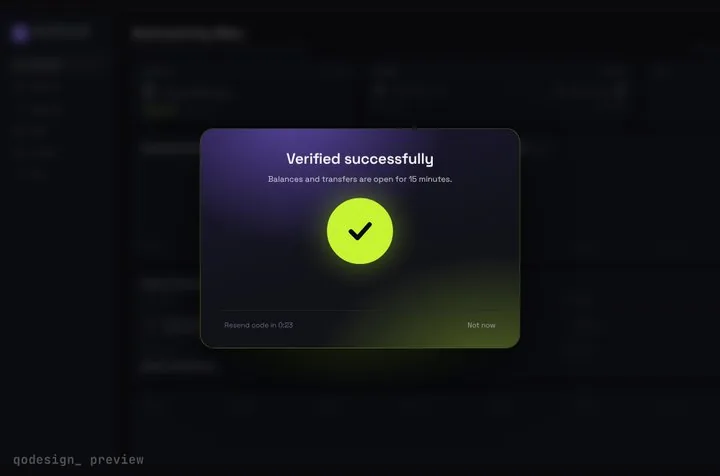
Better Auth's twoFactor plugin sends the visitor to a /2fa page after the password step. This is that page: an animated six-cell code screen that calls verifyTotp and lets them in.
 Loading live demo
Not downloaded yet? Full refund within 14 days. Broken files get fixed or refunded. Refunds
- Download right after paying
- Next.js + Cursor/v0 ready
- Use it in client projects
By buying you agree to the Terms and ask for instant access, so you lose the 14-day withdrawal right. When we still refundWe'll also email you when a new piece lands (about once a week). Unsubscribe in one click, anytime.
Paid through Stripe. We never see your card.
Ready forCursorv0Lovableshadcn CLI
Use it in Next.js
"use client";
import { useRouter } from "next/navigation";
import { StepUpGate } from "@/components/StepUpGate";
import { authClient } from "@/lib/auth-client";

export default function TwoFactorPage() {
  const router = useRouter();
  return (
    <StepUpGate
      title="Two-factor check"
      description="Enter the 6-digit code from your authenticator app."
      onVerify={async (code) => {
        const { error } = await authClient.twoFactor.verifyTotp({ code, trustDevice: true });
        return !error;
      }}
      onVerified={() => router.push("/dashboard")}
      onCancel={() => router.push("/sign-in")}
    >
      <div className="min-h-dvh" />
    </StepUpGate>
  );
}import { createAuthClient } from "better-auth/react";
import { twoFactorClient } from "better-auth/client/plugins";
export const authClient = createAuthClient({
plugins: [
twoFactorClient({
// the password was right and the account has 2FA on: go to the code page
onTwoFactorRedirect() {
window.location.href = "/2fa";
},
}),
],
});import { betterAuth } from "better-auth";
import { twoFactor } from "better-auth/plugins";
export const auth = betterAuth({
appName: "Acme", // shown in the authenticator app
emailAndPassword: { enabled: true },
plugins: [twoFactor()],
// database: your adapter; run the Better Auth CLI to add the twoFactor table
});Good to know
- Turning 2FA on happens in your settings page: authClient.twoFactor.enable({ password }) returns a totpURI to show as a QR code. The account switches to 2FA once the first code checks out.
- trustDevice: true skips the code on this browser for a while (Better Auth's default is 30 days). Leave it out to ask every time.
- The children here are an empty full-height div, because the page has nothing to show before the code. The gate frosts it and stays centred.
- After adding the plugin, run the Better Auth migrate or generate command so the database gets the twoFactor table and the user.twoFactorEnabled column.
- No onResend is passed, so the gate hides its Resend link. An authenticator app has nothing to resend. Not now shows a short neutral line; set cancelMessage to use your own words. Bought before October 22, 2026? Download the zip again to get both.
- The plugin names and verifyTotp come from better-auth 1.7's type definitions. We haven't run this page against a live Better Auth server.
Install
- Copy from the zipPut
react/src/components + react/src/dataintosrc/, thennpm i framer-motion better-auth. - Or ask your AIPaste PROMPT.md into Cursor, Lovable or v0.
Props
- onVerify
- (code) → Promise<boolean>, true unlocks
- onVerified
- after the unlock animation
- onCancel
- the Not now link
- cancelMessage
- the line Not now shows
- title / description
- the dialog's text
- length
- number of cells, 6 by default
How qodesign compares
- qodesign vs Magic UIMagic UI is best for: landing pages built with shadcn/ui.
- qodesign vs Aceternity UIAceternity UI is best for: teams building many marketing pages who want one big library.
All comparisons, with prices read on each library's own site.
Questions
Can it take backup codes?
Not in the six-cell screen. Add a "Use a backup code" link to a plain input that calls authClient.twoFactor.verifyBackupCode.
Does it work with Better Auth's email OTP 2FA?
Yes. Call authClient.twoFactor.sendOtp() when the page opens and on resend, and verifyOtp instead of verifyTotp.
Can Cursor or v0 add it for me?
Yes. Each download has a PROMPT.md. Paste it into Cursor, Lovable, v0 or Claude Code and it fits the piece into your app.
Can I use it in client work?
Yes, in personal and client projects. You can't resell the code itself as a kit.