A Strapi login page for Next.js
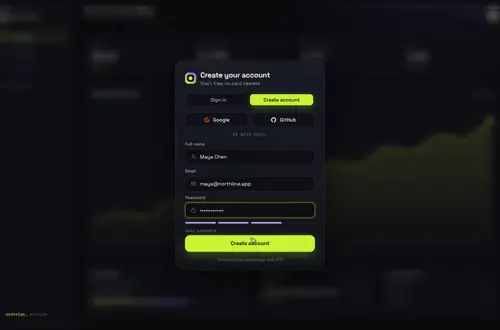
A sign in and create-account card for your site's users, wired to Strapi 5's /api/auth/local routes from a Next.js server action. It doesn't replace Strapi's own admin login screen at /admin, which you can only rebrand. Checked against Strapi 5.59.0.
By buying you agree to the Terms.
- Download right after paying
- Use it in client projects
- Won't run on the listed stack? We fix it or refund you
Ready forCursorv0Lovableshadcn CLI
Use it in Next.js
"use client";
import { useRouter } from "next/navigation";
import GatewayDive from "@/components/gateway-dive/GatewayDive";
import { signInAction, signUpAction } from "./actions";

export default function LoginPage() {
  const router = useRouter();
  return (
    <main style={{ height: "100dvh" }}>
      <GatewayDive
        autoplayDemo={false}
        brand="Acme"
        onSubmit={({ mode, name, email, password }) =>
          mode === "signin" ? signInAction(email, password) : signUpAction(name, email, password)
        }
        onSuccess={() =>
          setTimeout(() => {
            router.push("/account");
            router.refresh();
          }, 1400)
        }
      />
    </main>
  );
}"use server";
import { cookies } from "next/headers";
const STRAPI_URL = process.env.STRAPI_URL ?? "http://localhost:1337";
type Result = { ok: boolean; error?: string };
// Strapi 5 answers { jwt, user } on success and { data: null, error: { status, name, message } } on failure.
type StrapiAuthResponse = {
jwt?: string;
user?: { id: number; username: string; email: string };
error?: { status: number; name: string; message: string };
};
async function postAuth(path: string, body: Record<string, string>): Promise<Result> {
let res: Response;
try {
res = await fetch(`${STRAPI_URL}/api${path}`, {
method: "POST",
headers: { "Content-Type": "application/json" },
body: JSON.stringify(body),
cache: "no-store",
});
} catch {
return { ok: false, error: "Can't reach the server. Try again." };
}
const data = (await res.json().catch(() => ({}))) as StrapiAuthResponse;
if (!res.ok) return { ok: false, error: data.error?.message ?? "Something went wrong. Try again." };
// With email confirmation on, register answers with the user and no JWT.
if (!data.jwt) return { ok: false, error: "Check your inbox to confirm your email." };
(await cookies()).set("strapi_jwt", data.jwt, {
httpOnly: true, // the browser never reads the token
secure: process.env.NODE_ENV === "production",
sameSite: "lax",
path: "/",
maxAge: 60 * 60 * 24 * 7, // a week; Strapi's own JWT lasts 30 days by default
});
return { ok: true };
}
export async function signInAction(email: string, password: string): Promise<Result> {
return postAuth("/auth/local", { identifier: email, password });
}
export async function signUpAction(name: string, email: string, password: string): Promise<Result> {
// Strapi takes only username, email and password here by default.
// The email doubles as the username so two people called Sam don't collide.
// To keep the name too, see "Keeping the name from the sign-up card" below.
return postAuth("/auth/local/register", { username: email, email, password });
}Good to know
- This is the login for your site's users, the people Strapi calls end users. The /admin login is for your editors, and Gateway Dive doesn't change it. The next section covers what you can change there.
- signInAction sends the email as Strapi's identifier. Strapi takes an email or a username in that field.
- The JWT goes into an HTTP-only cookie that the server action sets, so JavaScript in the browser never reads it. Strapi's docs cookbook keeps its example short by putting the token in localStorage. Its Epic Next.js 15 tutorial uses an HTTP-only cookie, like this snippet.
- Errors are returned, not thrown. Next.js hides the message of an error thrown in a server function in production builds, so the card would only get a generic failure.
- Sign-up sends the email as the username. Strapi's register route takes only username, email and password by default, and usernames have to be unique, so two people called Sam would clash if you sent the name.
- Set STRAPI_URL in .env.local. Without it the actions call http://localhost:1337.
- Route in onSuccess after about 1.4 s so the dive can finish, and call router.refresh() so server components read the new cookie.
Strapi admin login page or your site's login? Start with the free route
- Most searches for a Strapi login page are about the admin panel. That screen belongs to your editors, and Strapi lets you rebrand it, not replace it. Strapi's logos docs list one key for it, config.auth.logo, and say that logo "is only shown on the login screen". You can also upload a logo in the admin settings, which Strapi says will "supersede any logo set through the configuration files". Theme colors (config.theme.light and config.theme.dark) and translations reach that screen too. All of it is free, and for an admin login it's the right tool.
- I found no documented way to swap the admin login view itself, so Gateway Dive can't go there.
- For your site's users, Strapi already shows the plain version. Its docs cookbook has a form that posts to /auth/local, and its blog has the Epic Next.js 15 Tutorial Part 4, "How to handle login and authentication", with server actions and an HTTP-only cookie. If a plain form is what you want, follow that tutorial and skip the card. Gateway Dive is for when you want sign in and create account on one animated screen over your app.
What the Strapi login API sends back, and what the card shows
- Strapi 5 answers a failed call with { data: null, error: { status, name, message, details } }, and the action passes error.message to the card. These are the messages in Strapi's REST docs for the two routes:
- Wrong email or password: "Invalid identifier or password". Email confirmation on and not done yet: "Your account email is not confirmed". Blocked in the admin: "Your account has been blocked by an administrator".
- Sign-up with an email or username that exists: "Email or Username are already taken". A field Strapi doesn't allow: "Invalid parameters: fieldName". Sign-ups switched off: "Register action is currently disabled".
- "Email or Username are already taken" tells a stranger that an account exists. If that matters for your site, swap it for one neutral line in postAuth.
- With email confirmation on, register answers with the user and no JWT, so the action shows "Check your inbox to confirm your email." instead of signing the person in.
- I took these from the docs and didn't run them against a live Strapi server.
The Strapi login rate limit behind a Next.js server
- Strapi rate-limits its auth routes. The defaults in the 5.59.0 plugin config are 10 requests per minute (interval 60000, max 10), the same as the table in the Users & Permissions docs.
- In the 5.59.0 plugin code, the login route's bucket is keyed by the route and the caller's IP, not by the account. The login on this page runs in a Next.js server action, so Strapi sees your Next.js server's IP for every visitor. My reading of the code is that on default settings all your visitors share one bucket of 10 login requests a minute. I didn't load-test it.
- Three ways out. Raise ratelimit.max in Strapi's config/plugins, as below. Or have Strapi see the visitor's IP: forward it from your server and turn on proxy.koa, Strapi's setting for trusting proxy headers, but only when Strapi can't be reached except through your proxy, or anyone can fake the header. Or call Strapi straight from the browser, which means browser JavaScript holds the JWT, the trade Strapi's cookbook makes.
- Register keys its bucket on the email in the request as well as the IP, so a crowd of sign-ups doesn't share one bucket the same way.
// In your Strapi project, not in the Next.js app.
export default () => ({
  "users-permissions": {
    config: {
      register: {
        // Also add a displayName (Text) field to the User collection type
        // in the Content-Type Builder, or Strapi rejects it.
        allowedFields: ["displayName"],
      },
      ratelimit: {
        interval: 60000, // 1 minute, the default
        max: 60, // the default is 10; see the rate limit section
      },
    },
  },
});
Keeping the name from the sign-up card
- Strapi's REST docs say: "Only username, email, and password are accepted in the request body by default." Anything else fails with "Invalid parameters" until you list it in register.allowedFields and add the field to the User collection type.
- With displayName allowed (the config above), change signUpAction to send it. I type-checked this but didn't run it against Strapi.
// app/login/actions.ts, signUpAction once displayName is allowed
export async function signUpAction(name: string, email: string, password: string) {
  return postAuth("/auth/local/register", { username: email, email, password, displayName: name });
}
Reading the signed-in user on the next page
- GET /api/users/me with the JWT as a Bearer token returns the signed-in user. If it answers 403, check that the Authenticated role has the me permission under Users & Permissions in the admin.
- In the default legacy mode a Strapi JWT lasts 30 days (jwt.expiresIn, 30d in the 5.59.0 config). The cookie here lasts a week. Strapi also has a refresh mode with short access tokens and refresh tokens, and this snippet doesn't handle it.
- Sign-out here only deletes the cookie. The token itself stays valid until it expires.
import { cookies } from "next/headers";
import { redirect } from "next/navigation";
import { signOutAction } from "./actions";

const STRAPI_URL = process.env.STRAPI_URL ?? "http://localhost:1337";

export default async function AccountPage() {
  const jwt = (await cookies()).get("strapi_jwt")?.value;
  if (!jwt) redirect("/login");

  const res = await fetch(`${STRAPI_URL}/api/users/me`, {
    headers: { Authorization: `Bearer ${jwt}` },
    cache: "no-store",
  });
  if (!res.ok) redirect("/login"); // expired or revoked token

  const user = (await res.json()) as { username: string; email: string };
  return (
    <main>
      <h1>Hi {user.email}</h1>
      <form action={signOutAction}>
        <button type="submit">Sign out</button>
      </form>
    </main>
  );
}"use server";
import { cookies } from "next/headers";
import { redirect } from "next/navigation";
export async function signOutAction() {
(await cookies()).delete("strapi_jwt");
redirect("/login");
}Versions checked and what I didn't run
- Checked on npm on Oct 25, 2026: @strapi/strapi and @strapi/plugin-users-permissions are both at 5.59.0, with 135,372 and 122,157 downloads for Oct 16 to 22. Both list react ^18.0.0 as a peer. That's the React inside Strapi's admin panel, and it doesn't touch your Next.js app's React 19.
- All the Next.js files on this page, the name variant and the Strapi config were type-checked with TypeScript 7.0.2 against Next.js 16.4.3, React 19.3.1 and @types/react 19.3.0, with Gateway Dive's own files. A call with a missing argument failed the check, as it should.
- Tailwind CSS v4: our check of every piece lists Gateway Dive as "works as-is", with "None. The only computed differences are the random SVG gradient ids." So you add nothing to globals.css. Some of our other pieces need an @config line under v4. Gateway Dive doesn't, and in a shadcn or daisyUI app that line is the wrong fix anyway, because it can change the whole app's font.
- Not run: a live Strapi server, the snippet in next dev or a production build, the rate limit, email confirmation, sign-out and Strapi Cloud. Not tried on a real phone.
Install
- Copy from the zipPut
react/src/componentsintosrc/, thennone (no animation library); a Strapi 5 server with Users & Permissions, which is on by default. - Or ask your AIPaste PROMPT.md into Cursor, Lovable or v0.
Props
- onSubmit
- calls signInAction or signUpAction, returns { ok, error? }
- onSuccess
- runs when the check appears; route to /account here
- defaultMode
- 'signup' to open on create account
- brand
- the name on the card
- backdrop
- your own screen behind the card
- autoplayDemo
- false in a real app
How qodesign compares
- qodesign vs Magic UIMagic UI is best for: landing pages built with shadcn/ui.
- qodesign vs Aceternity UIAceternity UI is best for: teams building many marketing pages who want one big library.
All comparisons, with prices read on each library's own site.
Questions
Can I replace the Strapi admin login page with my own?
Not that I could find in Strapi's docs. You can change the logo (config.auth.logo or an upload in the admin), the theme colors and the translations. This page is a login for your site's users, not for /admin.
Is /api/auth/local the Strapi login API?
Yes. POST /api/auth/local with identifier and password signs a user in and returns a JWT and the user. POST /api/auth/local/register creates the account.
Email or username in identifier?
Either. Strapi matches the identifier against both. The snippet sends the email.
Where should the Strapi JWT live?
In an HTTP-only cookie set on your server, as here, if your Next.js server does the Strapi calls. Strapi's cookbook uses localStorage to keep its example short, which leaves the token readable by any script on the page.
Does it work with Google or GitHub sign-in?
Users & Permissions has its own social providers, and the card has providers and onProvider props to start that flow. This page doesn't wire them.
Does it work with Strapi 4?
I only checked Strapi 5.59.0.
Can Cursor or v0 add it for me?
Yes. Each download has a PROMPT.md. Paste it into Cursor, Lovable, v0 or Claude Code and it fits the piece into your app.
Can I use it in client work?
Yes, in personal and client projects. You can't resell the code itself as a kit.