A react-credit-cards alternative for React 19
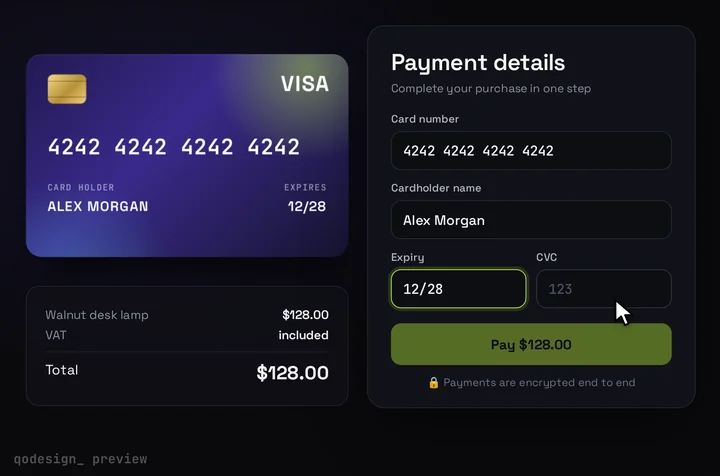
react-credit-cards still asks for React 15 or 16, so npm refuses it in a React 18 or 19 app. This is the whole card form instead: a 3D card that fills in as you type, flips for the CVC and holds Stripe's own card fields.
By buying you agree to the Terms.
- Download right after paying
- Use it in client projects
- Won't run on the listed stack? We fix it or refund you
Ready forCursorv0Lovableshadcn CLI
Use it in Next.js
"use client";
import { useRef } from "react";
import { loadStripe } from "@stripe/stripe-js";
import { Elements, CardNumberElement, CardExpiryElement, CardCvcElement, useStripe, useElements } from "@stripe/react-stripe-js";
import CardCheckout from "@/components/CardCheckout";

const stripePromise = loadStripe(process.env.NEXT_PUBLIC_STRIPE_PUBLISHABLE_KEY!);
const style = { base: { color: "#F4F2FF", fontSize: "18px" } };

function CardForm({ clientSecret, amount }: { clientSecret: string; amount: number }) {
  const stripe = useStripe();
  const elements = useElements();
  // what Stripe reported for each field (react-credit-cards needed this from your own inputs)
  const done = useRef({ number: false, expiry: false, cvc: false }).current;

  return (
    <CardCheckout
      amount={amount}
      currency="USD"
      renderCardFields={(slot) => {
        const track = (k: keyof typeof done) => (e: { complete: boolean; brand?: string }) => {
          done[k] = e.complete;
          slot.onChange({ complete: done.number && done.expiry && done.cvc, ...(e.brand ? { brand: e.brand } : {}) });
        };
        return (
          <div className="grid gap-[15px]">
            <label className={slot.labelClassName}>Card number</label>
            <div className={slot.fieldClassName}><CardNumberElement options={{ style }} onChange={track("number")} /></div>
            <label className={slot.labelClassName}>Expiry</label>
            <div className={slot.fieldClassName}><CardExpiryElement options={{ style }} onChange={track("expiry")} /></div>
            <label className={slot.labelClassName}>CVC</label>
            <div className={slot.fieldClassName}>
              {/* the old focused="cvc" prop: the card flips while this field has focus */}
              <CardCvcElement
                options={{ style }}
                onChange={track("cvc")}
                onFocus={() => slot.onChange({ focus: "cvc" })}
                onBlur={() => slot.onChange({ focus: null })}
              />
            </div>
          </div>
        );
      }}
      onConfirm={async ({ name }) => {
        if (!stripe || !elements) throw new Error("Stripe hasn't loaded yet.");
        const card = elements.getElement(CardNumberElement);
        if (!card) throw new Error("Card field missing.");
        const { error } = await stripe.confirmCardPayment(clientSecret, { payment_method: { card, billing_details: { name } } });
        if (error) throw error; // Pay comes back and the buyer can try again
      }}
    />
  );
}

export default function Checkout({ clientSecret, amount }: { clientSecret: string; amount: number }) {
  return (
    <Elements stripe={stripePromise} options={{ clientSecret }}>
      <CardForm clientSecret={clientSecret} amount={amount} />
    </Elements>
  );
}Good to know
- react-credit-cards 0.8.3 is its last release, published in June 2020. Its package.json asks for react ^15.0.0 || ^16.0.0, so npm stops with a peer dependency error in a React 18 or 19 app unless you add --legacy-peer-deps.
- react-credit-cards-2 is a free community fork that accepts React 16.8 up to 19 (version 1.2.0, February 2026). If you only want the card picture beside inputs you build yourself, it's a good pick, and it knows more card brands than this piece draws.
- The difference is how much you build. react-credit-cards draws the card and you pass it number, name, expiry, cvc and focused from your own form. CardCheckout is the card and the form together: the CVC flip, the Pay button, the spinner and the success state are already in it.
- For real money, put Stripe Elements in renderCardFields as above. Card digits stay inside Stripe's iframes and never reach your code. The page that creates the PaymentIntent on the server is in the Stripe Elements card form guide.
- The card has Visa and Mastercard artwork. Other brands Stripe reports, like Amex, show the card without a logo. The built-in inputs (demos and tests only) check 16-digit numbers with a Luhn check.
Install
- Copy from the zipPut
react/src/componentsintosrc/, thennpm i framer-motion @stripe/stripe-js @stripe/react-stripe-js. - Or ask your AIPaste PROMPT.md into Cursor, Lovable or v0.
Props
- renderCardFields
- Stripe Elements inside the design
- onConfirm
- confirm with Stripe; throw to show the error
- amount / currency
- what the card shows
- cardColors
- front gradient
How qodesign compares
- qodesign vs 21st.dev21st.dev is best for: browsing a huge marketplace and copying many components a month.
- qodesign vs Skiper UISkiper UI is best for: unusual interaction details for landing pages: image reveals, cursor trails, tooltips, drag-and-scroll galleries.
All comparisons, with prices read on each library's own site.
Questions
Can't I just install react-credit-cards with --legacy-peer-deps?
You can, and the card may well render. The flag turns off peer checks for your whole install, though, and the package hasn't had a release since 2020. The community fork react-credit-cards-2 is the cleaner free route.
Do I keep my own inputs?
Only for demos. In production the inputs are Stripe's, placed inside the card form through renderCardFields, so you don't handle card numbers at all.
Does the card form work in Next.js?
Yes, as a client component. Keep "use client" at the top of the file that renders it, as in the snippet above. App Router and Pages Router both work.
Can Cursor or v0 add it for me?
Yes. Each download has a PROMPT.md. Paste it into Cursor, Lovable, v0 or Claude Code and it fits the piece into your app.
Can I use it in client work?
Yes, in personal and client projects. You can't resell the code itself as a kit.