Animated checkout form for React
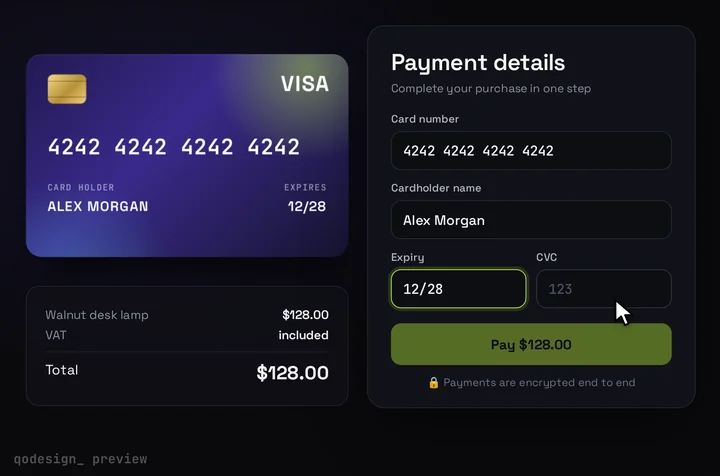
A 3D card fills in as you type and flips over for the CVC. React, Tailwind and Framer Motion, with Stripe Elements in the card fields.
By buying you agree to the Terms and ask for instant access, so you lose the 14-day withdrawal right. When we still refundWe'll also email you when a new piece lands (about once a week). Unsubscribe in one click, anytime.
Use it in Next.js
"use client";
import CardCheckout from "@/components/CardCheckout";

export default function Pay() {
  // Production: Stripe Elements sit in the renderCardFields slot, so card numbers never touch your code.
  return (
    <CardCheckout
      amount={49}
      currency="USD"
      productName="Pro plan"
      renderCardFields={(slot) => <div className={slot.fieldClassName}><CardElement onChange={(e) => slot.onChange({ complete: e.complete, brand: e.brand })} /></div>}
      onConfirm={({ name }) => confirmWithStripe(name)} // stripe.confirmCardPayment
    />
  );
}
Good to know
- The flip is a Framer Motion tween, not a spring. A motion.div animates rotateY to 180 when the CVC field has focus, over 0.75 s with a cubic-bezier ease.
- useReducedMotion sets that duration to 0, so the card turns at once for visitors who ask for less motion.
- The tilt that follows the pointer is set straight on the element's style, outside Framer Motion.
- In demo mode the form runs a Luhn check and detects the brand. For real payments, Stripe Elements fill the renderCardFields slot, so card numbers go to Stripe and never reach your server.
- Receipt Morph Checkout, linked below, is the other animated checkout on the shelf: the card splits, unrolls into a receipt and gets stamped PAID. Framer Motion's animate() drives its timeline, and useAnimationFrame draws each frame.
Install
- Copy from the zipPut
react/src/componentsintosrc/, thennpm i framer-motion. - Or ask your AIPaste PROMPT.md into Cursor, Lovable or v0.
Props
- amount / currency
- price and format
- renderCardFields
- Stripe Elements inside the design
- onConfirm
- confirm with Stripe, return a promise
- cardColors
- front gradient
How qodesign compares
- qodesign vs 21st.dev21st.dev is best for: browsing a huge marketplace and copying many components a month.
- qodesign vs Skiper UISkiper UI is best for: unusual interaction details for landing pages: image reveals, cursor trails, tooltips, drag-and-scroll galleries.
All comparisons, with prices read on each library's own site.
From the blog: 3D Flip Card Animation in React and Tailwind CSS (No Library)
From the blog: Credit Card Input in React: Spacing, Brand and Luhn
From the blog: Stripe Elements With a Custom Card Design in React and Next.js
Questions
Is it safe for real payments?
Yes, with the slot. The built-in inputs are for demos and tests. For real money, put Stripe Elements in renderCardFields so card numbers go straight to Stripe.
Which framer-motion version does it need?
The package.json asks for framer-motion ^11.11.0. We haven't tested it with the motion package's motion/react import yet.
Can I use the flip without the rest of the form?
Yes, but you'd lift it out yourself. The flip is one motion.div in CardCheckout.tsx with its rotateY and transition.
Can Cursor or v0 add it for me?
Yes. Each download has a PROMPT.md. Paste it into Cursor, Lovable, v0 or Claude Code and it fits the piece into your app.
Can I use it in client work?
Yes, in personal and client projects. You can't resell the code itself as a kit.