Shopify cart drawer for Next.js
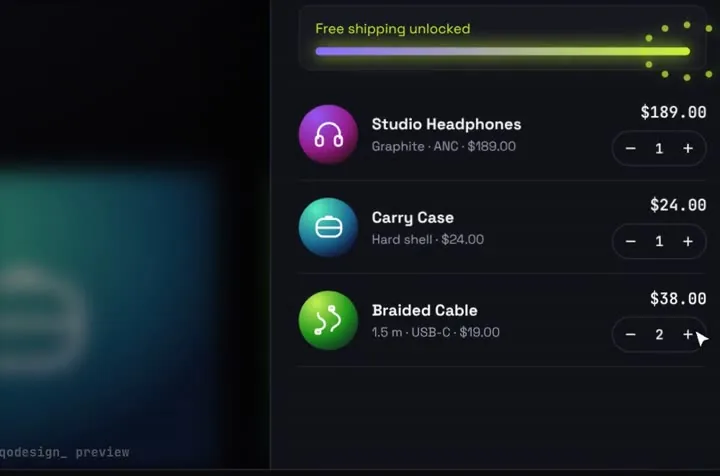
A headless Shopify cart in an animated drawer: items fly into the stack, a server action calls the Storefront API cartCreate mutation, and the buyer goes to Shopify's own checkout.
By buying you agree to the Terms.
- Download right after paying
- Use it in client projects
- Won't run on the listed stack? We fix it or refund you
Ready forCursorv0Lovableshadcn CLI
Use it in Next.js
"use client";
import StackCartDrawer from "@/components/StackCartDrawer";
import { createShopifyCheckout } from "./actions";

export default function Shop() {
  return (
    <div className="h-dvh">
      <StackCartDrawer
        autoplayDemo={false}
        onCheckout={async (items) => {
          try {
            const url = await createShopifyCheckout(items);
            window.location.assign(url);
            return { ok: true };
          } catch {
            return { ok: false }; // the drawer says the payment failed and keeps the cart
          }
        }}
      />
    </div>
  );
}"use server";
import { headers } from "next/headers";
const SHOP = process.env.SHOPIFY_STORE_DOMAIN!; // your-store.myshopify.com
const TOKEN = process.env.SHOPIFY_STOREFRONT_PRIVATE_TOKEN!;
// product id in the cart data -> Shopify product variant id
const VARIANTS: Record<string, string> = {
orbit: "gid://shopify/ProductVariant/1111111111",
case: "gid://shopify/ProductVariant/2222222222",
cable: "gid://shopify/ProductVariant/3333333333",
};
const CART_CREATE = `mutation CartCreate($lines: [CartLineInput!]!) {
cartCreate(input: { lines: $lines }) {
cart { checkoutUrl }
userErrors { field message }
}
}`;
type CartCreateReply = {
data?: { cartCreate: { cart: { checkoutUrl: string } | null; userErrors: { field: string[] | null; message: string }[] } };
errors?: { message: string }[];
};
export async function createShopifyCheckout(items: { id: string; qty: number }[]) {
const buyerIp = (await headers()).get("x-forwarded-for")?.split(",")[0]?.trim();
const res = await fetch(`https://${SHOP}/api/2026-10/graphql.json`, {
method: "POST",
cache: "no-store",
headers: {
"Content-Type": "application/json",
"Shopify-Storefront-Private-Token": TOKEN,
...(buyerIp ? { "Shopify-Storefront-Buyer-IP": buyerIp } : {}),
},
body: JSON.stringify({
query: CART_CREATE,
variables: { lines: items.map((i) => ({ merchandiseId: VARIANTS[i.id], quantity: i.qty })) },
}),
});
const json = (await res.json()) as CartCreateReply;
const result = json.data?.cartCreate;
if (!res.ok || json.errors?.length || result?.userErrors.length || !result?.cart) {
throw new Error(json.errors?.[0]?.message ?? result?.userErrors[0]?.message ?? `Shopify answered ${res.status}`);
}
return result.cart.checkoutUrl;
}Good to know
- The server action talks to the Storefront API with a private access token, so the token never reaches the browser. Shopify asks for the Shopify-Storefront-Buyer-IP header on server calls that come from shoppers, which is why the action forwards it.
- The query uses API version 2026-10, the latest one in Shopify's docs when we wrote this. Shopify keeps each version for about a year, so bump the date in the URL when yours gets old.
- cartCreate returns a checkoutUrl on the shop's own domain. Prices, tax and shipping come from Shopify at checkout, so the total the drawer shows is only a preview.
- The drawer ships with three demo products. Map each product id to a variant id (gid://shopify/ProductVariant/...). To load your own catalogue, widen the NorthwindData type in data/northwind.ts first.
- If Shopify answers with userErrors, the action throws and the drawer says the payment failed. Nothing was charged and the cart stays as it was.
Install
- Copy from the zipPut
react/src/components + react/src/dataintosrc/, thenno extra packages (fetch). - Or ask your AIPaste PROMPT.md into Cursor, Lovable or v0.
Props
- onCheckout
- (items, total) → { ok }
- data
- store name, products, free-shipping line
- autoplayDemo
- false for a real shop
How qodesign compares
- qodesign vs 21st.dev21st.dev is best for: browsing a huge marketplace and copying many components a month.
- qodesign vs Skiper UISkiper UI is best for: unusual interaction details for landing pages: image reveals, cursor trails, tooltips, drag-and-scroll galleries.
All comparisons, with prices read on each library's own site.
Questions
Do I need Hydrogen?
No. Hydrogen is Shopify's own React framework. This is a plain Next.js app that calls the same Storefront API with fetch.
Where do I get the token?
Install the Headless channel in your Shopify admin and create a storefront there. It gives you a public and a private access token. Keep the private one in a server environment variable.
Can I keep the cart between visits?
Yes. Save the cart id from cartCreate in a cookie, then use cartLinesAdd and cartLinesUpdate on the same cart instead of making a new one.
Can Cursor or v0 add it for me?
Yes. Each download has a PROMPT.md. Paste it into Cursor, Lovable, v0 or Claude Code and it fits the piece into your app.
Can I use it in client work?
Yes, in personal and client projects. You can't resell the code itself as a kit.