Adyen Custom Card component in React
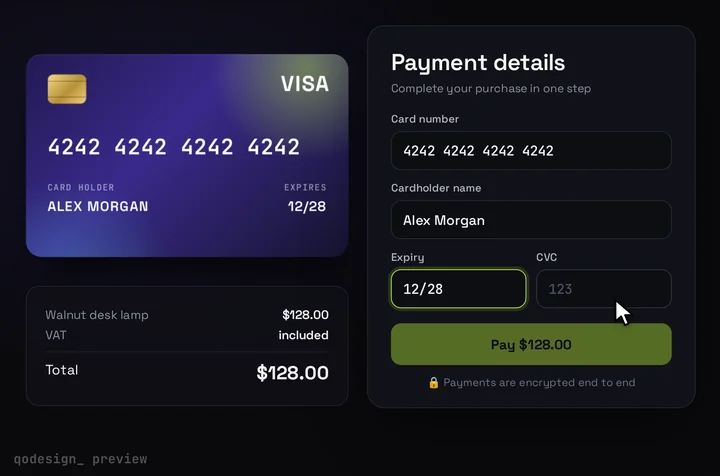
The 3D card checkout with Adyen's Custom Card fields inside it. Adyen's iframes hold the card number, so the card shows the brand and when every field is valid, and it flips when the buyer reaches the CVC.
By buying you agree to the Terms.
- Download right after paying
- Use it in client projects
- Won't run on the listed stack? We fix it or refund you
Ready forCursorv0Lovableshadcn CLI
Use it in Next.js
"use client";
import { useEffect, useRef } from "react";
import { useRouter } from "next/navigation";
import { AdyenCheckout, CustomCard, type PaymentCompletedData, type PaymentFailedData } from "@adyen/adyen-web";
import "@adyen/adyen-web/styles/adyen.css";
import CardCheckout, { type CardFieldsSlot } from "@/components/CardCheckout";

type Session = { id: string; sessionData: string };
type Outcome = { ok: true } | { ok: false; message: string };

// Adyen says "mc", the card says "mastercard". The card draws Visa and Mastercard.
const brandOf = (brand: string) => (brand === "mc" ? "mastercard" : brand === "visa" ? "visa" : null);

function AdyenFields({ slot, session, onReady, onResult }: {
  slot: CardFieldsSlot;
  session: Session;
  onReady: (card: CustomCard | null) => void;
  onResult: (o: Outcome) => void;
}) {
  const root = useRef<HTMLDivElement>(null);

  useEffect(() => {
    let card: CustomCard | undefined;
    let gone = false;
    (async () => {
      const checkout = await AdyenCheckout({
        environment: "test",
        clientKey: process.env.NEXT_PUBLIC_ADYEN_CLIENT_KEY,
        session,
        onPaymentCompleted: (r: PaymentCompletedData) =>
          onResult(r.resultCode === "Authorised" ? { ok: true } : { ok: false, message: "That card didn't go through." }),
        onPaymentFailed: (r?: PaymentFailedData) =>
          onResult({ ok: false, message: r?.resultCode === "Refused" ? "Your bank refused the card." : "That card didn't go through." }),
        onError: (e) => onResult({ ok: false, message: e.message || "Something went wrong. Try again." }),
      });
      if (gone || !root.current) return;
      card = new CustomCard(checkout, {
        brands: ["visa", "mc", "amex"],
        styles: {
          base: { color: "#F4F4F6", fontSize: "19px", fontFamily: "monospace" },
          placeholder: { color: "#4a4f61" },
          error: { color: "#ff6b6b" },
        },
        placeholders: { cardNumber: "1234 5678 9012 3456", expiryDate: "MM/YY", securityCodeThreeDigits: "123", securityCodeFourDigits: "1234" },
        onConfigSuccess: () => onReady(card ?? null),
        onBrand: (e) => slot.onChange({ brand: brandOf(e.brand) }),
        onAllValid: (e) => slot.onChange({ complete: e.allValid }),
        onFocus: (e) => slot.onChange({ focus: e.focus && e.fieldType === "encryptedSecurityCode" ? "cvc" : null }),
      });
      card.mount(root.current);
    })();
    return () => {
      gone = true;
      onReady(null);
      card?.unmount();
    };
  }, [session, slot, onReady, onResult]);

  // Adyen finds each field by its data-cse name inside the mounted node and puts its iframe there.
  return (
    <div ref={root} className="grid gap-[15px]">
      <div>
        <label className={slot.labelClassName}>Card number</label>
        <span data-cse="encryptedCardNumber" className={slot.fieldClassName} />
      </div>
      <div className="flex gap-[14px]">
        <div className="flex-1">
          <label className={slot.labelClassName}>Expiry</label>
          <span data-cse="encryptedExpiryDate" className={slot.fieldClassName} />
        </div>
        <div className="flex-1">
          <label className={slot.labelClassName}>CVC</label>
          <span data-cse="encryptedSecurityCode" className={slot.fieldClassName} />
        </div>
      </div>
    </div>
  );
}

export default function AdyenCardCheckout({ session, amount }: { session: Session; amount: number }) {
  const router = useRouter();
  const card = useRef<CustomCard | null>(null);
  const waiting = useRef<((o: Outcome) => void) | null>(null);
  const setCard = useRef((c: CustomCard | null) => (card.current = c)).current;
  const onResult = useRef((o: Outcome) => {
    waiting.current?.(o);
    waiting.current = null;
  }).current;

  return (
    <CardCheckout
      amount={amount}
      currency="EUR"
      resetAfter={null}
      renderCardFields={(slot) => <AdyenFields slot={slot} session={session} onReady={setCard} onResult={onResult} />}
      onConfirm={async () => {
        if (!card.current) throw new Error("The card fields haven't loaded yet.");
        const outcome = await new Promise<Outcome>((resolve) => {
          waiting.current = resolve;
          card.current!.submit(); // encrypts the fields and sends the payment through your session
        });
        if (!outcome.ok) throw new Error(outcome.message);
        router.push("/thanks");
      }}
    />
  );
}
import { createSession } from "@/lib/adyen";
import AdyenCardCheckout from "./checkout";

export const dynamic = "force-dynamic";

export default async function PayPage() {
  // The amount is set here on the server. A new session for every visit.
  const session = await createSession(1000, "EUR");
  return <AdyenCardCheckout session={session} amount={10} />;
}
// Server only. Your API key never reaches the browser.
const BASE = process.env.ADYEN_CHECKOUT_URL ?? "https://checkout-test.adyen.com/v72";

export async function createSession(value: number, currency: string) {
  const res = await fetch(`${BASE}/sessions`, {
    method: "POST",
    headers: { "X-API-Key": process.env.ADYEN_API_KEY!, "Content-Type": "application/json" },
    body: JSON.stringify({
      merchantAccount: process.env.ADYEN_MERCHANT_ACCOUNT,
      amount: { value, currency }, // minor units: 1000 is 10.00
      reference: crypto.randomUUID(),
      returnUrl: `${process.env.NEXT_PUBLIC_SITE_URL}/pay`,
      countryCode: "NL",
    }),
    cache: "no-store",
  });
  if (!res.ok) throw new Error(`Adyen session failed (${res.status})`);
  const { id, sessionData } = (await res.json()) as { id: string; sessionData: string };
  return { id, sessionData };
}
Good to know
- What the card can show: Adyen's iframes hold the card number, expiry and CVC, and Adyen encrypts them before anything leaves the browser. Your page and your server never see the digits. The 3D card hears the brand from onBrand, the valid state from onAllValid and the CVC focus from onFocus. It shows the brand, lights up Pay and flips for the CVC. It doesn't show the number the buyer types.
- What we ran and what we didn't: on October 25, 2026 we type-checked these three files against @adyen/adyen-web 6.47.0, next 15.5.28, react 19.3.1, framer-motion 14.6.0 and TypeScript 5.9.3, with the shipped CardCheckout source. We did not run them against an Adyen test account, so no real session, payment or 3D Secure challenge went through. Pay with Adyen's test cards before you ship.
- Adyen finds each field by its data-cse name inside the node you mount CustomCard on, so the three spans have to sit inside that div. Keep the adyen.css import: in 6.47.0 it is the rule that makes each Adyen iframe fill its box, and the card's field box is 54 px tall.
- submit() doesn't return the result. With a session, the answer comes back through onPaymentCompleted, onPaymentFailed or onError on AdyenCheckout, so the snippet waits for one of them and then lets onConfirm throw or carry on. Treat Authorised as paid on the page, but fulfil orders from Adyen's webhook, not from the redirect to /thanks.
- 3D Secure: when the issuer asks for a challenge, 6.47.0 unmounts the fields and mounts the challenge in the same node, so it opens inside the card's form. challengeWindowSize sets its size. Redirect results that come back to returnUrl aren't handled in this snippet; Adyen's sessions guide covers that page.
- The card draws a Visa or a Mastercard mark. Adyen calls Mastercard "mc", so the snippet maps it. Amex and other brands you allow still pay; the card just shows no logo.
- Set ADYEN_API_KEY, ADYEN_MERCHANT_ACCOUNT, NEXT_PUBLIC_ADYEN_CLIENT_KEY and NEXT_PUBLIC_SITE_URL, and add your site to the client key's allowed origins in the Customer Area. v72 was the latest Checkout API version in Adyen's API explorer on October 25, 2026. For live payments, switch environment to live (or your region) and set ADYEN_CHECKOUT_URL to your live endpoint, which has your account's prefix in it.
When Adyen's Card Component or Drop-in is the better pick
- Adyen's own docs say it first: "If you prefer not to build your own card payment form, use Drop-in or Card Component". Both come in the same @adyen/adyen-web package at no extra cost, and both are styled through adyen.css.
- Drop-in fits better when you want wallets and local payment methods next to cards, or when you'd rather Adyen draw the whole form, including the holder name, saved cards and error text. The Card Component fits when cards are all you take but you're happy with Adyen's layout.
- Custom Card is the route when the card form has to look like your product. Adyen describes it as a way to "Build your own UI and use Adyen's client-side solutions to encrypt card details." This page is that route, with a card that reacts while the buyer types.
Adyen custom card events in adyen-web 6
- We read these from the 6.47.0 type definitions, because Adyen's custom card page still mixes in older names. onBrand gets the detected brand (visa, mc, amex). onFocus gets fieldType and focus, and fieldType is encryptedSecurityCode for the CVC. onAllValid gets allValid whenever the whole set turns valid or stops being valid. onConfigSuccess fires once the fields are ready to type in, after onLoad.
- onFieldValid fires per field and, for the card number, hands you endDigits (the last four) and issuerBin. The 3D card has no slot for the last four yet, so the snippet leaves it out. onBinLookup and onBinValue are there if you need the issuing country or the first digits.
- The docs table lists onValid and onError for this component. In 6.47.0 the all-fields callback is onAllValid, and a config with onValid fails the type-check. onError is now the checkout-wide error callback that gets an AdyenCheckoutError; field errors arrive in onValidationError instead.
- Coming from a v5 guide: 6.47.0 has no default export and no checkout.create("securedfields"). Import AdyenCheckout and CustomCard by name, await AdyenCheckout(config), then call new CustomCard(checkout, options) and mount it.
How this differs from the Stripe and PayPal card guides
- All three put the provider's own fields inside the same card slot. What changes is the money path. With Stripe you confirm a PaymentIntent from the browser. With PayPal you create an order on your server, submit the fields, then capture on your server.
- With Adyen's sessions flow there is one server call: /sessions creates a session for a set amount, the page passes its id and sessionData to AdyenCheckout, and CustomCard.submit() sends the encrypted card to Adyen. The result comes back as a callback, which is why onConfirm waits for it.
Install
- Copy from the zipPut
react/src/componentsintosrc/, thennpm i framer-motion @adyen/adyen-web. - Or ask your AIPaste PROMPT.md into Cursor, Lovable or v0.
Props
- renderCardFields
- Adyen's Custom Card fields inside the design
- onConfirm
- submit to Adyen and wait for the result; throw to show the error
- amount / currency
- what the card shows (Adyen charges the session amount)
- resetAfter
- null keeps the success state
How qodesign compares
- qodesign vs 21st.dev21st.dev is best for: browsing a huge marketplace and copying many components a month.
- qodesign vs Skiper UISkiper UI is best for: unusual interaction details for landing pages: image reveals, cursor trails, tooltips, drag-and-scroll galleries.
All comparisons, with prices read on each library's own site.
Questions
Does the 3D card see the card number?
No. The number, expiry and CVC stay in Adyen's iframes and are encrypted there. The card only hears the brand, whether all fields are valid, and when the CVC field has focus.
Is it CustomCard or securedfields in adyen-web 6?
CustomCard. Version 6 imports it by name and creates it with new CustomCard(checkout, options). Older v5 guides call checkout.create("securedfields"), which 6.47.0 no longer has.
Does @adyen/adyen-web work with React 19?
Yes. It declares no React peer dependency and renders its fields with its own bundled Preact, so the React version doesn't matter. We type-checked the snippet with react 19.3.1.
Can Cursor or v0 add it for me?
Yes. Each download has a PROMPT.md. Paste it into Cursor, Lovable, v0 or Claude Code and it fits the piece into your app.
Can I use it in client work?
Yes, in personal and client projects. You can't resell the code itself as a kit.