Your own Amplify sign-in page in Next.js
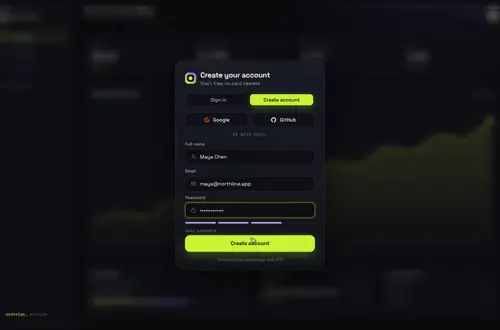
Amplify's Authenticator takes a theme, header and footer slots and new field labels. When you want a different screen instead of a restyled one, you call signIn, signUp and confirmSignUp from aws-amplify/auth yourself. Here they drive Gateway Dive, including the email code step Cognito asks for after sign-up.
By buying you agree to the Terms.
- Download right after paying
- Use it in client projects
- Won't run on the listed stack? We fix it or refund you
Ready forCursorv0Lovableshadcn CLI
Use it in Next.js
"use client";
// Before: <Authenticator>{({ signOut, user }) => <App />}</Authenticator>
import { useRef, useState, type FormEvent } from "react";
import { useRouter } from "next/navigation";
import { autoSignIn, confirmSignUp, resendSignUpCode, signIn, signInWithRedirect, signUp } from "aws-amplify/auth";
import GatewayDive from "@/components/gateway-dive/GatewayDive";

// Cognito error names worth a plain sentence; anything else gets the generic line
const messages: Record<string, string> = {
  NotAuthorizedException: "Wrong email or password.",
  UsernameExistsException: "That email already has an account. Sign in instead.",
  InvalidPasswordException: "That password doesn't meet the pool's rules.",
  CodeMismatchException: "That code doesn't match. Check the latest email.",
  ExpiredCodeException: "That code expired. We sent a new one.",
};
const say = (e: unknown) =>
  (e instanceof Error && messages[e.name]) || "That didn't work. Try again.";

export default function Login() {
  const router = useRouter();
  const pending = useRef<{ email: string; auto: boolean } | null>(null);
  const [confirm, setConfirm] = useState<{ email: string; auto: boolean } | null>(null);
  const [code, setCode] = useState("");
  const [note, setNote] = useState("");

  async function submitCode(e: FormEvent) {
    e.preventDefault();
    if (!confirm) return;
    try {
      const { nextStep } = await confirmSignUp({ username: confirm.email, confirmationCode: code.trim() });
      if (nextStep.signUpStep === "COMPLETE_AUTO_SIGN_IN") {
        await autoSignIn();
        router.push("/dashboard");
      } else {
        pending.current = null;
        setConfirm(null); // back to the card: confirmed, now sign in
      }
    } catch (err) {
      if (err instanceof Error && err.name === "ExpiredCodeException") await resendSignUpCode({ username: confirm.email });
      setNote(say(err));
    }
  }

  if (confirm) {
    return (
      <main className="grid min-h-dvh place-items-center bg-neutral-950 p-6 text-white">
        <form onSubmit={submitCode} className="w-full max-w-sm space-y-4">
          <h1 className="text-xl font-semibold">Check your email</h1>
          <p className="text-sm text-neutral-400">We sent a code to {confirm.email}.</p>
          <input
            value={code}
            onChange={(e) => setCode(e.target.value)}
            inputMode="numeric"
            autoComplete="one-time-code"
            aria-label="Confirmation code"
            className="w-full rounded-lg bg-neutral-900 px-3 py-2 tracking-widest"
          />
          {note ? <p role="alert" className="text-sm text-red-400">{note}</p> : null}
          <button className="w-full rounded-lg bg-white py-2 font-medium text-black">Confirm</button>
        </form>
      </main>
    );
  }

  return (
    <main style={{ height: "100dvh" }}>
      <GatewayDive
        autoplayDemo={false}
        brand="Acme"
        providers={[{ id: "google", label: "Google" }]} // the id "google" draws the Google logo
        onProvider={() => void signInWithRedirect({ provider: "Google" })}
        onSubmit={async ({ mode, name, email, password }) => {
          try {
            if (mode === "signup") {
              const { nextStep } = await signUp({
                username: email,
                password,
                options: { userAttributes: { email, name }, autoSignIn: true },
              });
              if (nextStep.signUpStep === "CONFIRM_SIGN_UP") pending.current = { email, auto: true };
              return { ok: true };
            }
            const { nextStep } = await signIn({ username: email, password });
            if (nextStep.signInStep === "DONE") return { ok: true };
            if (nextStep.signInStep === "CONFIRM_SIGN_UP") {
              await resendSignUpCode({ username: email });
              pending.current = { email, auto: false };
              return { ok: true };
            }
            // MFA codes, a forced new password and the rest need screens of their own
            return { ok: false, error: "This account needs a step this page doesn't handle yet." };
          } catch (e) {
            return { ok: false, error: say(e) };
          }
        }}
        onSuccess={() => {
          if (pending.current) setConfirm(pending.current); // show the code screen, skip the route
          else setTimeout(() => router.push("/dashboard"), 1400);
        }}
      />
    </main>
  );
}"use client";
import { Amplify } from "aws-amplify";
import outputs from "@/amplify_outputs.json";
// ssr: true keeps the tokens in cookies, as the Amplify Next.js docs ask
Amplify.configure(outputs, { ssr: true });
export default function ConfigureAmplifyClientSide() {
return null;
}Good to know
- Amplify's sign-in docs call the Authenticator "the quickest way to get started with Amplify Auth" and document signIn({ username, password }) from aws-amplify/auth for your own form. That's the route this page takes. Versions checked on October 25, 2026: aws-amplify 6.22.2 and @aws-amplify/ui-react 6.15.7, whose peer range includes React 19.
- When the free option fits better: if a theme, a logo in the header slot, relabelled fields and your own CSS get you close enough, keep the Authenticator. It's free, and it already runs the code step, forgot password and MFA. You can even override its signIn and signUp calls through the services prop. Swap it out when you want a different screen.
- The code step is yours now. With Cognito's defaults a new user stays unconfirmed until they type the emailed code, so signUp returns CONFIRM_SIGN_UP. The snippet shows a small code form, calls confirmSignUp, and then autoSignIn because signUp asked for it.
- The page handles DONE and CONFIRM_SIGN_UP from signIn. MFA codes, a forced new password and the other next steps get a plain message here. Those need screens of their own, and that's where the Authenticator saves the most work.
- Google goes through signInWithRedirect({ provider: "Google" }). Pass the id "google" to the card so it draws the logo. Amplify's external providers are Google, Facebook, Login with Amazon, Sign in with Apple, plus OIDC and SAML, so there's no GitHub button here.
- Configure Amplify once in a client component with ssr: true, as the Amplify Next.js docs show, and render it in your root layout. That keeps the tokens in cookies, so server code can read the session through @aws-amplify/adapter-nextjs.
- The card's Forgot? link has no prop yet. Link your own page under the card and call resetPassword there.
- Type-checked against aws-amplify 6.22.2, next 15.5 and react 19.1 with TypeScript 5.9, using the shipped component source and a stub amplify_outputs.json. We didn't run it against a live user pool.
What the Authenticator did that you now own
- Sign in and Create account tabs: the card has both. Create account adds a name field and a password strength meter.
- Confirm sign-up: the code form in the snippet, then confirmSignUp and autoSignIn.
- Resend code: resendSignUpCode, called when signIn finds an unconfirmed user or a code has expired.
- Forgot password: resetPassword and confirmResetPassword on a page you build.
- MFA (TOTP, SMS or email codes) and new password required: confirmSignIn with the code. Our Step-Up OTP Gate can be that code screen.
- socialProviders: the providers array plus signInWithRedirect.
- The signed-in children render prop: route to your app in onSuccess, and protect pages on the server with the Next.js adapter.
Install
- Copy from the zipPut
react/src/componentsintosrc/, thennpm i aws-amplify (already there if you used Authenticator; @aws-amplify/ui-react can go once nothing else uses it). - Or ask your AIPaste PROMPT.md into Cursor, Lovable or v0.
Props
- onSubmit
- signIn or signUp; returns { ok, error? }
- onSuccess
- show the code step or route to the app
- providers / onProvider
- { id: "google" } → signInWithRedirect
- defaultMode
- 'signin' or 'signup'
- backdrop
- your own screen behind the card
- autoplayDemo
- false in a real app
How qodesign compares
- qodesign vs Magic UIMagic UI is best for: landing pages built with shadcn/ui.
- qodesign vs Aceternity UIAceternity UI is best for: teams building many marketing pages who want one big library.
All comparisons, with prices read on each library's own site.
Questions
Can I customise the Amplify Authenticator without replacing it?
Yes, quite a lot: theme tokens, header and footer slots, form field labels and order, CSS, and overrides for its signIn and signUp calls. Replace it when you want a different layout, not a recoloured one.
Do I still need @aws-amplify/ui-react?
Not for this page. It only uses aws-amplify/auth. Keep ui-react if other screens use its components.
Why does sign-up need a code?
Cognito keeps new users unconfirmed until they verify their email by default. signUp returns CONFIRM_SIGN_UP, and confirmSignUp with the emailed code finishes it.
Does this work with Amplify Gen 1?
The aws-amplify v6 calls are the same. Gen 1 projects configure Amplify from aws-exports instead of amplify_outputs.json.
Does the sign-in page work in Next.js?
Yes, as a client component. Keep "use client" at the top of the file that renders it, as in the snippet above. App Router and Pages Router both work.
Can Cursor or v0 add it for me?
Yes. Each download has a PROMPT.md. Paste it into Cursor, Lovable, v0 or Claude Code and it fits the piece into your app.
Can I use it in client work?
Yes, in personal and client projects. You can't resell the code itself as a kit.