Mercado Pago React card form: the Brick first, then Secure Fields in a 3D card
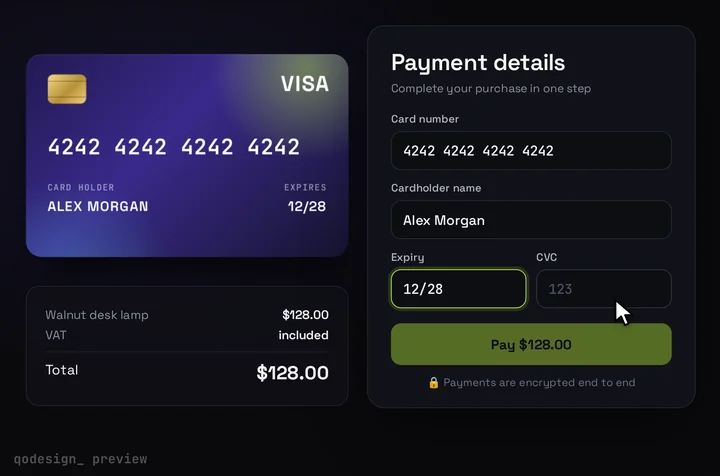
For most stores, Mercado Pago's own Card Payment Brick is the right pick. It's free and it handles the document type, issuer and installments for you. This page is for the other case: a custom card form built on the Secure Fields in @mercadopago/sdk-react, inside an animated 3D card.
By buying you agree to the Terms.
- Download right after paying
- Use it in client projects
- Won't run on the listed stack? We fix it or refund you
Ready forCursorv0Lovableshadcn CLI
Use it in Next.js
"use client";
import { useCallback, useRef, useState } from "react";
import { useRouter } from "next/navigation";
import {
  initMercadoPago,
  CardNumber,
  ExpirationDate,
  SecurityCode,
  createCardToken,
  getPaymentMethods,
} from "@mercadopago/sdk-react";
import CardCheckout, { type CardFieldsSlot } from "@/components/CardCheckout";
import PayerFields, { type Payer } from "./payer-fields";

initMercadoPago(process.env.NEXT_PUBLIC_MP_PUBLIC_KEY!, { locale: "pt-BR" });

// Module level on purpose: sdk-react re-creates a Secure Field whenever one of
// its props changes, so styles and callbacks must keep the same identity.
const fieldStyle = { color: "#F4F4F6", fontSize: "19px", fontFamily: "monospace", placeholderColor: "#4a4f61" };

// Mercado Pago ids: "visa", "master", "debvisa", "debmaster", "amex"...
// The card draws Visa and Mastercard, so the rest show no logo.
const brandOf = (id: string) =>
  id === "visa" || id === "debvisa" ? "visa" : id === "master" || id === "debmaster" ? "mastercard" : null;

export type CardMeta = { bin: string; paymentMethodId: string; issuerId: string };

function MercadoPagoFields({ slot, onCard }: { slot: CardFieldsSlot; onCard: (card: CardMeta | null) => void }) {
  const ok = useRef({ cardNumber: false, expirationDate: false, securityCode: false, bin: false }).current;
  const report = useCallback(
    () => slot.onChange({ complete: ok.cardNumber && ok.expirationDate && ok.securityCode && ok.bin }),
    [slot, ok],
  );
  const onValidity = useCallback(
    (e: { field: string; errorMessages: unknown[] }) => {
      if (e.field === "cardNumber" || e.field === "expirationDate" || e.field === "securityCode") ok[e.field] = e.errorMessages.length === 0;
      report();
    },
    [ok, report],
  );
  const onBinChange = useCallback(
    async ({ bin }: { bin?: string }) => {
      ok.bin = false;
      onCard(null);
      slot.onChange({ brand: null });
      report();
      if (!bin) return;
      const methods = await getPaymentMethods({ bin });
      const pm = methods?.results[0];
      if (!pm) return;
      ok.bin = true;
      onCard({ bin, paymentMethodId: pm.id, issuerId: String(pm.issuer.id) });
      slot.onChange({ brand: brandOf(pm.id) });
      report();
    },
    [ok, onCard, slot, report],
  );
  const onFocus = useCallback((e: { field: string }) => slot.onChange({ focus: e.field === "securityCode" ? "cvc" : null }), [slot]);
  const onBlur = useCallback(() => slot.onChange({ focus: null }), [slot]);

  return (
    <div className="grid gap-[15px]">
      <div>
        <label className={slot.labelClassName}>Card number</label>
        <div className={slot.fieldClassName}>
          <CardNumber placeholder="1234 5678 9012 3456" style={fieldStyle} onValidityChange={onValidity} onBinChange={onBinChange} onFocus={onFocus} onBlur={onBlur} />
        </div>
      </div>
      <div className="flex gap-[14px]">
        <div className="flex-1">
          <label className={slot.labelClassName}>Expiry</label>
          <div className={slot.fieldClassName}>
            <ExpirationDate placeholder="MM/YY" mode="short" style={fieldStyle} onValidityChange={onValidity} onFocus={onFocus} onBlur={onBlur} />
          </div>
        </div>
        <div className="flex-1">
          <label className={slot.labelClassName}>CVC</label>
          <div className={slot.fieldClassName}>
            <SecurityCode placeholder="123" style={fieldStyle} onValidityChange={onValidity} onFocus={onFocus} onBlur={onBlur} />
          </div>
        </div>
      </div>
    </div>
  );
}

export default function MercadoPagoCardCheckout({ amount }: { amount: number }) {
  const router = useRouter();
  const card = useRef<CardMeta | null>(null);
  const [bin, setBin] = useState<string | null>(null);
  const [payer, setPayer] = useState<Payer>({ email: "", docType: "", docNumber: "", installments: 1 });
  const onCard = useCallback((c: CardMeta | null) => {
    card.current = c;
    setBin(c?.bin ?? null);
  }, []);

  return (
    <div className="grid gap-6">
      <PayerFields amount={amount} bin={bin} value={payer} onChange={setPayer} />
      <CardCheckout
        amount={amount}
        currency="BRL"
        locale="pt-BR"
        resetAfter={null}
        renderCardFields={(slot) => <MercadoPagoFields slot={slot} onCard={onCard} />}
        onConfirm={async ({ name }) => {
          if (!card.current) throw new Error("Check the card number.");
          if (!payer.email || !payer.docType || !payer.docNumber) throw new Error("Fill in your email and document first.");
          const token = await createCardToken({
            cardholderName: name,
            identificationType: payer.docType,
            identificationNumber: payer.docNumber,
          });
          if (!token) throw new Error("The card fields haven't loaded yet.");
          const res = await fetch("/api/mercado-pago/pay", {
            method: "POST",
            headers: { "Content-Type": "application/json" },
            body: JSON.stringify({
              token: token.id,
              payment_method_id: card.current.paymentMethodId,
              issuer_id: card.current.issuerId,
              installments: payer.installments,
              payer: { email: payer.email, identification: { type: payer.docType, number: payer.docNumber } },
            }),
          });
          const { status } = (await res.json()) as { status?: string };
          if (status === "approved") return router.push("/thanks");
          if (status === "in_process" || status === "pending") return router.push("/thanks?pending=1");
          throw new Error("The payment was not approved. Try another card.");
        }}
      />
    </div>
  );
}
"use client";
import { useEffect, useState } from "react";
import { getIdentificationTypes, getInstallments } from "@mercadopago/sdk-react";

export type Payer = { email: string; docType: string; docNumber: string; installments: number };
type Option = { value: string; label: string };

const box = "h-11 w-full rounded-lg border border-zinc-300 bg-white px-3 text-sm text-zinc-900";

// Email, document and installments sit outside the card: Mercado Pago needs
// them in several countries, and the 3D card has no room for them.
export default function PayerFields({ amount, bin, value, onChange }: {
  amount: number;
  bin: string | null;
  value: Payer;
  onChange: (p: Payer) => void;
}) {
  const [docTypes, setDocTypes] = useState<Option[]>([]);
  const [plans, setPlans] = useState<Option[]>([{ value: "1", label: "1x" }]);
  const set = (patch: Partial<Payer>) => onChange({ ...value, ...patch });

  useEffect(() => {
    getIdentificationTypes().then((types) => setDocTypes((types ?? []).map((t) => ({ value: t.id, label: t.name }))));
  }, []);

  useEffect(() => {
    if (!bin) return;
    getInstallments({ amount: String(amount), bin, locale: "pt-BR" }).then((r) => {
      const costs = r?.[0]?.payer_costs ?? [];
      if (costs.length) setPlans(costs.map((c) => ({ value: String(c.installments), label: c.recommended_message })));
    });
  }, [amount, bin]);

  return (
    <div className="grid gap-3 sm:grid-cols-2">
      <input className={box} type="email" placeholder="Email" value={value.email} onChange={(e) => set({ email: e.target.value })} />
      <div className="flex gap-2">
        <select className={`${box} w-28`} value={value.docType} onChange={(e) => set({ docType: e.target.value })}>
          <option value="">Doc</option>
          {docTypes.map((d) => (
            <option key={d.value} value={d.value}>{d.label}</option>
          ))}
        </select>
        <input className={box} placeholder="Document number" value={value.docNumber} onChange={(e) => set({ docNumber: e.target.value })} />
      </div>
      <select className={`${box} sm:col-span-2`} value={String(value.installments)} onChange={(e) => set({ installments: Number(e.target.value) })}>
        {plans.map((p) => (
          <option key={p.value} value={p.value}>{p.label}</option>
        ))}
      </select>
    </div>
  );
}
import MercadoPagoCardCheckout from "./checkout";

export default function PayPage() {
  return (
    <main className="mx-auto grid max-w-[1000px] gap-6 p-6">
      <h1 className="text-2xl font-semibold">Pagamento</h1>
      <MercadoPagoCardCheckout amount={49.9} />
    </main>
  );
}
// Server only. The access token never reaches the browser, and the amount is set here.
import { NextResponse } from "next/server";

const AMOUNT = 49.9; // look the order up instead of trusting the browser

type Body = {
  token: string;
  payment_method_id: string;
  issuer_id?: string;
  installments: number;
  payer: { email: string; identification?: { type: string; number: string } };
};

export async function POST(req: Request) {
  const b = (await req.json()) as Body;
  const res = await fetch("https://api.mercadopago.com/v1/payments", {
    method: "POST",
    headers: {
      Authorization: `Bearer ${process.env.MP_ACCESS_TOKEN}`,
      "Content-Type": "application/json",
      "X-Idempotency-Key": crypto.randomUUID(),
    },
    body: JSON.stringify({
      transaction_amount: AMOUNT,
      token: b.token,
      installments: b.installments,
      payment_method_id: b.payment_method_id,
      issuer_id: b.issuer_id ? Number(b.issuer_id) : undefined,
      payer: b.payer,
      description: "Order 1042",
    }),
    cache: "no-store",
  });
  const payment = (await res.json()) as { status?: string; status_detail?: string };
  return NextResponse.json({ status: payment.status, detail: payment.status_detail }, { status: res.ok ? 200 : 402 });
}
Good to know
- What the card can show: Secure Fields are iframes, so the card number, expiry and CVC never touch your page or your server. The 3D card gets the brand from onBinChange plus getPaymentMethods, the valid state from onValidityChange, and the CVC flip from focus on the securityCode field. It shows the brand, lights up Pay and flips. It doesn't show the digits the buyer types.
- Keep the field props stable. In sdk-react 1.0.7 each Secure Field is re-created whenever one of its props changes, except placeholder and length. A style object or a callback written inline is a new value on every render, so the field would mount again while the buyer types. That's why the snippet keeps fieldStyle at module level and wraps every callback in useCallback.
- One of each field per page. Each Secure Field renders a div with a fixed id (cardNumberSecureField_container and so on) and keeps its instance on window, so two card numbers on one page would clash.
- The README says "Expiration Date cannot coexist with Expiration Month or Expiration Year", so pick one style. The snippet uses ExpirationDate with mode short (MM/YY).
- The server sets the amount and sends an X-Idempotency-Key. Mercado Pago's Card Payment Brick docs say "it is mandatory to send the attribute X-Idempotency-Key" and list the minimum fields: "token, transaction_amount, installments, payment_method_id and payer.email". Fulfil orders from Mercado Pago's webhook, not from the redirect to /thanks.
- The card draws a Visa or a Mastercard mark. Mercado Pago calls Mastercard "master" and has debit ids such as debvisa and debmaster, so the snippet maps them. Other brands still pay; the card just shows no logo.
- Set NEXT_PUBLIC_MP_PUBLIC_KEY and MP_ACCESS_TOKEN. The example uses the pt-BR locale and BRL; change both for your country.
- What we ran and what we didn't: on October 25, 2026 we type-checked these files and the Brick file below against @mercadopago/sdk-react 1.0.7, next 15.5.28, react 19.3.1, framer-motion 14.6.0 and TypeScript 5.9.3, with the shipped CardCheckout source. Three negative controls failed as they should (a made-up onBrandChange prop, mode long on the expiry, a string resetAfter). We had no Mercado Pago account, so no field loaded, no token was created and no payment went through. Reading an empty errorMessages list as valid comes from the types and the sdk-js fields docs, not from a live field. Test with Mercado Pago's test cards and test users before you ship.
Mercado Pago's Card Payment Brick fits most React stores
- Start here. Mercado Pago describes the Brick as "a payment form with an optimized design and different themes, providing all the necessary fields to make a payment with a credit and/or debit card". It also has the cardholder name and ID fields and shows alerts for missing or wrong input. It ships in the same @mercadopago/sdk-react package (1.0.7, Apache-2.0, React 16.8 to 19 as peers) at no extra cost.
- The Brick fits better when you want installments, issuer and document type handled for you, or when you sell in several Mercado Pago countries with different ID rules. That covers most stores. Use the Brick and skip this card.
- Secure Fields are the route when the card form has to look like your product. You then do the parts the Brick did: document type, installments and the issuer. The snippet at the top of this page does them with getIdentificationTypes, getInstallments and getPaymentMethods.
- The API route above takes the Brick's formData as it comes, because the custom form posts the same field names (token, issuer_id, payment_method_id, installments, payer). So you can start with the Brick and switch later without touching the server.
"use client";
import { initMercadoPago, CardPayment } from "@mercadopago/sdk-react";
import { useRouter } from "next/navigation";

initMercadoPago(process.env.NEXT_PUBLIC_MP_PUBLIC_KEY!, { locale: "pt-BR" });

export default function BrickCheckout({ amount }: { amount: number }) {
  const router = useRouter();
  return (
    <CardPayment
      initialization={{ amount }}
      onSubmit={async (formData) => {
        // formData carries token, issuer_id, payment_method_id, installments and payer
        const res = await fetch("/api/mercado-pago/pay", {
          method: "POST",
          headers: { "Content-Type": "application/json" },
          body: JSON.stringify(formData),
        });
        const { status } = (await res.json()) as { status?: string };
        if (status !== "approved" && status !== "in_process") throw new Error(status);
        router.push("/thanks");
      }}
      onError={(error) => console.error(error)}
    />
  );
}
Mercado Pago Secure Fields in React: what a custom form has to do
- The README lists five Secure Fields: CardNumber, SecurityCode, ExpirationDate, ExpirationMonth and ExpirationYear, plus createCardToken and updateCardToken. Each field takes a placeholder, a style object, and events: onValidityChange, onBinChange (card number only), onFocus, onBlur, onChange, onReady and onError.
- Brand: the fields don't report a brand. onBinChange gives you the first digits once they're valid, and getPaymentMethods({ bin }) returns the payment method id (visa, master, amex and so on) and the issuer. Keep both, because the payment call needs them.
- Installments: getInstallments({ amount, bin, locale }) returns payer_costs, each with installments and a recommended_message you can show as is. Note that amount is a string in the 1.0.7 types.
- Document: getIdentificationTypes() returns the ID types for your public key's country; the list differs by country. createCardToken takes the cardholder name, identificationType and identificationNumber and returns a token whose id goes to your server.
- 3D Secure: Mercado Pago's docs recommend 3DS 2.0 to raise approval rates. This snippet doesn't handle a challenge, so read their 3DS guide before you go live.
How this differs from the Stripe, PayPal and Adyen card guides
- All of them put the provider's fields in the same card slot. With Stripe you confirm a PaymentIntent from the browser, and with Adyen a session sends the payment for you. Mercado Pago works like a token flow: the browser creates a card token, and your server creates the payment with /v1/payments.
- Mercado Pago also asks for more buyer data than the others in several countries. The email, document and installments sit outside the 3D card in payer-fields.tsx, because the card has room for the card fields only.
Install
- Copy from the zipPut
react/src/componentsintosrc/, thennpm i framer-motion @mercadopago/sdk-react. - Or ask your AIPaste PROMPT.md into Cursor, Lovable or v0.
Props
- renderCardFields
- sdk-react Secure Fields inside the design
- onConfirm
- create the card token, then your server creates the payment; throw to show the error
- amount / currency
- what the card shows (your server charges its own amount)
- resetAfter
- null keeps the success state
How qodesign compares
- qodesign vs 21st.dev21st.dev is best for: browsing a huge marketplace and copying many components a month.
- qodesign vs Skiper UISkiper UI is best for: unusual interaction details for landing pages: image reveals, cursor trails, tooltips, drag-and-scroll galleries.
All comparisons, with prices read on each library's own site.
Questions
Does the 3D card see the card number?
No. The number, expiry and CVC stay in Mercado Pago's iframes. The card only hears the first digits' payment method, whether each field is valid, and when the CVC field has focus.
Card Payment Brick or Secure Fields?
The Brick for most stores. It's free and handles document type, issuer and installments. Secure Fields when the form must match your design, and then your code handles those parts, as this page shows.
Does @mercadopago/sdk-react work with React 19?
Version 1.0.7 lists react ^16.8 to ^19 as peers, and our snippet type-checks with react 19.3.1. We didn't run it against a Mercado Pago account.
Why does my Secure Field reset while I type?
Its props change on every render. sdk-react re-creates the field when any prop other than placeholder or length changes, so keep the style object outside the component and wrap the callbacks in useCallback.
Does this work in React Native?
No. sdk-react and this card are for the web; the Secure Fields render iframes in the DOM.
Can Cursor or v0 add it for me?
Yes. Each download has a PROMPT.md. Paste it into Cursor, Lovable, v0 or Claude Code and it fits the piece into your app.
Can I use it in client work?
Yes, in personal and client projects. You can't resell the code itself as a kit.