A Mastra chat UI for Next.js
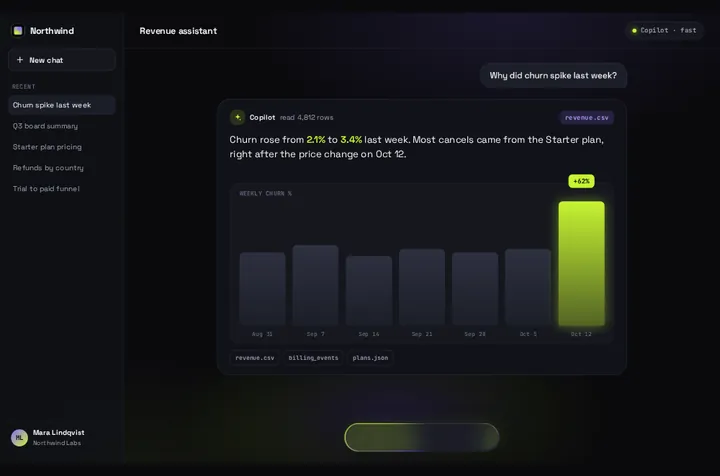
Mastra streams its agents in the AI SDK's format, so a useChat front end works. Here is the free route from Mastra's own docs, when it's the better pick, and Prompt Bloom on a Mastra agent: one question, and an answer that blooms out of the input.
By buying you agree to the Terms.
- Download right after paying
- Use it in client projects
- Won't run on the listed stack? We fix it or refund you
Ready forCursorv0Lovableshadcn CLI
Use it in Next.js
"use client";
import { useChat } from "@ai-sdk/react";
import { DefaultChatTransport } from "ai";
import PromptBloom from "@/components/PromptBloom";

export default function Chat() {
  const { messages, sendMessage, status, error } = useChat({
    transport: new DefaultChatTransport({
      api: "/api/chat",
      // Mastra memory keeps the history on the server, so send only the new message
      prepareSendMessagesRequest: ({ messages }) => ({ body: { messages: messages.slice(-1) } }),
    }),
  });

  const last = messages.at(-1);
  const reply =
    last?.role === "assistant" ? last.parts.map((p) => (p.type === "text" ? p.text : "")).join("") : "";

  return (
    <PromptBloom
      autoplayDemo={false}
      text={error ? "The agent didn't answer. Try again in a moment." : reply}
      streaming={status === "submitted" || status === "streaming"}
      onSubmit={(prompt) => sendMessage({ text: prompt })}
    />
  );
}import { handleChatStream } from "@mastra/ai-sdk";
import { createUIMessageStreamResponse } from "ai";
import { mastra } from "@/mastra";
export async function POST(req: Request) {
const params = await req.json();
const userId = "user-123"; // take this from your session, never from the request body
const stream = await handleChatStream({
mastra,
agentId: "support-agent", // the id of your Agent in src/mastra
version: "v7", // match the AI SDK major you installed
params: { ...params, memory: { thread: `chat-${userId}`, resource: userId } },
});
return createUIMessageStreamResponse({ stream });
}Good to know
- Run on October 25, 2026 in a fresh Next.js 16.4.3 app with @mastra/core 1.79.0, @mastra/ai-sdk 1.11.2, ai 7.0.153, @ai-sdk/react 4.0.157 and React 19.3.1. The Mastra agent used a mock model that streams a fixed reply, so the route and the page were real and the model wasn't. In headless Chromium at 390 and 1440 px the Thinking pill held, the reply streamed into the card, and the follow-up question went out with one message in the body.
- Keep version: "v7" when ai 7 is installed. Mastra's docs say handleChatStream "defaults to AI SDK v5 for backward compatibility". Without the line, this route fails the type-check against ai 7.0.153.
- prepareSendMessagesRequest sends only the newest message. Mastra's docs explain why: with memory on the agent, Mastra loads the history on the server, and sending the full history "is redundant and can cause message-ordering bugs".
- The route sets the memory thread and resource on the server, the way Mastra's Next.js guide does, so a user can't ask for someone else's thread. If the agent has no memory configured, Mastra logs "No memory is configured but resourceId and threadId were passed" and still streams the reply. We saw exactly that in the run.
- The card shows the text parts. Tools still run on the server, but Prompt Bloom draws no tool cards; the model's text after the tool call is what lands. Pass data to replace the demo's sample names, sources and chips.
- If the request fails, useChat sets error and the card shows your message instead of closing empty.
- Not run: a real model provider, Mastra memory with a storage adapter, the Mastra server variant below (type-checked only), Safari, Firefox and real phones.
Mastra chat UI: start with the free route
- Mastra doesn't ship a chat component of its own. Its Agentic UI docs list four front ends that work with it: AI SDK UI, Assistant UI, CopilotKit and OpenUI. The first three are free and open source on npm (ai and @ai-sdk/react are Apache-2.0, @assistant-ui/react and @copilotkit/react-core are MIT).
- Mastra's own Next.js guide is the free route, and it's where most people should start. It runs handleChatStream in app/api/chat/route.ts, renders the page with AI SDK UI and AI Elements (npx ai-elements@latest copies Conversation, Message, Tool and PromptInput into your project), and adds a GET route that reloads the thread from Mastra memory with toAISdkMessages.
- That route fits better if you want a scrolling thread, earlier messages back after a reload, tool calls drawn as cards, or file attachments. So do assistant-ui and CopilotKit, which Mastra's docs also cover. Prompt Bloom has none of those, and we'd rather you knew that before buying it.
- Prompt Bloom fits a narrower job: one question and one answer on screen, like an ask box on a dashboard or a help panel, where the answer card grows out of the input. The agent can still remember earlier turns through Mastra memory. The screen just doesn't list them.
- Mastra also publishes @mastra/react (1.12.0, peer react >=19.0.0 and @tanstack/react-query ^5.90.21). We didn't use it here. The AI SDK route above is the one Mastra's AI SDK UI page documents for useChat.
Mastra as its own server: chatRoute and useChat
- Mastra's AI SDK UI page, read on October 25, 2026: "You can use chatRoute(), workflowRoute(), and networkRoute() to create API routes that stream Mastra content in AI SDK-compatible format. Once implemented, you can use these API routes in useChat()."
- Use this when Mastra runs as its own server (mastra dev listens on port 4111) and Next.js is only the front end. Register chatRoute on the Mastra side. With :agentId in the path, one route serves every agent, and only the transport URL changes in the component.
- Type-checked only, against the same versions as the main snippet. We didn't start a Mastra server for this part. If your front end runs on another origin, check the Mastra server's CORS settings before you test.
import { Mastra } from "@mastra/core";
import { Agent } from "@mastra/core/agent";
import { chatRoute } from "@mastra/ai-sdk";

const supportAgent = new Agent({ id: "support-agent", name: "Support agent", instructions: "Be brief.", model: "openai/gpt-5-mini" });

export const mastra = new Mastra({
  agents: { supportAgent },
  server: { apiRoutes: [chatRoute({ path: "/chat/:agentId" })] },
});"use client";
import { useChat } from "@ai-sdk/react";
import { DefaultChatTransport } from "ai";
import PromptBloom from "@/components/PromptBloom";
// Mastra running as its own server (mastra dev, port 4111) with chatRoute({ path: "/chat/:agentId" })
export default function ServerChat() {
const { messages, sendMessage, status } = useChat({
transport: new DefaultChatTransport({ api: "http://localhost:4111/chat/support-agent" }),
});
const last = messages.at(-1);
const reply =
last?.role === "assistant" ? last.parts.map((p) => (p.type === "text" ? p.text : "")).join("") : "";
return (
<PromptBloom
autoplayDemo={false}
text={reply}
streaming={status === "submitted" || status === "streaming"}
onSubmit={(prompt) => sendMessage({ text: prompt })}
/>
);
}Mastra and AI SDK versions we checked
- From npm on October 25, 2026, downloads for the week of October 16 to 22: @mastra/core 1.79.0 (published October 21, 2026), 1,442,185. @mastra/ai-sdk 1.11.2, 375,773. @mastra/client-js 1.56.0, 151,317. @mastra/react 1.12.0, 18,052. All four are Apache-2.0.
- On the AI SDK side: ai 7.0.153 and @ai-sdk/react 4.0.157, both published October 24, 2026. @ai-sdk/react accepts React 18 and React 19.
- The import paths on this page are from @mastra/ai-sdk 1.11.2: handleChatStream and chatRoute from the package root, toAISdkMessages from @mastra/ai-sdk/ui. Mastra publishes often, so check them against the version you install.
- A Mastra GitHub issue asked for a "Chat UI that loads messages saved by Mastra back-end" (#5928, closed August 29, 2025). Mastra's Next.js guide now covers it with the GET route mentioned above.
Prompt Bloom on Tailwind v4 and React 19
- Our Tailwind v4 check on October 25, 2026 built Prompt Bloom twice in Next.js 16, once on Tailwind 4.3.3 and once on 3.4.19, and compared both at 390 and 1440 px. Result for Prompt Bloom: works as-is, and the pixel diff was 0 at both widths. You don't need a CSS change on Tailwind v4.
- The download's demo lists react ^18.3.1, but the component has no animation library and no React peer range of its own. The run on this page used react 19.3.1.
Install
- Copy from the zipPut
react/src/components + react/src/dataintosrc/, thennpm i @mastra/ai-sdk @ai-sdk/react ai. - Or ask your AIPaste PROMPT.md into Cursor, Lovable or v0.
Props
- text
- the agent's reply so far
- streaming
- true while the reply is arriving
- onSubmit
- (prompt) → sendMessage
- autoplayDemo
- false for a real chat
- data
- names, sources and chips on screen
- chart
- bar chart under the reply; off by default when streaming
How qodesign compares
- qodesign vs 21st.dev21st.dev is best for: browsing a huge marketplace and copying many components a month.
- qodesign vs Magic UIMagic UI is best for: landing pages built with shadcn/ui.
All comparisons, with prices read on each library's own site.
Questions
Does Mastra have its own chat UI component?
Not a drop-in one. Mastra's docs point to AI SDK UI, Assistant UI, CopilotKit and OpenUI, and its Next.js guide builds the chat page with AI Elements.
chatRoute or handleChatStream in Next.js?
handleChatStream when Mastra runs inside your Next.js app, as in Mastra's Next.js guide and the route above. chatRoute when Mastra runs as its own server and Next.js is only the front end.
Why send only the last message to Mastra?
When the agent has memory, Mastra loads the earlier messages from storage on the server. Mastra's docs say sending the full history is redundant and can cause message-ordering bugs.
Can I use assistant-ui with Mastra instead?
Yes. Mastra's docs have an Assistant UI page. Our assistant-ui composer guide shows Prompt Bloom inside assistant-ui, and this page wires useChat directly instead.
Does the Mastra chat work in Next.js?
Yes, as a client component. Keep "use client" at the top of the file that renders it, as in the snippet above. App Router and Pages Router both work.
Can Cursor or v0 add it for me?
Yes. Each download has a PROMPT.md. Paste it into Cursor, Lovable, v0 or Claude Code and it fits the piece into your app.
Can I use it in client work?
Yes, in personal and client projects. You can't resell the code itself as a kit.