n8n chat custom UI for React and Next.js
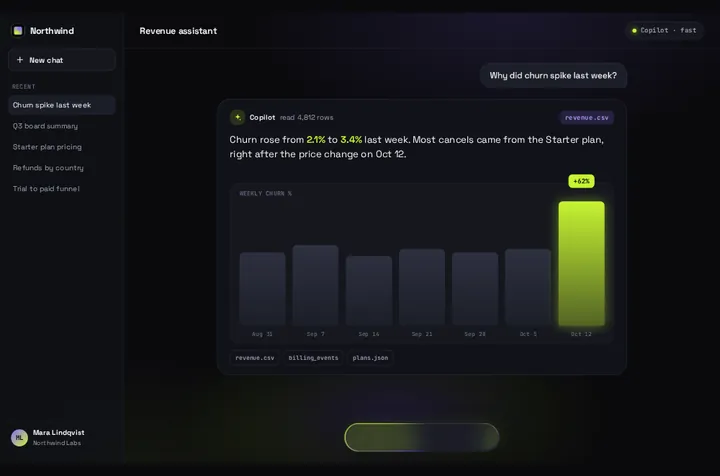
n8n's own chat widget can be restyled with CSS variables, and for a chat bubble on your site that's usually enough. Here is that route first, then the exact request a custom UI sends to the Chat Trigger, and Prompt Bloom wired to it: one question, and an answer card that grows out of the input.
By buying you agree to the Terms.
- Download right after paying
- Use it in client projects
- Won't run on the listed stack? We fix it or refund you
Ready forCursorv0Lovableshadcn CLI
Use it in Next.js
"use client";
import { useRef, useState } from "react";
import PromptBloom from "@/components/PromptBloom";

const FAILED = "The workflow didn't answer. Try again in a moment.";

export default function Ask() {
  const [text, setText] = useState("");
  const [busy, setBusy] = useState(false);
  const sessionId = useRef<string | null>(null);

  async function ask(prompt: string) {
    // one id per visitor tab, so a Memory node in n8n can keep the context
    sessionId.current ??= crypto.randomUUID();
    setText("");
    setBusy(true);
    try {
      const res = await fetch("/api/n8n", {
        method: "POST",
        headers: { "Content-Type": "application/json" },
        body: JSON.stringify({ chatInput: prompt, sessionId: sessionId.current }),
      });
      const data: { output?: string } = await res.json();
      setText(res.ok && data.output ? data.output : FAILED);
    } catch {
      setText(FAILED);
    } finally {
      setBusy(false);
    }
  }

  return <PromptBloom autoplayDemo={false} text={text} streaming={busy} onSubmit={ask} />;
}// Server side: the webhook URL and the Basic Auth password never reach the browser.
export async function POST(req: Request) {
const { chatInput, sessionId } = (await req.json()) as { chatInput?: unknown; sessionId?: unknown };
if (typeof chatInput !== "string" || !chatInput.trim() || typeof sessionId !== "string") {
return Response.json({ error: "chatInput and sessionId are required" }, { status: 400 });
}
const user = process.env.N8N_CHAT_USER;
const pass = process.env.N8N_CHAT_PASSWORD;
const res = await fetch(process.env.N8N_CHAT_URL!, {
method: "POST",
headers: {
"Content-Type": "application/json",
// only when the Chat Trigger's Authentication is Basic Auth
...(user && pass ? { Authorization: `Basic ${Buffer.from(`${user}:${pass}`).toString("base64")}` } : {}),
},
// the same body n8n's own chat widget sends
body: JSON.stringify({ action: "sendMessage", sessionId, chatInput: chatInput.slice(0, 4000) }),
});
if (!res.ok) return Response.json({ error: `n8n answered ${res.status}` }, { status: 502 });
// the widget reads output, then text; an AI Agent node answers with output
const data = (await res.json()) as { output?: string; text?: string };
return Response.json({ output: data.output ?? data.text ?? "" });
}Good to know
- Run on October 25, 2026 against a real n8n 2.44.6 on our machine: a Chat Trigger in Embedded Chat mode, Response Mode "When Last Node Finishes", and an Edit Fields node that set output from chatInput. No AI model was in the loop, so the workflow and the request were real and the answer was a fixed sentence. The page and route above ran in a fresh Next.js 16.4.3 app with React 19.3.1 and TypeScript 7.0.2. In headless Chromium at 390 and 1440 px the Thinking pill held, the answer bloomed into the card, and a second question went out with the same sessionId.
- What the Chat Trigger got from the route: {"action":"sendMessage","sessionId":"…","chatInput":"…"}. That is the body n8n's own widget sends (we read it in the @n8n/chat source and saw the widget send it in the same run). What came back: {"output":"…"}.
- The route reads output first, then text, the same order the widget's own code uses. An AI Agent node answers in output. If your last node is something else, check its field name in the execution log.
- With the webhook pointed at a wrong URL, n8n answered 404, the route answered 502, and the card showed the fallback sentence instead of closing empty.
- The route posts server to server, so the browser never calls n8n and CORS never comes into it. It also keeps the webhook URL out of your page source.
- Prompt Bloom shows one question and one answer. It has no list of earlier messages, no file upload and no streaming from n8n. The answer arrives whole, then the card reveals it. Plain words and **bold** render; other Markdown (lists, links, headings) shows as typed, so ask the agent for short plain answers.
- Not run: an AI Agent with a real model, a Memory node, Basic Auth on the Chat Trigger (the Authorization line is type-checked only), Streaming response mode, n8n Cloud, Safari, Firefox and real phones.
n8n chat custom UI: start with n8n's own widget
- n8n publishes its chat widget as @n8n/chat. Its README says it plainly: "The Chat window is entirely customizable using CSS variables." Colors, fonts, the window size, the toggle button, the header and the message bubbles each have a variable. It also does things Prompt Bloom doesn't: earlier messages come back with loadPreviousSession, it takes file uploads, it can stream, and it renders Markdown.
- If you want a chat bubble in the corner of your site that keeps the conversation, use the widget and restyle it. That fits better than Prompt Bloom, and it's free.
- The widget is built with Vue and ships Vue inside it, so in React you mount it from an effect. You restyle it with CSS, you don't get React components. Its license is not MIT: the package's license field says "SEE LICENSE IN LICENSE.md", and that file is n8n's Sustainable Use License. Read it if your use goes beyond your own site.
- Two things we hit in the run below. First, the widget's style.css sets every variable on :root, and Next.js loaded it after our globals.css, so our colors lost. Import the widget's CSS in app/layout.tsx above globals.css. Setting the variables on a lower element doesn't fully work either: derived ones like the toggle's hover color are worked out on :root and stayed pink. Second, React Strict Mode runs effects twice in development, so call unmount() in the cleanup or you get two chat buttons.
- We also found that the README's i18n example leaves out closeButtonTooltip, which the 1.43.3 types require. Copied into a .tsx file as-is, it fails the type-check.
"use client";
import { useEffect } from "react";
import { createChat } from "@n8n/chat";

export default function N8nChat() {
  useEffect(() => {
    const chat = createChat({
      webhookUrl: process.env.NEXT_PUBLIC_N8N_CHAT_URL!,
      mode: "window",
      loadPreviousSession: true, // needs a Memory node on the Chat Trigger and the agent
      initialMessages: ["Hi! Ask me anything about the docs."],
      i18n: {
        en: {
          title: "Ask the docs",
          subtitle: "Answers come from our n8n workflow.",
          footer: "",
          getStarted: "New conversation",
          inputPlaceholder: "Type your question",
          closeButtonTooltip: "Close",
        },
      },
    });
    // React Strict Mode runs effects twice in dev; without this you get two chat bubbles
    return () => chat.unmount();
  }, []);

  return null;
}import "@n8n/chat/style.css"; // first, so globals.css can override its :root variables
import "./globals.css";
export default function RootLayout({ children }: { children: React.ReactNode }) {
return (<html lang="en"><body>{children}</body></html>);
}/* n8n chat widget theme. Its own style.css sets these on :root too,
so app/layout.tsx imports "@n8n/chat/style.css" before this file. */
:root {
--chat--color--primary: #7c3aed;
--chat--color--primary-shade-50: #6d28d9;
--chat--color--primary--shade-100: #5b21b6;
--chat--color--secondary: #0f172a;
--chat--color-secondary-shade-50: #1e293b;
--chat--color-dark: #0f172a;
--chat--font-family: ui-sans-serif, system-ui, sans-serif;
--chat--border-radius: 0.75rem;
--chat--window--width: 380px;
--chat--window--height: 560px;
--chat--toggle--size: 56px;
}Build your own n8n chat UI: what the Chat Trigger expects
- In the Chat Trigger node, set Mode to Embedded Chat. n8n's docs: "This option requires you to create your own chat interface. You can use n8n's chat widget or build your own. Your chat interface must call the webhook URL shown in Chat URL in the node." Turn on Make Chat Publicly Available and publish the workflow. Our test ran with both on.
- The request is a POST with JSON: action set to sendMessage, your sessionId, and the user's text in chatInput. Those key names are the widget's defaults (chatInputKey and chatSessionKey), and the Chat Trigger reads the same names. Keep one sessionId per visitor, because a Memory node in the workflow uses it to keep the context.
- Response Mode "When Last Node Finishes" returns, in n8n's words, "the response code and the data output from the last node executed in the workflow". That's the mode this page uses. Streaming response sends chunks instead (the widget reads them as newline-delimited JSON), and the route above doesn't parse those.
- If the browser calls n8n directly, set Allowed Origin (CORS). n8n's docs: "Enter a comma-separated list of URLs allowed for cross-origin non-preflight requests. Use * (default) to allow all origins." With * our test instance echoed back whatever Origin we sent. The route handler above skips this, because only your server talks to n8n.
- For a private workflow, n8n's Authentication option offers Basic Auth: "All users must use the same username and password." Put them in N8N_CHAT_USER and N8N_CHAT_PASSWORD on the server, never in the page.
n8n chat widget customization or a custom React UI?
- Pick the widget when you want a support chat: a floating button, a scrolling history, earlier messages after a reload, file uploads, streaming. Change its look with the variables above.
- Build your own UI when the chat isn't a chat bubble at all, like an ask box on a landing page or a help panel in a dashboard, built in Tailwind with the rest of your React code. That's where Prompt Bloom fits: you type, the composer turns into a Thinking pill while n8n works, and the answer card blooms out of the input. Your n8n Memory node still keeps the context; the screen just shows the latest answer.
- Other free routes exist too. Our Vercel AI SDK and Mastra guides cover backends that stream tokens into the card, which n8n's plain JSON response doesn't do.
Prompt Bloom on Tailwind v4 and React 19
- Our Tailwind v4 check on October 25, 2026 built Prompt Bloom twice in Next.js 16, once on Tailwind 4.3.3 and once on 3.4.19, and compared both at 390 and 1440 px. Result for Prompt Bloom: works as-is, and the pixel diff was 0 at both widths. You don't need a CSS change on Tailwind v4.
- The run on this page used React 19.3.1. Prompt Bloom has no animation library and no React peer range of its own.
n8n and @n8n/chat versions we checked
- From npm on October 25, 2026, downloads for the week of October 16 to 22: n8n 2.44.6, 80,381. @n8n/chat 1.43.3 (published October 22, 2026), 9,613. @n8n/chat depends on vue ^3.5.13 and @n8n/design-system 2.43.3.
- n8n 2.44.6 asks for Node.js 24 or newer. On Node 22 it stops at start with "Your Node.js version 22.23.2 is currently not supported by n8n".
- GitHub search on the same day: 256 issues in n8n-io/n8n mention @n8n/chat, 35 of them open.
Install
- Copy from the zipPut
react/src/components + react/src/dataintosrc/, thennone (React only). - Or ask your AIPaste PROMPT.md into Cursor, Lovable or v0.
Props
- text
- the answer from n8n (empty while it works)
- streaming
- true while the request is out
- onSubmit
- (prompt) → POST to your route
- autoplayDemo
- false for a real chat
- data
- names, sources and chips on screen
- chart
- bar chart under the reply; off by default when streaming
How qodesign compares
- qodesign vs 21st.dev21st.dev is best for: browsing a huge marketplace and copying many components a month.
- qodesign vs Magic UIMagic UI is best for: landing pages built with shadcn/ui.
All comparisons, with prices read on each library's own site.
Questions
Can I customize the n8n chat widget without building my own UI?
Yes. @n8n/chat is themed with CSS variables (--chat--color--primary, --chat--window--width, --chat--toggle--size and more). In Next.js, import its style.css before your own globals.css so your values win.
What does the n8n Chat Trigger expect from a custom UI?
A POST with JSON: action "sendMessage", sessionId and chatInput. With Response Mode "When Last Node Finishes" it answers with the last node's data; an AI Agent node puts the reply in output.
Do I need to set CORS in n8n?
Only when the browser calls the webhook directly, as the widget does. A Next.js route handler that calls n8n from the server doesn't need it.
Does Prompt Bloom keep the chat history?
The screen shows one question and one answer. A Memory node in n8n can still keep the context per sessionId. For a scrolling history, use n8n's widget with loadPreviousSession.
Is @n8n/chat MIT licensed?
No. Its license field points to LICENSE.md, which is n8n's Sustainable Use License.
Does the n8n chat work in Next.js?
Yes, as a client component. Keep "use client" at the top of the file that renders it, as in the snippet above. App Router and Pages Router both work.
Can Cursor or v0 add it for me?
Yes. Each download has a PROMPT.md. Paste it into Cursor, Lovable, v0 or Claude Code and it fits the piece into your app.
Can I use it in client work?
Yes, in personal and client projects. You can't resell the code itself as a kit.