assistant-ui customization with a custom composer
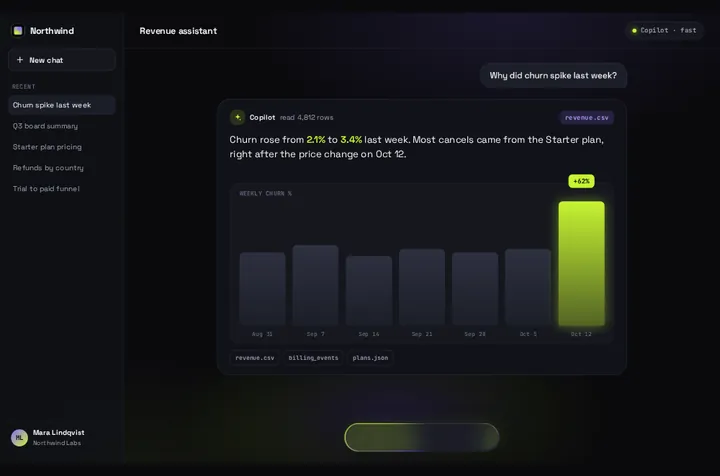
Restyle assistant-ui's own Thread first: it lands in your project as source, and the primitives under it are unstyled. If you want one animated question-and-answer card instead of a thread, Prompt Bloom can read the same runtime.
By buying you agree to the Terms.
- Download right after paying
- Use it in client projects
- Won't run on the listed stack? We fix it or refund you
Ready forCursorv0Lovableshadcn CLI
assistant-ui custom composer: Prompt Bloom on LocalRuntime
"use client";
import {
  AssistantRuntimeProvider,
  useAui,
  useAuiState,
  useLocalRuntime,
  type ChatModelAdapter,
} from "@assistant-ui/react";
import PromptBloom from "@/components/PromptBloom";

// assistant-ui's LocalRuntime: you write run(), it keeps the thread.
const adapter: ChatModelAdapter = {
  async *run({ messages, abortSignal }) {
    const res = await fetch("/api/chat", {
      method: "POST",
      headers: { "Content-Type": "application/json" },
      body: JSON.stringify({
        messages: messages.map((m) => ({
          role: m.role,
          text: m.content.map((p) => (p.type === "text" ? p.text : "")).join(""),
        })),
      }),
      signal: abortSignal,
    });
    if (!res.ok || !res.body) throw new Error(`Chat request failed (${res.status})`);

    const reader = res.body.pipeThrough(new TextDecoderStream()).getReader();
    let text = "";
    for (;;) {
      const { done, value } = await reader.read();
      if (done) break;
      text += value;
      yield { content: [{ type: "text", text }] }; // the whole reply so far, not a delta
    }
  },
};

// Prompt Bloom stands in for Thread + Composer and reads the same runtime.
function BloomComposer() {
  const aui = useAui();
  const isRunning = useAuiState((s) => s.thread.isRunning);
  const reply = useAuiState((s) => {
    const last = s.thread.messages.at(-1);
    if (last?.role !== "assistant") return "";
    const text = last.content.map((p) => (p.type === "text" ? p.text : "")).join("");
    if (last.status.type === "incomplete" && last.status.reason === "error") {
      return text || "Something went wrong. Try again in a moment.";
    }
    return text;
  });

  return (
    <PromptBloom
      autoplayDemo={false}
      text={reply}
      streaming={isRunning}
      onSubmit={(prompt) => aui.thread.append(prompt)}
    />
  );
}

export default function Assistant() {
  const runtime = useLocalRuntime(adapter);
  return (
    <AssistantRuntimeProvider runtime={runtime}>
      <BloomComposer />
    </AssistantRuntimeProvider>
  );
}import { streamText } from "ai";
import { model } from "./model"; // your provider's model from the AI SDK
type Turn = { role: "user" | "assistant" | "system"; text: string };
export async function POST(req: Request) {
const { messages }: { messages: Turn[] } = await req.json();
const result = streamText({
model,
messages: messages.map((m) => ({ role: m.role, content: m.text })),
});
return result.toTextStreamResponse(); // plain text chunks, what run() reads
}Good to know
- The free route covers most assistant-ui customization. The styled Thread installs with npx assistant-ui@latest add thread (or the shadcn CLI once assistant-ui's registry is in components.json) and lands in your project as source, so you change its Tailwind classes where they are. Slots such as Welcome, ToolFallback and ToolGroup swap through Thread's components prop. The Thread page, read on October 25, 2026, says Thread sets --thread-max-width, --composer-bg, --composer-radius and --composer-padding inline on ThreadPrimitive.Root, so "overriding them means editing your copy of thread.aui.tsx, not layering a class from outside."
- Under the styled layer are the primitives, which the docs call "the unstyled layer of assistant-ui". ComposerPrimitive.Root renders a form, Input a textarea and Send a button, and each takes asChild so your own design-system button can carry the behaviour. Pass compact to the root and it sets a data-compact attribute you can style while the input is one line. If you need a contentEditable or editor-library input, there's unstable_useComposerInput; the docs say it "may change without notice".
- When the free option fits better: whenever you want a real chat. Thread keeps a scrolling history and handles attachments, branching, editing, tool UI and markdown, and the Claude and Perplexity clones in assistant-ui's examples show how far a restyle goes. Prompt Bloom draws one question and one answer card. If a thread in your colours is the goal, restyle Thread and skip Prompt Bloom.
- The snippet uses LocalRuntime. Its docs, read on October 25, 2026: "You implement a single ChatModelAdapter (one run function) and the runtime handles everything else: messages, threads, branching, editing, regeneration, cancellation." For streaming, run is an async generator, and "Each yield replaces the previous content. Yield the full state every time, not deltas." That's why the adapter yields the whole reply so far.
- The runtime keeps the history even though the card doesn't show it. Every run gets all earlier turns in messages, so a follow-up typed into the card reaches your route with the conversation before it.
- In 0.15 you read state with useAuiState and act with useAui. The 0.15.31 types mark the call form as deprecated: "Access the scope as a property instead: aui.thread in place of aui.thread()". So the snippet calls aui.thread.append(prompt). The selector returns a string, which matches the docs' advice to return primitive values from selectors.
- Package facts, checked October 25, 2026: @assistant-ui/react 0.15.31 came out on October 22, and npm counted 1,273,377 downloads in the week to October 22. It accepts React 18 or 19, it's MIT licensed, and the assistant-ui/assistant-ui repo isn't archived (last push October 25).
- What Prompt Bloom doesn't do: each prompt replaces the card, so earlier turns aren't drawn. Tool calls, attachments, branching and message editing aren't rendered, and the paperclip is drawn but does nothing. There's no stop button; aui.thread.cancelRun() is there if you add your own.
- If run throws, the runtime ends the message with an error status and no text. The selector turns that into a line of text for the card, because Prompt Bloom closes empty when a stream ends with nothing. Model output is written as text, never parsed as HTML. **bold**, line breaks, - bullets and # headings are shown; nothing else is interpreted.
- What we checked, on October 25, 2026: both files type-check against @assistant-ui/react 0.15.31, ai 7.0.153, react 19.3.1, @types/react 19.3.0 and TypeScript 5.9.3, with the shipped Prompt Bloom source. We also ran the wiring in a simulated DOM (happy-dom) with a stand-in for Prompt Bloom and a fake fetch that streamed three chunks. text grew in three steps, streaming went false at the end, the second prompt was sent with the first exchange, and a 500 response showed the error line. We didn't open this setup in a browser with the real Prompt Bloom, and we didn't run the route against a model.
assistant-ui Thread or a custom composer: what each part maps to
- ThreadPrimitive.Messages: the card shows the newest assistant message's text. Earlier messages stay in s.thread.messages but aren't drawn.
- ComposerPrimitive.Input and Send: Prompt Bloom has its own composer. Its onSubmit(prompt) calls aui.thread.append(prompt), which adds the user message and starts a run.
- s.thread.isRunning: goes into streaming. While it's true and no text has arrived, the composer becomes a Thinking pill; then the words fill the card as they stream.
- ComposerPrimitive.Cancel: no match. Put a button next to the card that calls aui.thread.cancelRun() if runs can take long.
- Thread's Welcome slot: data.hello, data.helloSub and data.starters. Suggestions after an answer: data.chips, fixed strings that send their text when tapped.
- Attachments, BranchPicker, ActionBar, message editing and tool UI: no match. Keep Thread if your app uses them.
assistant-ui custom runtime and custom backend
- BloomComposer only reads thread state through useAuiState and calls aui.thread.append, so it doesn't care which runtime sits above it. The snippet uses LocalRuntime because it needs nothing beyond @assistant-ui/react and talks to any route that streams text.
- Your backend can be anything that returns a text stream. The route above uses the AI SDK's toTextStreamResponse, but a Python or Go server that writes plain text chunks works with the same adapter. If your server sends JSON events, parse them in run and yield the text you've collected so far.
- If you keep messages in your own store, assistant-ui's ExternalStoreRuntime is the documented route, and if you're on the AI SDK there's an AI SDK runtime too. We type-checked and ran only the LocalRuntime version shown here.
Install
- Copy from the zipPut
react/src/components + react/src/dataintosrc/, thennpm i @assistant-ui/react. - Or ask your AIPaste PROMPT.md into Cursor, Lovable or v0.
Props
- onSubmit
- (prompt) → aui.thread.append(prompt)
- text
- the newest assistant message's text, from useAuiState
- streaming
- s.thread.isRunning
- data
- every string on screen: greeting, starters, chips
- autoplayDemo
- false for a real chat
- chart
- bar chart under the reply; off by default when streaming
How qodesign compares
- qodesign vs 21st.dev21st.dev is best for: browsing a huge marketplace and copying many components a month.
- qodesign vs Magic UIMagic UI is best for: landing pages built with shadcn/ui.
All comparisons, with prices read on each library's own site.
Questions
How do I customize assistant-ui without a paid kit?
Restyle the Thread you installed. It's source in your project, so its Tailwind classes, its CSS variables and its slots are all yours to change. For layouts Thread can't reach, build from the unstyled primitives (ThreadPrimitive, ComposerPrimitive, MessagePrimitive) with asChild.
Is assistant-ui free?
The @assistant-ui/react library is MIT licensed. Assistant Cloud, for hosted thread persistence, is a separate service and isn't used on this page.
Does Prompt Bloom replace assistant-ui?
No. assistant-ui keeps the runtime, the message history and the run state. Prompt Bloom only replaces what you see: the composer and a single answer card.
Does it render tool calls or attachments?
No. The snippet passes only the assistant's text. Keep Thread, or render your tools yourself next to the card.
Does Prompt Bloom work in Next.js?
Yes, as a client component. Keep "use client" at the top of the file that renders it, as in the snippet above. App Router and Pages Router both work.
Can Cursor or v0 add it for me?
Yes. Each download has a PROMPT.md. Paste it into Cursor, Lovable, v0 or Claude Code and it fits the piece into your app.
Can I use it in client work?
Yes, in personal and client projects. You can't resell the code itself as a kit.