Animated chat UI for the Vercel AI SDK
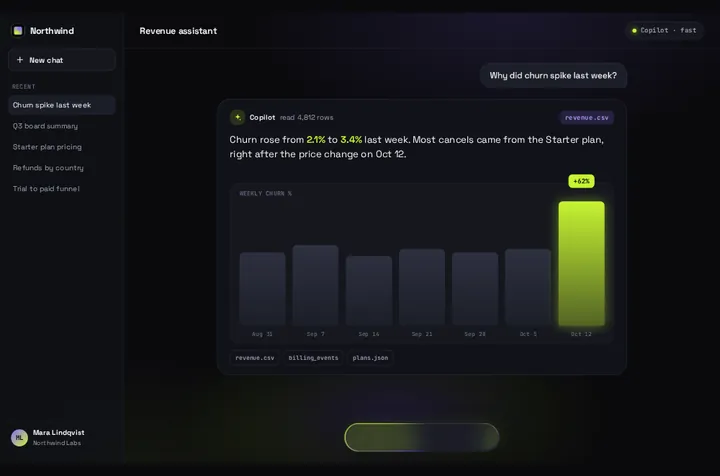
Prompt Bloom on useChat: the prompt lifts into a bubble, a Thinking pill waits for the first token, and the answer card streams your model's real reply word by word.
By buying you agree to the Terms.
- Download right after paying
- Use it in client projects
- Won't run on the listed stack? We fix it or refund you
Ready forCursorv0Lovableshadcn CLI
Use it in Next.js
"use client";
import { useChat } from "@ai-sdk/react";
import PromptBloom from "@/components/PromptBloom";

export default function Chat() {
  const { messages, sendMessage, status } = useChat(); // posts to /api/chat by default
  const last = messages.at(-1);
  const reply =
    last?.role === "assistant" ? last.parts.map((p) => (p.type === "text" ? p.text : "")).join("") : "";

  return (
    <PromptBloom
      autoplayDemo={false}
      text={reply}
      streaming={status === "submitted" || status === "streaming"}
      onSubmit={(prompt) => sendMessage({ text: prompt })}
    />
  );
}import { convertToModelMessages, streamText, type UIMessage } from "ai";
import { model } from "./model"; // your provider's model from the AI SDK
export async function POST(req: Request) {
const { messages }: { messages: UIMessage[] } = await req.json();
const result = streamText({ model, messages: await convertToModelMessages(messages) });
return result.toUIMessageStreamResponse();
}Good to know
- Tested in a fresh Next.js 16.4 app with ai 7.0 and @ai-sdk/react 4.0, against a mock model streaming through the same route as above.
- Pass the last assistant message as text and the chat status as streaming. The pill holds until the first token, and the sources, chips and follow-up box come back when the stream ends.
- Tokens don't re-render React. The card reads the newest text on its own animation frame and only touches the words that changed, so long replies stay smooth.
- Model output is written as text, never parsed as HTML. **bold**, line breaks, - bullets and # headings are shown; nothing else is interpreted.
- If the stream ends with no text the card closes empty. Pass your error message as text to show it in the card instead.
- Not on the AI SDK? Append chunks from any stream to a string in state, pass it as text, and keep streaming true until the reader is done.
Install
- Copy from the zipPut
react/src/components + react/src/dataintosrc/, thennpm i ai @ai-sdk/react. - Or ask your AIPaste PROMPT.md into Cursor, Lovable or v0.
Props
- text
- the reply so far (streaming mode)
- streaming
- true while the reply is arriving
- onSubmit
- (prompt) → send it to your model
- autoplayDemo
- false for a real chat
- chart
- bar chart under the reply; off by default when streaming
- data
- names, sources and chips on screen
How qodesign compares
- qodesign vs 21st.dev21st.dev is best for: browsing a huge marketplace and copying many components a month.
- qodesign vs Magic UIMagic UI is best for: landing pages built with shadcn/ui.
All comparisons, with prices read on each library's own site.
Questions
Does it work with useChat from the AI SDK?
Yes. That's the wiring shown above: the last assistant message goes in as text and status decides streaming. The README has the same two files from the test app.
Which model providers work?
Any provider the AI SDK supports. The component only sees the text, so OpenAI, Anthropic, Google or a local model all look the same to it.
Does the chat work in Next.js?
Yes, as a client component. Keep "use client" at the top of the file that renders it, as in the snippet above. App Router and Pages Router both work.
Is it accessible?
The composer is a real form with a labelled field and Enter to send, and the finished answer is read out through a polite live region. Under Reduce Motion the words appear without the bloom.
Can Cursor or v0 add it for me?
Yes. Each download has a PROMPT.md. Paste it into Cursor, Lovable, v0 or Claude Code and it fits the piece into your app.
Can I use it in client work?
Yes, in personal and client projects. You can't resell the code itself as a kit.