AI chat UI demo for your landing page
A full AI chat screen that plays itself: the prompt lifts into a bubble, a thinking pill opens into an answer card, and a chart builds. You write every word it shows.
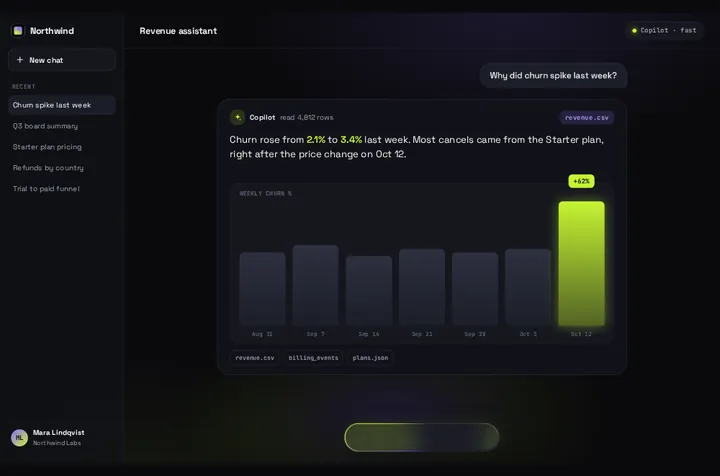
Use it in Next.js
"use client";
import PromptBloom from "@/components/PromptBloom";
import demo, { type PromptBloomData } from "@/data/northwind";

// Keep this object outside the component: a new data object restarts the scene.
const data: PromptBloomData = {
  ...demo,
  app: { ...demo.app, name: "Acme", title: "Support assistant", bot: "Acme AI" },
  demo: { ...demo.demo, prompt: "Which tickets are waiting longest?", file: "tickets.csv" },
  answer: {
    ...demo.answer,
    note: "read 1,204 tickets",
    text: "**14 tickets** have waited more than 48 hours. Most are billing questions from the weekend.",
    chartLabel: "OPEN TICKETS BY DAY",
  },
};

export function HeroDemo() {
  return (
    <div className="aspect-[16/10] w-full overflow-hidden rounded-2xl">
      <PromptBloom data={data} />
    </div>
  );
}
Good to know
- Best use today is a landing page demo of your AI product, showing a real question and the answer your product gives, on a 7.5 second loop.
- The answer card plays the text in data.answer. It doesn't stream a live model reply out of the box. onSubmit hands you the typed prompt, and the reply UI is yours to build.
- Keep the data object outside the component or in useMemo. A new object on every render restarts the scene.
- The screen is a 1440 × 900 stage that scales to its parent, so give the parent an aspect ratio, as in the snippet.
Install
- Copy from the zipPut
react/src/components + react/src/dataintosrc/, thennone (React only). - Or ask your AIPaste PROMPT.md into Cursor, Lovable or v0.
Props
- data
- every string, the answer, chart bars, sources
- autoplayDemo
- loops until the first click or key
- onSubmit
- (prompt) when someone types and sends
- fitScale
- fixed scale instead of filling the parent
Questions
Can it show my model's real answer?
Not live yet. It plays the answer you put in data. For a working chat, take the prompt from onSubmit and render the reply in your own message list.
Does it need any packages?
No, just React. The motion runs from a small timeline file that ships with it.
Can Cursor or v0 add it for me?
Yes. Each download has a PROMPT.md. Paste it into Cursor, Lovable, v0 or Claude Code and it fits the piece into your app.
Can I use it in client work?
Yes, in personal and client projects. You can't resell the code itself as a kit.