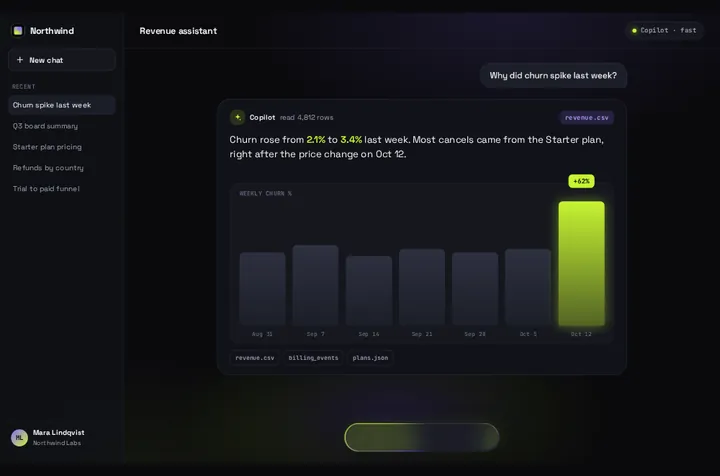
LangGraph's useStream hook hands you the agent's messages, a loading flag and a submit function, and leaves the screen to you. Prompt Bloom is a screen for that: the prompt lifts into a bubble, a Thinking pill holds while the graph runs, and the answer streams into one card.
"use client";
import { useStream } from "@langchain/react";
import { HumanMessage, type BaseMessage } from "@langchain/core/messages";
import PromptBloom from "@/components/PromptBloom";
import northwind from "@/data/northwind";

type AgentState = { messages: BaseMessage[] };

const data = { ...northwind, app: { ...northwind.app, name: "Acme", title: "Research agent", history: [] } };

export default function AgentChat() {
  const stream = useStream<AgentState>({
    apiUrl: process.env.NEXT_PUBLIC_LANGGRAPH_API_URL ?? "http://localhost:2024",
    assistantId: "agent", // the graph name in your langgraph.json
  });

  // One answer card: every AI text since the last human message, joined.
  // Tool calls and tool results in between are skipped, not drawn.
  const lastHuman = stream.messages.findLastIndex((m) => m.type === "human");
  const reply = stream.messages
    .slice(lastHuman + 1)
    .filter((m) => m.type === "ai")
    .map((m) => m.text)
    .filter(Boolean)
    .join("\n\n");

  return (
    <PromptBloom
      data={data}
      autoplayDemo={false}
      text={reply}
      streaming={stream.isLoading}
      onSubmit={(prompt) => void stream.submit({ messages: [new HumanMessage(prompt)] })}
    />
  );
}
Good to know
LangChain's frontend overview, read on October 26, 2026, builds its React examples on useStream from @langchain/react with apiUrl: "http://localhost:2024" and assistantId: "agent", the same two options as above. The hook keeps the thread, streams tokens into messages and sets isLoading while a run is active. The snippet reads those three things and Prompt Bloom draws them.
When the free option fits better: often. LangChain's Agent Chat UI (langchain-ai/agent-chat-ui, MIT, about 3,200 GitHub stars) is a full Next.js app that already renders threads, tool calls and interrupts against any LangGraph server. If you want a separate chat app for your agent, clone it. This page is for putting the agent inside a screen of your own product.
Package facts, checked October 26, 2026: @langchain/react 1.2.7 and @langchain/langgraph-sdk 1.12.7 both came out on October 22. npm counted 55,970 and 2,551,899 downloads in the week to October 22. Both accept React 18 or 19 and need @langchain/core 1.1.48 or newer.
What Prompt Bloom doesn't do: it shows one answer card, not a thread. Each prompt replaces the card. Earlier turns stay on the LangGraph thread and the agent still sees them, but they aren't drawn. Tool calls, interrupts, human-in-the-loop approvals, subagents and the todo list that deep agents keep aren't rendered; the snippet keeps the AI text only. There's no stop button and no file upload, and the paperclip is drawn but does nothing.
assistantId is the graph name from your langgraph.json. For a deployed graph, keep the API key off the client: point apiUrl at a route on your own domain that adds the key on the server, or use your deployment's own auth.
Model output is written as text, never parsed as HTML. Double-asterisk bold, line breaks, - bullets and # headings are shown; nothing else is interpreted.
Type-checked on October 26, 2026 against @langchain/react 1.2.7, @langchain/langgraph-sdk 1.12.7, @langchain/core 1.3.0 and react 19.1.10 with TypeScript 5.9.3, using the shipped Prompt Bloom source. We didn't run this page's code against a live LangGraph server. The text and streaming props are the same ones tested end to end on the Vercel AI SDK guide.
What each part of useStream maps to
stream.messages: the card shows every AI message's text since the last human message, joined. Tool messages in between are skipped.
stream.isLoading: goes into streaming. While it's true the composer becomes a Thinking pill, and words fill the card as tokens arrive.
stream.submit({ messages: [new HumanMessage(prompt)] }): called from onSubmit(prompt). The hook creates the thread on the first submit.
stream.stop(): no built-in button. Put your own next to the card if runs can take long.
stream.interrupt, stream.toolCalls, stream.subagents: no match. Keep Agent Chat UI, or draw them yourself beside the card.
Suggestions: data.chips show under a finished answer, and a tap sends the chip's text. They're fixed strings from data.
On the older @langchain/langgraph-sdk/react hook
Before v1, useStream shipped as @langchain/langgraph-sdk/react, and that import still exists in 1.12.7. Its messages are plain objects with type and content, and submit takes { type: "human", content }.
LangChain's v1 migration guide says the import name stays useStream but the return shape and options change, and that most chat apps move over in under an hour. If you're starting fresh, use @langchain/react.
Your agent's screen gets its look from prompt-bloom.css. prompt-bloom.css touches one thing outside the piece: .fit, .fit body { overflow: hidden }, a preview-mode rule that does nothing unless your app uses a class called fit. The rest stays under .qd-pb, and our shadcn test page looked the same with the piece on it.
If you build extra controls into the screen with shadcn Buttons, such as a stop button for long runs, know that buttons and inputs under .qd-pb inherit font and color from an unlayered rule. We measured a shadcn Button there at 16px/400 instead of 14px/500. Move the rule into @layer base before you add them.
Don't wrap the file in @scope the way some of our other guides do. Its rules already start with .qd-pb, and inside @scope (.qd-pb) they stop matching; the piece lost its styles in our test. @scope also needs Chrome or Edge 118+, Safari 17.4+ or Firefox 146+, and Safari 26.0 to 26.3 skips inputs, which includes this composer.
Cascade layers run in Chrome and Edge 99+, Firefox 97+ and Safari 15.4+ per MDN, older than Tailwind v4's own floor (Chrome 111, Safari 16.4, Firefox 128). The usual prefix fallback is already built in: every rule carries .qd-pb.
We checked this on October 25, 2026 in headless Chromium with Tailwind 4.3.3 and shadcn's new-york-v4 classes, at 1440 and 390 px. Shipped file: no change outside the piece. Edited copy: the piece computed exactly the same, and shadcn parts placed inside matched a page without it. Static test page, not a full Next.js build, Chromium only.
components/prompt-bloom.css (only if you add your own shadcn parts inside)
/* components/prompt-bloom.css (your copy). Only needed if you edit the
   piece and put your own shadcn Buttons or Inputs inside it. */

/* 1. Delete ".qd-pb button,.qd-pb input{font:inherit;color:inherit}" near
      the top of the file and paste it back inside a layer: */
@layer base {
  .qd-pb button,.qd-pb input{font:inherit;color:inherit}
}

/* 2. If those parts use bg-muted or font-mono, replace "--muted" with
      "--pb-muted" (11 places) and "--font-mono" with "--pb-font-mono"
      (10 places), and wrap them in
      <div className="text-foreground font-sans leading-normal">. */
Install
Copy from the zipPut react/src/components + react/src/data into src/, then npm i @langchain/react @langchain/langgraph-sdk @langchain/core.
Or ask your AIPaste PROMPT.md into Cursor, Lovable or v0.
Props
onSubmit
(prompt) → stream.submit
text
the AI reply so far
streaming
stream.isLoading
data
every string on screen
autoplayDemo
false for a real chat
chart
bar chart under the reply; off by default when streaming
How qodesign compares
qodesign vs 21st.dev21st.dev is best for: browsing a huge marketplace and copying many components a month.
All comparisons, with prices read on each library's own site.
Questions
What is useStream in LangGraph?
It's LangChain's React hook for talking to a LangGraph server. It creates or loads a thread, streams the agent's messages as they're generated, and gives you submit and stop.
Should I just use LangChain's Agent Chat UI?
If you want a standalone chat app for your agent, yes. It's free, MIT licensed and renders tool calls and interrupts. Prompt Bloom fits when the agent lives inside your own product and you want one animated answer card instead of a thread.
Does it show tool calls or interrupts?
No. The snippet keeps the AI text only. Read stream.toolCalls and stream.interrupt and draw them next to the card if your graph needs them.
Which package do I import useStream from?
@langchain/react for v1, which is what LangChain's docs use now. @langchain/langgraph-sdk/react is the older hook; the section above shows it too.
Does it work with a deployed LangGraph graph?
It works with any server the hook can reach. Keep your API key on the server; don't put it in a NEXT_PUBLIC variable.
Does Prompt Bloom work in Next.js?
Yes, as a client component. Keep "use client" at the top of the file that renders it, as in the snippet above. App Router and Pages Router both work.
Can Cursor or v0 add it for me?
Yes. Each download has a PROMPT.md. Paste it into Cursor, Lovable, v0 or Claude Code and it fits the piece into your app.
Can I use it in client work?
Yes, in personal and client projects. You can't resell the code itself as a kit.
Will it change my shadcn styles?
No, not outside the chat screen. Shadcn controls you add inside it need the small @layer edit in the section above.