An AI Elements Prompt Input alternative, with the send animation
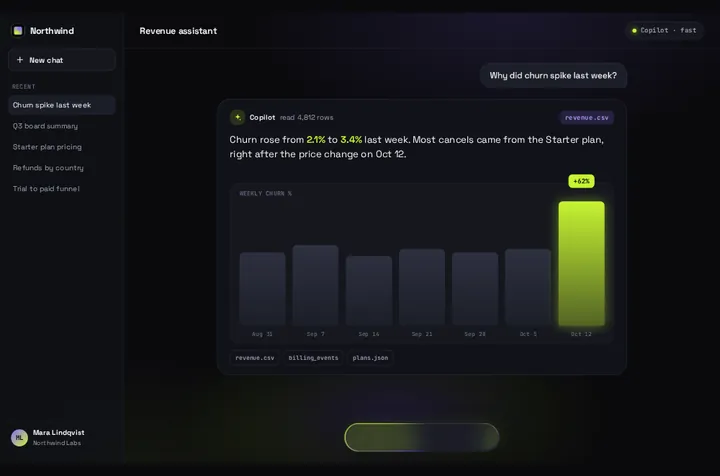
AI Elements is moving to shadcn/ui, and its docs say the project will be deprecated at the end of November 2026. If you were going to redo your chat box anyway, Prompt Bloom is a chat screen where the prompt lifts into a bubble and the answer blooms out and streams in.
By buying you agree to the Terms.
- Download right after paying
- Use it in client projects
- Won't run on the listed stack? We fix it or refund you
Ready forCursorv0Lovableshadcn CLI
Use it in Next.js
"use client";
// Before (AI Elements):
// <PromptInput onSubmit={handleSubmit}>
//   <PromptInputBody><PromptInputTextarea /></PromptInputBody>
//   <PromptInputFooter><PromptInputSubmit status={status} /></PromptInputFooter>
// </PromptInput>
import { useChat } from "@ai-sdk/react";
import PromptBloom from "@/components/PromptBloom";
import northwind, { type PromptBloomData } from "@/data/northwind";

const MODEL = "openai/gpt-5-mini"; // what your PromptInputSelect used to hold

// every string on screen is data: swap the demo copy for yours
const data: PromptBloomData = {
  ...northwind,
  app: { ...northwind.app, name: "Acme", title: "Support", model: "GPT-5 mini", bot: "Assistant", history: [] },
  demo: { ...northwind.demo, file: "", placeholder: "Ask anything", followup: "Ask a follow-up" },
  answer: { ...northwind.answer, note: "", sources: [] },
  hello: "Hi there",
  helloSub: "Ask about your account, billing or setup.",
  chips: ["Show my invoices", "Change my plan", "Talk to a person"],
};

export default function Chat() {
  const { messages, sendMessage, status } = useChat();
  const last = messages.at(-1);
  const reply =
    last?.role === "assistant" ? last.parts.map((p) => (p.type === "text" ? p.text : "")).join("") : "";

  return (
    <PromptBloom
      data={data}
      autoplayDemo={false}
      text={reply}
      streaming={status === "submitted" || status === "streaming"}
      onSubmit={(prompt) => sendMessage({ text: prompt }, { body: { model: MODEL } })}
    />
  );
}import { convertToModelMessages, streamText, type UIMessage } from "ai";
export async function POST(req: Request) {
const { messages, model }: { messages: UIMessage[]; model: string } = await req.json();
const result = streamText({ model, messages: await convertToModelMessages(messages) });
return result.toUIMessageStreamResponse();
}Good to know
- The banner on elements.ai-sdk.dev, read on October 25, 2026, says: "AI Elements is moving to shadcn/ui. This project will be deprecated at the end of November 2026." The ai-elements CLI is at 1.9.1 (October 14, 2026), npm counted 74,682 downloads in the week to October 22, and the GitHub repo is not archived.
- When the free option fits better: if you just need your current code to keep working, you don't need a new component. Prompt Input now lives on ui.shadcn.com as "a message field with attachments and a send button", and that page has a migration prompt that keeps every export with the same name and props. It's free, and for most apps it's the right move.
- What Prompt Bloom doesn't do: file attachments, screenshots, the action menu or a model picker. The paperclip is drawn but does nothing, and the model name in the header is a text label from data. If your users upload files or switch models, stay on Prompt Input.
- It's a whole chat screen, not just a field: a sidebar with recent chats, a header, the composer and one answer card. Each new prompt replaces the card, so there's no scrolling thread. If people need to scroll back through a conversation, keep a thread component such as shadcn's Chat.
- The model goes in the request body, the way the AI Elements example sends its select value. A string id like "openai/gpt-5-mini" goes through the AI SDK's default provider, the Vercel AI Gateway. Check the id against an allow list on the server, since anything in the body can be changed in the browser.
- Every string on screen comes from data: the names, the hello line, the chips under the answer and the sources. The small file label in the answer card is data.demo.file, a label and not an upload, so set it to something that fits your app.
- Type-checked on October 25, 2026 against ai 7.0.153, @ai-sdk/react 4.0.157, next 15.5.28 and react 19.1 with TypeScript 5.9.3, using the shipped component. We didn't run this page's code against a live model. The streaming wiring is the same one tested on the Vercel AI SDK guide.
What your Prompt Input code maps to
- PromptInput onSubmit(message): onSubmit(prompt) gets the text only. There is nothing for message.files.
- PromptInputTextarea: built in, a labelled field. Enter sends.
- PromptInputSubmit status={status}: streaming={status === "submitted" || status === "streaming"}. While it's true, the composer turns into a Thinking pill. There's no stop button.
- PromptInputActionAddAttachments, the attachments header, globalDrop and multiple: no match.
- PromptInputSelect for the model: no match. data.app.model shows a label, and you send the model yourself.
- PromptInputActionAddScreenshot and extra PromptInputButton tools such as web search: no match.
- Suggestion chips: data.chips show under the answer when it finishes, and a tap sends the chip's text.
Install
- Copy from the zipPut
react/src/components + react/src/dataintosrc/, thennpm i ai @ai-sdk/react. - Or ask your AIPaste PROMPT.md into Cursor, Lovable or v0.
Props
- onSubmit
- (prompt) → send it to your model
- text
- the reply so far
- streaming
- true while the reply is arriving
- data
- every string on screen
- autoplayDemo
- false for a real chat
- chart
- bar chart under the reply; off by default when streaming
How qodesign compares
- qodesign vs 21st.dev21st.dev is best for: browsing a huge marketplace and copying many components a month.
- qodesign vs Magic UIMagic UI is best for: landing pages built with shadcn/ui.
All comparisons, with prices read on each library's own site.
Questions
Is AI Elements going away?
Its docs say it's moving to shadcn/ui and the project will be deprecated at the end of November 2026. The code you added already lives in your repo, and the migration prompt on shadcn's Prompt Input page rebuilds it on Input Group and Attachment without renaming anything.
Can Prompt Bloom take file uploads?
No. There's no attachment handling and no model picker. Keep Prompt Input if you need either one.
Does it work with useChat?
Yes. Pass the last assistant message as text and the chat status as streaming, as in the snippet. The card waits for the first token, then shows words as they arrive.
Does Prompt Bloom work in Next.js?
Yes, as a client component. Keep "use client" at the top of the file that renders it, as in the snippet above. App Router and Pages Router both work.
Can Cursor or v0 add it for me?
Yes. Each download has a PROMPT.md. Paste it into Cursor, Lovable, v0 or Claude Code and it fits the piece into your app.
Can I use it in client work?
Yes, in personal and client projects. You can't resell the code itself as a kit.