Collapsible sidebar for React
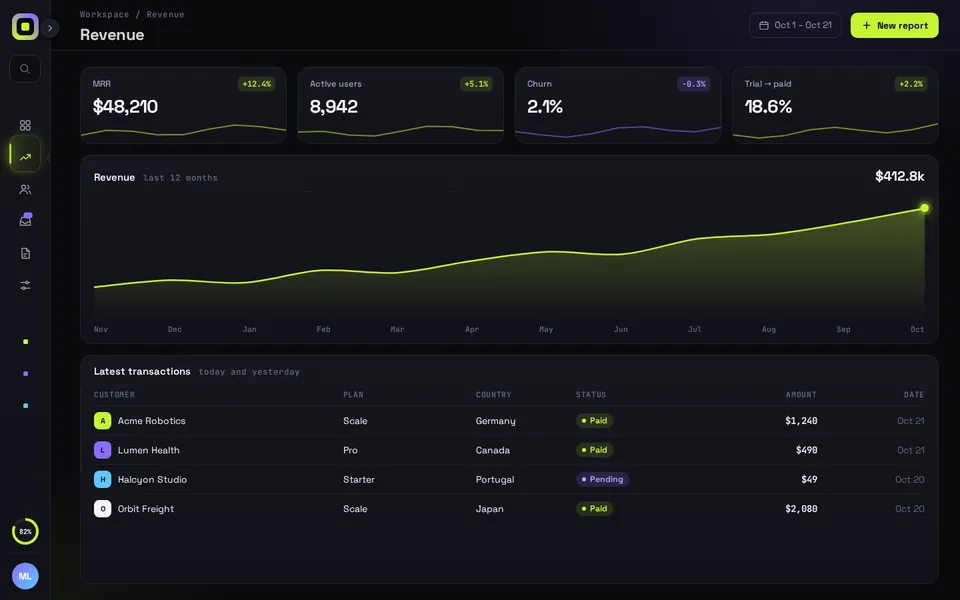
Collapse the sidebar to a 76 px icon rail and the page reflows with it on a spring: the cards widen, the chart redraws and the table opens a column. React and Framer Motion, ready for the Next.js App Router.
Use it in Next.js
"use client";
import { useRouter } from "next/navigation";
import ReflowSidebar from "@/components/ReflowSidebar";

export default function Shell({ rail }: { rail: boolean }) {
  const router = useRouter();
  return (
    <div style={{ height: "100dvh" }}>
      <ReflowSidebar
        autoplayDemo={false}
        // a saved "rail" wins; otherwise the default (rail on phones, open on desktop)
        defaultCollapsed={rail ? true : undefined}
        onNavigate={(id) => router.push(`/dashboard/${id}`)}
        onCollapsedChange={(collapsed) => {
          document.cookie = `sidebar=${collapsed ? "rail" : "open"}; path=/; max-age=31536000`;
        }}
      />
    </div>
  );
}import { cookies } from "next/headers";
import Shell from "./Shell";
// The layout stays mounted while you move between /dashboard pages,
// so the sidebar keeps its state and only the URL changes.
export default async function DashboardLayout({ children }: { children: React.ReactNode }) {
const rail = (await cookies()).get("sidebar")?.value === "rail";
return (
<>
<Shell rail={rail} />
{children}
</>
);
}export default function Page() {
return null;
}Good to know
- The component draws the whole shell: the sidebar, a header and a sample page (KPI cards, chart, table). Put your own page inside the <main> in ReflowSidebar.tsx. Anything laid out with flex or grid reflows the same way.
- The layout reads the cookie on the server and passes it down, so a reload comes back the way the visitor left it, rail or open.
- Pass defaultCollapsed={true} only for a saved rail. false would start it open, and on a phone that means over the page. Left undefined, it uses the default: rail on phones, open on desktop.
- There is no prop for the current page. The sidebar starts on the first nav item, so a reload on /dashboard/revenue highlights Overview until the visitor picks a page. Moving around inside the app keeps the right item, because the layout stays mounted.
- Ctrl/Cmd + B toggles it, the same shortcut shadcn/ui's Sidebar uses. Under Reduce Motion the visitor's own toggles happen at once, without the spring.
Install
- Copy from the zipPut
react/src/components + react/src/dataintosrc/, thennpm i framer-motion. - Or ask your AIPaste PROMPT.md into Cursor, Lovable or v0.
Props
- autoplayDemo
- false in a real app; true loops the 8 s demo
- defaultCollapsed
- start as the icon rail
- onCollapsedChange
- called with true when it folds to the rail
- onNavigate
- called with the nav item id
- data
- nav items and badge, projects, plan card, KPIs, chart and table rows
How qodesign compares
- qodesign vs shadcnblocksshadcnblocks is best for: assembling whole pages from ready-made sections.
- qodesign vs Kokonut UIKokonut UI is best for: landing page sections and templates installed by an AI agent.
All comparisons, with prices read on each library's own site.
Questions
How is it different from the shadcn/ui Sidebar?
shadcn's Sidebar gives you the parts (provider, menu, trigger) with an offcanvas or icon-only collapse, and you compose and style them yourself. Reflow Sidebar is one finished, animated shell: the width runs on a spring, the page reflows with it, and the rail has tooltips, a badge dot and a credits ring. The snippet above saves its state in a cookie, the way shadcn's does.
Does the sidebar work in Next.js?
Yes, as a client component. Keep "use client" at the top of the file that renders it, as in the snippet above. App Router and Pages Router both work.
Does it work on phones?
Yes. Up to 760 px wide the rail stays put and the open sidebar slides over the page with a dimmed backdrop. Tapping the backdrop, pressing Escape or picking a page closes it.
Can Cursor or v0 add it for me?
Yes. Each download has a PROMPT.md. Paste it into Cursor, Lovable, v0 or Claude Code and it fits the piece into your app.
Can I use it in client work?
Yes, in personal and client projects. You can't resell the code itself as a kit.