Sidebar that collapses to icons
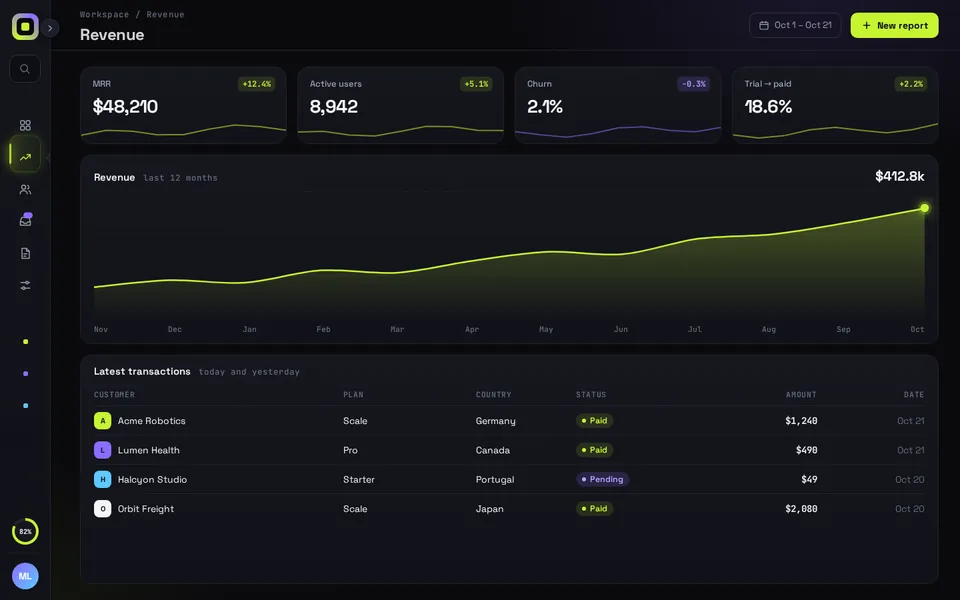
Collapse the sidebar to an icon rail and the page reflows with it on a spring, cards, chart and table included. React, Tailwind and Framer Motion.
By buying you agree to the Terms and ask for instant access, so you lose the 14-day withdrawal right. When we still refundWe'll also email you when a new piece lands (about once a week). Unsubscribe in one click, anytime.
Use it in Next.js
"use client";
import { useRouter } from "next/navigation";
import ReflowSidebar from "@/components/ReflowSidebar";

export default function Shell() {
  const router = useRouter();
  return (
    <div style={{ height: "100dvh" }}>
      <ReflowSidebar
        autoplayDemo={false}
        onCollapsedChange={(rail) => console.log(rail ? "icon rail" : "open")}
        onNavigate={(id) => router.push(`/dashboard/${id}`)}
      />
    </div>
  );
}
Good to know
- Framer Motion's animate() runs every spring, on plain numbers rather than on elements. The width folds to the rail at stiffness 260, damping 30.
- Picking a page starts four springs at once, with stiffness 520, 300, 240 and 120, so the highlight, the title and the chart arrive one after another.
- The engine writes each frame to the DOM, so the springs don't re-render React.
- Under Reduce Motion each spring jumps straight to its end value.
- Ctrl/Cmd + B toggles it. To keep the rail across reloads, save onCollapsedChange in a cookie and pass defaultCollapsed. The collapsible sidebar page below has that layout.
Install
- Copy from the zipPut
react/src/components + react/src/dataintosrc/, thennpm i framer-motion. - Or ask your AIPaste PROMPT.md into Cursor, Lovable or v0.
Props
- autoplayDemo
- false in a real app; true loops the demo
- defaultCollapsed
- start as the icon rail
- onCollapsedChange
- called with true when it folds to the rail
- onNavigate
- called with the nav item id
How qodesign compares
- qodesign vs shadcnblocksshadcnblocks is best for: assembling whole pages from ready-made sections.
- qodesign vs Kokonut UIKokonut UI is best for: landing page sections and templates installed by an AI agent.
- qodesign vs TremorTremor is best for: dashboards and charts: area, bar, line and donut charts, trackers, KPI cards, tables.
All comparisons, with prices read on each library's own site.
From the blog: shadcn Sidebar Icon Rail in Next.js: Keep the Collapsed State With a Cookie
From the blog: Accessible Tooltip in React and Tailwind CSS Without a Library
Questions
Which framer-motion version does it need?
The package.json asks for framer-motion ^11.11.0. We haven't tested it with the motion package's motion/react import yet.
Does it work on phones?
Yes. Up to 760 px wide the rail stays put and the open sidebar slides over the page with a dimmed backdrop.
Does the sidebar work in Next.js?
Yes, as a client component. Keep "use client" at the top of the file that renders it, as in the snippet above. App Router and Pages Router both work.
Can Cursor or v0 add it for me?
Yes. Each download has a PROMPT.md. Paste it into Cursor, Lovable, v0 or Claude Code and it fits the piece into your app.
Can I use it in client work?
Yes, in personal and client projects. You can't resell the code itself as a kit.