A Clerk Elements alternative for Core 3
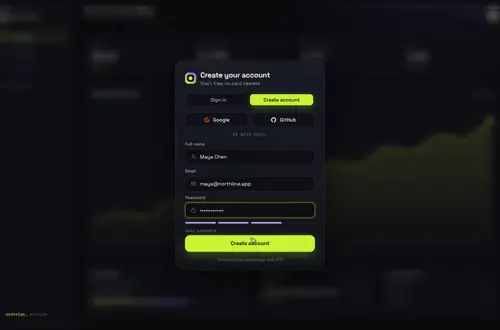
Clerk deprecated Elements when Core 3 shipped, and its docs now point to the redesigned useSignIn and useSignUp hooks. If you built sign-in and sign-up with SignIn.Root and SignUp.Root, here's the same pair rebuilt on those hooks, feeding one animated card: Gateway Dive.
By buying you agree to the Terms.
- Download right after paying
- Use it in client projects
- Won't run on the listed stack? We fix it or refund you
Ready forCursorv0Lovableshadcn CLI
Use it in Next.js
"use client";
// Before: <SignIn.Root> and <SignUp.Root> from @clerk/elements, each with its own
// steps, <Clerk.Field> inputs and <Clerk.Connection> buttons. Now: one card, two hooks.
import { useRef, useState, type FormEvent } from "react";
import { useRouter } from "next/navigation";
import { useSignIn, useSignUp } from "@clerk/nextjs";
import GatewayDive from "@/components/gateway-dive/GatewayDive";

type Step = "verify-email" | "new-device";
type Err = { message: string; longMessage?: string } | null;
const say = (e: Err) => e?.longMessage ?? e?.message ?? "That didn't work. Try again.";

export default function AuthPage() {
  const router = useRouter();
  const { signIn } = useSignIn();
  const { signUp } = useSignUp();
  const pending = useRef<Step | null>(null);
  const target = useRef("/dashboard");
  const [step, setStep] = useState<Step | null>(null);
  const [code, setCode] = useState("");
  const [note, setNote] = useState("");

  const go = (url: string) => {
    if (url.startsWith("http")) window.location.href = url;
    else router.push(url);
  };
  const toApp = ({ decorateUrl }: { decorateUrl: (to: string) => string }) => go(decorateUrl("/dashboard"));

  async function submitCode(e: FormEvent) {
    e.preventDefault();
    const flow = step === "verify-email" ? signUp : signIn;
    const { error } =
      step === "verify-email"
        ? await signUp.verifications.verifyEmailCode({ code: code.trim() })
        : await signIn.mfa.verifyEmailCode({ code: code.trim() });
    if (error) return setNote(say(error));
    if (flow.status !== "complete") return setNote("Clerk wants one more step for this account.");
    await flow.finalize({ navigate: toApp });
  }

  if (step) {
    // Elements: <SignUp.Step name="verifications"> with <SignUp.Strategy name="email_code">
    return (
      <main className="grid min-h-dvh place-items-center bg-neutral-950 p-6 text-white">
        <form onSubmit={submitCode} className="w-full max-w-sm space-y-4">
          <h1 className="text-xl font-semibold">Check your email</h1>
          <p className="text-sm text-neutral-400">
            {step === "verify-email" ? "Type the code Clerk sent to confirm your address." : "New device. Type the code Clerk just emailed you."}
          </p>
          <input
            value={code}
            onChange={(e) => setCode(e.target.value)}
            inputMode="numeric"
            autoComplete="one-time-code"
            aria-label="Verification code"
            className="w-full rounded-lg bg-neutral-900 px-3 py-2 tracking-widest"
          />
          {note ? <p role="alert" className="text-sm text-red-400">{note}</p> : null}
          <button className="w-full rounded-lg bg-white py-2 font-medium text-black">Verify</button>
        </form>
      </main>
    );
  }

  return (
    <main style={{ height: "100dvh" }}>
      <GatewayDive
        autoplayDemo={false}
        brand="Acme"
        providers={[{ id: "google", label: "Google" }, { id: "github", label: "GitHub" }]}
        // Elements: <Clerk.Connection name="google">
        onProvider={(id) =>
          void signIn.sso({
            strategy: id === "github" ? "oauth_github" : "oauth_google",
            redirectCallbackUrl: "/sso-callback",
            redirectUrl: "/dashboard",
          })
        }
        onSubmit={async ({ mode, name, email, password }) => {
          pending.current = null;
          if (mode === "signup") {
            const { error } = await signUp.password({ emailAddress: email, password, firstName: name });
            if (error) return { ok: false, error: say(error) };
            const sent = await signUp.verifications.sendEmailCode();
            if (sent.error) return { ok: false, error: say(sent.error) };
            pending.current = "verify-email";
            return { ok: true };
          }

          const { error } = await signIn.password({ emailAddress: email, password });
          if (error) return { ok: false, error: say(error) };
          if (signIn.status === "needs_client_trust") {
            // Device Trust is on by default: a new device gets an email code
            const sent = await signIn.mfa.sendEmailCode();
            if (sent.error) return { ok: false, error: say(sent.error) };
            pending.current = "new-device";
            return { ok: true };
          }
          if (signIn.status !== "complete") {
            // needs_second_factor (TOTP, SMS, backup codes) needs a screen of its own
            return { ok: false, error: "This account uses two-step sign-in, which this page doesn't handle yet." };
          }
          await signIn.finalize({
            navigate: ({ decorateUrl }) => {
              target.current = decorateUrl("/dashboard"); // route after the dive instead of now
            },
          });
          return { ok: true };
        }}
        onSuccess={() => {
          if (pending.current) setStep(pending.current);
          else setTimeout(() => go(target.current), 1400);
        }}
      />
      {/* Needed for sign-up when the app still uses Clerk's legacy bot protection */}
      <div id="clerk-captcha" />
    </main>
  );
}"use client";
import { HandleSSOCallback } from "@clerk/nextjs";
import { useRouter } from "next/navigation";
// Elements did this inside SignIn.Root. With the hooks it's its own route.
export default function SSOCallback() {
const router = useRouter();
return (
<HandleSSOCallback
navigateToApp={({ decorateUrl }) => {
const url = decorateUrl("/dashboard");
if (url.startsWith("http")) window.location.href = url;
else router.push(url);
}}
navigateToSignIn={() => router.push("/sign-in")}
navigateToSignUp={() => router.push("/sign-in")}
/>
);
}Good to know
- @clerk/elements 0.24.13 is still the latest release, published February 27, 2026. npm now marks it deprecated with: "This package is no longer supported. Please see the Core 3 release for more information." It still got 20,604 downloads in the week to October 22, 2026 (all checked October 25, 2026).
- Clerk's docs carry this banner on every Elements page: "This feature is deprecated. With the release of Clerk Core 3, the redesigned hooks are the recommended replacement for building custom flows." The Elements guides also still say it "currently only works with Next.js App Router and Clerk Core 2", and the package depends on @clerk/clerk-react 5 and @clerk/shared 3. @clerk/nextjs 7.9.20 (October 23, 2026) runs on @clerk/shared 4.
- When the free option fits better: Clerk's own <SignIn /> and <SignUp /> components are free, and they already cover forgot password, MFA, passkeys and every social connection you turn on. If you picked Elements mainly to match your colours and fonts, the appearance prop on those components is the shorter road. If you want your own plain markup, the Core 3 hooks and Clerk's custom flow guides are free too. This page uses the same hooks and adds a finished, animated card on top.
- Device Trust is on by default for password sign-in, so a user on a new device comes back as needs_client_trust. The snippet sends the email code with signIn.mfa.sendEmailCode() and checks it on the same code form, the way Clerk's email and password guide does.
- needs_second_factor (an authenticator app, SMS codes, backup codes) only gets a message here. Those users need Clerk's multi-factor custom flow or the prebuilt <SignIn />.
- The snippet saves the name as firstName. Turn on first and last name under User & authentication in the Clerk Dashboard, or leave firstName out of signUp.password().
- The card plays its dive after a sign-up too, and then the code form shows. The card's Forgot? link has no prop yet: put your own reset link under it and use signIn.resetPasswordEmailCode there.
- Type-checked on October 25, 2026 against @clerk/nextjs 7.9.20, next 15.5.28, react 19.1.4 and TypeScript 5.9.3, using the shipped component source. (Clerk 7.9.20 asks for react ~19.1.4 or newer on the 19.1 line, so npm stops with ERESOLVE on 19.1.0 to 19.1.3.) We didn't run it against a live Clerk instance, so the Google and GitHub redirects and the emailed codes were not tried end to end.
What each Clerk Elements part becomes
- SignIn.Root and SignUp.Root: useSignIn() and useSignUp(). Each hook hands you a signIn or signUp object that updates itself, so you no longer track attempt status or loading state. Both flows sit on one card, as the Sign in and Create account tabs.
- SignIn.Step name="start" with Clerk.Field name="identifier" and the password field: signIn.password({ emailAddress, password }) inside onSubmit, then signIn.finalize() once the status is complete.
- SignUp.Step name="start" with the email, password and name fields: signUp.password({ emailAddress, password, firstName }). The Create account tab already has the name field and a strength meter.
- SignUp.Step name="verifications" with SignUp.Strategy name="email_code": signUp.verifications.sendEmailCode() and verifyEmailCode({ code }), on the small code form in the snippet.
- Clerk.Connection name="google" or "github": the providers array plus signIn.sso({ strategy: "oauth_google" }), and a /sso-callback page with HandleSSOCallback.
- Clerk.FieldError and Clerk.GlobalError: return { ok: false, error } from onSubmit and the card shakes with Clerk's own sentence. The hooks also return errors.fields if you'd rather print messages under your own inputs.
- SignIn.Action submit and its loading state: the card's button handles both. On your own markup, the hooks give you fetchStatus.
- SignUp.Captcha: a plain <div id="clerk-captcha" /> on the page, if your app still uses legacy bot protection.
- SignIn.Step name="choose-strategy", forgot-password and the second-factor strategies (totp, phone_code, backup_code): no match on the card. Build those from Clerk's custom flow guides, or keep the prebuilt <SignIn />.
Install
- Copy from the zipPut
react/src/componentsintosrc/, thennpm uninstall @clerk/elements && npm i @clerk/nextjs@latest. - Or ask your AIPaste PROMPT.md into Cursor, Lovable or v0.
Props
- onSubmit
- signIn.password or signUp.password; returns { ok, error? }
- onSuccess
- open the code step, or route after the dive
- providers / onProvider
- { id: "google" } → signIn.sso
- defaultMode
- 'signin' or 'signup'
- backdrop
- your own screen behind the card
- autoplayDemo
- false in a real app
How qodesign compares
- qodesign vs Magic UIMagic UI is best for: landing pages built with shadcn/ui.
- qodesign vs Aceternity UIAceternity UI is best for: teams building many marketing pages who want one big library.
All comparisons, with prices read on each library's own site.
Questions
Is Clerk Elements deprecated?
Yes. npm marks @clerk/elements 0.24.13 as no longer supported, and Clerk's docs say the Core 3 hooks are the recommended replacement for custom flows. The last release came out on February 27, 2026.
Does Clerk Elements work with @clerk/nextjs 7?
Clerk's Elements guides say it only works with Clerk Core 2, and the package still depends on the Core 2 packages. Moving to @clerk/nextjs 7 means moving your custom screens to the hooks.
Should I just use Clerk's prebuilt SignIn component?
Often, yes. It's free, it handles MFA, passkeys and forgot password, and the appearance prop restyles it. Rebuild on the hooks when you want a screen that looks nothing like it.
How is this different from your other Clerk guides?
The custom sign-in page guide is password sign-in only, on the lamp login. The reverification guide is about asking a signed-in user for a fresh code. This page is the full sign-in plus sign-up pair that Elements users had, on one card.
Does the sign-in card work in Next.js?
Yes, as a client component. Keep "use client" at the top of the file that renders it, as in the snippet above. App Router and Pages Router both work.
Can Cursor or v0 add it for me?
Yes. Each download has a PROMPT.md. Paste it into Cursor, Lovable, v0 or Claude Code and it fits the piece into your app.
Can I use it in client work?
Yes, in personal and client projects. You can't resell the code itself as a kit.