Checkout page in Tailwind CSS, with a 3D card for the payment step
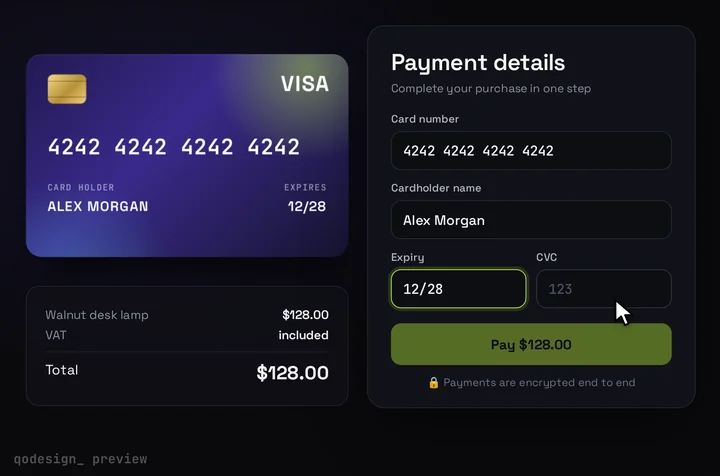
Most of a checkout page is plain Tailwind: contact, address, delivery and the order summary. Free blocks cover that part, and they come first below. Credit Card Checkout V1 is only the card step at the end, a 3D card that fills in as the buyer types and flips for the CVC.
By buying you agree to the Terms.
- Download right after paying
- Use it in client projects
- Won't run on the listed stack? We fix it or refund you
Ready forCursorv0Lovableshadcn CLI
A checkout page in Tailwind with the card as the last step
import PaymentStep from "./payment-step";

const items = [
  { id: "lamp", name: "Walnut desk lamp", note: "Warm white", qty: 1, price: 128 },
  { id: "shade", name: "Linen shade", note: "Sand", qty: 2, price: 24 },
];
const shipping = 8;
const money = (n: number) => new Intl.NumberFormat("en-US", { style: "currency", currency: "USD" }).format(n);

const input = "h-11 w-full rounded-lg border border-zinc-300 bg-white px-3 text-sm outline-none focus:border-zinc-900";
const label = "mb-1.5 block text-sm font-medium text-zinc-700";

export default function CheckoutPage() {
  const subtotal = items.reduce((sum, i) => sum + i.qty * i.price, 0);
  const total = subtotal + shipping;

  return (
    <main className="min-h-dvh bg-zinc-50 text-zinc-900">
      <div className="mx-auto max-w-6xl px-4 py-10">
        <ol className="flex gap-6 text-sm text-zinc-500">
          <li>Cart</li>
          <li className="font-medium text-zinc-900">Details</li>
          <li>Payment</li>
        </ol>

        <div className="mt-8 grid gap-8 lg:grid-cols-[1fr_360px]">
          {/* Plain Tailwind: contact, address, delivery. Swap in a free block here if you like. */}
          <form id="details" className="grid gap-8">
            <section className="grid gap-4">
              <h2 className="text-lg font-semibold">Contact</h2>
              <div>
                <label htmlFor="email" className={label}>Email</label>
                <input id="email" type="email" autoComplete="email" className={input} />
              </div>
            </section>
            <section className="grid gap-4 sm:grid-cols-2">
              <h2 className="text-lg font-semibold sm:col-span-2">Shipping address</h2>
              <div>
                <label htmlFor="first" className={label}>First name</label>
                <input id="first" autoComplete="given-name" className={input} />
              </div>
              <div>
                <label htmlFor="last" className={label}>Last name</label>
                <input id="last" autoComplete="family-name" className={input} />
              </div>
              <div className="sm:col-span-2">
                <label htmlFor="street" className={label}>Address</label>
                <input id="street" autoComplete="street-address" className={input} />
              </div>
              <div>
                <label htmlFor="city" className={label}>City</label>
                <input id="city" autoComplete="address-level2" className={input} />
              </div>
              <div>
                <label htmlFor="zip" className={label}>Postal code</label>
                <input id="zip" autoComplete="postal-code" className={input} />
              </div>
            </section>
            <fieldset className="grid gap-3">
              <legend className="mb-3 text-lg font-semibold">Delivery</legend>
              {["Standard, 3 to 5 days", "Express, next day"].map((d, i) => (
                <label key={d} className="flex items-center gap-3 rounded-lg border border-zinc-300 bg-white p-4 text-sm has-[:checked]:border-zinc-900">
                  <input type="radio" name="delivery" defaultChecked={i === 0} />
                  {d}
                </label>
              ))}
            </fieldset>
          </form>

          <aside className="h-fit rounded-2xl border border-zinc-200 bg-white p-6 lg:sticky lg:top-6">
            <h2 className="text-lg font-semibold">Order summary</h2>
            <ul className="mt-4 divide-y divide-zinc-100">
              {items.map((i) => (
                <li key={i.id} className="flex justify-between py-3 text-sm">
                  <span>
                    {i.name} <span className="text-zinc-500">x{i.qty}</span>
                    <span className="block text-zinc-500">{i.note}</span>
                  </span>
                  <span className="font-medium">{money(i.qty * i.price)}</span>
                </li>
              ))}
            </ul>
            <dl className="mt-4 grid gap-2 border-t border-zinc-200 pt-4 text-sm">
              <div className="flex justify-between"><dt className="text-zinc-500">Subtotal</dt><dd>{money(subtotal)}</dd></div>
              <div className="flex justify-between"><dt className="text-zinc-500">Shipping</dt><dd>{money(shipping)}</dd></div>
              <div className="flex justify-between text-base font-semibold"><dt>Total</dt><dd>{money(total)}</dd></div>
            </dl>
          </aside>
        </div>

        {/* The one step the card piece covers. */}
        <section className="mt-12">
          <h2 className="mb-4 text-lg font-semibold">Payment</h2>
          <PaymentStep amount={total} />
        </section>
      </div>
    </main>
  );
}
"use client";
import { useEffect, useRef, useState } from "react";
import CardCheckout from "@/components/CardCheckout";

// The card is drawn on a fixed 1000 x 660 stage. Scale it down to the column.
const W = 1000;
const H = 660;

export default function PaymentStep({ amount }: { amount: number }) {
  const box = useRef<HTMLDivElement>(null);
  const [scale, setScale] = useState(1);

  useEffect(() => {
    const el = box.current;
    if (!el) return;
    const ro = new ResizeObserver(([entry]) => setScale(Math.min(1, entry.contentRect.width / W)));
    ro.observe(el);
    return () => ro.disconnect();
  }, []);

  return (
    <div ref={box} className="mx-auto w-full max-w-[1000px] overflow-hidden rounded-3xl" style={{ height: H * scale }}>
      <div style={{ width: W, transform: `scale(${scale})`, transformOrigin: "top left" }}>
        <CardCheckout
          amount={amount}
          currency="USD"
          productName="Your order"
          title="Pay by card"
          subtitle="Last step. Your details are saved above."
          resetAfter={null}
          // Demo mode: with no renderCardFields the card fakes the payment.
          // Before you take money, pass your provider's hosted fields in
          // renderCardFields and confirm in onConfirm (see the provider guides).
        />
      </div>
    </div>
  );
}
import type { ReactNode } from "react";
import "./globals.css";

// The card's CSS names "Space Grotesk" and "JetBrains Mono" directly,
// so load them under those names, as the zip's index.html does.
export default function RootLayout({ children }: { children: ReactNode }) {
  return (
    <html lang="en">
      <head>
        <link rel="preconnect" href="https://fonts.googleapis.com" />
        <link
          rel="stylesheet"
          href="https://fonts.googleapis.com/css2?family=JetBrains+Mono:wght@500;600&family=Space+Grotesk:wght@400;500;600;700&display=swap"
        />
      </head>
      <body>{children}</body>
    </html>
  );
}
@import "tailwindcss";

/* Credit Card Checkout V1 on Tailwind v4. v4 skips the zip's
   tailwind.config.js, so pin the card's two fonts here, inside the card
   only. The utilities layer plus !important is what reaches the
   cardholder name field, which carries !font-sans. */
@layer utilities {
  .qcc-root .font-sans,
  .qcc-root .\!font-sans {
    font-family: "Space Grotesk", system-ui, sans-serif !important;
  }
  .qcc-root .font-mono {
    font-family: "JetBrains Mono", ui-monospace, monospace;
  }
}
Good to know
- The page itself is plain Tailwind. The contact, address, delivery and summary blocks use stock utilities, so you can swap any of them for a free block from the list further down. The card piece only fills the Payment section.
- As written, the card runs in demo mode. With no renderCardFields it uses its own inputs and fakes a payment, which is fine for a layout check and wrong for real money. Before you take payments, pass your provider's hosted card fields in renderCardFields and confirm the payment in onConfirm. The guides linked in the section on payment providers below show each one.
- The card is drawn on a fixed 1000 x 660 stage, so payment-step.tsx scales it to the column with a ResizeObserver. In our headless check at 1440 px wide it drew at full size. At 390 px it drew at 358 x 236, a scale of about 0.36, with no sideways scroll. At that size the 19 px card number field reads at about 7 px, which is too small to type in comfortably. On phones, consider a plain card form and keep the 3D card for wider screens.
- The stage has its own dark background, so on a light checkout it reads as a dark panel. Its accent and cardColors props change the glow and the card face, but not the stage.
- The details form above posts nowhere yet. Send it to your order API and set the amount on your server; the amount prop only sets what the card shows.
- What we ran on October 25, 2026: tsc with TypeScript 5.9.3 against next 15.5.28, react 19.3.1, framer-motion 14.6.0 and the shipped CardCheckout source, with a failing negative control. We also bundled the page and opened it in headless Chromium at 1440 and 390 px with Tailwind 4.3.3, with no page errors. We did not run a Next.js build of this exact app, and we didn't test Safari, Firefox or a real phone.
Free Tailwind checkout page blocks first
- If you want a whole checkout page and your payment provider's own form is fine, start with a free block. We opened each block page on October 25, 2026 and read which examples are marked free.
- Flowbite's "Tailwind CSS Checkout" page lists five examples. One is free: "Default checkout page". It has delivery details, payment choices as radio cards (credit card, payment on delivery, PayPal), delivery methods, a voucher field, the totals and a Proceed to Payment button. The other four (accordion, products, drawer and modal) are marked Pro. Flowbite's "Order summary" page works the same way: "Default order summary" is free and the other four are Pro.
- Preline's "Checkout Flow Pages" category lists eight blocks, including guest checkout, signed-in checkout, review and pay, a shopping bag and order confirmation. All eight were marked Pro. The related Preline categories we checked (cart line items, order summary cards, order tracking) were Pro too. Preline's free open-source library has the form parts you'd build one from, but no ready checkout page.
- ReadymadeUI and FlyonUI also show up for this search. Their pages load the examples with JavaScript and we couldn't read which ones are free, so check on their sites before you count on them.
- When the free block fits better: you need the full multi-section page, and Stripe's Payment Element, PayPal's buttons or another hosted form is fine for the card. Take Flowbite's free default checkout and stop there. Its Proceed to Payment button is the exact spot where this card would go if you want the card step to feel finished.
What the card covers on a Tailwind checkout page
- Credit Card Checkout V1 is one step: the payment. It shows a product name, a VAT row and the total, takes the cardholder name, and either uses its own number, expiry and CVC inputs (for demos) or your provider's hosted fields. Then Pay shows a spinner and a success state.
- It doesn't do the cart, shipping address, delivery options, coupons or tax. Those stay in your plain Tailwind page or a free block, as in the snippet above.
- Its CSS stays inside the card. All 57 selectors in card-checkout.css start with a .qcc- class, the keyframes are prefixed, and the file sets nothing on :root, html, body or bare elements. Our October 25 audit of every piece rated it clean, and we re-read the file for this page.
Checkout page on Tailwind v4: two font rules
- The zip is a Vite project on Tailwind 3.4. Our Tailwind v4 check of every paid piece (October 25, 2026) rated this one a one-line fix: "The card inputs lose Space Grotesk (font-sans) and the number field loses JetBrains Mono (font-mono)." Tailwind v4 ignores the zip's tailwind.config.js, so the inputs fall back to the default stacks.
- The check's first fix was @config pointing at that file. The same check was corrected on October 25: in a UI-kit app (shadcn, daisyUI, HeroUI) don't use @config, because it either changes nothing or switches your whole app's sans font. Use a rule scoped to the card instead.
- We tested the scoped rule for this page and found one catch. The cardholder name field carries !font-sans, an important utility that lives in Tailwind's utilities layer, and a plain unlayered rule can't beat it. Inside @layer utilities, with !important on the sans rule, all four fields got the right font: name in Space Grotesk, number, expiry and CVC in JetBrains Mono. Measured in headless Chromium with Tailwind 4.3.3, once on a plain v4 page and once with a shadcn-style @theme inline font; the body and the details form kept the app font both times.
- The rules name the fonts and don't load them. Load Space Grotesk and JetBrains Mono under those names, as app/layout.tsx above does with the same link the zip's index.html uses.
Wiring the card step to a real payment
- The card takes any provider whose card fields can sit in its slot. renderCardFields gets a slot with onChange, and you report the brand, whether the fields are complete and when the CVC has focus. onConfirm runs when Pay is pressed and throws to show an error on the card.
- We have a guide for each provider we've tested this way: Stripe Elements, PayPal Card Fields, Adyen Custom Card, Basis Theory and Mercado Pago Secure Fields. Pick yours from the links below and drop its checkout file into payment-step.tsx in place of the demo card.
Install
- Copy from the zipPut
react/src/componentsintosrc/, thennpm i framer-motion. - Or ask your AIPaste PROMPT.md into Cursor, Lovable or v0.
Props
- amount / currency
- what the card shows; your server charges the real total
- renderCardFields
- your provider's hosted card fields; leave it out only for a demo
- onConfirm
- confirm the payment with your provider; throw to show the error
- resetAfter
- null keeps the success state
How qodesign compares
- qodesign vs 21st.dev21st.dev is best for: browsing a huge marketplace and copying many components a month.
- qodesign vs Skiper UISkiper UI is best for: unusual interaction details for landing pages: image reveals, cursor trails, tooltips, drag-and-scroll galleries.
All comparisons, with prices read on each library's own site.
Questions
Is there a free Tailwind checkout page?
Yes. Flowbite's "Default checkout page" block is marked free, and so is its "Default order summary". The other Flowbite checkout examples and all of Preline's checkout flow pages were marked Pro when we checked on October 25, 2026.
Is the card responsive?
Not by itself. It's a fixed 1000 x 660 stage, and the snippet scales it to the column. Below about 600 px wide it gets too small to type in, so use a plain card form on phones.
Does it work with Tailwind v4?
Yes, with two font rules scoped to .qcc-root inside @layer utilities, shown above. Skip @config in a shadcn or daisyUI app.
Will the card's CSS change the rest of my checkout?
No. Every rule in card-checkout.css starts with a .qcc- class, and the file sets nothing on :root, html or body.
Can Cursor or v0 add it for me?
Yes. Each download has a PROMPT.md. Paste it into Cursor, Lovable, v0 or Claude Code and it fits the piece into your app.
Can I use it in client work?
Yes, in personal and client projects. You can't resell the code itself as a kit.