Basis Theory React Elements card form
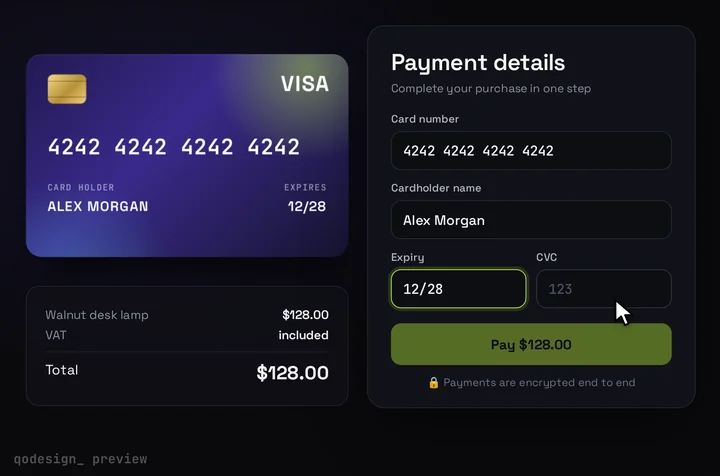
The 3D card checkout with Basis Theory's split card fields inside it. Basis Theory's iframes hold the card number, so the card shows the brand and when every field is valid, and it flips when the buyer reaches the CVC.
By buying you agree to the Terms.
- Download right after paying
- Use it in client projects
- Won't run on the listed stack? We fix it or refund you
Ready forCursorv0Lovableshadcn CLI
Use it in Next.js
"use client";
import { useRef } from "react";
import {
  BasisTheoryProvider,
  CardNumberElement,
  ExpiryElement,
  CVVElement,
  useBasisTheory,
  type CardNumberElementRef,
  type ExpiryElementRef,
  type CVVElementRef,
} from "@basis-theory/react-elements";
import CardCheckout, { type CardFieldsSlot } from "@/components/CardCheckout";

type Field = "number" | "expiry" | "cvc";
type Refs = {
  number: React.RefObject<CardNumberElementRef | null>;
  expiry: React.RefObject<ExpiryElementRef | null>;
  cvc: React.RefObject<CVVElementRef | null>;
};

// The card draws Visa and Mastercard. Anything else shows the plain front.
// The exact brand words come from Basis Theory's iframe, so match loosely.
const brandOf = (b?: string) => {
  const s = (b ?? "").toLowerCase();
  return s.includes("visa") ? "visa" : s.includes("master") ? "mastercard" : null;
};

function BasisTheoryFields({ slot, refs }: { slot: CardFieldsSlot; refs: Refs }) {
  // each iframe only knows about itself, so keep the three valid flags here
  const valid = useRef<Record<Field, boolean>>({ number: false, expiry: false, cvc: false });
  const setValid = (field: Field, ok: boolean) => {
    valid.current[field] = ok;
    const v = valid.current;
    slot.onChange({ complete: v.number && v.expiry && v.cvc });
  };
  const focus = (field: Field | null) => () => slot.onChange({ focus: field });

  return (
    <div className="grid gap-[15px]">
      <div>
        <span className={slot.labelClassName}>Card number</span>
        <div className={slot.fieldClassName}>
          <CardNumberElement
            ref={refs.number}
            ariaLabel="Card number"
            placeholder="1234 5678 9012 3456"
            iconPosition="none"
            onChange={(e) => {
              slot.onChange({ brand: brandOf(e.detail.cardBrand) });
              setValid("number", e.detail.isValid);
            }}
            onFocus={focus("number")}
            onBlur={focus(null)}
          />
        </div>
      </div>
      <div className="flex gap-[14px]">
        <div className="flex-1">
          <span className={slot.labelClassName}>Expiry</span>
          <div className={slot.fieldClassName}>
            <ExpiryElement
              ref={refs.expiry}
              ariaLabel="Expiry date"
              placeholder="MM/YY"
              onChange={(e) => setValid("expiry", e.detail.isValid)}
              onFocus={focus("expiry")}
              onBlur={focus(null)}
            />
          </div>
        </div>
        <div className="flex-1">
          <span className={slot.labelClassName}>CVC</span>
          <div className={slot.fieldClassName}>
            <CVVElement
              ref={refs.cvc}
              ariaLabel="Security code"
              placeholder="123"
              onChange={(e) => setValid("cvc", e.detail.isValid)}
              onFocus={focus("cvc")}
              onBlur={focus(null)}
            />
          </div>
        </div>
      </div>
    </div>
  );
}

function Checkout({ amount }: { amount: number }) {
  const { bt, error } = useBasisTheory();
  const refs: Refs = {
    number: useRef<CardNumberElementRef | null>(null),
    expiry: useRef<ExpiryElementRef | null>(null),
    cvc: useRef<CVVElementRef | null>(null),
  };

  if (error) return <p>The card form didn't load. Refresh and try again.</p>;

  return (
    <CardCheckout
      amount={amount}
      currency="USD"
      resetAfter={null}
      renderCardFields={(slot) => <BasisTheoryFields slot={slot} refs={refs} />}
      onConfirm={async ({ name }) => {
        const number = refs.number.current;
        const expiry = refs.expiry.current;
        const cvc = refs.cvc.current;
        if (!bt || !number || !expiry || !cvc) throw new Error("The card fields haven't loaded yet.");

        // The element refs go in, Basis Theory swaps in the real values inside its own frames.
        // Same shape as the package README: the expiry ref fills both month and year.
        const token = await bt.tokens.create({
          type: "card",
          data: { number, expiration_month: expiry, expiration_year: expiry, cvc },
        });

        // Only the token id reaches your server. Charging it is server work (see below).
        const res = await fetch("/api/pay", {
          method: "POST",
          headers: { "Content-Type": "application/json" },
          body: JSON.stringify({ tokenId: token.id, name }),
        });
        if (!res.ok) throw new Error("That card didn't go through.");
      }}
    />
  );
}

export default function BasisTheoryCardCheckout({ amount }: { amount: number }) {
  return (
    <BasisTheoryProvider
      apiKey={process.env.NEXT_PUBLIC_BASIS_THEORY_KEY!}
      errorFallback={<p>The card form didn't load. Refresh and try again.</p>}
    >
      <Checkout amount={amount} />
    </BasisTheoryProvider>
  );
}
Good to know
- What the card can show: the number, expiry and CVC stay inside Basis Theory's iframes. Your page and your server never see the digits. The 3D card hears the brand from the card number's onChange (event.detail.cardBrand), each field's isValid, and which field has focus. It shows the brand, lights up Pay once all three are valid and flips for the CVC. It doesn't show what the buyer types.
- What we ran and what we didn't: on October 25, 2026 we type-checked this file against @basis-theory/react-elements 3.3.1, next 16.4.3, react 19.3.1, @types/react 19.3.0, framer-motion 14.6.0 and TypeScript 5.9.3 and 7.0.2, with the shipped CardCheckout source. We did not run it against a Basis Theory account, so no iframe loaded, no token was created and nothing was charged. Two things we couldn't see without a live session: the exact brand words the iframe sends (the snippet matches "visa" and anything with "master" loosely) and how tall the iframe sits in the card's 54 px field box. Check both with a Basis Theory test key before you ship.
- Each element only reports on itself, so the snippet keeps three valid flags and tells the card when all three are true. The package README's own example does the same with three useState flags.
- The expiry ref goes in for both expiration_month and expiration_year, the same way the README does it. The SDK fills each from the one field.
- NEXT_PUBLIC_BASIS_THEORY_KEY is the public key (the README says it starts with pk_). Your private key stays on the server.
- iconPosition="none" hides Basis Theory's brand icon inside the field, since the 3D card already shows the brand. The 3.3.1 types say "none" also hides the built-in manual co-badge selector, so leave the icon on if you take co-badged cards and want buyers to pick the network.
- The README says CVVElement adjusts the expected length when a CardNumberElement is on the same page: 3 digits for Visa and Mastercard, 4 for Amex. The snippet relies on that and passes nothing extra.
- Charging is server work and isn't shown here. Only token.id reaches /api/pay. From there your server charges the card with your private key, through Basis Theory's proxy or the processor integration you set up. Pick that path from Basis Theory's docs for your processor.
When Basis Theory's own CardElement is the better pick
- Basis Theory ships a unified CardElement in the same package. It puts number, expiry and CVC in one component, reports one change event with cardBrand and errors for all three fields, and takes layout and stackAt props. If you want the least code and a standard card row, use it and skip everything on this page.
- It also fits better when you'd rather not track three valid flags yourself, or when the card row sits in a form that already has its own look and no room for an animated card.
- The split elements on this page are the route when the card form has to look like your product: three separate iframes you place yourself, here inside a card that turns, shows the brand and flips for the CVC.
Basis Theory React Elements v3: what changed from the v2 guides
- On October 25, 2026, npm's latest tag for @basis-theory/react-elements was 3.3.1 (published October 22, 2026), with 51,319 downloads in the week of October 16 to 22. The 2.x line lives on under the legacy tag (2.17.0). The README still says npm install @basis-theory/react-elements@beta, but the beta tag pointed to 3.0.0-beta.6 that day, older than latest. Install it without @beta.
- Basis Theory's Collect Cards guide, read the same day, still shows the 2.x React code: useBasisTheory('<API_KEY>', { environment: 'test' }), BasisTheoryProvider bt={bt}, CardExpirationDateElement and CardVerificationCodeElement. Against 3.3.1 those names fail the type-check: CardExpirationDateElement and CardVerificationCodeElement have no exported member, and useBasisTheory expects 0 arguments.
- In 3.3.1 the provider takes the key itself (BasisTheoryProvider apiKey), useBasisTheory() takes no arguments and returns { bt, error }, and the split fields are CardNumberElement, ExpiryElement and CVVElement. The provider also takes an errorFallback for when the SDK fails to start.
- Events arrive as CustomEvent objects, so the data sits on event.detail. Every field's change detail has isValid, isEmpty and error. The card number's adds cardBrand, last4, bin and cvvLengths. The guide's 2.x snippet destructures cardBrand straight from the handler argument, which doesn't match the 3.3.1 types. Tokens come from bt.tokens.create({ type: "card", data }) with the element refs inside data.
How this differs from the Stripe, Adyen and PayPal card guides
- All of them put the provider's own fields inside the same card slot. The difference is who holds the card afterwards. Stripe, Adyen and PayPal (and Braintree's hosted fields on the PayPal page) are the processor: the fields send the card straight into that processor's payment flow.
- Basis Theory is a vault, not a processor. The fields turn the card into a Basis Theory token, and you charge it through whichever processor you use, with the real number filled in on Basis Theory's side. That's useful if you route cards to more than one processor or want to keep the card when you switch. If you only ever charge through one processor, that processor's own fields are less to run.
Install
- Copy from the zipPut
react/src/componentsintosrc/, thennpm i framer-motion @basis-theory/react-elements. - Or ask your AIPaste PROMPT.md into Cursor, Lovable or v0.
Props
- renderCardFields
- Basis Theory's split elements inside the design
- onConfirm
- create the Basis Theory token and send its id to your server; throw to show the error
- amount / currency
- what the card shows (your server decides the real charge)
- resetAfter
- null keeps the success state
How qodesign compares
- qodesign vs 21st.dev21st.dev is best for: browsing a huge marketplace and copying many components a month.
- qodesign vs Skiper UISkiper UI is best for: unusual interaction details for landing pages: image reveals, cursor trails, tooltips, drag-and-scroll galleries.
All comparisons, with prices read on each library's own site.
Questions
Does the 3D card see the card number?
No. The number, expiry and CVC stay in Basis Theory's iframes. The card only hears the brand, whether each field is valid and which field has focus.
Is @basis-theory/react-elements v3 still a beta?
No. On October 25, 2026 npm's latest tag was 3.3.1. The README still says to install @beta, but that tag pointed to 3.0.0-beta.6, which is older. Use npm i @basis-theory/react-elements.
Does it work with React 19?
Yes. 3.3.1 declares react and react-dom ^16.8.0 through ^19.0.0 as peers, and we type-checked the snippet with react 19.3.1.
Should I use Basis Theory or Stripe Elements?
If every card goes to Stripe, Stripe Elements is one less service to run. Basis Theory makes sense when you want to keep the card as your own token and charge it through more than one processor.
Can Cursor or v0 add it for me?
Yes. Each download has a PROMPT.md. Paste it into Cursor, Lovable, v0 or Claude Code and it fits the piece into your app.
Which Tailwind version?
The package is set up with Tailwind CSS 3.4. Styles that Tailwind can't express live in a small CSS file next to the component.
Can I use it in client work?
Yes, in personal and client projects. You can't resell the code itself as a kit.