A ZITADEL custom login page in Next.js
ZITADEL lets you run your own login UI on its Session and OIDC APIs. Here the spotlight lamp login checks the email and password in one server action, hands the session to the waiting OIDC request and sends the browser back to your app.
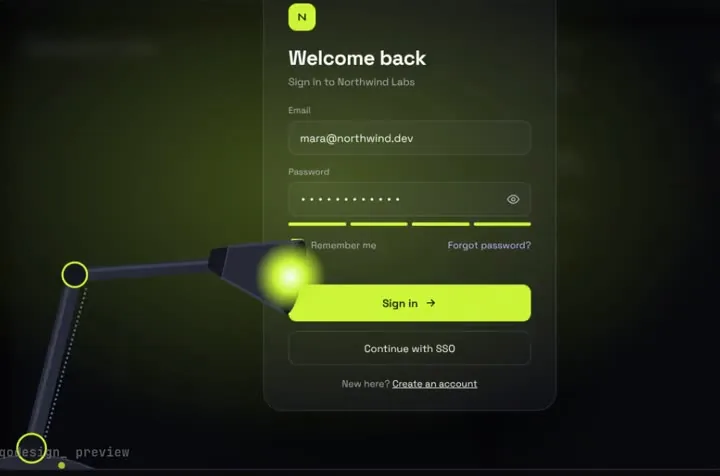
By buying you agree to the Terms.
- Download right after paying
- Use it in client projects
- Won't run on the listed stack? We fix it or refund you
Ready forCursorv0Lovableshadcn CLI
Use it in Next.js
"use server";
import { Code, ConnectError } from "@connectrpc/connect";
import { oidcService, sessionService } from "@/lib/zitadel";

type Result = { ok: boolean; message?: string; callbackUrl?: string };

export async function signInWithZitadel(authRequestId: string, email: string, password: string): Promise<Result> {
  if (!authRequestId.startsWith("V2_")) {
    return { ok: false, message: "Open this page from your app's sign-in button." };
  }

  let session: { sessionId: string; sessionToken: string };
  try {
    // One call with both checks. Login V2 asks for the login name first and the
    // password on a second screen; the Session API also takes them together.
    session = await sessionService.createSession({
      checks: {
        user: { search: { case: "loginName", value: email } },
        password: { password },
      },
    });
  } catch (err) {
    if (err instanceof ConnectError && (err.code === Code.Unavailable || err.code === Code.DeadlineExceeded)) {
      return { ok: false, message: "Can't reach the sign-in server. Try again in a minute." };
    }
    // Unknown user, wrong password, locked user: one message for all of them.
    return { ok: false, message: "That email and password don't match." };
  }

  try {
    // Hand the session to the waiting OIDC request. ZITADEL answers with the
    // redirect back to your app (code and state included).
    const { callbackUrl } = await oidcService.createCallback({
      authRequestId,
      callbackKind: { case: "session", value: { sessionId: session.sessionId, sessionToken: session.sessionToken } },
    });
    return { ok: true, callbackUrl };
  } catch {
    // e.g. the auth request expired or was already used
    return { ok: false, message: "This sign-in link expired. Start again from the app." };
  }
}import { createServerTransport } from "@zitadel/client/node";
import { createOIDCServiceClient, createSessionServiceClient } from "@zitadel/client/v2";
// Server code only. The token is the personal access token of a service user
// with the IAM_LOGIN_CLIENT role on your instance.
const transport = createServerTransport(process.env.ZITADEL_SERVICE_USER_TOKEN!, {
// your instance, e.g. https://my-team.zitadel.cloud (gRPC over HTTP/2)
baseUrl: process.env.ZITADEL_API_URL!,
});
export const sessionService = createSessionServiceClient(transport);
export const oidcService = createOIDCServiceClient(transport);import LoginCard from "./LoginCard";
// ZITADEL sends the browser here as /login?authRequest=V2_...
export default async function LoginPage({ searchParams }: { searchParams: Promise<{ authRequest?: string }> }) {
const { authRequest } = await searchParams;
return <LoginCard authRequestId={authRequest ?? ""} />;
}"use client";
import { useRef } from "react";
import SpotlightLampLogin from "@/components/SpotlightLampLogin";
import { signInWithZitadel } from "./actions";
export default function LoginCard({ authRequestId }: { authRequestId: string }) {
const next = useRef<string | undefined>(undefined);
return (
<div style={{ height: "100dvh" }}>
<SpotlightLampLogin
autoplayDemo={false}
onSignIn={async (email, password) => {
const res = await signInWithZitadel(authRequestId, email, password);
next.current = res.callbackUrl;
return { ok: res.ok, message: res.message };
}}
// after the light floods the screen, go back to the app with the code
onSuccess={() => {
if (next.current) window.location.assign(next.current);
}}
/>
</div>
);
}import { NextResponse, type NextRequest } from "next/server";
// The OIDC endpoints live on your login domain and are passed through to ZITADEL,
// with the two headers the Login App docs ask for.
export const config = { matcher: ["/.well-known/:path*", "/oauth/:path*", "/oidc/:path*"] };
export function proxy(request: NextRequest) {
const api = new URL(process.env.ZITADEL_API_URL!);
const headers = new Headers(request.headers);
headers.set("x-zitadel-public-host", request.nextUrl.host);
headers.set("x-zitadel-instance-host", api.host);
const target = new URL(request.nextUrl.pathname + request.nextUrl.search, api);
return NextResponse.rewrite(target, { request: { headers } });
}Good to know
- Checked on October 25, 2026: @zitadel/client 1.3.1 (published July 28, 2025, MIT) had 27,266 downloads in the week of October 16 to 22, and @zitadel/react 1.1.1 had 4,966. ZITADEL's own Login V2 lives in the main repo under apps/login, on next 16.3.8, react 19.2.6 and tailwindcss ^4.3.0. The older zitadel/typescript repo is archived.
- Make a service user with the IAM_LOGIN_CLIENT role on your instance and give the app its personal access token as ZITADEL_SERVICE_USER_TOKEN, plus ZITADEL_API_URL without a trailing slash. Those are the same two variables ZITADEL's fork guide uses for apps/login. The token stays on the server; only the action and lib/zitadel.ts read it.
- Copy SpotlightLampLogin.tsx, engine.ts and lamp-login.css into components and the data folder into data. The card ships its own CSS, so this page doesn't need Tailwind at all.
- The card checks its fields before the action runs: the email has to look like an email, and the password needs at least 6 characters. If your login names aren't emails, or your password policy allows shorter passwords, change those two checks in SpotlightLampLogin.tsx.
- Import Code and ConnectError from @connectrpc/connect, not from @zitadel/client. In 1.3.1 the package's index.d.ts lists both, so tsc passes, but its built index.js doesn't export them, and next build stops with "Export ConnectError doesn't exist in target module". The client's README also shows createServerTransport without an httpVersion; that's right, because it's a gRPC transport and passing httpVersion fails tsc.
- What we ran: the five files type-checked against @zitadel/client 1.3.1, @zitadel/proto 1.3.1, @connectrpc/connect 2.2.0, next 16.4.3, react 19.3.1, framer-motion 14.6.0 and TypeScript 5.9.3 with the shipped component, and a misspelled check case fails tsc as it should. next build passed. Under next start with a local stand-in for ZITADEL, the proxy passed /.well-known/openid-configuration through with both x-zitadel headers, a sign-in with no authRequest showed "Open this page from your app's sign-in button.", and with the stand-in stopped the card showed "Can't reach the sign-in server." We haven't signed in against a real ZITADEL instance, so the success path and createCallback weren't run.
Branding or the Login V2 theme may be all you need
- ZITADEL's branding settings set a logo, colors and a font per instance or per organization, for light and dark mode, and the docs say "The login and the emails will be sent with your branding." For most teams that's enough, and it keeps every screen: passkeys, MFA, identity providers, registration and password reset.
- If you self-host the new Login V2, apps/login also ships THEME_CUSTOMIZATION.md: NEXT_PUBLIC_THEME_ROUNDNESS (edgy, mid, full), NEXT_PUBLIC_THEME_LAYOUT (side-by-side, top-to-bottom), NEXT_PUBLIC_THEME_SPACING, NEXT_PUBLIC_THEME_APPEARANCE (flat, material) and NEXT_PUBLIC_THEME_BACKGROUND_IMAGE. No code, and you still get ZITADEL's updates. Pick this before anything on this page if it gets you close.
Fork Login V2, or build your own login UI?
- ZITADEL calls its Login UI "an MIT-licensed Next.js application maintained in the ZITADEL monorepo". The apps/login folder has its own MIT LICENSE, while the rest of the repo is AGPL-3.0. The fork guide is frank about the cost: "your fork becomes an application that your team must build, test, secure, monitor, and update." Fork it when you want to change how a few screens look and keep everything else Login V2 does.
- The route on this page is the docs' "Build your own Login UI": a small Next.js app that talks to the Session API and the OIDC service through @zitadel/client. It's much less code to own, and the trade is that it only does what you write. Here that's one email and password screen.
- If you fork, note the Tailwind detail from our Tailwind v4 check of this piece. apps/login uses Tailwind 4, and under v4 the preflight reset comes back on, so the card's h1 and h2 drop from bold to normal and line-height becomes 1.5. Our fix for a fresh app swaps @import "tailwindcss" for the theme and utilities layers only, but in a Login V2 fork that would also take the reset away from ZITADEL's own screens. There you'd restyle those headings in lamp-login.css instead, which we haven't tested.
Login name first, password second: why one call works here
- Login V2 asks for the login name on one screen and the password on the next. ZITADEL's username and password guide describes that flow as "creating a new session with a username and updating it with the password", but it also says "you can create a new session with the first credentials a user enters."
- The lamp shows both fields at once, so the action sends both checks in a single createSession call: user.search with case loginName, and password. The cost is that you can't route people by their login name first, for example to send a company domain to its identity provider before asking for a password. If you need that, keep a login name step in front of the card.
How the OIDC hand-off works
- Your app starts a normal authorization request at your login domain. proxy.ts passes /.well-known, /oauth and /oidc through to ZITADEL with x-zitadel-public-host and x-zitadel-instance-host, which the Login App docs list as the proxy's job. In the ZITADEL console, set the app to the new login with your login domain as its custom URI; the docs say "The version and the optional custom URI for the available login UI is configurable under the application settings." ZITADEL then sends the browser to /login?authRequest=V2_... on your login domain.
- After createSession, the action calls createCallback with the auth request id and the session id and token. ZITADEL answers with a callbackUrl that carries the code and state, and the card's onSuccess sends the browser there once the light floods the screen. The docs say the token's account has to be "permitted to finalize the Auth Request through the IAM_LOGIN_CLIENT role."
- The snippet doesn't check your login policies. The Login App docs say the flow is finalized only once "the user is authenticated according to the policies", and Login V2 reads your login settings to decide that. This action checks a password and nothing more, so use it where a password is the whole sign-in. If your organization requires MFA, passkeys or an identity provider, fork Login V2 instead.
Install
- Copy from the zipPut
react/src/components + react/src/dataintosrc/, thennpm i framer-motion @zitadel/client @connectrpc/connect. - Or ask your AIPaste PROMPT.md into Cursor, Lovable or v0.
Props
- onSignIn
- (email, password) → { ok, message? }; here it calls the server action
- onSuccess
- runs after the flood; here it goes to the callbackUrl
- autoplayDemo
- false for a real login page
- data
- names shown on the card and behind it
How qodesign compares
- qodesign vs Magic UIMagic UI is best for: landing pages built with shadcn/ui.
- qodesign vs Aceternity UIAceternity UI is best for: teams building many marketing pages who want one big library.
All comparisons, with prices read on each library's own site.
Questions
Should I fork ZITADEL's Login V2 or build my own login UI?
Fork it when you need its screens (MFA, passkeys, identity providers, registration) and only want them to look different. Build your own on the Session API when a single email and password screen is all you need, as on this page.
Does this work without a login name step?
Yes. The Session API accepts the user check and the password check in one createSession call, which is what the action does. You lose the chance to route by login name before the password.
What does the service user need?
The IAM_LOGIN_CLIENT role on your instance and a personal access token. ZITADEL's docs name that role as the one allowed to finalize an auth request, which is the createCallback step.
Do I need Tailwind?
No. The card ships its own CSS. Tailwind only matters if you put it inside a Login V2 fork, where preflight changes the card's headings.
Is ZITADEL's login UI open source?
Yes. apps/login carries an MIT license inside a repo that is otherwise AGPL-3.0, and the docs call it an MIT-licensed Next.js application.
Can Cursor or v0 add it for me?
Yes. Each download has a PROMPT.md. Paste it into Cursor, Lovable, v0 or Claude Code and it fits the piece into your app.
Can I use it in client work?
Yes, in personal and client projects. You can't resell the code itself as a kit.