A Keycloakify custom login page
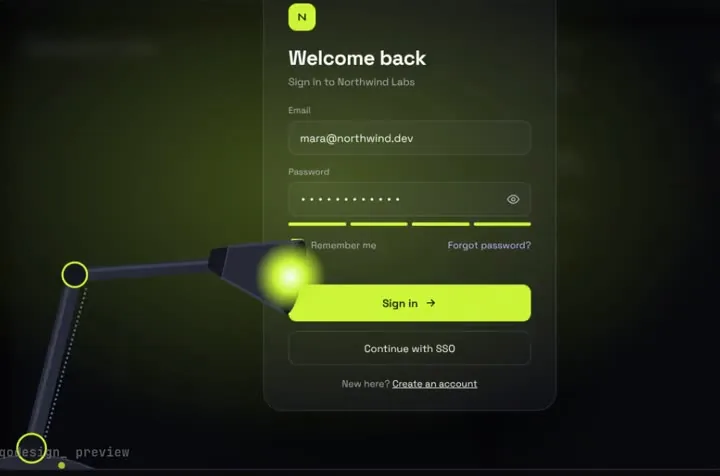
Keycloakify turns a Vite and React app into a Keycloak login theme. Here the spotlight lamp login replaces login.ftl, posts the email and password to Keycloak the same way the stock form does, and shows Keycloak's error when the password is wrong.
By buying you agree to the Terms.
- Download right after paying
- Use it in client projects
- Won't run on the listed stack? We fix it or refund you
Ready forCursorv0Lovableshadcn CLI
Use it in a Keycloakify theme
import { kcSanitize } from "keycloakify/lib/kcSanitize";
import SpotlightLampLogin from "../../components/SpotlightLampLogin";
import northwind from "../../data/northwind";
import type { KcContext } from "../KcContext";
import "./LampLogin.css";

type LoginKcContext = Extract<KcContext, { pageId: "login.ftl" }>;

// Keycloak expects a normal form POST to url.loginAction with the same fields
// its own login.ftl sends. This builds that form and submits it.
function postToKeycloak(action: string, fields: Record<string, string>) {
  const form = document.createElement("form");
  form.method = "post";
  form.action = action;
  form.hidden = true;
  for (const [name, value] of Object.entries(fields)) {
    const input = document.createElement("input");
    input.type = "hidden";
    input.name = name;
    input.value = value;
    form.appendChild(input);
  }
  document.body.appendChild(form);
  form.submit();
}

export default function LampLogin({ kcContext }: { kcContext: LoginKcContext }) {
  const { url, auth, realm, message, messagesPerField } = kcContext;
  // "Sign in to ..." reads the realm's display name. The blurred app behind the card is still the mock data.
  const data = { ...northwind, company: { ...northwind.company, name: realm.displayName || realm.name } };

  // A wrong password comes back as a fresh login.ftl with the error on the
  // username/password fields; other notices arrive in kcContext.message.
  const notice = messagesPerField.existsError("username", "password")
    ? messagesPerField.getFirstError("username", "password")
    : message?.summary;

  return (
    <div style={{ position: "fixed", inset: 0 }}>
      <SpotlightLampLogin
        data={data}
        autoplayDemo={false}
        onSignIn={(email, password) => {
          postToKeycloak(url.loginAction, {
            username: email,
            password,
            credentialId: auth.selectedCredential ?? "",
          });
          // Never resolves: the browser is already leaving for Keycloak, so the
          // card stays busy instead of playing its success animation.
          return new Promise<{ ok: boolean }>(() => {});
        }}
      />
      {notice && (
        <p
          role="alert"
          className="kc-notice"
          dangerouslySetInnerHTML={{ __html: kcSanitize(notice) }}
        />
      )}
    </div>
  );
}import { Suspense, lazy } from "react";
import type { ClassKey } from "keycloakify/login";
import type { KcContext } from "./KcContext";
import { useI18n } from "./i18n";
import DefaultPage from "keycloakify/login/DefaultPage";
import Template from "keycloakify/login/Template";
const UserProfileFormFields = lazy(() => import("keycloakify/login/UserProfileFormFields"));
const LampLogin = lazy(() => import("./pages/LampLogin"));
const doMakeUserConfirmPassword = true;
export default function KcPage(props: { kcContext: KcContext }) {
const { kcContext } = props;
const { i18n } = useI18n({ kcContext });
return (
<Suspense>
{(() => {
switch (kcContext.pageId) {
case "login.ftl":
// The card asks for an email and a password. Use it only when the realm
// takes exactly that; every other case keeps Keycloak's default page.
if (kcContext.realm.password && kcContext.realm.loginWithEmailAllowed && !kcContext.usernameHidden) {
return <LampLogin kcContext={kcContext} />;
}
break;
}
return (
<DefaultPage
kcContext={kcContext}
i18n={i18n}
classes={classes}
Template={Template}
doUseDefaultCss={true}
UserProfileFormFields={UserProfileFormFields}
doMakeUserConfirmPassword={doMakeUserConfirmPassword}
/>
);
})()}
</Suspense>
);
}
const classes = {} satisfies { [key in ClassKey]?: string };.kc-notice {
position: fixed;
top: 16px;
left: 50%;
transform: translateX(-50%);
max-width: calc(100% - 32px);
margin: 0;
padding: 10px 14px;
border-radius: 10px;
background: #2a0f12;
color: #ffd7d7;
font: 500 14px/1.4 system-ui, sans-serif;
z-index: 10;
}Good to know
- Keycloakify describes itself as a way to "Build custom Keycloak login, account, email and admin themes with React, Angular or Svelte." The current release is keycloakify 11.16.4 (October 21, 2026), with 94,821 downloads in the week to October 22. The GitHub repo, now at keycloakify/keycloakify, isn't archived and was last pushed on October 21.
- Copy SpotlightLampLogin.tsx, engine.ts and lamp-login.css into src/components and the data folder into src/data of your Keycloakify project. The starter has no @ alias, so the imports above are relative.
- The card checks its fields before anything is posted: the email has to look like an email, and the password needs at least 6 characters. If your realm's password policy allows shorter ones, change that check in SpotlightLampLogin.tsx.
- KcPage only uses the card when the realm allows password sign-in and Login with email. Keycloak turns Login with email on for new realms (RealmManager sets loginWithEmailAllowed to true). Every other case, like a username-only realm or a re-login where Keycloak already knows the user, keeps Keycloakify's default page.
- A wrong password comes back as a fresh login page with the error on the username and password fields. LampLogin reads it from messagesPerField (or kcContext.message for other notices) and shows it above the card, sanitized with Keycloakify's kcSanitize like the stock page does.
- Type-checked against keycloakify 11.16.4, react 18.3.1, @types/react 18.3.31, framer-motion 11.18.2 and TypeScript 5.9.3, with the starter's tsconfig and the shipped component source. We also built it with Vite and opened it on Keycloakify's mock login.ftl context in a headless browser. The card posted username, password and credentialId to the mock loginAction, and a mocked wrong password showed the notice. We haven't run it inside a real Keycloak server, and the default-page branch was only type-checked.
- Build the theme with npm run build-keycloak-theme. Keycloakify's deploy guide says it "will create a /dist_keycloak directory containing the necessary JAR files": keycloak-theme-for-kc-all-other-versions.jar for Keycloak 11 to 21 and 26 or newer, keycloak-theme-for-kc-22-to-25.jar for 22 to 25.
Why the success animation doesn't play on a Keycloak page
- Keycloak checks the password on its own server. The stock login.ftl is a plain form: action={url.loginAction} method="post", with fields named username, password and a hidden credentialId. LampLogin sends exactly those fields, and the browser then leaves the page.
- That means the card never hears whether the password was right. Keycloak answers with a redirect to your app or a new login page. So onSignIn returns a promise that never settles, the card stays on its busy state until the page changes, and the light flood from the preview above never plays. What you keep is the lamp, the spotlight that follows the focused field, and the look of the card.
Replacing login.ftl without ejecting it
- Keycloakify's docs explain that it "internalizes all the components that make up the default UI, exposing only the DefaultPage component." You don't have to eject anything to swap one page. Add a case for "login.ftl" to the switch in src/login/KcPage.tsx, as in the second file above, and every other page keeps falling through to DefaultPage.
- npx keycloakify eject-page is still useful. The docs say it lets you "select specific components from Keycloakify's source code, which will then be copied into your own codebase for further customization." Eject login.ftl if you'd rather restyle Keycloak's own form. Its Login.tsx is also the best list of what the page can do: remember me, reset password, registration, identity provider buttons and passkeys.
What the card doesn't wire for you
- The card's extra controls are placeholders in its source. Forgot password links to #forgot, Create an account to #signup, Continue with SSO is a button with no handler, and the Remember me checkbox has no name, so it isn't sent.
- To use them, edit SpotlightLampLogin.tsx: point the links at url.loginResetCredentialsUrl and url.registrationUrl, send each SSO button to social.providers[i].loginUrl, and add rememberMe to the posted fields when realm.rememberMe is on. Or delete the ones your realm doesn't use. OTP, password reset, registration and the other Keycloak pages aren't covered by this card.
When Keycloakify's default theme fits better
- If you want every Keycloak page to match, the free route is Keycloakify's starter with its default theme. DefaultPage already renders all the login pages, including OTP, reset, registration, identity provider links and passkeys, and its CSS customization guide shows how to restyle them through the kc classes. Keycloakify also has a Using Tailwind guide for that route.
- Spotlight Lamp Login is one email and password screen. Pick it when the sign-in page is the part people see every day and you want it to feel like your product, and you're fine leaving the other pages on the default theme.
Install
- Copy from the zipPut
react/src/components + react/src/dataintosrc/, thennpm i framer-motion. - Or ask your AIPaste PROMPT.md into Cursor, Lovable or v0.
Props
- onSignIn
- (email, password); here it posts to url.loginAction and never resolves
- autoplayDemo
- false for a real login page
- data
- the company name on the card and the blurred app behind it
How qodesign compares
- qodesign vs Magic UIMagic UI is best for: landing pages built with shadcn/ui.
- qodesign vs Aceternity UIAceternity UI is best for: teams building many marketing pages who want one big library.
All comparisons, with prices read on each library's own site.
Questions
Does the success animation play after Keycloak signs someone in?
No. The form posts to Keycloak and the browser leaves the page, so the card stays busy until Keycloak redirects. The flood you see in the preview only plays where your own code checks the password, like the Supabase or Stack Auth guides.
Do I need to eject login.ftl?
No. Add a "login.ftl" case to the switch in src/login/KcPage.tsx and render your page there. Eject it only if you want to restyle Keycloak's own form instead.
Which Keycloak versions does the theme work with?
Keycloakify builds two JARs by default: one for Keycloak 11 to 21 and 26 or newer, and one for 22 to 25. Use the one that matches your server.
What happens to the reset password, OTP and register pages?
They stay on Keycloakify's default theme through DefaultPage. The card only replaces login.ftl.
Does the card need Tailwind?
No. It ships with its own CSS file. If the rest of your theme uses Tailwind, Keycloakify's docs have a Using Tailwind page.
Can Cursor or v0 add it for me?
Yes. Each download has a PROMPT.md. Paste it into Cursor, Lovable, v0 or Claude Code and it fits the piece into your app.
Can I use it in client work?
Yes, in personal and client projects. You can't resell the code itself as a kit.