A custom WorkOS AuthKit login page in Next.js
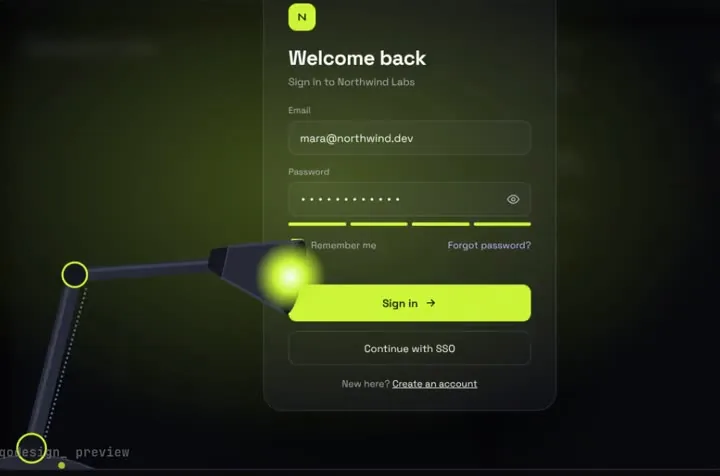
Your own sign-in screen on WorkOS: the spotlight lamp login calls authenticateWithPassword in a server action and saves the same AuthKit session cookie the hosted page would.
By buying you agree to the Terms.
- Download right after paying
- Use it in client projects
- Won't run on the listed stack? We fix it or refund you
Ready forCursorv0Lovableshadcn CLI
Use it in Next.js
"use client";
import { useRouter } from "next/navigation";
import SpotlightLampLogin from "@/components/SpotlightLampLogin";
import { signInWithPassword } from "./actions";

export default function LoginPage() {
  const router = useRouter();
  return (
    <div className="h-dvh">
      <SpotlightLampLogin
        autoplayDemo={false}
        onSignIn={(email, password) => signInWithPassword(email, password)}
        onSuccess={() => {
          router.push("/dashboard");
          router.refresh();
        }}
      />
    </div>
  );
}"use server";
import { headers } from "next/headers";
import { getWorkOS, saveSession } from "@workos-inc/authkit-nextjs";
export async function signInWithPassword(email: string, password: string) {
const h = await headers();
try {
const auth = await getWorkOS().userManagement.authenticateWithPassword({
clientId: process.env.WORKOS_CLIENT_ID!,
email,
password,
ipAddress: h.get("x-forwarded-for")?.split(",")[0]?.trim(),
userAgent: h.get("user-agent") ?? undefined,
});
// the same encrypted session cookie AuthKit's hosted flow sets, so withAuth() keeps working
await saveSession(auth, `${process.env.NEXT_PUBLIC_SITE_URL}/login`);
return { ok: true };
} catch {
// wrong password, unknown email, or a step this screen doesn't handle (email verification, MFA)
return { ok: false, message: "That email and password don't match." };
}
}Good to know
- Type-checked against @workos-inc/authkit-nextjs 4.6.0 (with @workos-inc/node 12.0) and next 15.5 with TypeScript 5.9. We haven't signed in to a live WorkOS environment with it.
- WorkOS's AuthKit overview says the hosted UI is the fastest way in, and that "integrating against the API allows you to implement your own UI and Sign In flow." This page is the second route.
- The authkit-nextjs README calls saveSession "an advanced API intended for specific integration scenarios" and says you shouldn't need it with hosted AuthKit. That's fair: if the hosted page looks fine to you, keep it. It also does SSO, social login, MFA and sign-up for you.
- Turn on Email + Password in the WorkOS dashboard. Keep the authkit middleware and env vars from WorkOS's Next.js quickstart, so withAuth() reads the session this page saves. The README marks WORKOS_API_KEY as optional, but this route needs it: the password call runs on your server with the key.
- authenticateWithPassword throws when it can't finish: a wrong password, but also an account that still needs email verification, MFA or SSO. The snippet shows one message for all of them. Read the error's code if you want to send those users to the right next step.
- The lamp is one sign-in screen. Sign-up, password reset and social buttons aren't in it. Link to your own pages for those, or to WorkOS's hosted sign-up.
Install
- Copy from the zipPut
react/src/components + react/src/dataintosrc/, thennpm i framer-motion @workos-inc/authkit-nextjs. - Or ask your AIPaste PROMPT.md into Cursor, Lovable or v0.
Props
- onSignIn
- (email, password) → { ok, message? }
- onSuccess
- runs after the light floods the screen
- autoplayDemo
- false for a real page
- data
- names shown after sign-in
How qodesign compares
- qodesign vs Magic UIMagic UI is best for: landing pages built with shadcn/ui.
- qodesign vs Aceternity UIAceternity UI is best for: teams building many marketing pages who want one big library.
All comparisons, with prices read on each library's own site.
Questions
Can I restyle the hosted AuthKit page instead?
Partly. WorkOS lists a custom domain and branding for the hosted page. A screen like the lamp, with its own motion, needs your own UI on the API.
Does withAuth() still work after this sign-in?
Yes. saveSession writes the same encrypted cookie the hosted callback sets, so the middleware and withAuth() read it as usual.
Where do sign-up and SSO go?
Not on this screen. Send SSO users through getSignInUrl() to the hosted flow, and keep sign-up on its own page.
Can Cursor or v0 add it for me?
Yes. Each download has a PROMPT.md. Paste it into Cursor, Lovable, v0 or Claude Code and it fits the piece into your app.
Can I use it in client work?
Yes, in personal and client projects. You can't resell the code itself as a kit.