Custom Clerk sign-in page
The spotlight lamp login on Clerk's useSignIn hook: password sign-in, Clerk's own error text under the field, and a redirect when the session is ready.
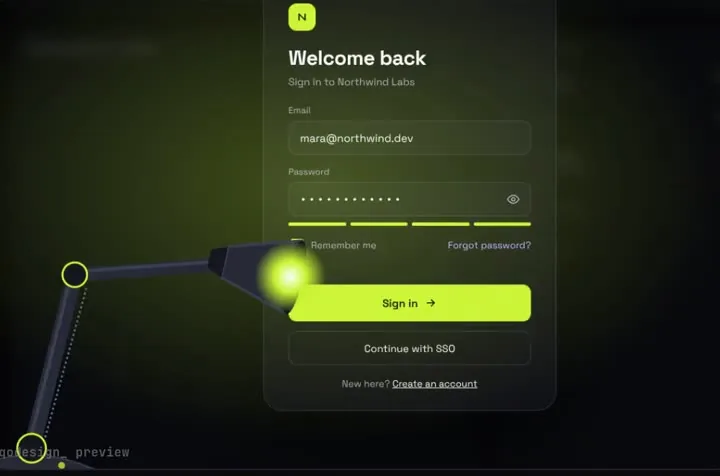
Use it in Next.js
"use client";
import { useRouter } from "next/navigation";
import { useSignIn } from "@clerk/nextjs";
import SpotlightLampLogin from "@/components/SpotlightLampLogin";

export default function SignInPage() {
  const router = useRouter();
  const { signIn } = useSignIn();

  return (
    <div className="h-dvh">
      <SpotlightLampLogin
        autoplayDemo={false}
        onSignIn={async (email, password) => {
          const { error } = await signIn.password({ emailAddress: email, password });
          if (error) return { ok: false, message: error.longMessage ?? error.message };

          if (signIn.status !== "complete") {
            // needs_second_factor or needs_client_trust: send these users to your code step.
            return { ok: false, message: "This account needs a verification code to finish signing in." };
          }

          await signIn.finalize({
            navigate: ({ decorateUrl }) => {
              const url = decorateUrl("/dashboard");
              if (url.startsWith("http")) window.location.href = url;
              else router.push(url);
            },
          });
          return { ok: true };
        }}
      />
    </div>
  );
}
Good to know
- Written for @clerk/nextjs 7, where useSignIn returns a signIn object with password() and finalize(). Older guides use signIn.create and setActive, and that code no longer type-checks on version 7.
- Wrap your app in ClerkProvider and set your Clerk keys, as in Clerk's Next.js quickstart. The page only replaces the form.
- Accounts with two-factor auth come back with a status other than complete. The snippet shows a message for them; add Clerk's code step if your users have 2FA on.
- The lamp is a full-screen scene. Give it a parent with a real height (h-dvh above).
Install
- Copy from the zipPut
react/src/components + react/src/dataintosrc/, thennpm i framer-motion @clerk/nextjs. - Or ask your AIPaste PROMPT.md into Cursor, Lovable or v0.
Props
- onSignIn
- (email, password) → { ok, message? }
- onSuccess
- runs after the light floods the screen
- autoplayDemo
- false for a real page
- data
- names shown after sign-in
How qodesign compares
- qodesign vs Magic UIMagic UI is best for: landing pages built with shadcn/ui.
- qodesign vs Aceternity UIAceternity UI is best for: teams building many marketing pages who want one big library.
All comparisons, with prices read on each library's own site.
Questions
Why not Clerk's own SignIn component?
Use it if you're happy with how it looks. This is for when you want the sign-in page itself to be the memorable part.
Does Clerk's error text show?
Yes. Return { ok: false, message } and the lamp prints it under the password field.
Can Cursor or v0 add it for me?
Yes. Each download has a PROMPT.md. Paste it into Cursor, Lovable, v0 or Claude Code and it fits the piece into your app.
Can I use it in client work?
Yes, in personal and client projects. You can't resell the code itself as a kit.