PocketBase login page for React
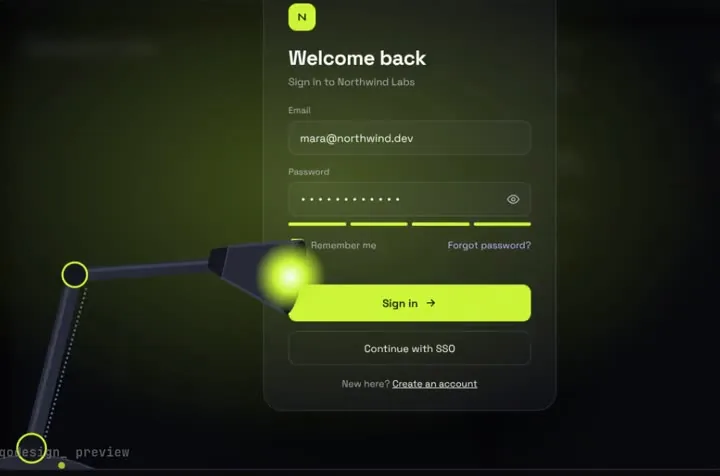
The spotlight lamp login on PocketBase's authWithPassword. It shows a clear message for a wrong password, sets a cookie your middleware can read, and avoids the duplicate-request cancel that trips up React apps.
By buying you agree to the Terms.
- Download right after paying
- Use it in client projects
- Won't run on the listed stack? We fix it or refund you
Ready forCursorv0Lovableshadcn CLI
Use it in Next.js
"use client";
import { useRouter } from "next/navigation";
import { ClientResponseError } from "pocketbase";
import SpotlightLampLogin from "@/components/SpotlightLampLogin";
import { pb } from "@/lib/pocketbase";

export default function LoginPage() {
  const router = useRouter();

  return (
    <div className="h-dvh">
      <SpotlightLampLogin
        autoplayDemo={false}
        onSignIn={async (email, password) => {
          try {
            // requestKey: null stops the SDK from cancelling a repeat call (React Strict Mode, double submits).
            await pb.collection("users").authWithPassword(email, password, { requestKey: null });
            // A readable cookie so middleware and server components can see the login.
            document.cookie = pb.authStore.exportToCookie({ httpOnly: false });
            return { ok: true };
          } catch (err) {
            if (err instanceof ClientResponseError && err.status === 400) {
              return { ok: false, message: "That email and password don't match." };
            }
            return { ok: false, message: "Can't reach the server right now. Try again." };
          }
        }}
        onSuccess={() => router.push("/dashboard")}
      />
    </div>
  );
}import PocketBase from "pocketbase";
// One client for the browser. On the server, make a new PocketBase() per request instead.
export const pb = new PocketBase(process.env.NEXT_PUBLIC_POCKETBASE_URL);import { NextResponse, type NextRequest } from "next/server";
import PocketBase from "pocketbase";
export function middleware(request: NextRequest) {
const pb = new PocketBase(process.env.NEXT_PUBLIC_POCKETBASE_URL);
pb.authStore.loadFromCookie(request.headers.get("cookie") ?? "");
// isValid only checks that the token hasn't expired. Your collection API rules still guard the data.
if (!pb.authStore.isValid) {
return NextResponse.redirect(new URL("/login", request.url));
}
return NextResponse.next();
}
export const config = { matcher: ["/dashboard/:path*"] };Good to know
- PocketBase answers a wrong email or password with a 400. The snippet turns that into a message the lamp shows under the password field. Anything else, like the server being down, gets a different line.
- The SDK cancels a request when an identical one is still pending. React Strict Mode and quick double clicks both trigger that, so the snippet passes requestKey: null.
- exportToCookie defaults to httpOnly, which a browser can't set from JavaScript. httpOnly: false lets the cookie land so middleware can read it. If you need httpOnly, sign in through a route handler instead.
- The lamp is a full-screen scene. Give it a parent with a real height (h-dvh above), or it has nothing to fill.
- We type-checked the snippets against pocketbase 0.28 and Next.js 15. Plain React with Vite works too: keep the onSignIn part and skip the cookie and middleware.
Install
- Copy from the zipPut
react/src/components + react/src/dataintosrc/, thennpm i framer-motion pocketbase. - Or ask your AIPaste PROMPT.md into Cursor, Lovable or v0.
Props
- onSignIn
- (email, password) → { ok, message? }
- onSuccess
- runs after the light floods the screen
- autoplayDemo
- false for a real page
- data
- names shown after sign-in
How qodesign compares
- qodesign vs Magic UIMagic UI is best for: landing pages built with shadcn/ui.
- qodesign vs Aceternity UIAceternity UI is best for: teams building many marketing pages who want one big library.
All comparisons, with prices read on each library's own site.
Questions
Does it work with a username instead of an email?
Yes, if your users collection allows username as an identity field. authWithPassword takes either. The lamp's first field still checks for an email format, though, so change that check in the component.
How do I sign out?
Call pb.authStore.clear() and clear the pb_auth cookie, then send them back to /login.
Can I sign in admins with it?
Use pb.collection("_superusers") instead of users. Most apps keep admin sign-in on PocketBase's own dashboard, though.
Can Cursor or v0 add it for me?
Yes. Each download has a PROMPT.md. Paste it into Cursor, Lovable, v0 or Claude Code and it fits the piece into your app.
Can I use it in client work?
Yes, in personal and client projects. You can't resell the code itself as a kit.