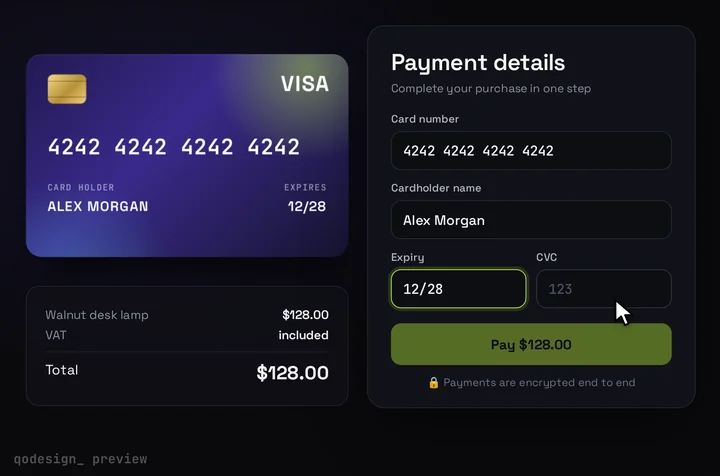
The Payment Element inside the 3D card, in the App Router
app/pay/checkout.tsx
"use client";
import { useRouter } from "next/navigation";
import { loadStripe, type Appearance } from "@stripe/stripe-js";
import { Elements, PaymentElement, useElements, useStripe } from "@stripe/react-stripe-js";
import CardCheckout from "@/components/CardCheckout";
import { createPaymentIntent } from "./actions";

// Outside the component, so Stripe.js loads once.
const stripePromise = loadStripe(process.env.NEXT_PUBLIC_STRIPE_PUBLISHABLE_KEY!);

// Free: Stripe's Appearance API, set to the card's dark colours.
const appearance: Appearance = {
  theme: "night",
  labels: "above",
  variables: {
    colorPrimary: "#C6FF3D",
    colorBackground: "#0d0e13",
    colorText: "#F4F4F6",
    colorDanger: "#FF5C6C",
    fontFamily: "Space Grotesk, system-ui, sans-serif",
    borderRadius: "14px",
  },
  rules: {
    ".Input": { border: "1px solid #2a2e3b", fontSize: "16px" },
    ".Input:focus": { borderColor: "#C6FF3D", boxShadow: "0 0 0 4px rgba(198, 255, 61, 0.14)" },
    ".Tab--selected": { borderColor: "#C6FF3D" },
  },
};

type Props = { amount: number; currency: string; productName: string };

function PaymentForm({ amount, currency, productName }: Props) {
  const stripe = useStripe();
  const elements = useElements();
  const router = useRouter();

  return (
    <CardCheckout
      amount={amount / 100}
      currency={currency.toUpperCase()}
      productName={productName}
      resetAfter={null}
      renderCardFields={(slot) => (
        <PaymentElement
          options={{
            layout: "tabs",
            // The card already asks for the name, so Stripe doesn't ask twice.
            fields: { billingDetails: { name: "never" } },
          }}
          onChange={(e) => slot.onChange({ complete: e.complete })}
          onReady={(element) => {
            // React Stripe.js 7.0.0 has no prop for this event, so attach it here.
            element.on("carddetailschange", (e) => slot.onChange({ brand: e.details?.brands?.[0] ?? null }));
          }}
        />
      )}
      onConfirm={async ({ name }) => {
        if (!stripe || !elements) throw new Error("Stripe hasn't loaded yet.");

        // 1. Validate the form and collect wallet data. Call it before any await on your server.
        const { error: submitError } = await elements.submit();
        if (submitError) throw submitError;

        // 2. Create the PaymentIntent now, on the server.
        const clientSecret = await createPaymentIntent();

        // 3. Confirm. 3D Secure runs here when the card asks for it.
        const { error, paymentIntent } = await stripe.confirmPayment({
          elements,
          clientSecret,
          redirect: "if_required", // cards stay on the page, redirect methods leave and come back
          confirmParams: {
            return_url: `${window.location.origin}/pay/complete`,
            payment_method_data: { billing_details: { name } },
          },
        });
        if (error) throw error; // the card shows Stripe's message and Pay comes back

        setTimeout(() => router.push(`/pay/complete?payment_intent=${paymentIntent.id}`), 1200);
      }}
    />
  );
}

export default function Checkout(props: Props) {
  return (
    // Deferred intent: Elements renders from mode, amount and currency, before any PaymentIntent exists.
    <Elements stripe={stripePromise} options={{ mode: "payment", amount: props.amount, currency: props.currency, appearance }}>
      <PaymentForm {...props} />
    </Elements>
  );
}
app/pay/page.tsx
import { PLAN } from "@/lib/plan";
import Checkout from "./checkout";

// No PaymentIntent on page load, so this page can be static.
export default function PayPage() {
  return (
    <main className="grid min-h-dvh place-items-center overflow-hidden bg-[#0b0a14] p-4">
      <Checkout amount={PLAN.amount} currency={PLAN.currency} productName={PLAN.name} />
    </main>
  );
}
lib/plan.ts and lib/stripe.ts (server only)
// lib/plan.ts
// One place for what you sell. The page shows it, the Server Action charges it.
export const PLAN = { id: "pro", name: "Pro plan", amount: 1000, currency: "usd" } as const; // amount in cents

// lib/stripe.ts
import "server-only";
import Stripe from "stripe";

// The secret key stays on the server. server-only fails the build if a client file imports this.
export const stripe = new Stripe(process.env.STRIPE_SECRET_KEY!);
app/pay/actions.ts (Server Action: create the PaymentIntent on Pay)
"use server";
import { stripe } from "@/lib/stripe";
import { PLAN } from "@/lib/plan";

// Runs when the buyer presses Pay, not when the page loads.
// The amount comes from the server. Never take it from the browser.
export async function createPaymentIntent(): Promise<string> {
  const intent = await stripe.paymentIntents.create({
    amount: PLAN.amount,
    currency: PLAN.currency,
    automatic_payment_methods: { enabled: true }, // the methods you turned on in the Dashboard
    metadata: { plan: PLAN.id },
  });
  if (!intent.client_secret) throw new Error("Couldn't start the payment.");
  return intent.client_secret;
}
app/pay/complete/page.tsx (where redirect methods come back)
import Link from "next/link";
import { stripe } from "@/lib/stripe";

const MESSAGES: Record<string, string> = {
  succeeded: "Payment received. Thanks!",
  processing: "Your payment is processing. We'll email you when it clears.",
  requires_payment_method: "That payment didn't go through. Try another method.",
};

// Stripe sends redirect methods back here with ?payment_intent=pi_...
// Read the status from Stripe, not from the URL. Fulfil in the webhook, not here.
export default async function Complete({ searchParams }: { searchParams: Promise<{ payment_intent?: string }> }) {
  const { payment_intent } = await searchParams;
  if (!payment_intent?.startsWith("pi_")) return <p>No payment found.</p>;

  const intent = await stripe.paymentIntents.retrieve(payment_intent);
  return (
    <main className="grid min-h-dvh place-items-center p-6 text-center">
      <p>{MESSAGES[intent.status] ?? "Something went wrong."}</p>
      {intent.status === "requires_payment_method" && <Link href="/pay">Back to checkout</Link>}
    </main>
  );
}
app/api/stripe/webhook/route.ts (verify the signature, then fulfil)
import type Stripe from "stripe";
import { stripe } from "@/lib/stripe";

// Stripe signs every webhook. Check the signature on the raw body before you trust the event.
export async function POST(req: Request) {
  const body = await req.text();
  const signature = req.headers.get("stripe-signature");
  if (!signature) return new Response("missing signature", { status: 400 });

  let event: Stripe.Event;
  try {
    event = stripe.webhooks.constructEvent(body, signature, process.env.STRIPE_WEBHOOK_SECRET!);
  } catch {
    return new Response("bad signature", { status: 400 });
  }

  if (event.type === "payment_intent.succeeded") {
    const intent = event.data.object;
    // Fulfil here: mark intent.metadata.plan paid. Stripe can send an event twice, so key on intent.id.
    console.log("paid", intent.id, intent.amount_received);
  }
  if (event.type === "payment_intent.payment_failed") {
    // Optional: email the buyer. intent.last_payment_error?.message says why.
  }
  return new Response("ok");
}