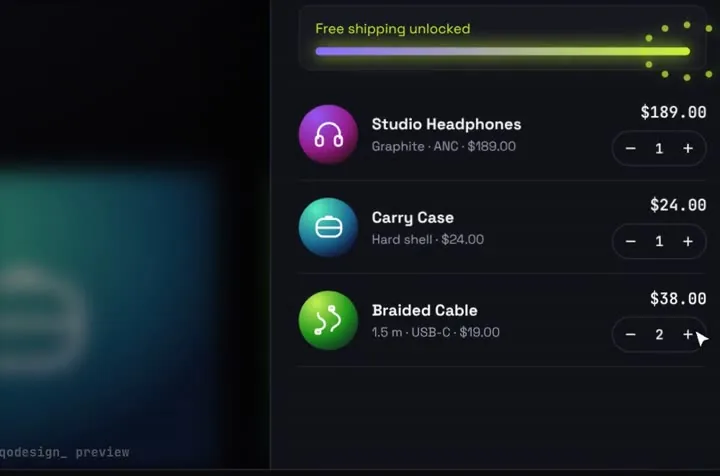
Stack Cart Drawer's Checkout button, sent to Stripe Checkout
app/shop/page.tsx
"use client";
import { useEffect } from "react";
import StackCartDrawer from "@/components/StackCartDrawer";
import { createCheckoutUrl } from "./actions";

type Line = { id: string; qty: number };

// The drawer awaits this. Nobody has paid yet, so never resolve { ok: true } here: that plays the
// paid animation. Send the buyer to Stripe and leave the promise pending, so the button stays on Paying.
async function goToStripe(items: Line[]): Promise<{ ok: boolean }> {
  let url: string;
  try {
    url = await createCheckoutUrl(items);
  } catch {
    return { ok: false }; // no session: the drawer keeps the cart and says nothing was charged
  }
  window.location.assign(url);
  return new Promise<{ ok: boolean }>(() => {});
}

export default function Shop() {
  // Back from Stripe: the browser may restore this page from memory with the button still on Paying.
  useEffect(() => {
    const onShow = (e: PageTransitionEvent) => {
      if (e.persisted) window.location.reload();
    };
    window.addEventListener("pageshow", onShow);
    return () => window.removeEventListener("pageshow", onShow);
  }, []);

  return (
    <div className="h-dvh">
      <StackCartDrawer autoplayDemo={false} onCheckout={goToStripe} />
    </div>
  );
}
app/shop/actions.ts
"use server";
import { redirect } from "next/navigation";
import { stripe } from "@/lib/stripe";
import { PRICE_IDS } from "@/lib/catalog";

type Line = { id: string; qty: number };
const SITE = process.env.NEXT_PUBLIC_SITE_URL!; // e.g. https://shop.example.com, no trailing slash

function toLineItems(items: Line[]) {
  if (items.length === 0) throw new Error("The cart is empty");
  return items.map(({ id, qty }) => {
    const price = PRICE_IDS[id];
    if (!price || !Number.isInteger(qty) || qty < 1 || qty > 20) throw new Error("Unknown product or quantity");
    return { price, quantity: qty };
  });
}

// Creates a hosted Checkout Session and returns its URL. The browser goes there next.
export async function createCheckoutUrl(items: Line[]): Promise<string> {
  const session = await stripe.checkout.sessions.create({
    mode: "payment",
    line_items: toLineItems(items),
    // Stripe swaps {CHECKOUT_SESSION_ID} for the real id. Keep the braces exactly like this.
    success_url: `${SITE}/shop/thanks?session_id={CHECKOUT_SESSION_ID}`,
    cancel_url: `${SITE}/shop`,
  });
  if (!session.url) throw new Error("Stripe sent no Checkout URL");
  return session.url;
}

// For a plain <form action>. redirect() must sit outside any try/catch: it works by throwing.
export async function checkoutForm(formData: FormData) {
  const url = await createCheckoutUrl([{ id: String(formData.get("product")), qty: 1 }]);
  redirect(url);
}
lib/catalog.ts
import "server-only";

// The cart's product ids mapped to Price ids from your Stripe Dashboard (Product catalog).
// The amounts live in Stripe, so nobody can change them from the browser.
export const PRICE_IDS: Record<string, string> = {
  orbit: "price_studio_headphones",
  case: "price_travel_case",
  cable: "price_braided_cable",
};
lib/stripe.ts
import "server-only";
import Stripe from "stripe";

// The secret key stays on the server. server-only fails the build if a client file imports this.
export const stripe = new Stripe(process.env.STRIPE_SECRET_KEY!);
app/shop/thanks/page.tsx
import { redirect } from "next/navigation";
import { stripe } from "@/lib/stripe";

// success_url lands here. Read the session from Stripe: the URL alone proves nothing.
export default async function Thanks({ searchParams }: { searchParams: Promise<{ session_id?: string }> }) {
  const { session_id } = await searchParams;
  if (!session_id) redirect("/shop");

  const session = await stripe.checkout.sessions.retrieve(session_id);
  if (session.status === "open") redirect("/shop"); // not finished on Stripe yet

  return (
    <main className="mx-auto max-w-md p-8">
      <h1 className="text-2xl font-semibold">
        {session.payment_status === "paid" ? "Paid. Thank you!" : "Order received, payment is processing."}
      </h1>
      <p className="mt-2 text-neutral-500">A receipt goes to {session.customer_details?.email ?? "your email"}.</p>
    </main>
  );
}
app/api/stripe/webhook/route.ts
import type Stripe from "stripe";
import { stripe } from "@/lib/stripe";
import { fulfillOrder } from "@/lib/orders";

// Fulfil from the webhook, not from the thanks page: the buyer may close the tab before it loads.
export async function POST(req: Request) {
  const body = await req.text(); // the raw body, exactly as Stripe signed it
  const signature = req.headers.get("stripe-signature");
  if (!signature) return new Response("missing signature", { status: 400 });

  let event: Stripe.Event;
  try {
    event = stripe.webhooks.constructEvent(body, signature, process.env.STRIPE_WEBHOOK_SECRET!);
  } catch {
    return new Response("bad signature", { status: 400 });
  }

  // completed fires when the buyer finishes. Bank debits can still be unpaid then and pay later,
  // which sends async_payment_succeeded. Check payment_status on both.
  if (event.type === "checkout.session.completed" || event.type === "checkout.session.async_payment_succeeded") {
    const session = event.data.object;
    if (session.payment_status === "paid") {
      const { data: lines } = await stripe.checkout.sessions.listLineItems(session.id);
      await fulfillOrder(session.id, lines);
    }
  }
  return new Response("ok");
}
lib/orders.ts
import "server-only";
import type Stripe from "stripe";

// Your database call. Stripe can send the same event twice, so make this idempotent on sessionId.
export async function fulfillOrder(sessionId: string, lines: Stripe.LineItem[]) {
  console.log("fulfil", sessionId, lines.map((l) => `${l.quantity} x ${l.description}`));
}