A shadcn cart drawer for Next.js
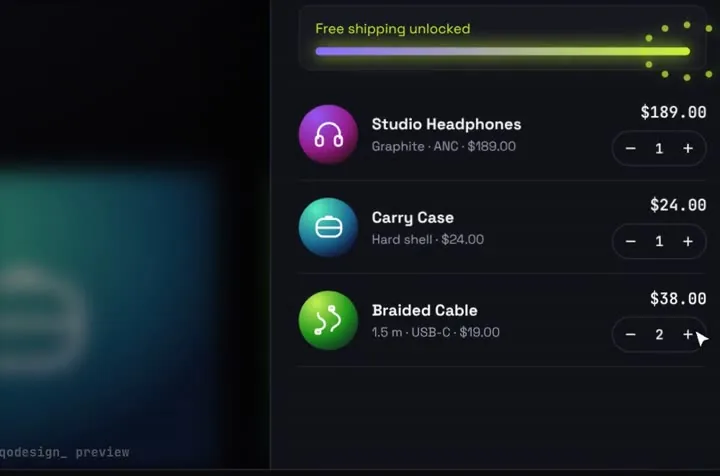
shadcn has no cart component, but its Sheet makes a good free one, and the first snippet below is that cart. Stack Cart Drawer is for stores that want products to fly into the cart.
By buying you agree to the Terms.
- Download right after paying
- Use it in client projects
- Won't run on the listed stack? We fix it or refund you
Ready forCursorv0Lovableshadcn CLI
The free shadcn cart: Sheet plus your line items
"use client"

import { Minus, Plus, ShoppingCart } from "lucide-react"
import { Button } from "@/components/ui/button"
import {
  Sheet,
  SheetClose,
  SheetContent,
  SheetDescription,
  SheetFooter,
  SheetHeader,
  SheetTitle,
  SheetTrigger,
} from "@/components/ui/sheet"

export type CartLine = { id: string; name: string; price: number; qty: number }

const usd = new Intl.NumberFormat("en-US", { style: "currency", currency: "USD" })

export function CartSheet({
  lines,
  onQty,
  onCheckout,
}: {
  lines: CartLine[]
  onQty: (id: string, delta: number) => void
  onCheckout: () => void
}) {
  const count = lines.reduce((n, l) => n + l.qty, 0)
  const subtotal = lines.reduce((s, l) => s + l.price * l.qty, 0)

  return (
    <Sheet>
      <SheetTrigger asChild>
        <Button variant="outline" aria-label={`Cart, ${count} items`}>
          <ShoppingCart />
          {count}
        </Button>
      </SheetTrigger>
      <SheetContent>
        <SheetHeader>
          <SheetTitle>Your cart</SheetTitle>
          <SheetDescription>
            {count === 0 ? "Your cart is empty." : `${count} items`}
          </SheetDescription>
        </SheetHeader>
        <ul className="grid gap-3 overflow-y-auto px-4">
          {lines.map((l) => (
            <li key={l.id} className="grid grid-cols-[1fr_auto] items-center gap-2">
              <div>
                <p className="text-sm font-medium">{l.name}</p>
                <p className="text-muted-foreground text-sm">{usd.format(l.price)}</p>
              </div>
              <div className="flex items-center gap-1">
                <Button size="icon" variant="outline" aria-label={`Remove one ${l.name}`} onClick={() => onQty(l.id, -1)}>
                  <Minus />
                </Button>
                <span className="w-6 text-center text-sm tabular-nums">{l.qty}</span>
                <Button size="icon" variant="outline" aria-label={`Add one ${l.name}`} onClick={() => onQty(l.id, 1)}>
                  <Plus />
                </Button>
              </div>
            </li>
          ))}
        </ul>
        <SheetFooter>
          <div className="flex justify-between text-sm font-medium">
            <span>Subtotal</span>
            <span>{usd.format(subtotal)}</span>
          </div>
          <Button disabled={count === 0} onClick={onCheckout}>
            Checkout
          </Button>
          <SheetClose asChild>
            <Button variant="outline">Keep shopping</Button>
          </SheetClose>
        </SheetFooter>
      </SheetContent>
    </Sheet>
  )
}Good to know
- This free cart is the better fit for most shadcn stores. It uses shadcn's own Sheet and Button, so it matches the rest of your UI, it gets focus handling from Radix Dialog, and the cart state stays yours: pass in the lines from your store and handle onQty and onCheckout.
- shadcn's docs describe Sheet as a component that "Extends the Dialog component to display content that complements the main content of the screen." The Sheet file from the new-york-v4 registry imports radix-ui, lucide-react and cn.
- Stack Cart Drawer is a storefront section plus a cart: a header with a glass cart button, a product grid and the drawer. It keeps the cart state inside the component, so your existing shadcn product cards can't add to it without editing its source.
- Products come from the data prop, in the shape of the demo data (id, name, variant, price, hue, badge). Each product's art is an SVG icon looked up by product id, so new ids need their own icon, or an edit to render your product images.
- onCheckout receives the items as { id, qty } and a total that includes shipping. Resolve { ok: true } and the lines fold back into the cart with a check. Resolve { ok: false } and it announces "Payment failed. Nothing was charged." Price the order again on the server, as actions.ts below does.
- The piece fills the viewport height (100vh, then 100dvh) and clips what overflows, so give it its own route. If your site header sits above it, the page scrolls by the header's height.
- It names Space Grotesk but doesn't load it. Load the font with next/font or a stylesheet link, or the store falls back to system-ui.
What shadcn gives you for a cart today
- No cart component and no cart block. On October 25, 2026 the new-york-v4 registry.json listed 471 items, 97 of them blocks: charts, dashboard, login, sidebar and signup. None is a cart, checkout or shop block. The blocks page says: "Copy and paste into your apps. Works with all React frameworks. Open Source. Free forever."
- Sheet is the side panel most shadcn carts are built on, like the snippet above. Drawer is the bottom sheet for phones. Its docs now say: "The drawer component now uses Base UI instead of Vaul." So an older shadcn Drawer in your project may still be the Vaul one.
- Vaul itself: version 1.1.2, last published December 14, 2024. npm reports 21,182,194 downloads for October 16 to 22, but its daily counts read 0 for October 19 to 21, so treat that number loosely. Our Vaul alternative guide covers the cart drawer side of that.
- Search results today also show shopping cart blocks on third-party shadcn sites such as shadcnblocks and shadcn studio. We haven't tested them. If you want a static cart that looks like the rest of your shadcn app, one of those or the Sheet above is the simpler route.
- Stack Cart Drawer fits a different job: the add-to-cart moment. Tap Add and the product shrinks into a disc that arcs into the cart button, the total rolls, a ring fills toward free shipping, and opening the cart unfolds each disc into a line item.
Stack Cart Drawer as a shadcn cart drawer
- Its stylesheet was written as a standalone page. It sets its colour variables on :root, styles html and body, and uses short global class names like .grid, .page and .row. We dropped it unedited into a scratch shadcn app and measured what changed outside the cart.
- Unedited, the whole app changed. The body turned near-black and switched to Space Grotesk. shadcn's --muted variable became the piece's grey-blue, because both define --muted on :root. A shadcn "grid grid-cols-2 gap-4" row became three columns with a 30px gap (one column on a phone), because the piece's .grid rule is unlayered and beats Tailwind's grid utility. A shadcn Button went from 14px at weight 500 to 16px at weight 400.
- The fix is to scope the piece. Wrap it in a div with the class qcd, make three edits to your copy of cart-drawer.css, and add three rules to globals.css. @scope keeps every piece rule inside .qcd, and the rules in globals.css undo preflight and shadcn's base layer inside the cart only.
- With that, the shadcn elements on the same page measured identical to a page without the piece, at 1440 and 390 px wide. Inside the cart we compared 52 computed properties on all 329 elements against the piece built with preflight off, the setup it was made for. The only difference left: 123 SVG elements carry a solid border style with zero width, which draws nothing.
- @scope works in Chrome and Edge 118+, Safari 17.4+ and Firefox 146+, per caniuse data read October 25, 2026. Older browsers ignore the whole block, so the cart would show unstyled there.
/* components/cart-drawer.css (your copy from the zip). Three edits: */

/* 1. Find "html:not(.fit) " and replace it with nothing.
      It's in 9 lines inside the max-width: 760px block. */

/* 2. Change ":root{" to ":scope{" and "html,body{" to ":scope{". */

/* 3. Wrap the whole file in one @scope block: */
@scope (.qcd) {
  /* ...the file as shipped, with edits 1 and 2... */
}/* Add below shadcn's theme and @layer base in app/globals.css */
/* Stack Cart Drawer was built with Tailwind's preflight off. Inside .qcd only,
roll the base styles (preflight and shadcn's base layer) back to browser
defaults. Unlayered and zero specificity, so the piece's own rules still win.
SVGs are left out: a revert would wipe their width, r, fill and stroke. */
:where(.qcd, .qcd :not(svg, svg *)) {
all: revert;
}
:where(.qcd) {
line-height: normal;
}
:where(.qcd svg) {
display: inline;
vertical-align: baseline;
}"use client"
import StackCartDrawer from "@/components/StackCartDrawer"
import { startCheckout } from "./actions"
export default function StorePage() {
return (
<div className="qcd">
<StackCartDrawer autoplayDemo={false} onCheckout={(items) => startCheckout(items)} />
</div>
)
}"use server"
import type { CartItem } from "@/components/engine"
// Your catalogue, read on the server. Never trust prices or totals from the browser.
const PRICES: Record<string, number> = { orbit: 189, case: 24, cable: 19 }
export async function startCheckout(items: CartItem[]): Promise<{ ok: boolean }> {
const valid = items.every((i) => i.id in PRICES && Number.isInteger(i.qty) && i.qty > 0)
if (!valid || items.length === 0) return { ok: false }
const total = items.reduce((sum, i) => sum + PRICES[i.id] * i.qty, 0)
// Create the order or payment here with `total`.
console.info("order", items, total)
return { ok: true }
}Tailwind v4 notes for this shadcn cart
- Our Tailwind v4 check of October 25, 2026 (Next 16.4.3, Tailwind 4.3.3) put Stack Cart Drawer in the small-fix group: "v4's @import "tailwindcss" turns preflight back on. The piece was built with corePlugins.preflight:false, and v4 ignores corePlugins." Line height goes to 1.5, buttons lose their padding and appearance, inline SVGs become blocks, and the h1 and product titles drop from bold to normal.
- The check's fix for a plain Tailwind v4 app is to swap @import "tailwindcss" for three imports that leave preflight out, plus .ring { box-shadow: none; } for the cart button wrapper. The check itself notes that this "also drops preflight for the buyer's own pages." In a shadcn app the rest of your UI was built with preflight on, so we didn't use the swap there and scoped the piece instead. We didn't test the swap inside a shadcn app.
- The scoped rules above also cover the ring: with them in place, the cart button wrapper's box-shadow matched the preflight-off build, so the .ring line isn't needed.
- The check's @config fix is for the font in four other pieces (04, 05, 06 and 08). Stack Cart Drawer doesn't need it, and in a shadcn app @config would change your whole app's sans font, which our shadcn login guide measured.
- shadcn's current globals.css also imports shadcn/tailwind.css. In shadcn 4.22.1 that file holds keyframes and custom variants and no base styles, so our test theme left it out.
What we ran and what we didn't
- Type-checked and built on October 25, 2026: the free cart-sheet.tsx with the new-york-v4 sheet.tsx and button.tsx from shadcn's registry, and the store page, actions.ts and scoped CSS with the shipped Stack Cart Drawer files. Packages: radix-ui 1.8.1, lucide-react 1.61.0, cn 0.5.0, class-variance-authority 0.7.1, tw-animate-css 1.4.0 and framer-motion 14.6.0, all current on npm that day, on our own app's Next 15.5.28, React 19.1.1, Tailwind 4.3.3 and TypeScript 5.9.3. A deliberately wrong argument to startCheckout failed tsc, as it should.
- Run in headless Chromium at 1440 and 390 px: two products added, cart opened, checkout pressed. The cart announced "Paid. Order NL-20418 placed.", the server action received both items, there were no page errors and nothing scrolled sideways.
- Not run: Next 16, Safari, Firefox, real phones, screen readers, shadcn's dark mode, a real payment, or the shadcn CLI (we copied the registry files by hand). The free cart's trigger rendered, but we didn't click its Sheet open in the browser. Space Grotesk wasn't loaded in the test app. File paths on this page are shortened from the test app's.
- Versions read on npm that day: shadcn 4.22.1 (published October 18, 2026; 8,003,630 downloads October 16 to 22, with the same zero daily counts for October 19 to 21), vaul 1.1.2.
Install
- Copy from the zipPut
react/src/components + react/src/dataintosrc/, thennpm i framer-motion. - Or ask your AIPaste PROMPT.md into Cursor, Lovable or v0.
Props
- data
- store name, products, free-shipping threshold
- onCheckout
- your payment call, resolve { ok: true }
- autoplayDemo
- false for a real store; true loops the demo until the first tap
How qodesign compares
- qodesign vs 21st.dev21st.dev is best for: browsing a huge marketplace and copying many components a month.
- qodesign vs Skiper UISkiper UI is best for: unusual interaction details for landing pages: image reveals, cursor trails, tooltips, drag-and-scroll galleries.
All comparisons, with prices read on each library's own site.
Questions
Does shadcn have a cart component?
No. On October 25, 2026 its components and blocks had no cart. Sheet or Drawer with your own line items is the usual route, like the free snippet on this page.
Should I use shadcn's Sheet instead of Stack Cart Drawer?
For a plain cart panel that matches your shadcn UI, yes. It's free and the snippet above is enough for most stores. Stack Cart Drawer is for the flying add-to-cart animation and the free-shipping ring.
Can my shadcn product cards add to Stack Cart Drawer?
Not without editing it. It renders its own product grid and keeps the cart state inside the component.
Will its CSS break my shadcn theme?
Unedited, yes: it sets --muted, the body colours and a global .grid rule. The three edits and the scoped rules on this page keep it inside its own div.
Does the cart work in Next.js?
Yes, as a client component. Keep "use client" at the top of the file that renders it, as in the snippet above. App Router and Pages Router both work.
Can Cursor or v0 add it for me?
Yes. Each download has a PROMPT.md. Paste it into Cursor, Lovable, v0 or Claude Code and it fits the piece into your app.
Can I use it in client work?
Yes, in personal and client projects. You can't resell the code itself as a kit.