A custom Stack Auth sign-in page in Next.js
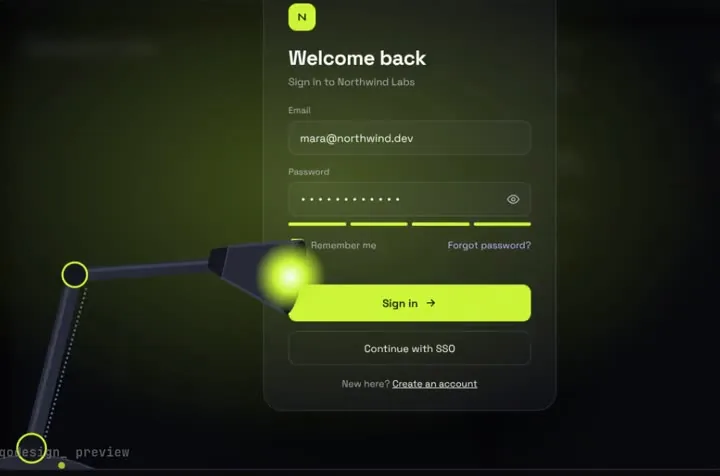
Stack Auth is now Hexclave, and the SDK still lets you own the sign-in page. Here the spotlight lamp login calls signInWithCredential, prints Hexclave's error text when the password is wrong, and lets the light play before you leave.
By buying you agree to the Terms.
- Download right after paying
- Use it in client projects
- Won't run on the listed stack? We fix it or refund you
Ready forCursorv0Lovableshadcn CLI
Use it in Next.js
"use client";
import { useRouter } from "next/navigation";
import { useHexclaveApp } from "@hexclave/next";
import SpotlightLampLogin from "@/components/SpotlightLampLogin";

export default function SignInPage() {
  const app = useHexclaveApp();
  const router = useRouter();

  return (
    <div className="h-dvh">
      <SpotlightLampLogin
        autoplayDemo={false}
        onSignIn={async (email, password) => {
          // noRedirect: stay here so the light can play before you leave
          const result = await app.signInWithCredential({ email, password, noRedirect: true });
          if (result.status === "error") {
            // wrong email or password: Hexclave's own wording, printed under the field
            return { ok: false, message: result.error.humanReadableMessage };
          }
          return { ok: true };
        }}
        onSuccess={() => router.push(app.urls.afterSignIn)}
      />
    </div>
  );
}import { HexclaveClientApp } from "@hexclave/next";
export const hexclaveClientApp = new HexclaveClientApp({
tokenStore: "nextjs-cookie",
urls: {
default: { type: "hosted" }, // sign-up, password reset and the rest stay on Hexclave's hosted pages
signIn: "/sign-in", // this page, so redirectToSignIn() lands here
afterSignIn: "/dashboard",
},
});import { HexclaveProvider } from "@hexclave/next";
import { hexclaveClientApp } from "@/hexclave/client";
export default function RootLayout({ children }: { children: React.ReactNode }) {
return (
<html lang="en">
<body>
<HexclaveProvider app={hexclaveClientApp}>{children}</HexclaveProvider>
</body>
</html>
);
}Good to know
- Hexclave's migration guide says it plainly: "Stack Auth is now Hexclave." stack-auth.com redirects to hexclave.com, and both API hosts point at the same service, so @stackframe/stack 2.8.108 (last published May 26, 2026) keeps working. The new Next.js package is @hexclave/next 1.0.133 (October 20, 2026), with 12,568 downloads in the week to October 22.
- Still on @stackframe/stack? signInWithCredential takes the same options and returns the same result there (we read 2.8.108's types). Use the old names (StackClientApp, StackProvider, useStackApp) and leave out default: { type: "hosted" }, which 2.8.108's types don't have. @hexclave/next still exports the old names too, marked deprecated.
- Type-checked against @hexclave/next 1.0.133, next 15.5.28 and TypeScript 5.9.3 with the shipped component source. We haven't signed in to a live Hexclave project with it.
- Point the urls option at your page. Hexclave's docs say that when you add a custom sign-in page you should update the matching urls key and the redirects after it, because redirectToSignIn() and the other helpers read them. Here default stays hosted, so sign-up and password reset keep Hexclave's own pages.
- noRedirect: true stops the SDK from leaving straight after a good password, so the lamp gets to finish. onSuccess then goes to app.urls.afterSignIn.
- If an account has two-factor on, the SDK runs its own code step from inside signInWithCredential. We didn't test that path, so try it with a 2FA account before launch.
- If branding doesn't matter, Hexclave's free hosted pages fit better: you write no page code, and its docs say they stay up to date automatically. Its SignIn component is the free middle ground if you want the page on your own domain.
- The lamp is one email and password screen. OAuth buttons, sign-up and reset aren't in it. Give it a parent with a real height (h-dvh above).
Moving the page from @stackframe/stack to @hexclave/next
- Hexclave's guide swaps the package (npm uninstall @stackframe/stack, npm install @hexclave/next) and renames every Stack* name to Hexclave*: StackClientApp becomes HexclaveClientApp, StackProvider becomes HexclaveProvider, useStackApp becomes useHexclaveApp.
- signInWithCredential keeps its name and its return value: { status: "ok" } or { status: "error", error }. The error has a humanReadableMessage, which is what the lamp prints under the field.
- The old handler route (/handler/sign-in with StackHandler) still works as HexclaveHandler. For new projects Hexclave's docs recommend hosted pages, and a custom page like this one sits beside either.
Install
- Copy from the zipPut
react/src/components + react/src/dataintosrc/, thennpm i framer-motion @hexclave/next. - Or ask your AIPaste PROMPT.md into Cursor, Lovable or v0.
Props
- onSignIn
- (email, password) → { ok, message? }
- onSuccess
- runs after the light floods the screen
- autoplayDemo
- false for a real page
- data
- names shown after sign-in
How qodesign compares
- qodesign vs Magic UIMagic UI is best for: landing pages built with shadcn/ui.
- qodesign vs Aceternity UIAceternity UI is best for: teams building many marketing pages who want one big library.
All comparisons, with prices read on each library's own site.
Questions
Is Stack Auth the same as Hexclave?
Yes. Hexclave's migration guide says Stack Auth is now Hexclave: same dashboard, APIs and data, new brand and package names. The old @stackframe packages keep working.
Why not Hexclave's own SignIn component?
Use it if its look works for you; it's free and covers OAuth and magic links. This page is for when the sign-in screen itself should be the memorable part.
Do I have to move to @hexclave/next first?
No. Hexclave says the @stackframe packages keep working and staying on them needs no action. Move when it suits you; the sign-in call is the same.
Can Cursor or v0 add it for me?
Yes. Each download has a PROMPT.md. Paste it into Cursor, Lovable, v0 or Claude Code and it fits the piece into your app.
Can I use it in client work?
Yes, in personal and client projects. You can't resell the code itself as a kit.